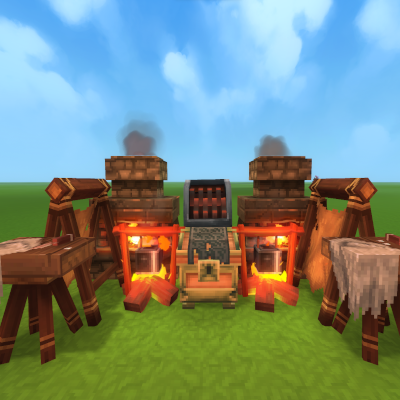
AutoBench
A lightweight QOL mod that automatically pulls fuel and resources from nearby chests and starts processing them — fully configurable.
About AutoBench
🔧 Auto Bench
Feeling lazy and want the game to do the heavy lifting for you?
Auto Bench has your back.
Auto Bench is a quality-of-life mod that automatically pulls resources from nearby containers and starts or ignites benches for you — all fully controlled through configuration.
Perfect for players who want less micromanagement and more gameplay.
✨ Features
🔄 Automatically pulls required resources from nearby chests
🔥 Starts / ignites benches for you (based on config)
⚙️ Fully configurable per bench type
🧠 Designed to scale well, even with many benches
⚠️ Important Disclaimer
READ THIS BEFORE INSTALLING IN AN EXISTING WORLD
If installed in an existing world, the Salvager will immediately start auto-recycling items from nearby chests for:
Items starting with Weapon_
Items starting with Armor_
You’ve been warned 😄
(Check or tweak your config first if this is not desired.)
🚧 Development Status
🧪 Early Access — bugs may still be present
📦 A public Git repository will be added soon
💬 Feedback and bug reports are very welcome!
📦 Versions
Latest game version
Auto Bench 2.1.0 — Game build 4 (2026-01-24)
Categories
Need a Server?
Run AutoBench on a dedicated Hytale server with easy mod management.
Get Hytale HostingFrequently Asked Questions
What is AutoBench?
A lightweight QOL mod that automatically pulls fuel and resources from nearby chests and starts processing them — fully configurable.
How do I download AutoBench?
You can download AutoBench for free from CurseForge. Click the "Download on CurseForge" button on this page to go directly to the download page.
Who created AutoBench?
AutoBench was created by Frotty277. The mod has been downloaded 1.2K times.
Is AutoBench compatible with Hytale servers?
AutoBench is designed for Hytale and can be used on both single-player and multiplayer servers. Check the mod page on CurseForge for specific compatibility information.
How do I install AutoBench?
To install AutoBench: 1) Download the mod from CurseForge, 2) Place the file in your Hytale mods folder, 3) Restart the game. The mod should load automatically.
Related Farming Mods
View all mods![[NoCube's] Tavern](https://media.forgecdn.net/avatars/thumbnails/1594/779/256/256/639031144996392372.png)
[NoCube's] Tavern
NoCube
Adds hops, brewing, and new decorations! Hytale style.
![[NoCube's] Culinary](https://media.forgecdn.net/avatars/thumbnails/1601/240/256/256/639034493328120832.png)
[NoCube's] Culinary
NoCube
Adds new foods
![[NoCube's] Bakehouse](https://media.forgecdn.net/avatars/thumbnails/1601/210/256/256/639034459035434806.png)
[NoCube's] Bakehouse
NoCube
Grinding flour, baking bread in the oven, and making pastries!
![[NoCube's] Cultivation](https://media.forgecdn.net/avatars/thumbnails/1601/95/256/256/639034389831292555.png)
[NoCube's] Cultivation
NoCube
Make farming more comfortable than ever before!

Recover Arrows
Lupin
This mod lets you pick up arrows from the ground!
Shimmer Shrubs
DarkhaxDev
Farm resources using magic berry bushes!