Better Scoreboard
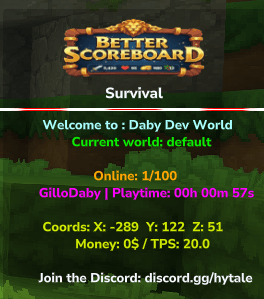
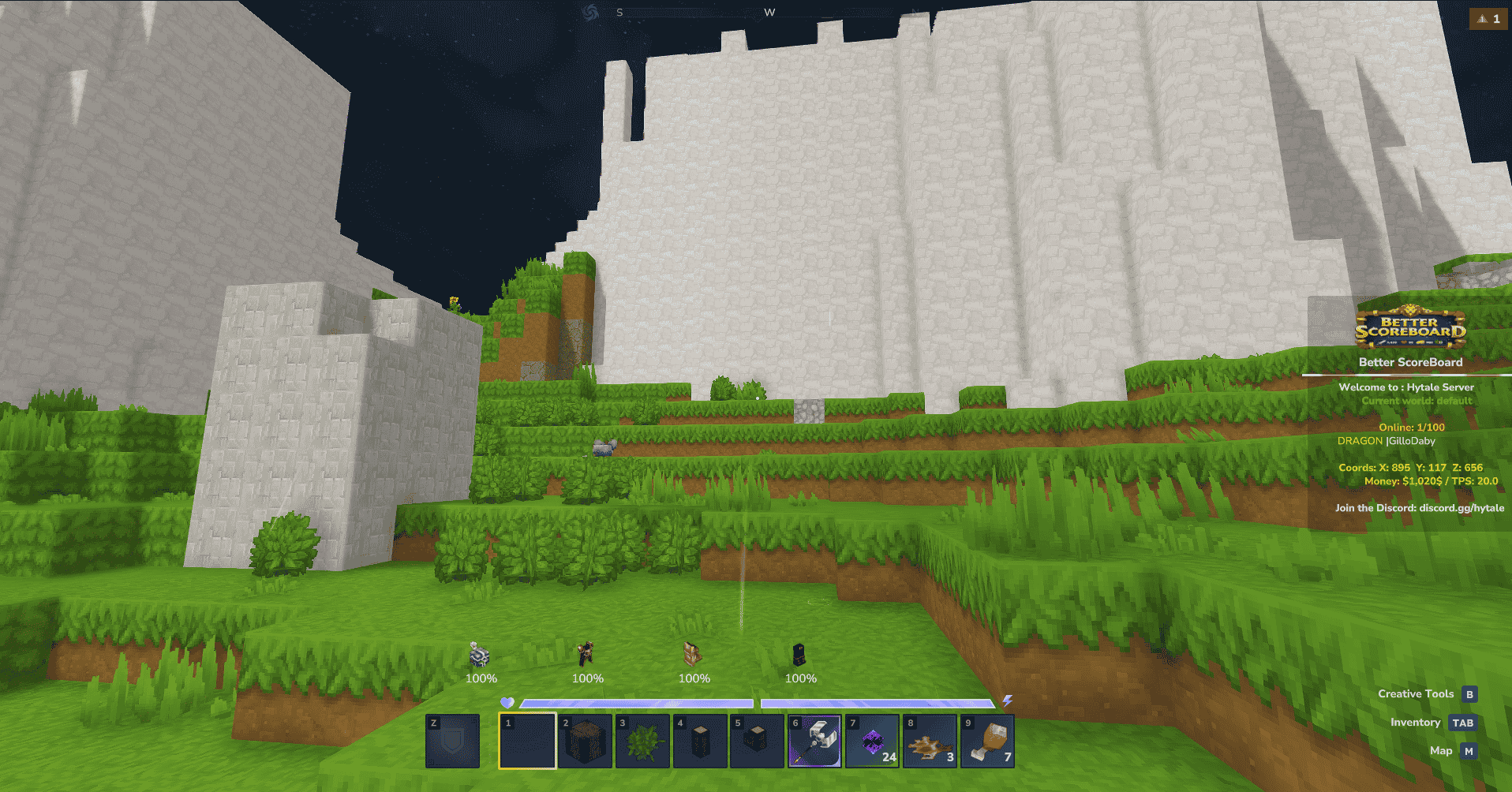
Better Scoreboard adds a clean scoreboard on the right side of the screen for all players, showing real-time server and player info without cluttering the HUD. Lightweight and server-friendly.
About Better Scoreboard
📊 Better Scoreboard – Global Info Overlay
⚠️ Work in Progress This mod is still under active development. Bugs, visual changes, or balance adjustments may occur. Use at your own risk and feel free to report issues or suggestions.
Better Scoreboard adds a dynamic, global scoreboard displayed on the right side of the screen for all players. It provides real-time server and player information while remaining clean, readable, and fully immersive.
Ideal for servers that want always-visible stats, powerful customization, and zero disruption to gameplay.
Recommanding MultipleHUD1.0.1.jar to get better perfomance!
✨ Key Features
📊 Global Scoreboard Display
Displays a clean and consistent scoreboard on the right side of the screen for all connected players.
🛠️ Scoreboard Management Commands
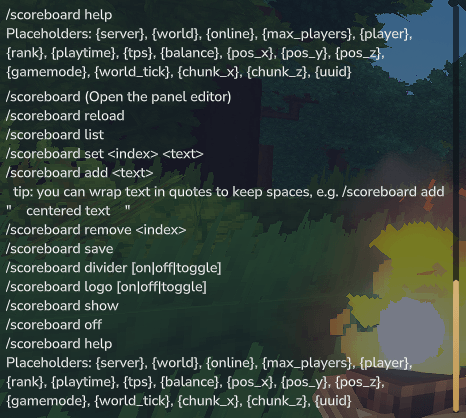
Manage the scoreboard entirely in-game with powerful commands:
/scoreboard Displays the current scoreboard.
/scoreboard reload Reloads the scoreboard configuration without restarting the server.
/scoreboard show | off Show or hide the scoreboard.
/scoreboard list Lists all scoreboard lines with their indexes.
/scoreboard set <index> <text> Replaces the text at a specific line index.
/scoreboard add <text> Adds a new line to the scoreboard.
/scoreboard remove <index> Removes a line from the scoreboard.
/scoreboard divider Enable or disable the divider line.
/scoreboard logo on | off | toggle Show or hide the scoreboard logo.
/scoreboard save Saves the current scoreboard configuration to your config files.
💡 Tip: Wrap text in quotes to preserve spaces (Need only if used in chat) Example: /scoreboard add " centered text "
✨ Featured Banner Logo (Customizable)
You can fully customize the featured banner logo.
Open the .jar file using WinRAR, 7-Zip, or similar
Navigate to:
BetterScoreBoard-1.5.6.jar └─ Common/UI/Custom/Textures/BetterScoreBoard
Replace better_logo.png with your own image
📐 Recommended size: 256×64 px ⚠️ Important: Keep the exact file name (better_logo.png)
➖ Scoreboard Divider Toggle
Enable or disable the divider line at any time using: /scoreboard divider
🅱️ Bold Text Support
Make scoreboard text bold by wrapping it with asterisks: *TEXT*
🌈 Multiple Colors per Line
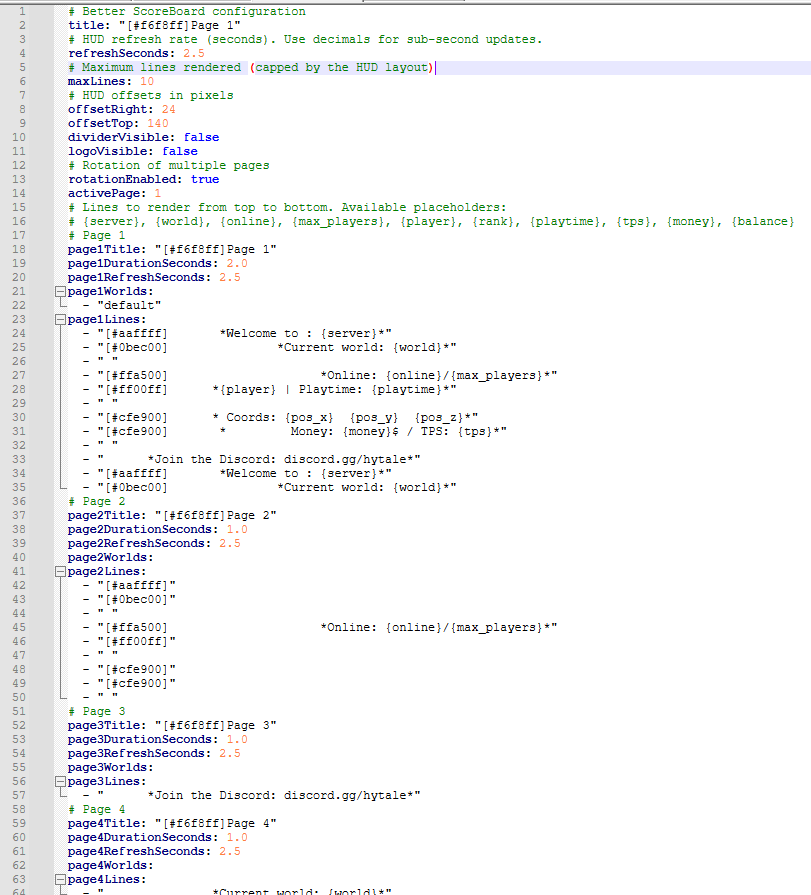
Use hex color formatting to create advanced multi-color text:
[#ff5555]B [#ff8800]e [#ffee00]t [#55ff55]t [#55ffff]e [#5555ff]r [#ff0000]S [#ff7f00]c [#ffff00]o [#7fff00]r [#00ff00]e [#00ffff]B [#0000ff]o [#8b00ff]a [#ff00ff]r [#ff007f]d
🌎 World-Based Scoreboards
Define which scoreboard page is displayed depending on the player’s current world.
📄 Up to 12 Scoreboard Pages
Create up to 12 different pages to enable:
Smooth transitions
Animations
Dynamic layouts
⚡ Custom Refresh Rate & Page Duration
Control how often the scoreboard refreshes and how long each page stays visible.
🔑 Required Dependencies
MultipleHUD YOU NEED THIS TO MAKE THE SCOREBOARD WORK! Recommanding V1.0.1 to get the better perfomance possible! MultipleHUD - Hytale Mods - CurseForge
🔑 Optional Dependencies
LuckyPerms Added optional compatibility with the LuckyPerms Plugins due to high demand: LuckPerms - Hytale Mods - CurseForge
TheEconomy Use: {money} or {balance} TheEconomy - Hytale Mods - CurseForge
Economy Use: {money} or {balance} Economy - Hytale Mods - CurseForge
HyFactions
Use: {faction}, {faction_tag}, {faction_rank} Power & claims: {power}, {powermax}, {factionpower}, {factionpowermax}, {claim}, {maxclaim} HyFactions - Hytale Mods - CurseForge
(content will be extended in future updates)
|ASK IN COMMENT FOR DEPENDANCY REQUEST|
Other
⚠️ Performance Warning: EyeSpy may cause performance issues on servers running multiple HUD mods. It forces all HUD plugins to re-render frequently, which can result in noticeable lag on high-traffic servers. A fix is currently being worked on. by their team
RPG Leveling and Stats/Skill Is now compatible using their latest version: 0.1.7 and + RPG Leveling And Stats/Skills - Hytale Mods - CurseForge
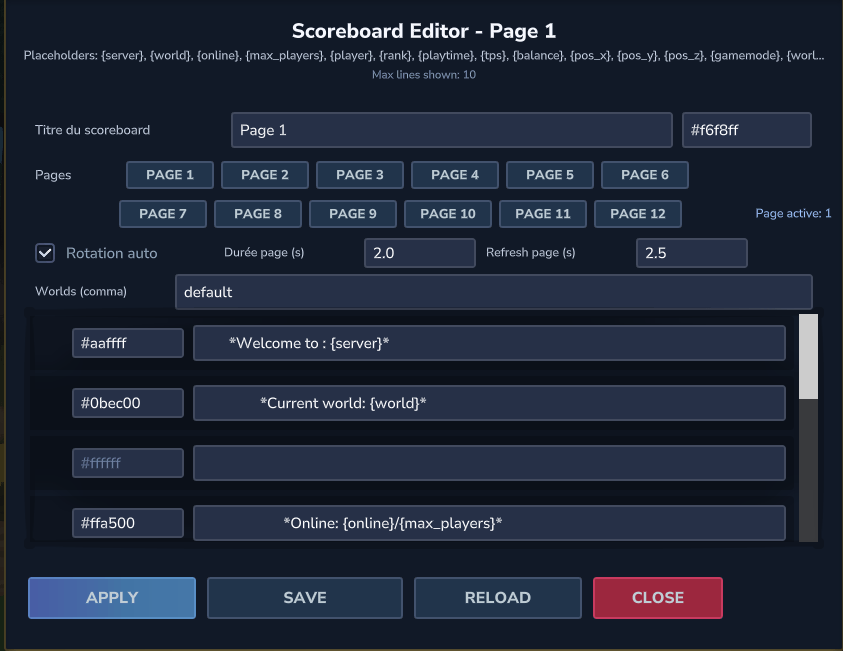
✨ Screenshot
In-Game Result
In-Game configurations:
External configuration:
In-Game Commands:
⚡ Real-Time Updates
The scoreboard updates automatically as values change—no commands or manual refresh required.
🎮 Non-Intrusive UI
Minimalist and readable design that never blocks gameplay or UI elements.
🚀 Lightweight & Server-Friendly
Highly optimized with minimal impact on both server and client performance.
🛠️ Permissions
betterscoreboard.editor – Open the main scoreboard editor
betterscoreboard.reload – Reload the scoreboard
betterscoreboard.list – List scoreboard lines
betterscoreboard.set – Modify a scoreboard line
betterscoreboard.add – Add a new line
betterscoreboard.remove – Remove a line
betterscoreboard.save – Save configuration
betterscoreboard.help – View help
betterscoreboard.show – Show the scoreboard
betterscoreboard.off – Hide the scoreboard
betterscoreboard.divider – Toggle divider
betterscoreboard.logo – Toggle logo visibility
🛠️ Available Placeholders
Core
{server} {world} {online} {max_players} {player} {uuid} {playtime} {totalplaytime} {tps} {gamemode} {world_tick}
Position
{pos_x} {pos_y} {pos_z} {chunk_x} {chunk_z}
Optional
Economy: {money} {balance}
LuckPerms: {rank}
HyFactions: {faction} {faction_rank} {faction_tag}
🛠️ Planned Features (WIP)
Public API for other mods to inject custom lines
Animated and themed scoreboards
📥 Installation
Place BetterScoreboard.jar into your server’s Mods folder
Place the latest MultipleHUD.jar into the Mods folder
Why is MultipleHUD required?
Hytale only allows one CustomUI HUD at a time. MultipleHUD enables multiple HUD-based mods to work together. Without it, Better Scoreboard may be hidden if another HUD mod is active.
Restart the server
Join the game and enjoy a clean, informative scoreboard!
ℹ️ Mod Information
Developer: GilloDaby
Version: 1.5.6
Compatibility: Hytale Server API (Java)
Categories
Screenshots
Need a Server?
Run Better Scoreboard on a dedicated Hytale server with easy mod management.
Get Hytale HostingFrequently Asked Questions
What is Better Scoreboard?
Better Scoreboard adds a clean scoreboard on the right side of the screen for all players, showing real-time server and player info without cluttering the HUD. Lightweight and server-friendly.
How do I download Better Scoreboard?
You can download Better Scoreboard for free from CurseForge. Click the "Download on CurseForge" button on this page to go directly to the download page.
Who created Better Scoreboard?
Better Scoreboard was created by GilloDaby. The mod has been downloaded 2.3K times.
Is Better Scoreboard compatible with Hytale servers?
Better Scoreboard is designed for Hytale and can be used on both single-player and multiplayer servers. Check the mod page on CurseForge for specific compatibility information.
How do I install Better Scoreboard?
To install Better Scoreboard: 1) Download the mod from CurseForge, 2) Place the file in your Hytale mods folder, 3) Restart the game. The mod should load automatically.
Related Misc Mods
View all mods
Ymmersive Melodies
Conczin
Upload and play MIDI files in-game on various instruments to annoy your friends with custom melodies!

MultipleHUD
Buuz135
A simple mod that allows you to have multiple HUDs present at once.

Spanish Translation
Plexu5
A Spanish language translation for Hytale. Includes UI, items, and menus.

YUNG's HyDungeons
YUNGNICKYOUNG
Adds new procedurally generated dungeon instances!

Just Enough Tales (JEI mod)
uwudwagon
A JEI mod for Hytale.
![[NoCube's] Simple Bags](https://media.forgecdn.net/avatars/thumbnails/1601/201/256/256/639034453685921721.png)
[NoCube's] Simple Bags
NoCube
Adds bags that you can put anything in!