
Block Information
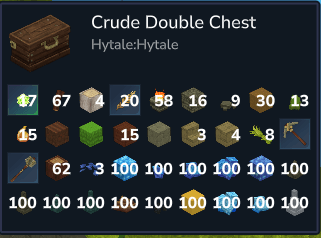
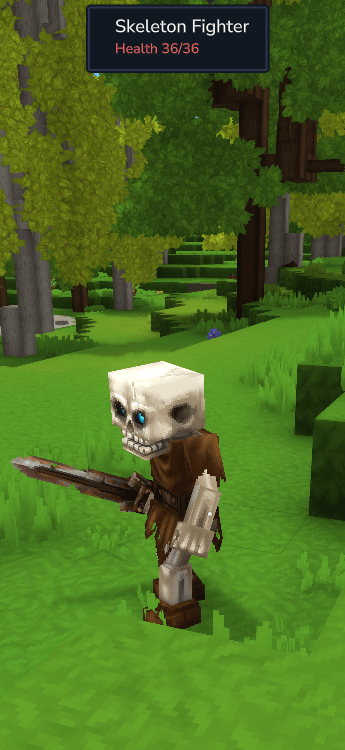
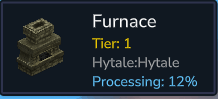
*Multihud Compatible* Get all the information you need on Blocks & Mobs. Health, Break Progress, Processing %, Chest contents w/Moveable UI
About Block Information
Join The Discord!!
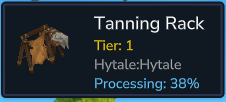
***Requires Multiple Hud*** Block Information is a mod that adds elements to the game to show you information about what you are looking at. Completely Customizable Mod w/the ability to disable and enable features at will. The UI is completely moveable aswell! **Features: **Shows what block you are looking at Where The Block Comes From Workbench Tiers Block Break Progress Bar Show what is in chests you look at Processing Time of Workbenches Customizable UI placements Toggles for all features **Hytale is Early Access More Features likely to come in the future **
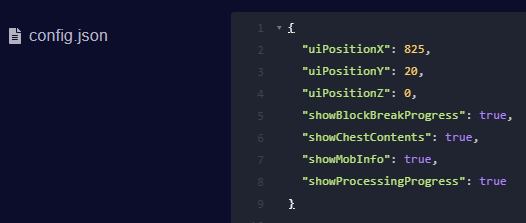
CONFIG FILE LOCATION \-------------------- mods/Starforge-BlockInfo/config.json
CONFIG OPTIONS - uiPositionX (default: 825) - Horizontal position of the UI uiPositionY (default: 20) - Vertical position of the UI uiPositionZ (default: 0) - Z-index of the UI showBlockBreakProgress (default: true) - Show block break progress bar when breaking blocks showChestContents (default: true) - Show chest/container contents when looking at containers showMobInfo (default: true) - Show mob/entity info when looking at mobs showProcessingProgress (default: true) - Show processing progress for furnaces, tanners, etc.
- Set the distance for the information UI to show in config.yml "infoDisplayDistance": 5.0
COMMANDS & PERMISSIONS \----------------------
Configuration Commands:
/reloadblockui Permission: starforge.adminreloadblockui Description: Reload config from file
/blockui x \[value\] - sets value /blockui x - gets current and default values Permission: starforge.adminreloadblockui Description: Get or set UI X position
/blockui y \[value\] - sets value /blockui y - gets current and default values Permission: starforge.adminreloadblockui Description: Get or set UI Y position
Block Break Progress UI:
/disableprogressui Permission: starforge.admindisablebreakui Description: Disable block break progress bar
/enableprogressui Permission: starforge.adminenablebreakui Description: Enable block break progress bar
Chest Contents UI:
/disablechestui Permission: starforge.admindisablechestui Description: Disable chest contents display
/enablechestui Permission: starforge.adminenablechestui Description: Enable chest contents display
Mob Info UI:
/disablemobui Permission: starforge.admindisablemobui Description: Disable mob/entity info display
/enablemobui Permission: starforge.adminenablemobui Description: Enable mob/entity info display
Bench/Processing Progress UI:
/disablebenchui Permission: starforge.admindisablebenchui Description: Disable processing progress (furnaces, tanners)
/enablebenchui Permission: starforge.adminenablebenchui Description: Enable processing progress
NOTES \----- \- All commands work with OP status even without the specific permission node \- Console can execute all commands \- Changes made via commands are saved to the config file immediately \- Requires Starforge-Essentials for permission system (optional - falls back to OP check if not installed)
Categories
Screenshots
Need a Server?
Run Block Information on a dedicated Hytale server with easy mod management.
Get Hytale HostingFrequently Asked Questions
What is Block Information?
*Multihud Compatible* Get all the information you need on Blocks & Mobs. Health, Break Progress, Processing %, Chest contents w/Moveable UI
How do I download Block Information?
You can download Block Information for free from CurseForge. Click the "Download on CurseForge" button on this page to go directly to the download page.
Who created Block Information?
Block Information was created by StarforgedStudio. The mod has been downloaded 528 times.
Is Block Information compatible with Hytale servers?
Block Information is designed for Hytale and can be used on both single-player and multiplayer servers. Check the mod page on CurseForge for specific compatibility information.
How do I install Block Information?
To install Block Information: 1) Download the mod from CurseForge, 2) Place the file in your Hytale mods folder, 3) Restart the game. The mod should load automatically.
Related Qol Mods
View all mods
EyeSpy
DarkhaxDev
Adds a HUD that displays information about what you're looking at!

Advanced Item Info
Buuz135
Adds a searchable GUI that displays all the items and the game and displays extra properties they have

Overstacked
DarkhaxDev
Increases the maximum stack size of items.

Violet's Wardrobe
VioletsWorkshop
Adds more customisation options in the form of craftable cosmetics

Item Magnet
Jaredlll08
Adds a magnet that attracts items towards the player.

Endgame & QoL - Boss & Elite Update (3.0.0 in a week)
Lewaii
Endgame & QoL v2.2: Face the Alpha T-Rex & Void Spectres! Unlock Backpack IV & Void Gliders. Restore unused content and challenge stronger, rebalanced bosses!