Chat Customization
Customize your chat with prefixes, suffixes, colors, nicknames, pronouns, and more!
About Chat Customization
Chat Customization
DISABLE CHAT FORMATTING IN LUCKPERMS AND USE JAVA 25
Customize your chat with prefixes, suffixes, colors, nicknames, pronouns, and more!
Documentation
Features
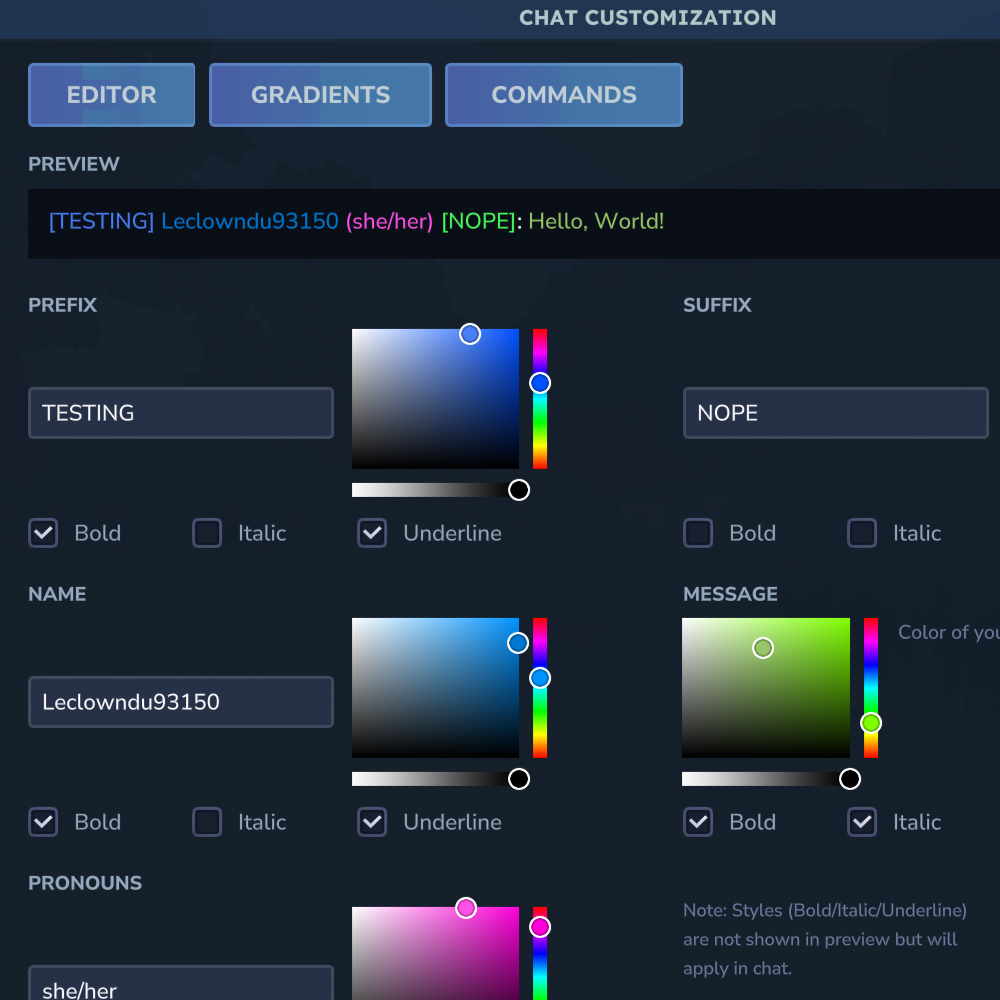
Visual Editor - Full GUI for customizing your chat appearance with live preview
Preset System - Admin-defined presets (Style, Prefix, Pronoun, Message) with automatic application based on permissions and priority
Gradients Tab - Dedicated tab for gradient and rainbow configuration per element
Custom prefixes and suffixes with colors
Nicknames and pronouns display
Name and message color customization
Text styles: bold, italic, underline
Gradient text effects for all elements (prefix, name, pronouns, suffix, message)
Rainbow text effects for all elements
@mentions with sound notifications
Permission-Based - Fine-grained control over features and presets
Visual Editor
Open the visual editor with /chateditor to customize your chat without memorizing commands:
Editor Tab - Set prefix, suffix, nickname, pronouns with color pickers and style toggles
Gradients Tab - Configure gradient start/end colors and rainbow effects for each element
Commands Tab - Quick reference for all available commands
Live preview of your chat appearance
Color pickers for each element
Style toggles (bold, italic, underline)
Press X to reset gradients/rainbow for any element
Commands
Basic Customization
Command Description Example
/prefix <text> Set your chat prefix /prefix VIP
/prefix "spaced text" Set prefix with spaces /prefix "VIP Member"
/suffix <text> Set your chat suffix /suffix MVP
/suffix "spaced text" Set suffix with spaces /suffix "2024 Edition"
/nickname <name> Set your display name /nickname CoolSteve
/nickname "spaced name" Set nickname with spaces /nickname "Cool Steve"
/pronouns <text> Set your pronouns /pronouns she/her
Colors
Command Description Example
/namecolor <color> Set your name color /namecolor GOLD
/msgcolor <color> Set your message color /msgcolor #FF69B4
/prefixcolor <color> Set your prefix color /prefixcolor RED
/suffixcolor <color> Set your suffix color /suffixcolor AQUA
/pronounscolor <color> Set your pronouns color /pronounscolor PINK
/colors Show all available colors /colors
Clearing Settings
Use /hyssential clear <target> to clear any setting:
Command Description
/hyssential clear nickname Reset to username
/hyssential clear prefix Remove your prefix
/hyssential clear suffix Remove your suffix
/hyssential clear pronouns Remove your pronouns
/hyssential clear namecolor Reset name color
/hyssential clear msgcolor Reset message color
/hyssential clear prefixcolor Reset prefix color
/hyssential clear suffixcolor Reset suffix color
/hyssential clear pronounscolor Reset pronouns color
/hyssential clear colors Reset all colors
/hyssential clear style Clear all text styles
/hyssential clear rainbow Clear all rainbow effects
/hyssential clear gradient Clear all gradients
/hyssential clear all Reset entire chat profile
Text Styles
Command Description Example
/style <target> bold Toggle bold on element /style name bold
/style <target> italic Toggle italic on element /style prefix italic
/style <target> underline Toggle underline on element /style message underline
Valid targets: prefix, name, pronouns, suffix, message
Advanced Effects
Command Description Example
/gradient <target> <start> <end> Gradient effect on any element /gradient name RED GOLD
/gradient <target> clear Remove gradient from element /gradient prefix clear
/rainbow <target> Toggle rainbow on element /rainbow name
/rainbow <target> on Enable rainbow on element /rainbow suffix on
/rainbow <target> off Disable rainbow on element /rainbow message off
Valid targets: prefix, name, pronouns, suffix, message
Profile Management
Command Description Example
/chateditor Open the visual chat editor /chateditor
/chatprofile View your current chat profile /chatprofile
/resetformat Reset all customizations /resetformat
Preset Commands
Command Description Permission
/preset Open the preset selector GUI -
/chatcustom preset Open preset management UI (admin) chatcustom.admin.presets
/chatcustom reload Reload configuration and presets chatcustom.admin.reload
Alias: /cc for /chatcustom
Presets are automatically applied based on player permissions and priority when chatting. Higher priority presets take precedence.
Admin Commands
Command Description Example
/chatadmin view <player> View a player's profile /chatadmin view Steve
/chatadmin reset <player> Reset a player's profile /chatadmin reset Steve
/chatadmin setprefix <player> [value] Set/clear player prefix /chatadmin setprefix Steve Admin
/chatadmin setsuffix <player> [value] Set/clear player suffix /chatadmin setsuffix Steve Pro
/chatadmin setnickname <player> [value] Set/clear player nickname /chatadmin setnickname Steve Steven
/chatadmin setpronouns <player> [value] Set/clear player pronouns /chatadmin setpronouns Steve he/him
/chatadmin setnamecolor <player> [value] Set/clear player name color /chatadmin setnamecolor Steve RED
/chatadmin setmsgcolor <player> [value] Set/clear player message color /chatadmin setmsgcolor Steve AQUA
/chatadmin setprefixcolor <player> <color> Set player prefix color /chatadmin setprefixcolor Steve GOLD
/chatadmin setsuffixcolor <player> <color> Set player suffix color /chatadmin setsuffixcolor Steve BLUE
/chatadmin setpronounscolor <player> <color> Set player pronouns color /chatadmin setpronounscolor Steve PINK
/chatadmin clearnamecolor <player> Clear player name color /chatadmin clearnamecolor Steve
/chatadmin clearmsgcolor <player> Clear player message color /chatadmin clearmsgcolor Steve
/chatadmin clearprefixcolor <player> Clear player prefix color /chatadmin clearprefixcolor Steve
/chatadmin clearsuffixcolor <player> Clear player suffix color /chatadmin clearsuffixcolor Steve
/chatadmin clearpronounscolor <player> Clear player pronouns color /chatadmin clearpronounscolor Steve
/chatadmin setstyle <player> <target> <style> Set text style on element /chatadmin setstyle Steve name bold
/chatadmin setrainbow <player> <target> [on/off] Set rainbow on element /chatadmin setrainbow Steve prefix on
/chatadmin setgradient <player> <target> <start> <end> Set gradient on element /chatadmin setgradient Steve name RED BLUE
/chatadmin clearstyle <player> [target] Clear styles (all or specific) /chatadmin clearstyle Steve name
/chatadmin clearrainbow <player> [target] Clear rainbow (all or specific) /chatadmin clearrainbow Steve
/chatadmin cleargradient <player> [target] Clear gradient (all or specific) /chatadmin cleargradient Steve prefix
Available Colors
Named Colors
RED — #FF5555
DARK_RED — #AA0000
GOLD — #FFAA00
YELLOW — #FFFF55
GREEN — #55FF55
DARK_GREEN — #00AA00
AQUA — #55FFFF
DARK_AQUA — #00AAAA
BLUE — #5555FF
DARK_BLUE — #0000AA
LIGHT_PURPLE — #FF55FF
DARK_PURPLE — #AA00AA
WHITE — #FFFFFF
GRAY — #AAAAAA
DARK_GRAY — #555555
BLACK — #000000
PINK — #FF69B4
ORANGE — #FFA500
LIME — #00FF00
CYAN — #00FFFF
Custom Hex Colors
You can also use any hex color in the format #RRGGBB:
#FF0000 — Pure Red
#00FF00 — Pure Green
#0000FF — Pure Blue
#FF69B4 — Hot Pink
#FFD700 — Gold
#8A2BE2 — Blue Violet
Configuration
Config file: config.json
{ "DefaultNameColor": "WHITE", "DefaultMessageColor": "WHITE", "MaxPrefixLength": 16, "MaxSuffixLength": 16, "MaxNicknameLength": 24, "MaxPronounsLength": 16, "AllowBold": true, "AllowItalic": true, "AllowUnderline": true, "AllowGradients": true, "AllowRainbow": true, "EnableMentions": true, "MentionColor": "YELLOW", "MentionSound": true }
Option Description Default
DefaultNameColor Default color for player names WHITE
DefaultMessageColor Default color for messages WHITE
MaxPrefixLength Maximum prefix length 16
MaxSuffixLength Maximum suffix length 16
MaxNicknameLength Maximum nickname length 24
MaxPronounsLength Maximum pronouns length 16
AllowBold Allow bold text style true
AllowItalic Allow italic text style true
AllowUnderline Allow underline text style true
AllowGradients Allow gradient text effects true
AllowRainbow Allow rainbow text effects true
EnableMentions Enable @mention system true
MentionColor Color for highlighted mentions YELLOW
MentionSound Play sound when mentioned true
Permissions
Configure permissions in config.json:
Permission Description Default
chatcustomization.prefix Use /prefix command chatcustomization.prefix
chatcustomization.suffix Use /suffix command chatcustomization.suffix
chatcustomization.nickname Use /nickname command chatcustomization.nickname
chatcustomization.pronouns Use /pronouns command chatcustomization.pronouns
chatcustomization.color Use color commands chatcustomization.color
chatcustomization.style Use style commands chatcustomization.style
chatcustomization.gradient Use gradient effects chatcustomization.gradient
chatcustomization.rainbow Use rainbow effects chatcustomization.rainbow
chatcustomization.admin Use admin commands chatcustomization.admin
Set RequirePermissionForPrefix, RequirePermissionForSuffix, etc. to true to enforce permissions.
Data Storage
Player profiles are stored in JSON format in the plugin data folder:
profiles.json - All player chat profiles
Chat Format Example
[VIP] Steve (he/him) [MVP]: Hello everyone! Where:
[VIP] - Prefix
Steve - Nickname (or username)
(he/him) - Pronouns
[MVP] - Suffix
Hello everyone! - Message
Support on Discord
If you'd like to support me and the development of my mods, I recommend trying out BisectHosting. Use code "project8gbderam" to get 25% off your first month of a gaming server for new customers. They offer 24/7 support and lightning-fast response times, ensuring you're in great hands and providing exceptional assistance for all your gaming needs. https://www.bisecthosting.com/project8gbderam
Categories
Need a Server?
Run Chat Customization on a dedicated Hytale server with easy mod management.
Get Hytale HostingFrequently Asked Questions
What is Chat Customization?
Customize your chat with prefixes, suffixes, colors, nicknames, pronouns, and more!
How do I download Chat Customization?
You can download Chat Customization for free from CurseForge. Click the "Download on CurseForge" button on this page to go directly to the download page.
Who created Chat Customization?
Chat Customization was created by Project8gbDeRam. The mod has been downloaded 2.4K times.
Is Chat Customization compatible with Hytale servers?
Chat Customization is designed for Hytale and can be used on both single-player and multiplayer servers. Check the mod page on CurseForge for specific compatibility information.
How do I install Chat Customization?
To install Chat Customization: 1) Download the mod from CurseForge, 2) Place the file in your Hytale mods folder, 3) Restart the game. The mod should load automatically.
Related Qol Mods
View all mods
EyeSpy
DarkhaxDev
Adds a HUD that displays information about what you're looking at!

Advanced Item Info
Buuz135
Adds a searchable GUI that displays all the items and the game and displays extra properties they have

Overstacked
DarkhaxDev
Increases the maximum stack size of items.

Violet's Wardrobe
VioletsWorkshop
Adds more customisation options in the form of craftable cosmetics

Item Magnet
Jaredlll08
Adds a magnet that attracts items towards the player.

Endgame & QoL - Boss & Elite Update (3.0.0 in a week)
Lewaii
Endgame & QoL v2.2: Face the Alpha T-Rex & Void Spectres! Unlock Backpack IV & Void Gliders. Restore unused content and challenge stronger, rebalanced bosses!