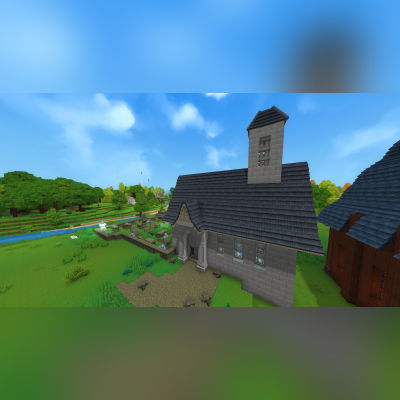
Church of Gaia
This is a small build dedicated to Gaia. I thought the statues of Gaia would go very nicely in a marble themed church making it look very pure, clean and bright.
About Church of Gaia
This contains two prefabs. One with the graveyard and one without.
Church of Gaia.prefab.json
Curch of Gaia no_graveyard.prefab.json
This prefab is a small, marble-themed church dedicated to Gaia, the god of Orbis. I felt it was only fitting to create a place of worship for Gaia, reflecting her purity, light, and connection to the natural world.
The build is intentionally kept at a modest scale so it can fit naturally into a small town or village environment, whether as a central landmark or a quiet place of reflection. I chose marble as the primary material to give the structure a clean, bright, and pure aesthetic, which felt thematically appropriate for a divine figure like Gaia.
I plan on building a temple dedicated to Varyn in the future for anyone that would be interested.
I will be uploading more builds as prefabs for you to use for private use only.
Future builds will vary in size from small, medium to large and will fit many different scenarios.
You may use this prefab in exploration worlds or creative worlds for private use only.
You are not permitted to use this build in any commercial projects.
You are not permitted to re-upload this build or claim it as your own on Curseforge or any other site.
Please respect these terms and enjoy incorporating the Church of Gaia into your worlds.
Instructions:
Copy the file to this file location: C:\Users\[USERNAME]\AppData\Roaming\Hytale\UserData\Saves\[SAVE FILE NAME]\prefabs - this will be different depending on where the game is installed to. For example, I have my game installed to my F: drive which would make my file path F:\Hytale\UserData\Saves\[SAVE FILE NAME]\prefabs
If you do not have have a file named "prefabs" then you will need to create a new prefabs file in your save file. A prefabs file will only generate in your save file if you have already made a prefab in that world. If you have never made a prefab before then you will not see this file hence the need to create it manually.
Afterwards, place the Church of Gaia.prefab.json and/or the Curch of Gaia no_graveyard.prefab.json file into the prefabs file.
Once you load into the world enter creative mode and select the 'paste' tool. With the paste tool in your hand, press 'E' and click the drop down box which by default is set to "assets" and select "server" then select the relevant prefab. You will see a ghost/outline of the prefab to know where it will be placed and then tap right click to paste it into the world and enjoy.
See images for further help with the in-game menu if you are confused.
Categories
Need a Server?
Run Church of Gaia on a dedicated Hytale server with easy mod management.
Get Hytale HostingFrequently Asked Questions
What is Church of Gaia?
This is a small build dedicated to Gaia. I thought the statues of Gaia would go very nicely in a marble themed church making it look very pure, clean and bright.
How do I download Church of Gaia?
You can download Church of Gaia for free from CurseForge. Click the "Download on CurseForge" button on this page to go directly to the download page.
Who created Church of Gaia?
Church of Gaia was created by Surulias. The mod has been downloaded 194 times.
Is Church of Gaia compatible with Hytale servers?
Church of Gaia is designed for Hytale and can be used on both single-player and multiplayer servers. Check the mod page on CurseForge for specific compatibility information.
How do I install Church of Gaia?
To install Church of Gaia: 1) Download the mod from CurseForge, 2) Place the file in your Hytale mods folder, 3) Restart the game. The mod should load automatically.
Related Misc Mods
View all mods
Ymmersive Melodies
Conczin
Upload and play MIDI files in-game on various instruments to annoy your friends with custom melodies!

MultipleHUD
Buuz135
A simple mod that allows you to have multiple HUDs present at once.

Spanish Translation
Plexu5
A Spanish language translation for Hytale. Includes UI, items, and menus.

YUNG's HyDungeons
YUNGNICKYOUNG
Adds new procedurally generated dungeon instances!

Just Enough Tales (JEI mod)
uwudwagon
A JEI mod for Hytale.
![[NoCube's] Simple Bags](https://media.forgecdn.net/avatars/thumbnails/1601/201/256/256/639034453685921721.png)
[NoCube's] Simple Bags
NoCube
Adds bags that you can put anything in!