Colors
Brings the typical & color code formatting!
About Colors
Dependencies
This mod depends on Hyxin please read on how to install it! But Colors mod (this one) needs to be put into the mods/ folder, not earlyplugins/.
Introduction
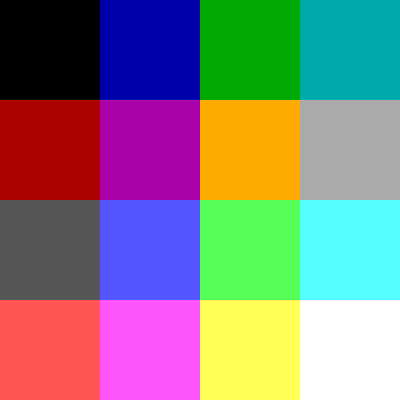
This mod aims to have it easier for people to add colors to their mods. You can use any of the colors shown on the table below to create better looking text! I added an example below too :) Hope you find it useful. Please read the bottom-most disclaimer explaining when this format is applied.
Example
&0Black &1Dark Blue &2Dark Green &3Dark Aqua &4Dark Red &5Dark Purple &6Gold &7Gray &8Dark Gray &9Blue &aGreen &bAqua &cRed &dLight Purple &eYellow &fWhite &r| &lBold &r| &oItalic &r| &l&oBold Italic &r| &c&lRed Bold &a&oGreen Italic &r| Escape: \&a not green
Would be shown as:
Notice how the character \ before a & makes it not apply any color!
Code Name
&0 Black
&1 Dark Blue
&2 Dark Green
&3 Dark Aqua
&4 Dark Red
&5 Dark Purple
&6 Gold
&7 Gray
&8 Dark Gray
&9 Blue
&a Green
&b Aqua
&c Red
&d Light Purple
&e Yellow
&f White
&l Bold
&o Italic
&n Underline
&m Strikethrough
&k Obfuscated
&r Reset
Important explanation
This format is ONLY applied to messages sent with Message#raw method, therefore messages in chat for example won't take on this format! But most mods use this method to send Server messages to players on chat so you can modify them in their configs.
Categories
Frequently Asked Questions
What is Colors?
Brings the typical & color code formatting!
How do I download Colors?
You can download Colors for free from CurseForge. Click the "Download on CurseForge" button on this page to go directly to the download page.
Who created Colors?
Colors was created by MuriPlz. The mod has been downloaded 24 times.
Is Colors compatible with Hytale servers?
Colors is designed for Hytale and can be used on both single-player and multiplayer servers. Check the mod page on CurseForge for specific compatibility information.
How do I install Colors?
To install Colors: 1) Download the mod from CurseForge, 2) Place the file in your Hytale mods folder, 3) Restart the game. The mod should load automatically.
Related Misc Mods
View all mods
Ymmersive Melodies
Conczin
Upload and play MIDI files in-game on various instruments to annoy your friends with custom melodies!

MultipleHUD
Buuz135
A simple mod that allows you to have multiple HUDs present at once.

Spanish Translation
Plexu5
A Spanish language translation for Hytale. Includes UI, items, and menus.

YUNG's HyDungeons
YUNGNICKYOUNG
Adds new procedurally generated dungeon instances!

Just Enough Tales (JEI mod)
uwudwagon
A JEI mod for Hytale.
![[NoCube's] Simple Bags](https://media.forgecdn.net/avatars/thumbnails/1601/201/256/256/639034453685921721.png)
[NoCube's] Simple Bags
NoCube
Adds bags that you can put anything in!