Command Panel
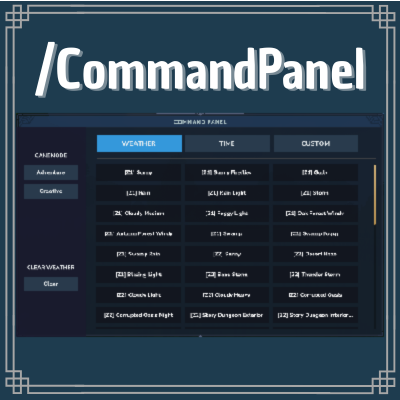
Change between 64 types of weather, time, and more with one click!
About Command Panel
🔍 About
This is a simple quality-of-life Hytale plugin that adds a user-friendly command panel where you can change your game mode, the weather, and the time by simply pressing a button!
Perfect for content creators who want to make cinematics or take screenshots with a specific weather or time, and for players who don’t feel like typing a full command (me).
Usage
You can open the Command Panel using any of the following commands:
/commandpanel
/c
/panel
Keybinding
By default, Hytale uses the Switch Game Mode key (O by default) to toggle between Adventure and Creative mode.
You can use:
/togglegamemode
/tgm
to toggle the behavior of the Switch Game Mode key:
When enabled, pressing the Switch Game Mode key will open the Command Panel instead of switching game modes.
When disabled, the key will behave exactly like in vanilla Hytale, switching between Adventure and Creative mode.
You can run /togglegamemode or /tgm again at any time to switch back to the vanilla behavior.
📚 Features
Gamemode: Two bottons to change your gamemode. That's it, that's all.
Weather: There are 64 buttons you can use to customize the weather as you like! (I tried to include them all, if any are missing, let me know)
Time: You can change the time from dawn to midnight, passing through midday and dusk.
Q: What about the "CUSTOM" tab??
R: That'll be a feature I'm planning to implement in a near future, allowing you to register any command you want and save it to a button located in the Custom Tab.
Q: Plans for adding a search bar or filters for the commands?
R: Aye.
ROADMAP:
Add the option to add/remove commands to Custom tab -> UI Revamp + search filters.
🎞️ Showcase
Categories
Screenshots

Need a Server?
Run Command Panel on a dedicated Hytale server with easy mod management.
Get Hytale HostingFrequently Asked Questions
What is Command Panel?
Change between 64 types of weather, time, and more with one click!
How do I download Command Panel?
You can download Command Panel for free from CurseForge. Click the "Download on CurseForge" button on this page to go directly to the download page.
Who created Command Panel?
Command Panel was created by Matowowo. The mod has been downloaded 219 times.
Is Command Panel compatible with Hytale servers?
Command Panel is designed for Hytale and can be used on both single-player and multiplayer servers. Check the mod page on CurseForge for specific compatibility information.
How do I install Command Panel?
To install Command Panel: 1) Download the mod from CurseForge, 2) Place the file in your Hytale mods folder, 3) Restart the game. The mod should load automatically.
Related Misc Mods
View all mods
Ymmersive Melodies
Conczin
Upload and play MIDI files in-game on various instruments to annoy your friends with custom melodies!

MultipleHUD
Buuz135
A simple mod that allows you to have multiple HUDs present at once.

Spanish Translation
Plexu5
A Spanish language translation for Hytale. Includes UI, items, and menus.

YUNG's HyDungeons
YUNGNICKYOUNG
Adds new procedurally generated dungeon instances!

Just Enough Tales (JEI mod)
uwudwagon
A JEI mod for Hytale.
![[NoCube's] Simple Bags](https://media.forgecdn.net/avatars/thumbnails/1601/201/256/256/639034453685921721.png)
[NoCube's] Simple Bags
NoCube
Adds bags that you can put anything in!