
Conquest Auction House
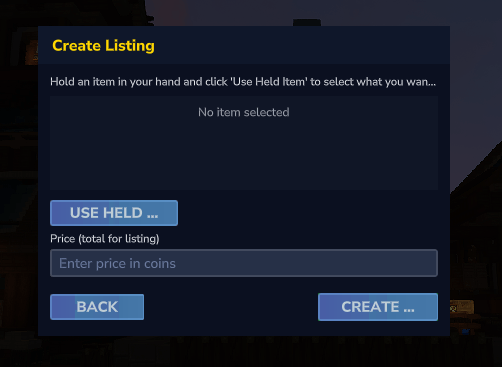
Conquest Auction House is a comprehensive server-side mod for Hytale that introduces a fully functional player-driven economy system. Players can buy and sell items through an intuitive custom UI, creating a dynamic marketplace for your server.
About Conquest Auction House
Core Features
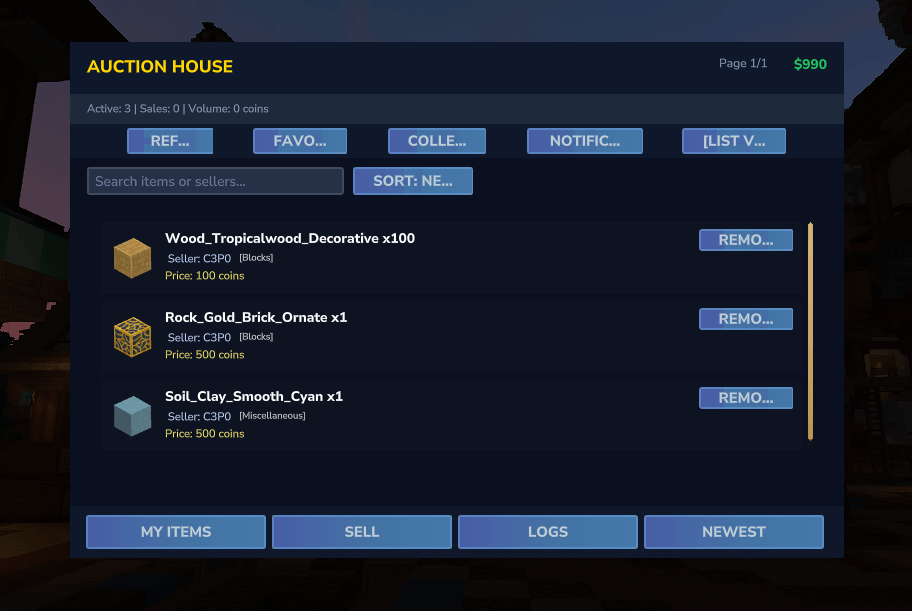
1. Auction House System - **Persistent Listings** - All auction listings are saved to JSON and persist across server restarts - **Item Previews** - Visual item icons with quantity indicators - **Seller Information** - Each listing displays the seller's username with reputation badges - **Pricing System** - Flexible pricing with configurable maximum limits - **Metadata Support** - Preserves item durability, enchantments, and custom data - **Smart Filtering** - Search by item name, seller, or filter by favorites - **Dual View Modes** - Switch between List View (6 items/page) or Grid View (12 items/page) - **Price Intelligence** - Real-time price comparison tooltips showing percentage vs market average
2. Wallet & Economy System - **Per-Player Wallets** - Each player has a persistent coin balance - **Automatic Transactions** - Instant coin transfers on purchases - **Balance Persistence** - Wallet data saved in JSON format - **Player-to-Player Transfers** - Send coins directly to other players - **Admin Controls** - Add/remove coins from any player's wallet - **Overflow Protection** - Integer overflow prevention on deposits
3. Market Intelligence Dashboard - **Live Market Stats** - Real-time display of: - Active Listings count - Total Sales processed - Total Volume traded (in coins) - **Price History Tracking** - Automatic average price calculation for each item type - **Market Trends** - Visual indicators for items priced above/below market average
4. Notification System - **Real-Time Alerts** - 5 notification types: - **Sale** - When your item sells - **Purchase** - When you buy an item - **Alert** - Price alerts on favorite items - **Expired** - When your listing expires - **Payment** - When you receive coins - **Notification Center** - Badge counter showing unread notifications - **Smart Storage** - Auto-cleanup (max 50 notifications per player) - **Persistent Data** - Saved in `notifications.json`
5. Seller Reputation System - **Automatic Badge System** - 6 reputation tiers based on total sales: - 🔲 **[NEW]** - 1-9 sales (gray) - 🟨 **[ACTIVE]** - 10-49 sales (yellow) - 🟩 **[EXPERIENCED]** - 50-99 sales (green) - 🔷 **[TRUSTED]** - 100-499 sales (cyan) - 🟪 **[MASTER]** - 500-999 sales (purple) - 🟨 **[LEGENDARY]** - 1000+ sales (gold) - **Seller Stats Tracking** - Total sales count and total revenue earned - **Persistent Data** - Saved in `seller_stats.json`
6. Collection Box System - **Safe Item Storage** - Items from purchases/cancellations stored securely - **Persistent Collection** - Survives server restarts - **Badge Counter** - Visual indicator of items waiting for collection - **Quick Access** - One-click collection from main UI - **Inventory Protection** - Items safely stored if inventory is full
7. Transaction History - **Complete Logs** - Track all purchases and sales - **Detailed Records** - Item, price, buyer, seller, timestamp - **Player-Specific View** - See only your own transactions - **Persistent Storage** - Saved in `transactions.json`
8. Favorites System - **Bookmark Items** - Mark items for quick filtering - **Quick Filter** - One-click to view only favorite items - **Price Alerts** - Get notified when favorite items are listed - **Persistent Data** - Saved in `favorites.json`
Custom User Interface
Five Dedicated UI Pages
**1. Auction Browser** - Market Stats Bar (Active/Sales/Volume) - Quick Actions Bar (Refresh, Favorites, Collection, Notifications, View Toggle) - Paginated item display (6 or 12 items per page based on view mode) - Real-time balance display - Search functionality for items and sellers - Sort options (Newest, Price: Low to High, Price: High to Low) - Buy/Cancel buttons contextual to ownership - Price comparison tooltips - Seller reputation badges
Commands
layer Commands | Command | Description | Permission | |---------|-------------|------------| | `/hdv` | Opens the auction house browser | Default | | `/hdv collect` | Collect all items from your collection box | Default | | `/auction` | Alias for `/hdv` | Default | | `/auctionhouse` | Alias for `/hdv` | Default | | `/balance` | Check your coin balance | Default | | `/pay <player> <amount>` | Send coins to another player | Default |
### Admin Commands | Command | Description | Permission | |---------|-------------|------------| | `/coins add <player> <amount>` | Add coins to a player's wallet | OP | | `/coins remove <player> <amount>` | Remove coins from a player's wallet | OP | | `/coins set <player> <amount>` | Set a player's coin balance | OP |
## Data Persistence
All data is stored in JSON format at: `C:\Users\[Username]\AppData\Roaming\Hytale\UserData\Mods\`
**Data Files:** - `auctions.json` - Active auction listings - `wallets.json` - Player coin balances - `transactions.json` - Transaction history - `collection_box.json` - Unclaimed items - `favorites.json` - Player favorite items - `seller_stats.json` - Seller reputation data - `price_history.json` - Market price averages - `notifications.json` - Player notifications - `config.json` - Plugin configuration
## Configuration
Default settings in `config.json`: ```json { "maxListingPrice": 1000000, "maxActiveListings": 10, "listingDuration": 604800, "listingFee": 10 } ```
**Configuration Options:** - `maxListingPrice` - Maximum price per listing (default: 1,000,000 coins) - `maxActiveListings` - Maximum listings per player (default: 10) - `listingDuration` - Listing duration in seconds (default: 604,800 = 7 days) - `listingFee` - Fee to create a listing (default: 10 coins)
Categories
Screenshots
Need a Server?
Run Conquest Auction House on a dedicated Hytale server with easy mod management.
Get Hytale HostingFrequently Asked Questions
What is Conquest Auction House?
Conquest Auction House is a comprehensive server-side mod for Hytale that introduces a fully functional player-driven economy system. Players can buy and sell items through an intuitive custom UI, creating a dynamic marketplace for your server.
How do I download Conquest Auction House?
You can download Conquest Auction House for free from CurseForge. Click the "Download on CurseForge" button on this page to go directly to the download page.
Who created Conquest Auction House?
Conquest Auction House was created by vaydoor. The mod has been downloaded 115 times.
Is Conquest Auction House compatible with Hytale servers?
Conquest Auction House is designed for Hytale and can be used on both single-player and multiplayer servers. Check the mod page on CurseForge for specific compatibility information.
How do I install Conquest Auction House?
To install Conquest Auction House: 1) Download the mod from CurseForge, 2) Place the file in your Hytale mods folder, 3) Restart the game. The mod should load automatically.
Related Qol Mods
View all mods
EyeSpy
DarkhaxDev
Adds a HUD that displays information about what you're looking at!

Advanced Item Info
Buuz135
Adds a searchable GUI that displays all the items and the game and displays extra properties they have

Overstacked
DarkhaxDev
Increases the maximum stack size of items.

Violet's Wardrobe
VioletsWorkshop
Adds more customisation options in the form of craftable cosmetics

Item Magnet
Jaredlll08
Adds a magnet that attracts items towards the player.

Endgame & QoL - Boss & Elite Update (3.0.0 in a week)
Lewaii
Endgame & QoL v2.2: Face the Alpha T-Rex & Void Spectres! Unlock Backpack IV & Void Gliders. Restore unused content and challenge stronger, rebalanced bosses!