EasyGive Commands
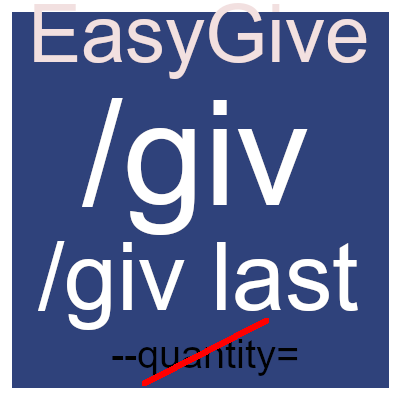
Tired of typing --quantity? Or rerunning the last command again? This Mod simplifies giving yourself items with /giv item count instead of /give item --quantity count. And type /giv last to repeat the last /giv command! (Simple Item Command Utility)
About EasyGive Commands
EasyGive
Newest Update:
Added "Did you mean? [suggested item ids]" if you typed the wrong id!
Help / Issues
Make sure you have op. With /op self.
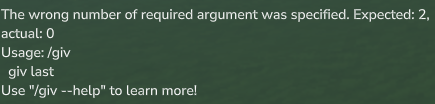
And that the plugin is correctly installed / enabled. This text should appear if you type /giv without anything else:
If above text appears you have it installed / enabled!1 If it says command not found, make sure to enable it in the World Settings in the Mods Section (Right Click World)
! Make sure you enable the mod for your world!
Here is a List of the Vanilla IDs for Hytale: Hytale Item IDs - Complete List of Items, Blocks & Weapons Please type /giv first so you know it's enabled. If it doesn't give you a Help text with usage instructions, then the Mod is not correctly installed or enabled. Please check the sections below for Install / Enable Instructions
Quick Start - Singleplayer
Install: Download the latest release and put the JAR into your %appdata%\Hytale\UserData\Mods Folder or your servers mods/ folder
Go to your main menu
Go back into your Worlds menu
Right click any world and add "EasyGive" (tick the [ ] next to the name)
You can now use the command: Just type /giv Ingredient_Fibre 40
Without the e
Quick Start - Server
Install: Download the latest release and put the JAR into your servers mods/ folder
Restart the server
You can now use the command: Just type /giv Ingredient_Fibre 40
Without the e
It also tells you with a handy Box at the right corner what item it gave and the icon of the item:
With this mod you will be able to: /giv <item> <count> Examples: /give Ingredient_Fibre 100 /giv Furniture_Dungeon_Chest_Epic 35
To give yourself Deco_Iron_Bars you can use the following command:
/giv Deco_Iron_Bars 10 (in my command you have to include the count, if you just need 1 you can /give with e)
If you only need 1 of an item you can use " /give Ingredient_Fibre" as an example.
Base Game: The default /give command in Hytale requires you to type --quantity to give more than one item. Example: /give Ingredient_Fibre --quantity 64
Updates:
18.01 (v1.0.1)
added last parameter to /giv:
usage /giv last
Gives yourself the last item with the last count (basically reruns the last /giv)
You can support my projects by using Code ArkaTale when purchasing Hytale!
Categories
Screenshots
Need a Server?
Run EasyGive Commands on a dedicated Hytale server with easy mod management.
Get Hytale HostingFrequently Asked Questions
What is EasyGive Commands?
Tired of typing --quantity? Or rerunning the last command again? This Mod simplifies giving yourself items with /giv item count instead of /give item --quantity count. And type /giv last to repeat the last /giv command! (Simple Item Command Utility)
How do I download EasyGive Commands?
You can download EasyGive Commands for free from CurseForge. Click the "Download on CurseForge" button on this page to go directly to the download page.
Who created EasyGive Commands?
EasyGive Commands was created by ArkaTale. The mod has been downloaded 388 times.
Is EasyGive Commands compatible with Hytale servers?
EasyGive Commands is designed for Hytale and can be used on both single-player and multiplayer servers. Check the mod page on CurseForge for specific compatibility information.
How do I install EasyGive Commands?
To install EasyGive Commands: 1) Download the mod from CurseForge, 2) Place the file in your Hytale mods folder, 3) Restart the game. The mod should load automatically.
Related Misc Mods
View all mods
Ymmersive Melodies
Conczin
Upload and play MIDI files in-game on various instruments to annoy your friends with custom melodies!

MultipleHUD
Buuz135
A simple mod that allows you to have multiple HUDs present at once.

Spanish Translation
Plexu5
A Spanish language translation for Hytale. Includes UI, items, and menus.

YUNG's HyDungeons
YUNGNICKYOUNG
Adds new procedurally generated dungeon instances!

Just Enough Tales (JEI mod)
uwudwagon
A JEI mod for Hytale.
![[NoCube's] Simple Bags](https://media.forgecdn.net/avatars/thumbnails/1601/201/256/256/639034453685921721.png)
[NoCube's] Simple Bags
NoCube
Adds bags that you can put anything in!