EasyHome
Simple home teleportation for Hytale servers. Set homes, teleport back instantly. Fully customizable: adjustable limits, teleport delays, and permission-based tiers. No config files needed—configure everything in-game with /easyhome admin.
About EasyHome
EasyHome
Let players save locations and teleport back instantly! Perfect for survival servers.
Built for the European Hytale survival server at play.hyfyve.net
Quick Start
Install: Download the latest release and drop the JAR into your server's mods/ folder
Restart your server
Set a home: Stand where you want and type /sethome
Teleport back: Type /home from anywhere!
That's it! Players can now save and teleport to their favorite spots.
Features
Multiple Homes - Save spots like "base", "mine", "farm" and teleport between them
Easy Limits - Choose how many homes players can have
Teleport Delay - Optional countdown before teleporting (stops combat logging)
Simple Setup - Configure everything in-game, no files to edit
Player Commands
Command What it does
/sethome Save where you're standing as "home"
/sethome base Save where you're standing as "base"
/home Teleport to "home"
/home base Teleport to "base"
/homes See all your saved homes
/delhome base Delete "base"
/homehelp Show help
Server Owner Setup
Step 1: Let players use homes
Run this in your console:
perm group add Adventure homes.use Done! Players can now use /sethome and /home.
Step 2: Choose how many homes players get
Want everyone to have 3 homes?
/easyhome admin set default 3 Want to turn off the teleport delay?
/easyhome admin set warmup 0 Want instant teleport for admins only?
perm group add admin homes.bypass.warmup
Admin Commands
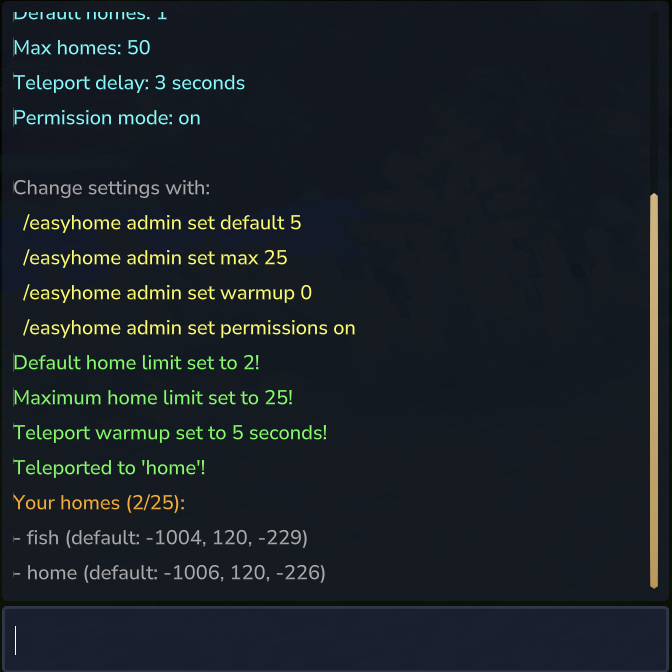
See your current settings
/easyhome admin config Change how many homes everyone gets
/easyhome admin set default 5 Change the maximum homes allowed
/easyhome admin set max 25 Change the teleport delay
/easyhome admin set warmup 5 Set to 0 for instant teleport.
Turn permission-based limits on/off
/easyhome admin set permissions off When OFF: Everyone gets the same number of homes.
When ON: You can give different groups different limits using permissions.
Giving Different Groups Different Limits
Want VIPs to have more homes than regular players? Here's how:
First, turn on permission mode:
/easyhome admin set permissions on Then set up your groups:
perm group add Adventure homes.use perm group add Adventure homes.limit.1
perm group add vip homes.use perm group add vip homes.limit.5
perm group add admin homes.use perm group add admin homes.limit.unlimited perm group add admin homes.admin Now regular players get 1 home, VIPs get 5, and admins get unlimited!
All Permissions
Permission What it does
homes.use Can use home commands
homes.admin Can use /easyhome admin
homes.limit.1 Can have 1 home
homes.limit.3 Can have 3 homes
homes.limit.5 Can have 5 homes
homes.limit.10 Can have 10 homes
homes.limit.25 Can have 25 homes
homes.limit.50 Can have 50 homes
homes.limit.unlimited Can have max homes
homes.bypass.warmup Teleports instantly (no delay)
Common Questions
"How do I give everyone 3 homes without messing with permissions?"
/easyhome admin set default 3 /easyhome admin set permissions off "Players say teleporting takes too long"
/easyhome admin set warmup 0 "A player says they can't set more homes"
Either increase the default limit:
/easyhome admin set default 5 Or give them a higher permission:
perm user add PlayerName homes.limit.10
License
MIT - Use it however you like!
Categories
Frequently Asked Questions
What is EasyHome?
Simple home teleportation for Hytale servers. Set homes, teleport back instantly. Fully customizable: adjustable limits, teleport delays, and permission-based tiers. No config files needed—configure everything in-game with /easyhome admin.
How do I download EasyHome?
You can download EasyHome for free from CurseForge. Click the "Download on CurseForge" button on this page to go directly to the download page.
Who created EasyHome?
EasyHome was created by PhillipJ. The mod has been downloaded 2.4K times.
Is EasyHome compatible with Hytale servers?
EasyHome is designed for Hytale and can be used on both single-player and multiplayer servers. Check the mod page on CurseForge for specific compatibility information.
How do I install EasyHome?
To install EasyHome: 1) Download the mod from CurseForge, 2) Place the file in your Hytale mods folder, 3) Restart the game. The mod should load automatically.
Related Qol Mods
View all mods
EyeSpy
DarkhaxDev
Adds a HUD that displays information about what you're looking at!

Advanced Item Info
Buuz135
Adds a searchable GUI that displays all the items and the game and displays extra properties they have

Overstacked
DarkhaxDev
Increases the maximum stack size of items.

Violet's Wardrobe
VioletsWorkshop
Adds more customisation options in the form of craftable cosmetics

Item Magnet
Jaredlll08
Adds a magnet that attracts items towards the player.

Endgame & QoL - Boss & Elite Update (3.0.0 in a week)
Lewaii
Endgame & QoL v2.2: Face the Alpha T-Rex & Void Spectres! Unlock Backpack IV & Void Gliders. Restore unused content and challenge stronger, rebalanced bosses!