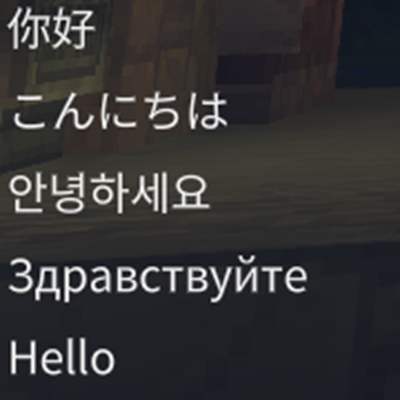
Font Fix
Remove font restrictions and provide support for Chinese, Japanese, Korean, and other languages.
About Font Fix
This mod increases the font texture size to 10240x10240 and includes a built-in font that supports CJK characters (containing 42,247 characters). This allows for better communication among players without modifying the game files.
Note: If you are using a localization mod that modifies HytaleClient.exe, please uninstall it and use an unmodified version of the game; otherwise, conflicts may occur.
How to Install:(Installation via the Curseforge App is not currently supported)
Download the mod.
Open the Hytale client, click the gear icon in the upper-left corner, then click "Open directory".
Navigate to the install\release\package\game\latest\Client folder.
Extract the plugin into this folder. At this point, version.dll should be located in the same directory as HytaleClient.exe.
Enjoy it!
这个模组将字体纹理的尺寸提高至10240x10240,并且内置了一套支持CJK字符的字体(包含42247个字符),可以让玩家更好地进行交流,并且不会修改游戏文件。
注意,如果使用了修改HytaleClient.exe的本地化模组,请卸载并使用未修改游戏的版本,否则会导致冲突。
如何安装:(暂不支持通过Curseforge App安装)
下载该模组。
打开 Hytale 客户端,点击左上角的齿轮图标,然后点击“Open directory”。
进入 install\release\package\game\latest\Client 文件夹。
将插件解压到此文件夹。此时,version.dll 应与 HytaleClient.exe 位于同一目录。
启动!
このMODはフォントテクスチャのサイズを10240x10240に引き上げ、さらにCJK文字(42,247文字を含む)をサポートするフォントを内蔵しています。これにより、プレイヤー間のコミュニケーションが向上し、かつゲームファイルを改変することはありません。
注意:HytaleClient.exeを改変するローカライズMODを使用している場合は、アンインストールして未改変のゲームバージョンを使用してください。そうしないと競合が発生する可能性があります。
インストール方法:(Curseforgeアプリ経由でのインストールには非対応です)
MODをダウンロードします。
Hytale クライアントを開き、左上の歯車アイコンをクリックして、「Open directory」をクリックします。
install\release\package\game\latest\Client フォルダに移動します。
プラグインをこのフォルダに解凍します。この時点で、version.dll は HytaleClient.exe と同じディレクトリに配置されているはずです。
お楽しみください!
이 모드는 글꼴 텍스처 크기를 10240x10240으로 늘리고, CJK 문자(42,247자 포함)를 지원하는 내장 글꼴을 포함하고 있습니다. 이를 통해 플레이어 간 소통이 개선되며, 게임 파일을 수정하지 않습니다.
참고: HytaleClient.exe를 수정하는 현지화 모드를 사용 중인 경우, 제거하고 수정되지 않은 게임 버전을 사용하십시오. 그렇지 않으면 충돌이 발생할 수 있습니다.
설치 방법:(Curseforge 앱을 통한 설치는 아직 지원되지 않습니다)
모드를 다운로드합니다.
Hytale 클라이언트를 실행하고, 왼쪽 상단의 기어 아이콘을 클릭한 후 "Open directory"를 클릭합니다.
install\release\package\game\latest\Client 폴더로 이동합니다.
플러그인을 이 폴더에 압축 해제합니다. 이 시점에서 version.dll 파일은 HytaleClient.exe와 동일한 디렉터리에 위치해야 합니다.
즐기세요!
Categories
Frequently Asked Questions
What is Font Fix?
Remove font restrictions and provide support for Chinese, Japanese, Korean, and other languages.
How do I download Font Fix?
You can download Font Fix for free from CurseForge. Click the "Download on CurseForge" button on this page to go directly to the download page.
Who created Font Fix?
Font Fix was created by Krash220. The mod has been downloaded 497 times.
Is Font Fix compatible with Hytale servers?
Font Fix is designed for Hytale and can be used on both single-player and multiplayer servers. Check the mod page on CurseForge for specific compatibility information.
How do I install Font Fix?
To install Font Fix: 1) Download the mod from CurseForge, 2) Place the file in your Hytale mods folder, 3) Restart the game. The mod should load automatically.
Related Misc Mods
View all mods
Ymmersive Melodies
Conczin
Upload and play MIDI files in-game on various instruments to annoy your friends with custom melodies!

MultipleHUD
Buuz135
A simple mod that allows you to have multiple HUDs present at once.

Spanish Translation
Plexu5
A Spanish language translation for Hytale. Includes UI, items, and menus.

YUNG's HyDungeons
YUNGNICKYOUNG
Adds new procedurally generated dungeon instances!

Just Enough Tales (JEI mod)
uwudwagon
A JEI mod for Hytale.
![[NoCube's] Simple Bags](https://media.forgecdn.net/avatars/thumbnails/1601/201/256/256/639034453685921721.png)
[NoCube's] Simple Bags
NoCube
Adds bags that you can put anything in!