
HyFactions
A Faction Mod for Hytale
About HyFactions
⚔️ Hyfaction - Complete Faction System for Hytale
A comprehensive faction management mod for Hytale servers featuring territory claims, alliances, strategic PvP, overclaiming, and extensive customization. Perfect for competitive servers seeking organized faction warfare.
Version: 1.0.509 - Major Overhaul Update 🚀
🌟 Overview
Hyfaction transforms your Hytale server into a dynamic faction-based environment where players create factions, claim territories, forge alliances, and engage in strategic PvP combat. With an intuitive GUI system, ECS integration, overclaiming mechanics, and extensive customization, Hyfaction provides everything needed for competitive faction gameplay.
Main Commands: /hf | /hyfaction | /faction | /f
✨ Key Features
🏰 Advanced Faction Management
Create & manage factions with unique names and random colors
Three-tier role hierarchy (Owner, Officer, Member) with distinct permissions
Smart invitation system with explicit acceptance
Comprehensive activity logs tracking the last 100 faction actions
Individual faction storage with isolated JSON files per faction
Complete dissolution removing all claims and data files
🆕 Member limit system - Configure maximum members per faction (default: 50)
🆕 Disband confirmation - New popup to prevent accidental faction deletion
🗺️ Intelligent Territory System
Chunk-based claiming protecting faction territories
Visual map integration displaying claimed chunks in faction colors
Integrated minimap in GUI for contextual awareness
15x15 chunk grid for easy territory management
Power-based limits ensuring balanced expansion
🆕 Adjacent claims system - Force factions to claim only connected territories
🆕 Anti-hole protection - Prevents disconnected chunk groups when unclaiming
🆕 Overclaiming system - Capture enemy territory when their power reaches 0!
🆕 Inactive faction decay - Auto-remove claims from inactive factions
Automatic decay system for inactive or low-power factions (configurable)
Dimension restrictions preventing claims in temporary or restricted areas
⚡ Dynamic Power System
Personal power for each player (configurable cap at 20)
Faction power calculation as sum of member power (capped per player)
Automatic regeneration every configurable interval (+1 power/player)
Strategic power loss on death (-1) or killing neutrals (-1)
🆕 Configurable power cost - Set power required per claim (default: 2)
🆕 No power loss in WarZones - Fight freely without penalties!
Real-time recalculation on member changes and power events
Power deficit penalties triggering automatic claim decay
🤝 Diplomatic Relations System
Alliances - Mutual protection, shared land access, no friendly fire
Enemies - Full PvP, bidirectional hostility, overclaiming enabled 🔥
Neutrals - PvP enabled with power penalties for aggression
Alliance request system with approval/rejection mechanics
Automatic enemy conversion when rejecting alliance requests
Color-coded displays (green allies, red enemies, white/gray neutrals)
🏠 Home & Teleportation
Faction home set by owner in claimed territory
Exact teleportation preserving position AND rotation (yaw/pitch)
Cross-dimension support using Hytale's native teleportation
Member-only access with permission checks
Configurable cooldown and delay system
⚔️ Advanced Combat System
Combat tagging preventing logout exploitation (15s default)
Relationship-based PvP rules (allies protected, enemies open)
Power penalties for attacking neutrals
Combat logs tracking all deaths with timestamps
🆕 Safe zones for admin-designated protection areas (Green)
🆕 WarZones for PvP combat without power loss penalties (Red)
Death detection via ECS DeathComponent and chat analysis
💬 Faction & Alliance Chat System - NEW!
🆕 Chat Toggle Mode - Switch between chat channels instantly
Faction Chat (/hf c) - Toggle faction chat mode
Alliance Chat (/hf a) - Toggle alliance chat mode
General Chat (/hf g) - Toggle back to general chat
Visual confirmation when switching chat modes
Distinct formatting with custom colors and prefixes
Secure messaging - Only faction/allied members can participate
No message duplication - Efficient message delivery
Permission-based control via LuckPerms integration
🎯 Special Zone System - NEW!
🟢 SafeZones (Green)
Complete protection from all PvP combat
No block breaking or placement allowed
Admin-designated safe areas for spawns, hubs, or events
Displayed in green on the world map
Highest priority in map display
🔴 WarZones (Red)
🆕 Dedicated PvP combat zones
PvP enabled without power loss on death
No penalties for dying in WarZones
Ideal for events, arenas, and organized combat
Displayed in red on the world map
Automatic "WarZone" title notification on entry/exit
Visual indication in claim GUI: "PvP enabled - No power loss on death"
Admin-only creation and management
🛡️ Comprehensive Protection
Block placement/breaking protection in claimed chunks
Interaction protection for containers, doors, and mechanisms
Fluid placement protection (water, lava, etc.)
Item pickup protection in claimed areas
Allied access to friendly territories (configurable)
Creative mode bypass option for building (configurable)
Admin override system for server management
🆕 Multi-world support - Works correctly with multiple worlds and dimensions
👑 Professional Admin Tools
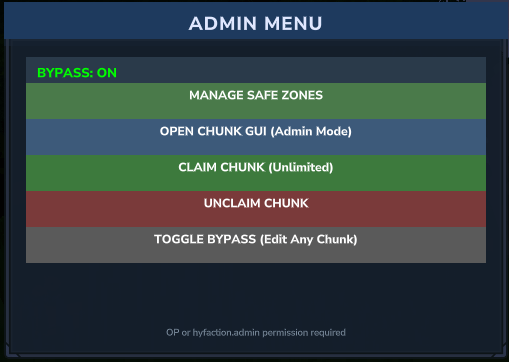
Consolidated admin menu with all management options
Unlimited claiming for server setup and events
Bypass mode toggle for modifying any territory
🆕 Enhanced admin unclaim - Can unclaim even if creates disconnected groups
🆕 Safe zone management (add/remove/list)
🆕 WarZone management - New dedicated menu for creating combat zones
Admin chunk GUI with unrestricted access
Override system for special permissions
🎨 Modern User Interface
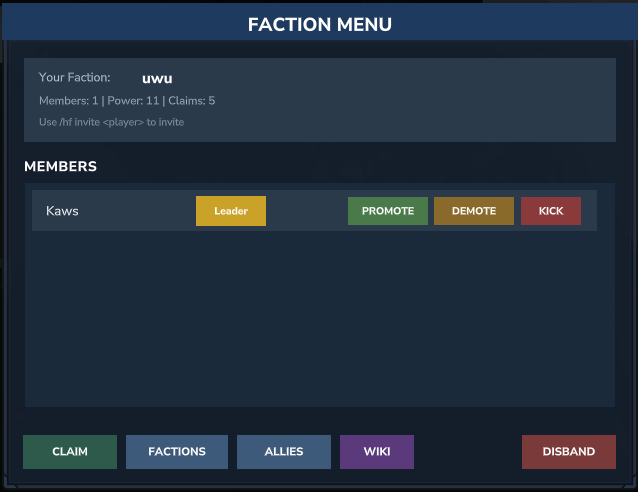
Interactive main menu showing faction stats, members, and actions
Chunk management GUI with integrated minimap and 15x15 grid
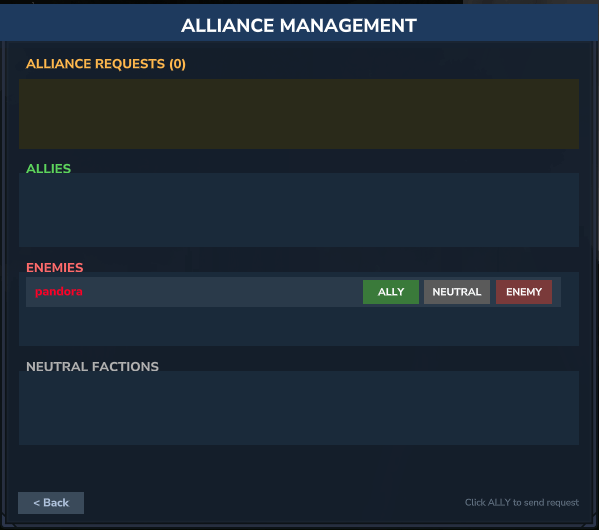
🆕 Auto-updating alliance UI - Reflects changes in real-time
Alliance management with visual request handling
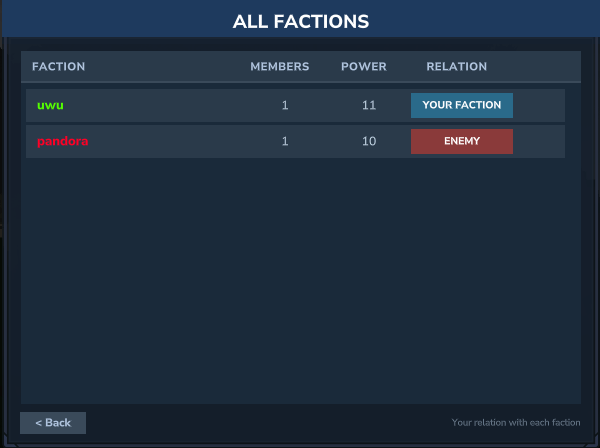
Faction browser listing all factions with click-to-view members
🆕 Disband confirmation popup - Prevents accidental faction deletion
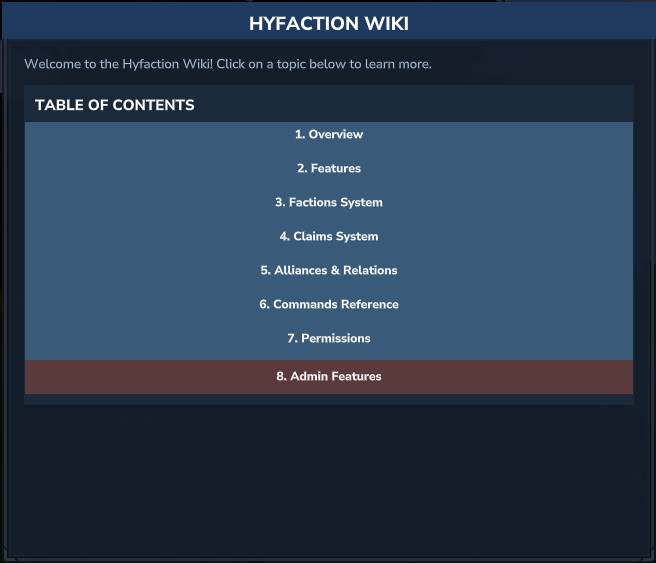
Multi-page wiki with comprehensive in-game documentation
Help system with categorized command reference
Color-coded badges for roles and relationships
🆕 WarZone indicators in claim GUI with clear tooltips
📋 Complete Command Reference
Basic Faction Commands
Command Permission Description
/hf or /hf list - Open interactive faction menu (GUI)
/hf create <n> hyfaction.create Create a new faction with unique name
/hf invite <player> hyfaction.invite Invite player to faction (Owner/Officer)
/hf accept - Accept pending faction invitation
/hf leave - Leave current faction (not for Owner)
/hf kick <player> hyfaction.kick Remove player from faction
/hf disband hyfaction.disband Dissolve faction completely (Owner only)
Home & Teleportation
Command Permission Description
/hf sethome hyfaction.sethome Set faction home at current position (Owner only)
/hf home hyfaction.home Teleport to faction home with exact rotation
Member Management
Command Permission Description
/hf promote <player> hyfaction.promote Promote member to Officer (Owner only)
/hf demote <player> hyfaction.demote Demote Officer to Member (Owner only)
Territory Management
Command Permission Description
/hf chunk hyfaction.claim/hyfaction.unclaim Open chunk management GUI with minimap
/hf overclaim hyfaction.claim 🆕 NEW - Capture enemy faction chunk (requires ≤0 power, enemy relation)
Note: Direct /hf claim and /hf unclaim commands are deprecated. All territory management now uses the /hf chunk GUI.
Diplomatic Relations
Command Permission Description
/hf ally <faction> hyfaction.ally Send alliance request (auto-accept if mutual)
/hf enemy <faction> hyfaction.enemy Declare faction as enemy (bidirectional, enables overclaiming)
/hf neutral <faction> hyfaction.enemy Set neutral relationship (unilateral)
/hf faction - View all factions with relations and stats
Information & Help
Command Permission Description
/hf logs - Display last 100 faction activity entries
/hf help - Open interactive help menu with all commands
/hf wiki - Access multi-page in-game documentation
Communication Commands - 🆕 NEW!
Command Permission Description
/hf c <message> hyfaction.chat.faction 🆕 Toggle faction chat mode - Switch to faction channel
/hf a <message> hyfaction.chat.ally 🆕 Toggle alliance chat mode - Switch to alliance channel
/hf g - 🆕 Toggle general chat - Return to global chat
Administrative Commands
Command Permission Description
/hf admin hyfaction.admin Open consolidated admin menu
/hf admin-chunk hyfaction.admin Open admin chunk GUI (unlimited)
/hf admin-claim hyfaction.admin Claim current chunk (unrestricted)
/hf admin-unclaim hyfaction.admin Unclaim current chunk (any owner)
/hf admin safezone add hyfaction.admin Add current chunk as safe zone
/hf admin safezone remove hyfaction.admin Remove safe zone from current chunk
/hf admin safezone list hyfaction.admin List all safe zones with coordinates
/hf admin warzone add hyfaction.admin 🆕 NEW - Add current chunk as WarZone
/hf admin warzone remove hyfaction.admin 🆕 NEW - Remove WarZone from current chunk
/hf admin warzone list hyfaction.admin 🆕 NEW - List all WarZones with coordinates
🔑 Permissions & Integrations
Permission System Integration
Hyfaction supports multiple permission systems for maximum flexibility:
LuckPerms
Full integration with LuckPerms for granular permission control. Without LuckPerms, all permissions default to granted (permissive mode).
HyperPerms ⭐
Automatic integration with HyperPerms - Advanced permissions for Hytale!
Features:
🎨 Automatic faction prefix in chat - Shows faction name before player's group prefix
👑 Optional rank display - Include faction rank (Owner, Officer, Member) in chat
🔧 Chat placeholders - Use faction data anywhere in chat format
⚙️ Customizable formats - Full control over faction info display
Placeholders Available:
%faction% - Player's faction name (e.g., "Warriors")
%faction_rank% - Player's rank within faction (Owner/Officer/Member)
%faction_tag% - Short faction tag (typically 4 characters)
Chat Examples:
[Warriors][Admin] Steve: Hello everyone! # With faction [Warriors|Owner][Admin] Steve: Hello! # With faction + rank [Admin] Steve: Hello! # No faction
No configuration required! HyperPerms automatically detects Hyfaction. Just install both mods and they work together instantly.
Learn more: HyperPerms HyFactions Integration
Core Permissions
Permission Function Notes
hyfaction.create Create factions Required for /hf create
hyfaction.invite Invite players Also requires Officer+ role
hyfaction.claim Claim chunks Used in chunk GUI and overclaim
hyfaction.unclaim Unclaim chunks Used in chunk GUI
hyfaction.home Use faction home Teleport to home
hyfaction.sethome Set faction home Owner only + permission
hyfaction.kick Kick members Owner/Officer + permission
hyfaction.promote Promote to Officer Owner only + permission
hyfaction.demote Demote to Member Owner only + permission
hyfaction.ally Manage alliances Ally/enemy/neutral relations
hyfaction.enemy Manage relations Same as ally permission
hyfaction.disband Dissolve faction Owner only + permission
hyfaction.admin Admin access All admin commands + bypass
hyfaction.chat.faction Faction chat 🆕 Use /hf c for faction chat
hyfaction.chat.ally Alliance chat 🆕 Use /hf a for alliance chat
Permission Hierarchy
Owner: Automatic bypass for all faction permissions
Officer: Limited permissions based on role + LuckPerms
Member: Basic permissions via LuckPerms only
Admin: Full override with hyfaction.admin permission
⚙️ Configuration
Configuration file: plugins/Hyfaction/config/Hyfaction.json (auto-generated with defaults)
Configuration Options
Setting Type Default Description
DefaultFactionClaimsAmount Integer 25 Starting claims for new factions (legacy)
MaxFactionClaims Integer 100 Absolute maximum chunks per faction
MaxPlayerPower Integer 20 Power cap per player (faction contribution limit)
PowerRegenerationHours Integer 1 Hours between +1 power regeneration
CombatTagDurationSeconds Integer 15 Combat tag duration (logout penalty period)
ClaimDecaySeconds Integer 600 Delay before auto-unclaiming excess chunks (10 min)
EnableOverclaiming Boolean true 🆕 Enable/disable overclaiming system
PowerPerClaim Integer 2 🆕 Power cost per claim (customizable)
MaxFactionMembers Integer 50 🆕 Maximum members per faction
OnlyAdjacentClaims Boolean false 🆕 Force adjacent claims only (connected territories)
InactiveFactionDecayDays Integer 7 🆕 Days before auto-removing claims from inactive factions (0 to disable)
NeutralKillPowerLoss Integer 1 🆕 Power loss when killing neutral players (configurable penalty)
SafeZoneAllowDoors Boolean false 🆕 Allow door interactions in SafeZones
SafeZoneAllowChests Boolean false 🆕 Allow chest access in SafeZones
WarZoneAllowDoors Boolean false 🆕 Allow door interactions in WarZones
WarZoneAllowChests Boolean false 🆕 Allow chest access in WarZones
ShowClaimsOnMap Boolean true Display faction chunks on world map
ShowFactionNameInChat Boolean true Prefix faction name in chat messages
HidePlayersNotInSameFactionOnMap Boolean false Hide non-faction players on map
HidePlayerNameTags Boolean false Hide player name tags in-game
HidePlayerMarkersOnMap Boolean false Hide player markers on world map
HomeTeleportDelaySeconds Integer 5 Delay before home teleportation
HomeTeleportCooldownMinutes Integer 5 Cooldown between home teleports
ForceHyfactionChunkWorldMap Boolean true Force Hyfaction map for compatible dimensions
CreativeModeBypassProtection Boolean false Allow creative players to bypass protection
DefaultFactionBlockPlaceEnabled Boolean true Allow allies to place blocks by default
DefaultFactionBlockBreakEnabled Boolean false Allow allies to break blocks by default
DefaultFactionBlockInteractEnabled Boolean false Allow allies to interact with blocks by default
Complete Configuration Example
{ "DefaultFactionClaimsAmount": 25, "DefaultFactionBlockPlaceEnabled": true, "DefaultFactionBlockBreakEnabled": false, "DefaultFactionBlockInteractEnabled": false, "ForceHyfactionChunkWorldMap": true, "CreativeModeBypassProtection": false, "ShowClaimsOnMap": true, "CombatTagDurationSeconds": 15, "PowerRegenerationHours": 1, "MaxPlayerPower": 20, "ShowFactionNameInChat": true, "MaxFactionClaims": 100, "ClaimDecaySeconds": 600, "HidePlayersNotInSameFactionOnMap": false, "HomeTeleportDelaySeconds": 5, "HomeTeleportCooldownMinutes": 5, "HidePlayerNameTags": false, "HidePlayerMarkersOnMap": false, "EnableOverclaiming": true, "PowerPerClaim": 2, "MaxFactionMembers": 50, "OnlyAdjacentClaims": true, "InactiveFactionDecayDays": 7, "NeutralKillPowerLoss": 1, "SafeZoneAllowDoors": false, "SafeZoneAllowChests": false, "WarZoneAllowDoors": false, "WarZoneAllowChests": false }
👥 Faction Role System
👑 Owner (Proprietor)
Unique faction leader with absolute control
Permissions:
Dissolve faction completely
Promote members to Officer
Demote Officers to Member
Kick any member (Officers and Members)
Set faction home location
Manage all diplomatic relations
Accept/reject alliance requests
Invite new players
Restrictions:
Cannot leave faction (must disband)
Cannot be kicked or demoted
Only one Owner per faction
⭐ Officer
Trusted member with management authority
Permissions:
Invite new players
Kick Members only (not other Officers)
Manage diplomatic relations (ally/enemy/neutral)
Accept/reject alliance requests
Claim/unclaim chunks (with LuckPerms permission)
Use overclaim on enemy territory
Restrictions:
Cannot promote/demote anyone
Cannot kick other Officers or Owner
Cannot dissolve faction
Cannot set faction home
🎖️ Member
Standard faction participant
Permissions:
Claim chunks (with hyfaction.claim)
Unclaim chunks (with hyfaction.unclaim)
Overclaim enemy chunks (with hyfaction.claim)
Teleport to faction home
View faction information
Access faction logs
Restrictions:
Cannot invite players
Cannot kick anyone
Cannot manage relations
Cannot promote/demote
Cannot set home
No management access
🎮 Advanced Systems
Power System Mechanics
Calculation:
Faction power = Sum of all member power (capped at MaxPlayerPower per player)
Example: With MaxPlayerPower = 20, a player with 25 power contributes only 20
Regeneration:
+1 power per player every PowerRegenerationHours
Individual timers (not simultaneous)
Automatic recalculation on completion
Power Loss:
-1 power on death (detected via DeathComponent or chat keywords)
-1 power for killing neutral players
🆕 No power loss when dying in WarZones
Tracked in CombatLogManager
Recalculation Triggers:
Member joins/leaves faction
Power regeneration completes
Death or kill events
Automatic every 5 minutes
Claim Limit Formula:
maxClaims = min(factionPower / PowerPerClaim, MaxFactionClaims)
Default: 1 claim requires 2 power (configurable via PowerPerClaim)
🆕 Adjacent Claims System - NEW!
Force connected territories for strategic gameplay!
How it works:
When OnlyAdjacentClaims: true, factions can only claim chunks next to existing claims
First claim in each dimension becomes the starting point
Anti-hole protection prevents creating disconnected groups when unclaiming
Admin bypass - Admins can still unclaim any chunk via admin commands
Benefits:
Encourages strategic territory planning
Prevents scattered, disconnected claims
Creates more cohesive faction territories
Easier to defend contiguous land
Configuration:
OnlyAdjacentClaims: true - Enable adjacent claims requirement
OnlyAdjacentClaims: false - Allow claiming anywhere (default)
🆕 Inactive Faction Decay - NEW!
Automatically clean up claims from inactive factions!
How it works:
Hourly check scans all factions for activity
If no members have been online for InactiveFactionDecayDays days, claims are removed
Factions themselves remain (members can rejoin and reclaim)
Configurable duration or disable entirely
Configuration:
InactiveFactionDecayDays: 7 - Auto-remove claims after 7 days of inactivity
InactiveFactionDecayDays: 0 - Disable inactive decay system
Benefits:
Keeps map clean from abandoned territories
Frees up land for active players
Prevents server bloat from inactive factions
Configurable to match your server's activity level
🔥 Overclaiming System
Capture enemy territory through strategic warfare!
Requirements:
✅ Target faction must have ≤ 0 power
✅ Target faction must be declared as enemy (use /hf enemy <faction>)
✅ Chunk must already be claimed by the enemy faction
✅ Your faction must have enough available claims
How it works:
Declare a faction as enemy: /hf enemy <targetFaction>
Engage in combat to reduce their power to 0 or below
Stand in a chunk claimed by the enemy faction
Execute /hf overclaim to capture it
Configuration:
EnableOverclaiming: true - Overclaiming enabled, no automatic decay
EnableOverclaiming: false - Overclaiming disabled, normal decay system applies
Success Messages:
✅ "Successfully overclaimed chunk from [FactionName]!"
Error Messages:
❌ "You can only overclaim chunks from factions with ≤ 0 power"
❌ "You can only overclaim chunks from enemy factions"
❌ "This chunk is not claimed"
💬 Chat System - NEW!
Faction Chat:
Format: [FACTION] [FactionName] Player: Message
Custom colors based on your faction's RGB color
Private communication - Only faction members receive messages
Perfect for: Quick coordination during raids and PvP battles
Alliance Chat:
Format: [ALLY] [FactionName] Player: Message
Cyan color to distinguish from faction messages
Coordinate with allies - Messages sent to all allied factions
Requires: At least one allied faction
Perfect for: Large-scale attacks and strategic planning
Usage Examples:
/hf c Everyone online for the raid at 8pm! /hf a Need backup at coordinates X:100 Z:200
Response Messages:
✅ "Message sent to faction" - Successfully sent
✅ "Message sent to X allied faction(s)" - Sent to allies
❌ "You don't have any allied factions" - No alliances
❌ "You must be in a faction to use faction chat" - Not in faction
❌ "You don't have permission to use this command" - Missing permission
PvP System
Damage Rules:
Same faction: Damage canceled
Allied factions: Damage canceled, shared land access
Enemy factions: Full PvP enabled, combat tag applied, overclaiming available
Neutral players: PvP enabled, combat tag applied, -1 power penalty for killer
Safe zones: All damage canceled
WarZones: PvP enabled, no power loss on death
Combat Tag:
Duration: CombatTagDurationSeconds (default: 15s)
Logout during tag: -1 power penalty
Tracked per player with expiration
📁 Data Storage Architecture
🆕 NEW in v1.0.389: All plugin data has been moved to a new location for better organization!
Old Location: universe/Hyfaction/ New Location: plugins/Hyfaction/config/
Migration Guide
⚠️ IMPORTANT: If you're updating from v1.0.388 or earlier, follow these steps:
Quick Migration Steps:
🛑 Stop your server
💾 Backup your universe/Hyfaction/ folder
📁 Create directories:
plugins/Hyfaction/config/
plugins/Hyfaction/config/faction/
📦 Move main files to plugins/Hyfaction/config/:
Parties.json
Claims.json
NameCache.json
AdminOverrides.json
SafeZones.json
WarZones.json
combatlogs.json
📦 Move faction files: All UUID.json files from factions/ → config/faction/
✅ Start server and verify everything works
⚠️ Always backup before making changes!
File Structure (v1.0.389+)
plugins/Hyfaction/config/ ├── Hyfaction.json (configuration) ├── Parties.json ├── Claims.json ├── NameCache.json ├── AdminOverrides.json ├── SafeZones.json ├── WarZones.json ├── combatlogs.json └── faction/ ├── {UUID1}.json ├── {UUID2}.json └── ...
🎯 Perfect For
✅ Competitive PvP servers with organized faction warfare ✅ Survival servers requiring territorial control ✅ RPG servers needing clan/guild systems ✅ Large-scale servers with structured player organizations ✅ Community servers fostering team-based gameplay ✅ Hardcore servers with strategic land management ✅ 🆕 Event servers with dedicated PvP arenas (WarZones) ✅ 🆕 Multi-world servers - Fully compatible with multiple dimensions
💡 Why Choose Hyfaction?
Modern Architecture
Native ECS integration for optimal performance
Asynchronous data handling preventing lag
Modular system design for extensibility
🆕 Multi-world thread safety - Proper synchronization across dimensions
Comprehensive Features
Every feature a faction mod needs
No external dependencies required
Optional integrations: LuckPerms & HyperPerms
Professional admin tools included
🆕 Overclaiming system for strategic territory control
🆕 WarZones for penalty-free PvP events
User-Friendly Design
Intuitive GUI for all major functions
In-game wiki and help system
Visual feedback and notifications
Clear zone indicators on map and in-game
Active Development
Regular updates and bug fixes
Community-driven improvements
Version 1.0.395+ tested and stable
Crash fixes for multi-world servers
🆘 Support & Documentation
In-Game Help:
/hf wiki - Complete multi-page documentation
/hf help - Command reference with descriptions
Configuration:
Auto-generated config with sensible defaults
Fully documented options
Examples included
Troubleshooting:
Check plugins/Hyfaction/config/ directory for data files
Verify LuckPerms installation (optional)
Review server logs for errors
Migration issues? Ensure all files were moved correctly from universe/Hyfaction/
🔗 Quick Links
Commands: Use /hf help in-game
Wiki: Access via /hf wiki in-game
Config: plugins/Hyfaction/config/Hyfaction.json
Data: plugins/Hyfaction/config/ directory
Permissions: LuckPerms & HyperPerms compatible
HyperPerms Integration: Documentation
📝 Technical Specifications
Hytale Version: Compatible with latest Hytale server Mod Version: 1.0.509+ Dependencies: None (optional: LuckPerms, HyperPerms) Permission Systems: LuckPerms, HyperPerms (auto-detection) Languages: 🌍 Multi-language support (EN, FR, ES, DE) Multi-World: ✅ Full support with crash fixes ECS Systems: 11 registered systems Storage: JSON-based with async saving Data Location: plugins/Hyfaction/config/ Performance: Optimized map updates with chunk-specific queue system
🌐 Features at a Glance
Feature Status Details
Faction Creation ✅ Unique names, auto-owner assignment
Territory Claims ✅ Chunk-based with power limits
Overclaiming ✅ 🆕 Capture enemy territory at 0 power
Alliance System ✅ Request/accept with mutual requirements
PvP Management ✅ Relationship-based damage control
Power System ✅ Regeneration, loss, decay mechanics
Protection ✅ Blocks, fluids, interactions, pickups
Admin Tools ✅ Unlimited claims, bypass, safe zones
WarZones ✅ 🆕 PvP without power loss penalties
SafeZones ✅ Complete protection zones
Faction Chat ✅ 🆕 Private faction communication (/hf c)
Alliance Chat ✅ 🆕 Coordinate with allies (/hf a)
Multi-World ✅ 🆕 Thread-safe operations across dimensions
Adjacent Claims ✅ 🆕 Force connected territories (configurable)
Inactive Decay ✅ 🆕 Auto-remove claims from inactive factions
Member Limits ✅ 🆕 Configurable max members per faction
Multi-Language ✅ 🆕 Support for EN, FR, ES, DE
Chat Toggle ✅ 🆕 Switch between chat channels instantly
Zone Permissions ✅ 🆕 Configure door/chest access in zones
GUI Interface ✅ Modern menus with minimap integration
World Map ✅ Colored faction territories + zones
Combat Logging ✅ Death tracking and power penalties
LuckPerms ✅ Full integration (optional)
HyperPerms ✅ Auto chat integration with placeholders
ECS Integration ✅ 11 systems for optimal performance
🔄 Changelog Highlights
v1.0.509 - Major Overhaul Update 🚀
🌍 Multi-Language System - JSON-based translations (EN, FR, ES, DE)
💬 Chat Toggle Mode - Switch between faction/alliance/general chat with /hf c, /hf a, /hf g
🔧 Enhanced LuckPerms Integration - Improved prefix/suffix support with placeholder resolution
⚡ Optimized Map Updates - Chunk-specific queue system for better performance
🛡️ Zone Permissions - Configure door/chest access in SafeZones and WarZones
⚙️ Configurable Power Loss - NeutralKillPowerLoss setting for killing neutral players
🗑️ UI Cleanup - Removed wiki button and faction descriptions for cleaner interface
🔒 Thread Safety - Fixed volatile flags and race conditions
📊 Performance Boost - Only modified chunks are updated instead of entire map
🎨 Better Chat Formatting - LuckPerms prefix/suffix with color code conversion
New Configuration Options:
{ "NeutralKillPowerLoss": 1, "SafeZoneAllowDoors": false, "SafeZoneAllowChests": false, "WarZoneAllowDoors": false, "WarZoneAllowChests": false }
Language Files: Auto-generated in config/lang/ (en-US.json, fr-FR.json, es-ES.json, de-DE.json)
v1.0.430 - Adjacent Claims & Configuration Update ⚙️
🆕 Adjacent Claims System - Force factions to claim only connected territories
🆕 Anti-hole protection - Prevents disconnected chunk groups when unclaiming
🆕 Inactive Faction Decay - Auto-remove claims after X days of inactivity (configurable)
🆕 PowerPerClaim - Customizable power cost per claim (default: 2)
🆕 MaxFactionMembers - Limit maximum members per faction (default: 50)
🆕 Auto-updating Alliance UI - Alliance interface updates in real-time
🆕 Disband confirmation popup - Prevents accidental faction deletion
🔧 Thread safety fixes - Fixed volatile flags and race conditions
🔧 Enhanced admin powers - Admins can unclaim even if creates disconnected groups
⚙️ Decay system improvements - Now respects adjacency rules
Configuration Example:
{ "PowerPerClaim": 2, "MaxFactionMembers": 50, "OnlyAdjacentClaims": false, "InactiveFactionDecayDays": 7 }
v1.0.395 - Crash Fix Update 🛠️
🔧 CRITICAL FIX - Resolved server crashes on multi-world servers
✅ Stability restored - Plugin now works correctly with multiple worlds
🔒 Thread safety - All player access executed in correct world thread
🚫 No more crashes - Fixed synchronization issues in map, chat, and notification systems
Hotfix release - Immediate update recommended for multi-world servers
v1.0.389 - Data Migration Update 📁
🆕 NEW DATA LOCATION - Moved from universe/Hyfaction/ to plugins/Hyfaction/config/
🆕 Parties.json - New party system data file
📁 Better organization - All data files in one location with configuration
🔧 Multi-world support - Fixed threading issues for servers with multiple worlds
✅ Thread safety - All player access now executed in correct world thread
🛡️ Stability improvements - Better synchronization for map, chat, and notification systems
⚙️ Code improvements - Fixed Java deprecation warnings
Migration guide included for seamless upgrade
⚠️ REQUIRES MANUAL MIGRATION - See migration guide above
v1.0.370 - Communication Update 💬
🆕 Faction Chat - Private communication with /hf c
🆕 Alliance Chat - Coordinate with allies via /hf a
🆕 Chat Permissions - Control access with LuckPerms
Custom color formatting based on faction colors
Efficient message delivery without duplication
Bug fixes and performance improvements
v1.0.365 - WarZone Update 🔥
🆕 WarZones System - Dedicated PvP zones without power loss
🆕 Overclaiming - Capture enemy territory at 0 power
🆕 SafeZones - Complete protection for spawn areas
Enhanced map display with priority zones
Improved combat logging and tracking
HyperPerms integration support
Performance optimizations and bug fixes
Transform your Hytale server into an epic faction battlefield! ⚔️🏰
Hyfaction - Where strategy meets survival
Categories
Screenshots
Need a Server?
Run HyFactions on a dedicated Hytale server with easy mod management.
Get Hytale HostingFrequently Asked Questions
What is HyFactions?
A Faction Mod for Hytale
How do I download HyFactions?
You can download HyFactions for free from CurseForge. Click the "Download on CurseForge" button on this page to go directly to the download page.
Who created HyFactions?
HyFactions was created by IM_Eilanna. The mod has been downloaded 2.4K times.
Is HyFactions compatible with Hytale servers?
HyFactions is designed for Hytale and can be used on both single-player and multiplayer servers. Check the mod page on CurseForge for specific compatibility information.
How do I install HyFactions?
To install HyFactions: 1) Download the mod from CurseForge, 2) Place the file in your Hytale mods folder, 3) Restart the game. The mod should load automatically.
Related Misc Mods
View all mods
Ymmersive Melodies
Conczin
Upload and play MIDI files in-game on various instruments to annoy your friends with custom melodies!

MultipleHUD
Buuz135
A simple mod that allows you to have multiple HUDs present at once.

Spanish Translation
Plexu5
A Spanish language translation for Hytale. Includes UI, items, and menus.

YUNG's HyDungeons
YUNGNICKYOUNG
Adds new procedurally generated dungeon instances!

Just Enough Tales (JEI mod)
uwudwagon
A JEI mod for Hytale.
![[NoCube's] Simple Bags](https://media.forgecdn.net/avatars/thumbnails/1601/201/256/256/639034453685921721.png)
[NoCube's] Simple Bags
NoCube
Adds bags that you can put anything in!