
HyVotifier - Votifier Plugin & Mod (NuVotifier / Voting / Vote / Votifier)
✨ A Votifier for Hytale Servers (V1 & V2 Vote Protocol Support). Custom UI! Send Notifications, Sounds, Broadcasts, Commands and much more! Easiest way to reward users for voting! With vote forwarding support!
About HyVotifier - Votifier Plugin & Mod (NuVotifier / Voting / Vote / Votifier)
HyVotifier is a powerful Hytale Votifier mod/plugin built for modern Hytale servers. If you’re looking for a reliable Votifier for Hytale, HyVotifier makes it easy to track votes, reward players, and boost your server’s activity with fully customizable features.
🌟 Features
Send custom chat messages to players after they vote
Broadcast vote announcements to the entire server when someone votes
Run reward commands automatically on vote (works with other mods & plugins)
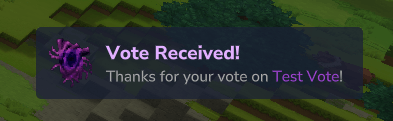
Show on-screen vote notifications for instant feedback and visibility
Play custom sounds when a player votes
Daily vote reminders to encourage consistent voting and boost vote counts
Test votes using an in-game command to verify everything is set up correctly
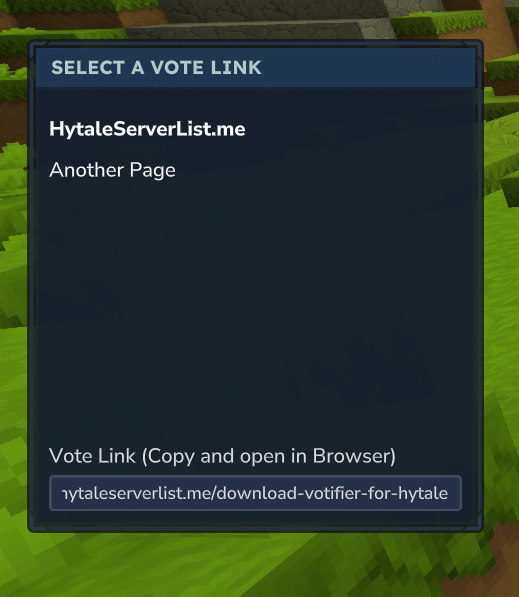
Custom vote GUI command that opens a fully configurable menu where players can easily copy vote links
Clickable Vote Links in Chat to easily redirect players to your voting websites of choice.
Vote Forwarding for Server Networks to share votes across servers.
Join our Discord for quick support and bug reports! Having trouble with your configs? Use this tool to check for formatting erros: https://jsonlint.com/
✨ Color Formatting
MiniMessage style color support was added in Version 1.3. You can now configure messages with custom colors
HyVotifier uses TaleMessage for color formatting. Available tags:
<black>, <dark_blue>, <dark_green>, <dark_aqua>, <dark_red>, <dark_purple>, <gold>, <gray>, <dark_gray>, <blue>, <green>, <aqua>, <red>, <light_purple>, <yellow>, <white>
Example:
<gray>Thanks for your vote on <gold>%from%</gold>. <green>Enjoy your rewards!</green>
You can even do rainbow colors! Example:
<gradient:red:yellow:green:blue:purple>Rainbow Gradient!</gradient>
✨ General Setup
Example config.json:
{ "BindHost": "0.0.0.0", "BindPort": 8193, "DisableV1Protocol": false, "DebugMode": false, "Tokens": { "HytaleServerList.me": "ugp71IWvPERCSxnh" } }
BindHost: The Ip that votifier listes on, leave it at 0.0.0.0 if you want to use your servers public ip BindPort: The port that is used to listed for votes, 8192 is the default port DisableV1Protocol: Makes it so HyVotifier does no loger listen for v1 votes. Tokens: V2 Protocol Tokens. You don’t need to specify tokens unless you’re using a website that is using the V2 Vote Protocol. Scroll down to the "🔐 Security & How It Works" section to learn when tokens are required and when they aren’t.
✨ Rewards
You can setup rewards in form of commands that execute in the console. Commands can be configured so they execute for every vote and you can configure rng commands that run based on a chance.
Example rewards.json:
{ "RewardCommands": [ "give %player% Food_Wildmeat_Cooked --quantity=10", "give %player% Potion_Health_Small --quantity=3" ], "RewardMessages": [ "<gray>Thanks for your vote on <gold>%from%</gold>. <green>Enjoy your rewards!</green>" ], "BroadcastWhenOffline": false, "RewardBroadcasts": [ "<gray>Player <gradient:red:yellow:green:blue:purple>%player%</gradient> has voted for our server!</gray>" ], "RngRewardsEnabled": true, "RngRewardsNothingChance": 0.0, "RngRewards": [ { "Percentage": 10.0, "Commands": [ "give %player% Food_Popcorn --quantity=25" ], "BroadcastMessages": [ "<gray>Player <gold>%player%</gold> received a special reward for voting! <dark_gray>(%chance%% Chance)" ], "Messages": [ "<green>You received <gold>Popcorn</gold> as a special voting reward!" ] }, { "Percentage": 10.0, "Commands": [ "give %player% Food_Wildmeat_Cooked --quantity=25" ], "BroadcastMessages": [ "<gray>Player <gold>%player%</gold> received a special reward for voting! <dark_gray>(%chance%% Chance)" ], "Messages": [ "<green>You received <gold>Cooked Wild Meat</gold> as a special voting reward!" ] }, { "Percentage": 5.0, "Commands": [ "give %player% Ore_Adamantite --quantity=12" ], "BroadcastMessages": [ "<gray>Player <gold>%player%</gold> received a <green>rare reward</green> for voting! <dark_gray>(%chance%% Chance)" ], "Messages": [ "<green>You received <gold>Adamantite Ore</gold> as a <green>rare</green> voting reward!" ] } ] }
RewardCommands: A list of commands that get executed in the console when a player votes. Leave empty to disable. Supported placeholders: `%player%` RewardMessages: A list of messages sent directly to the player who voted. Leave empty to disable. Supported placeholders: `%player%`, `%from%`
RewardBroadcasts: A list of messages broadcast to all online players when someone votes. Leave empty to disable. Supported placeholders: `%player%`, `%from%` BroadcastWhenOffline: When set to `true`, reward broadcasts are sent to all players even if the voting player is offline. When `false`, broadcasts only occur when the voting player is online.
RngRewardsEnabled: Master toggle for RNG (random) rewards system. Set to `true` to enable random reward selection when players vote. RngRewardsNothingChance: The chance (0-100) that a player receives no RNG reward when voting. Set to `0` to disable. For example, `25.0` means a 25% chance of getting nothing. RngRewards: A list of special rewards that can be randomly selected when a player votes. Each reward has its own percentage chance, commands, and messages. Percentages work proportionally and don't need to add up to 100%.
Percentage: The relative weight/chance of this reward being selected. Percentages work proportionally - if Reward A has 10% and Reward B has 20%, Reward B will be selected twice as often as Reward A.
Commands: A list of commands executed when this specific RNG reward is selected. Leave empty to disable. Supported placeholders: `%player%` Messages: A list of messages sent directly to the player who received this RNG reward. Leave empty to disable. Supported placeholders: `%player%`, `%from%`, `%chance%` BroadcastMessages: A list of messages broadcast to all online players when this specific RNG reward is selected. Leave empty to disable. Supported placeholders: `%player%`, `%from%`, `%chance%`
✨ Notifications
Example notification.json:
{ "Enabled": true, "TitleMessage": "<#e2b0ff>Vote Received!</#e2b0ff>", "TitleColor": "#e2b0ff", "DescriptionMessage": "<gray>Thanks for your vote on <#9f44d3>%from%</#9f44d3>!</gray>", "DescriptionColor": "#9f44d3", "IconItem": "Ingredient_Voidheart" }
Enabled: Lets you toggle this feature on or off. TitleMessage: The Primary Message for the notification that shows on top. TitleColor: A Hex Color for the title. (No Longer needed, see Color Support section) DescriptionMessage: The Secondary Message for the notification that shows at the bottom. DescriptionColor: The color for the description. (No Longer needed, see Color Support section) IconItem: The item name that is rendered on the left of the Notification. Can be any Hytale Item that is available on your server!
✨ Vote Reminders
Example voteReminder.json:
{ "Enabled": true, "SendOnJoin": true, "ExpireAfterHours": 24, "DelayInMinutes": 1, "Message": "<red><b>Heads Up!</b></red> <gray>You have not voted today! Do so with <green>'/vote'</green> to receive free rewards!</gray>", "Title": { "Enabled": true, "Title": "Reminder Title!", "SubTitle": "Don't forgot to /vote for free rewards!", "DurationSeconds": 3, "FadeInSeconds": 0.5, "FadeOutSeconds": 0.5 }, "Notification": { "Enabled": true, "TitleMessage": "<#e2b0ff>Reminder Notification!</#e2b0ff>", "DescriptionMessage": "<gray>Don't forgot to <#9f44d3>/vote</#9f44d3> for free rewards!</gray>", "IconItem": "Tool_Growth_Potion" }, "Sound": { "Enabled": true, "Sound": "SFX_Player_Pickup_Item", "SoundCategory": "UI" } }
Enabled: Lets you toggle this feature on or off. SendOnJoin: Sends the reminder immediately after a player has spawned into the server if they havent voted yet. ExpireAfterHours: How long a vote should stay valid for. If this time expires the player will start receiving reminders again. DelayInMinutes: How often the reminder message should be sent. Message: The message for the reminder. (Leave empty to disable)
Title (at the top center of the screen)
Notification (at the bottom right)
✨ Sounds
Example sound.json:
{ "Enabled": true, "SoundName": "SFX_Portal_Neutral_Open", "SoundCategory": "UI" }
Enabled: Lets you toggle this feature on or off. SoundName: The sound you want to play for the user after they vote. SoundCategory: The category for the Sound. Not sure how this is used exactly so i added it as a configurable option. Leave on UI to use all the default Hytale sounds.
✨ Clickable Vote Links & Custom Gui
Example voteCommand.json:
{ "Enabled": true, "OpenCustomGui": true, "SendChatMessage": true, "ChatMessageHeader": [ "<gray>----------------- <gold><b>Our Vote Links</b></gold> -----------------</gray>", "<white>Click on a vote link to open it in your browser." ], "ChatMessageFooter": [ "<gray>----------------- <gold><b>Our Vote Links</b></gold> -----------------</gray>" ], "ChatMessageTemplate": "<gold>[<yellow>#%id%</yellow>]</gold> <yellow><click:%link%>%name% <b>(Click)</b></click></yellow>", "VoteLinks": { "HytaleServerList.me": "https://hytaleserverlist.me/download-votifier-for-hytale" } }
Enabled: Lets you toggle this feature on or off. VoteLinks: The Links that your users can visit to vote for your server. You can use the %player% placeholder for vote links to insert the users name into the link. OpenCustomGui: Opens the custom gui when enabled. SendChatMessage: Sends a chat message with clickable links when enabled.
ChatMessageHeader & ChatMessageFooter & ChatMessageTemplate:
When clicked it opens a confirmation popup and redirects players directly to the website!
✨ Vote Forwarding
Vote forwarding lets one vote count on multiple Hytale servers. This is great for networks, so all your servers can receive the same vote rewards.
Example voteForwarding.json:
{ "Enabled": true, "ForwardingSecret": "RGqLbdYrgUte", "SendToTargets": false, "ForwardingTargets": [ { "Name": "Example Target", "ForwardingSecret": "ForwardingSecret", "Address": "localhost", "Port": 8195 } ] }
Enabled: When enabled it will listen for forwarded votes. ForwardingSecret: This is the secret for that specific instance of the HyVotifier plugin. SendToTargets: When enabled this instance will try to forward incoming votes to all configured ForwardingTargets. ForwardingTargets: This is a array of hyvotifier instances. You need to enter a forwarding secret, ip and port for every target.
Setup instructions
If you’re using HyVotifier on more than one server, each server needs its own port number.
1) Give every server a different port
Main server: Pick a port and make it public (open).
Other servers: Pick different ports for each one, but these can stay private/closed.
Your main server must be able to reach the other servers’ ports (even if the ports are not public).
2) Only connect the vote website to your main server
When you add your server to a voting website:
Only enter:
the IP of your main server
the port of your main server
🚫 Don’t add the other servers to the website unless you know what you are doing.
3) Keys / Tokens (Votifier v1 vs v2)
Depending on the Votifier version:
Votifier v1
Only use the public.key from your main server
Votifier v2
Only put the website tokens in the main server’s config.yml
Only the main server needs to be set up on the vote website — it will forward the vote to the others automatically.
✨ Commands
/testvote <player> Permission: votifier.test Description: Runs a simulated vote for the specified player. Good to test your configuration!
/vote Permission: hsl.votifier.command.vote (No Permission since Version 1.4) Description: Opens a vote gui for the player which lets you copy vote links easily!
✨ For Developers
Everything below is meant for developers to integrate voting into their own mods or a voting website like HytaleServerList.me.
🎗️ Custom Event
HyVotifier triggers the PlayerVoteEvent when a vote is registered which you can listen for in your own mods.
me.hytaleserverlist.mods.hytalevotifier.event.PlayerVoteEvent
Add our plugin as a dependency for your project and subscribe to the event like this:
getEventRegistry().registerGlobal(PlayerVoteEvent.class, (playerVoteEvent) -> { // Do some stuff here });
playerVoteEvent.getWorld() - To get the world of the player playerVoteEvent.getPlayerRef() - To get the PlayerRef Object playerVoteEvent.getVote() - To get the Vote Object
me.hytaleserverlist.mods.hytalevotifier.event.AsyncVoteReceivedEvent This event is called on the votifier thread and runs async. It gets fired for any vote that is received (also forwarded votes) and does not include player reference or a world.
asyncVoteReceivedEvent.getVote() - To get the Vote Object
📩 Sending Votes
This mod lets you send votes to Hytale servers using both Votifier V1 and Votifier V2 protocols. It supports all the same known features as the popular NuVotifier plugin.
NodeJS Vote Sending Packages
V1 Prorocol: https://www.npmjs.com/package/votifier-send
V2 Protocol: https://www.npmjs.com/package/votifier2
🔐 Security & How It Works
Both vote protocols are secure and safe to use, but they work slightly differently and depending on the websites implemetation you need to choose what works. Some websites support V1 Votes others V2 Votes and some let you choose a protocol version of your liking.
V1 Protocol (RSA Encryption)
The V1 Protocol uses a RSA Keypair to encrypt votes. You need to provide the contents of the "rsa/public.key" file to the website. You DONT need to configure a token in this case.
Server owners provide their RSA public key to the voting website (found in "mods/HSL_Votifier/rsa/public.key")
V2 Protocol (Token/HMAC)
For websites using the V2 protocol, you need to configure a token. The website will provide you with a serviceName and token (some sites let you choose your own token). You can then add them to your config.yml like this:
"Tokens": { "<ServiceName provided by the website>": "<Token/Secret provided by the website>" }
Firewall configuration
If you’re still not receiving votes from voting websites, it’s most likely because your Votifier port is not allowed to receive TCP traffic — meaning the port is closed.
To verify this, you can use a port check website like: https://ping.eu/port-chk/ Just enter your Votifier IP and Votifier port, then click Go. If you see a message like “… port is closed”, voting websites will not be able to connect to your Votifier plugin.
In that case, you’ll need to open the Votifier port and allow TCP traffic.
If you’re on a VPS or dedicated server with terminal/OS access, you can use either:
sudo ufw allow <VOTIFIER_PORT>/tcp
or:
sudo iptables -A INPUT -p tcp --dport <VOTIFIER_PORT> -j ACCEPT
If you’re using a game server host, you’ll need to check the firewall settings in the hosting panel, or contact their support to request an additional open port for Votifier communication.
✨ Credits
For a detailed documentation visit: https://hytaleserverlist.me/download-votifier-for-hytale
View NuVotifier for Minecraft: https://github.com/NuVotifier/NuVotifier
TaleMessage: https://github.com/InsiderAnh/TaleMessage
A public repository for public contributions will be set up in the following days. Enjoy! ❤️
Categories
Screenshots




Need a Server?
Run HyVotifier - Votifier Plugin & Mod (NuVotifier / Voting / Vote / Votifier) on a dedicated Hytale server with easy mod management.
Get Hytale HostingFrequently Asked Questions
What is HyVotifier - Votifier Plugin & Mod (NuVotifier / Voting / Vote / Votifier)?
✨ A Votifier for Hytale Servers (V1 & V2 Vote Protocol Support). Custom UI! Send Notifications, Sounds, Broadcasts, Commands and much more! Easiest way to reward users for voting! With vote forwarding support!
How do I download HyVotifier - Votifier Plugin & Mod (NuVotifier / Voting / Vote / Votifier)?
You can download HyVotifier - Votifier Plugin & Mod (NuVotifier / Voting / Vote / Votifier) for free from CurseForge. Click the "Download on CurseForge" button on this page to go directly to the download page.
Who created HyVotifier - Votifier Plugin & Mod (NuVotifier / Voting / Vote / Votifier)?
HyVotifier - Votifier Plugin & Mod (NuVotifier / Voting / Vote / Votifier) was created by ogfabio. The mod has been downloaded 1.7K times.
Is HyVotifier - Votifier Plugin & Mod (NuVotifier / Voting / Vote / Votifier) compatible with Hytale servers?
HyVotifier - Votifier Plugin & Mod (NuVotifier / Voting / Vote / Votifier) is designed for Hytale and can be used on both single-player and multiplayer servers. Check the mod page on CurseForge for specific compatibility information.
How do I install HyVotifier - Votifier Plugin & Mod (NuVotifier / Voting / Vote / Votifier)?
To install HyVotifier - Votifier Plugin & Mod (NuVotifier / Voting / Vote / Votifier): 1) Download the mod from CurseForge, 2) Place the file in your Hytale mods folder, 3) Restart the game. The mod should load automatically.
Related Misc Mods
View all mods
Ymmersive Melodies
Conczin
Upload and play MIDI files in-game on various instruments to annoy your friends with custom melodies!

MultipleHUD
Buuz135
A simple mod that allows you to have multiple HUDs present at once.

Spanish Translation
Plexu5
A Spanish language translation for Hytale. Includes UI, items, and menus.

YUNG's HyDungeons
YUNGNICKYOUNG
Adds new procedurally generated dungeon instances!

Just Enough Tales (JEI mod)
uwudwagon
A JEI mod for Hytale.
![[NoCube's] Simple Bags](https://media.forgecdn.net/avatars/thumbnails/1601/201/256/256/639034453685921721.png)
[NoCube's] Simple Bags
NoCube
Adds bags that you can put anything in!