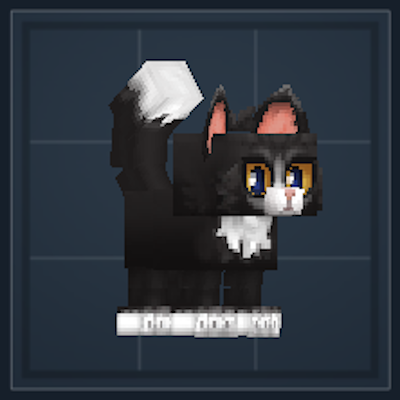
Kami's Pets
Adds a collection of Pets with custom interactions! Pick them up in egg form, make them follow, or wait in place for you!
About Kami's Pets
Kami's Pets
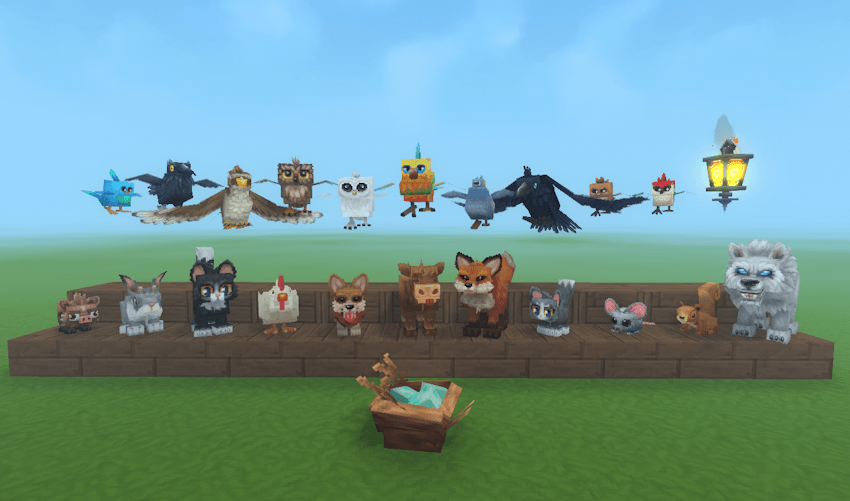
This mod adds 22 custom pets that can follow you, wait in place for you, or be picked up in egg form! Each of the Pet Spawn Eggs can be crafted at a custom Pet Egg Workbench, which can be crafted in the normal Workbench. 11 of the current pets follow you on the ground, whereas the other 11 will float/fly towards you. Waiting grounded pets will fall asleep if there is no player nearby.
Press F on your pet to make them follow you or wait for you. Press F while crouching to pick up the pet in egg form. allowing you to carry them with you in your inventory.
Grounded Pets
Boar
Bunny
Cat
Chicken
Corgi
Cow Calf
Fox
Kitten
Mouse
Squirrel
White Wolf
Floating Pets
Bluebird
Crow
Hawk
Brown Owl
Snow Owl
Parrot
Pigeon
Raven
Sparrow
Woodpecker
Wraith Lantern (Has a closer follow distance and lights up blocks around it)
Planned Pets
Here's every mob that I'd like to add as a pet. I will slowly add them all as pet's over the next few updates, and categorize them better in the Pet Egg Bench. If you have any more recommendations that aren't listed, please let me know!
Chick
Duck
Frogs
Gecko
Goat Kid
Hatworm
Horse Foal
Silk Larva
Void Larva
Meerkat
Mouflon Lamb
Penguin
Pig/Piglet/Both (Plus wild variants)
Rabbit
Ram Lamb
Rat
Sheep Lamb
Skrill
Skrill Chick
Cobra Snake
Marsh Snake
Rattle Snake
Living Spark
Turkey Chick
Warthog Piglet
Black Wolf
Installation
Download the zip file and move it into the mods folder here: AppData\Roaming\Hytale\UserData\mods. Then enable the mod by right clicking on your world in game, and check the box next to Pets.
[Known Bugs]
Using a Pet Spawn Egg on a slab will spawn the pet below the slab.
Using a Pet Spawn Egg on the side of a block will spawn the pet on top of that block, even if there is another block there.
Pets will not teleport through portals with you. Pick them up before if you wish to take them with you.
Sometimes when floating pets teleport to you, they teleport underneath blocks.
The pathfinding sometimes gets confused. If a pet cannot find a path to you, the pet will stop following until you move out of range, it will then teleport to you.
[Change Log]
V1.0.2
Pets now use separation built in to the engine. This should stop them jittering around as much when there are more than 3 pet's following you.
Pets now use the built in pathfinding instead of running in a straight line to you.
Issues
Since adding the built in separation, waiting pets can be moved or try to move out of the way of following pets. I'm waiting for documentation to see if I can possibly change this.
V1.0.1
Pets should no longer get stuck in the ground after teleporting to the Player.
Slightly decreased pet teleport radius.
Categories
Screenshots
Need a Server?
Run Kami's Pets on a dedicated Hytale server with easy mod management.
Get Hytale HostingFrequently Asked Questions
What is Kami's Pets?
Adds a collection of Pets with custom interactions! Pick them up in egg form, make them follow, or wait in place for you!
How do I download Kami's Pets?
You can download Kami's Pets for free from CurseForge. Click the "Download on CurseForge" button on this page to go directly to the download page.
Who created Kami's Pets?
Kami's Pets was created by CouldBeKami. The mod has been downloaded 1.6K times.
Is Kami's Pets compatible with Hytale servers?
Kami's Pets is designed for Hytale and can be used on both single-player and multiplayer servers. Check the mod page on CurseForge for specific compatibility information.
How do I install Kami's Pets?
To install Kami's Pets: 1) Download the mod from CurseForge, 2) Place the file in your Hytale mods folder, 3) Restart the game. The mod should load automatically.
Related Misc Mods
View all mods
Ymmersive Melodies
Conczin
Upload and play MIDI files in-game on various instruments to annoy your friends with custom melodies!

MultipleHUD
Buuz135
A simple mod that allows you to have multiple HUDs present at once.

Spanish Translation
Plexu5
A Spanish language translation for Hytale. Includes UI, items, and menus.

YUNG's HyDungeons
YUNGNICKYOUNG
Adds new procedurally generated dungeon instances!

Just Enough Tales (JEI mod)
uwudwagon
A JEI mod for Hytale.
![[NoCube's] Simple Bags](https://media.forgecdn.net/avatars/thumbnails/1601/201/256/256/639034453685921721.png)
[NoCube's] Simple Bags
NoCube
Adds bags that you can put anything in!