Kyv Claims
A complete land protection plugin for Hytale servers. Players can claim and protect areas using coordinates, with a GUI, per-region permissions, grief protection with a 5-block buffer, multilingual support (EN/PT), and a public API for plugin integration.
About Kyv Claims
KyvClaims - Land Protection System
A complete land protection plugin for Hytale servers that allows players to claim and protect their territories with a graphical interface and granular permissions per area. Each claim has independent control over building, block removal, and bucket usage.
Features
Core Protection
Claim System: Define rectangular areas using coordinates (GUI or commands)
Dual Interface: Use graphical interface or traditional commands
Trusted Players: Add friends to build collaboratively in your claims
Buffer Zone: Automatic protection around claims to prevent griefing
Triple Bucket Protection: Advanced system to prevent water/lava griefing
Permissions & Control
Granular Permissions: 14 individual permissions with wildcard support
Per-Claim Control: Each area has independent access settings
Admin Tools: Full administrative control over all claims
Visual Feedback
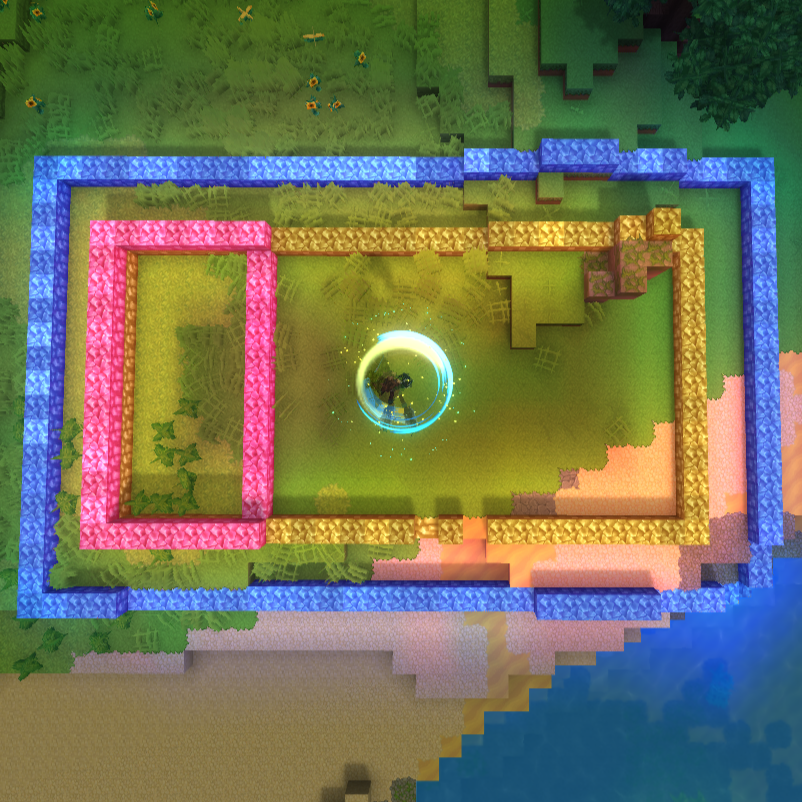
Client-Side Visualization: Border display only for the client Yellow: Valid area for new claims
Blue: Viewing existing claimed area
Pink: Conflict with existing claims
Additional Features
Claim-Wide Crafting: Crafting benches can access all chests in your claim (requires permission)
Multilingual: English and Portuguese (Brazil) support
Persistent Storage: Claims saved automatically in JSON format
Public API: Integration with shops, VIP systems, and economy plugins
How It Works
Two Ways to Use
1. Graphical Interface
Open with /claim command
Click POS1 and POS2 buttons to select area corners
Visual feedback with colored borders shows selection status
Use /claim again to open confirmation screen
Click Create Claim to finalize
2. Traditional Commands
Use /claim pos1 and /claim pos2 to select area
Execute /claim create to claim
Manage with commands like /claim trust, /claim list, etc.
Visual Feedback System
The plugin displays colored borders to help you understand claim status:
Yellow Borders: Valid area - you can claim this space
Blue Borders: Existing claim - viewing your claimed area
Pink Borders: Conflict - area overlaps with another claim
Protection Flow
Select Area: Use GUI buttons or commands (/claim pos1, /claim pos2)
Visual Feedback: See colored borders indicating status
Create Claim: Confirm in GUI or use /claim create
Manage: Add trusted players, rename, or delete claims
Protection Active: Only owner and trusted players can build/break/use buckets
Buffer Zone
A 5-block buffer around each claim prevents building too close to others' territories. Only the claim owner and trusted players can build within their own buffer zone.
Claim-Wide Crafting
When enabled, players with permission can use crafting benches that pull materials from all chests in their claim instead of just nearby ones. Perfect for large bases with organized storage systems. Requires kyvclaims.use.claimwidecrafting permission.
Commands
User Commands
/claim - Open claims interface
/claim pos1 - Define first corner position
/claim pos2 - Define second corner position
/claim create - Create claim with selected area
/claim cancel - Cancel current selection
/claim list - List your claims
/claim info - View claim information at your location
/claim trust <player> - Add trusted player to current claim
/claim untrust <player> - Remove trusted player from current claim
/claim abandon <name> - Delete a claim by name
Admin Commands
/claim admin list - List all server claims
/claim admin remove <name> - Remove any claim
/claim admin remove <player> <name> - Remove specific player's claim
/claim admin setlimit <player> <blocks> - Set player's block limit
/claim admin addblocks <player> <blocks> - Add blocks to player's limit
/claim admin info <player> - View player's claim information
/claim admin reload - Reload plugin configuration
/claim admin bypass - Toggle bypass mode (ignore all protections)
Configuration
The plugin creates two files in mods/kyvclaims/:
config.json
Configure default settings:
defaultBlockLimit: Default number of blocks each player can claim
claimBufferDistance: Minimum distance in blocks between claim
enableClaimWideCrafting: Enable claim-wide crafting feature
language: Interface language - en_US (English) or pt_BR (Portuguese)
Example configuration:
{ "defaultBlockLimit": 10000, "claimBufferDistance": 5, "enableClaimWideCrafting": true, "language": "en_US" } Buffer Distance Explained: The buffer distance prevents claims from being created too close to each other. For example, with claimBufferDistance: 5, players cannot create claims within 5 blocks of existing claims (unless they own the existing claim). This helps prevent griefing and maintains spacing between player territories.
claims.json
All claims are automatically saved here in JSON format. This file is managed by the plugin and shouldn't be edited manually.
Permissions
Managing Permissions
You can manage permissions in two ways:
Using a permissions plugin (recommended for complex setups)
Directly in server's permissions.json (simple setup)
Add permissions to groups in your server's permissions.json file located in the server root directory.
Example permissions.json:
{ "users": { "player-uuid-here": { "groups": ["Default"] } }, "groups": { "Default": [ "kyvclaims.use.create", "kyvclaims.use.remove", "kyvclaims.use.trust", "kyvclaims.use.untrust", "kyvclaims.use.info", "kyvclaims.use.list", "kyvclaims.use.rename", "kyvclaims.use.claimwidecrafting" ], "OP": ["*"] } } Wildcards
kyvclaims.* - All permissions
kyvclaims.use.* - All user permissions
kyvclaims.admin.* - All admin permissions
User Permissions
kyvclaims.use.create - Create claims
kyvclaims.use.remove - Remove own claims
kyvclaims.use.trust - Add trusted players
kyvclaims.use.untrust - Remove trusted players
kyvclaims.use.info - View claim information
kyvclaims.use.list - List own claims
kyvclaims.use.rename - Rename claims
kyvclaims.use.claimwidecrafting - Use claim-wide crafting (default: DENIED)
Admin Permissions
kyvclaims.admin - Unlimited claim blocks
kyvclaims.admin.create - Create claims for others
kyvclaims.admin.remove - Remove any claim
kyvclaims.admin.bypass - Ignore all protections
kyvclaims.admin.setlimit - Set player block limits
kyvclaims.admin.reload - Reload configuration
Note: Players with OP status or kyvclaims.admin permission have unlimited claim blocks and full access automatically.
Installation
Download the latest version
Place kyv-claims-x.x.x.jar in your server's mods folder
Restart the server
Configure permissions in your server's permissions.json
Edit mods/kyvclaims/config.json if needed
Multilingual Support
The plugin automatically loads messages based on your configuration:
English: Set "language": "en_US" in config.json
Portuguese: Set "language": "pt_BR" in config.json
All UI elements, commands, and messages are fully translated.
Developer API
KyvClaims provides a public API for integration with shops, VIP systems, and economy plugins. See API section below for details.
Support
For issues, suggestions, or contributions:
Report bugs on the issue tracker
- Join our Discord community
Developed by ItaloSixx — KYV Verdant Realm |
API Documentation
KyvClaims provides a public API for integration with shops, VIP systems, and economy plugins.
Setup
Add "kyvclaims" to your plugin's Dependencies in manifest.json, then import com.claims.ClaimAPI in your code.
Main Methods
Block Management:
addClaimBlocks(UUID, int) - Add blocks to player's limit
removeClaimBlocks(UUID, int) - Remove blocks from player's limit
setClaimBlocks(UUID, int) - Set total block limit
resetToDefault(UUID) - Reset to default limit
Query Methods:
getAvailableBlocks(UUID) - Get available blocks (total - used)
getUsedBlocks(UUID) - Get blocks used in claims
getTotalBlocks(UUID) - Get total block limit
canClaim(UUID, int) - Check if player can claim area
Claim Information:
getPlayerClaims(UUID) - Get list of player's claims
canBuild(UUID, Location) - Check if player can build at location
Common Use Cases
Shop Plugins: Sell claim blocks using addClaimBlocks()
VIP Systems: Grant extra blocks with setClaimBlocks()
Economy Integration: Check available blocks before purchases
Rank Systems: Different block limits per rank
Event Rewards: Give claim blocks as rewards
Note: Players with OP status or kyvclaims.admin permission have unlimited blocks automatically.
Query Methods
getAvailableBlocks(UUID playerUUID)
Returns how many blocks player can still use.
Returns: int - Available blocks (total - used)
getUsedBlocks(UUID playerUUID)
Returns how many blocks player has used in claims.
Returns: int - Used blocks
getTotalBlocks(UUID playerUUID)
Returns player's total block limit.
Returns: int - Total limit
canClaim(UUID playerUUID, int blockCount)
Checks if player has enough blocks to claim an area.
Returns: boolean - true if can claim
Claim Information
getPlayerClaims(UUID playerUUID)
Returns list of all claims owned by player.
Returns: List<Claim> - Player's claims
canBuild(UUID playerUUID, Location location)
Checks if player can build at specific location.
Returns: boolean - true if allowed, false if protected
Usage Example
Shop Plugin - Sell claim blocks:
Call: ClaimAPI.addClaimBlocks(playerUUID, 1000)
Returns: true if successful
VIP System - Set custom limit:
Call: ClaimAPI.setClaimBlocks(playerUUID, 50000)
Display player info:
Call: ClaimAPI.getAvailableBlocks(playerUUID)
Returns: Number of blocks player can still use
Check before claiming:
Call: ClaimAPI.canClaim(playerUUID, blockCount)
Returns: true if player has enough blocks
Important Notes
OPs/Admins: Players with OP status or kyvclaims.admin permission have unlimited blocks automatically
Persistence: All limits are saved automatically in mods/kyvclaims/claims.json
Thread Safety: All API methods are thread-safe
Default Limit: Configured in config.json with defaultBlockLimit
Common Use Cases
Shop Plugins: Sell claim blocks using addClaimBlocks()
VIP Systems: Grant extra blocks with setClaimBlocks()
Economy Integration: Check available blocks before purchases
Rank Systems: Different block limits per rank
Rewards: Give claim blocks as event rewards
Categories
Need a Server?
Run Kyv Claims on a dedicated Hytale server with easy mod management.
Get Hytale HostingFrequently Asked Questions
What is Kyv Claims?
A complete land protection plugin for Hytale servers. Players can claim and protect areas using coordinates, with a GUI, per-region permissions, grief protection with a 5-block buffer, multilingual support (EN/PT), and a public API for plugin integration.
How do I download Kyv Claims?
You can download Kyv Claims for free from CurseForge. Click the "Download on CurseForge" button on this page to go directly to the download page.
Who created Kyv Claims?
Kyv Claims was created by italosixx. The mod has been downloaded 188 times.
Is Kyv Claims compatible with Hytale servers?
Kyv Claims is designed for Hytale and can be used on both single-player and multiplayer servers. Check the mod page on CurseForge for specific compatibility information.
How do I install Kyv Claims?
To install Kyv Claims: 1) Download the mod from CurseForge, 2) Place the file in your Hytale mods folder, 3) Restart the game. The mod should load automatically.
Related Qol Mods
View all mods
EyeSpy
DarkhaxDev
Adds a HUD that displays information about what you're looking at!

Advanced Item Info
Buuz135
Adds a searchable GUI that displays all the items and the game and displays extra properties they have

Overstacked
DarkhaxDev
Increases the maximum stack size of items.

Violet's Wardrobe
VioletsWorkshop
Adds more customisation options in the form of craftable cosmetics

Item Magnet
Jaredlll08
Adds a magnet that attracts items towards the player.

Endgame & QoL - Boss & Elite Update (3.0.0 in a week)
Lewaii
Endgame & QoL v2.2: Face the Alpha T-Rex & Void Spectres! Unlock Backpack IV & Void Gliders. Restore unused content and challenge stronger, rebalanced bosses!