
MAC (ModList And Config)
Mod list and config UI for Hytale.
About MAC (ModList And Config)
MAC (Modlist And Config)
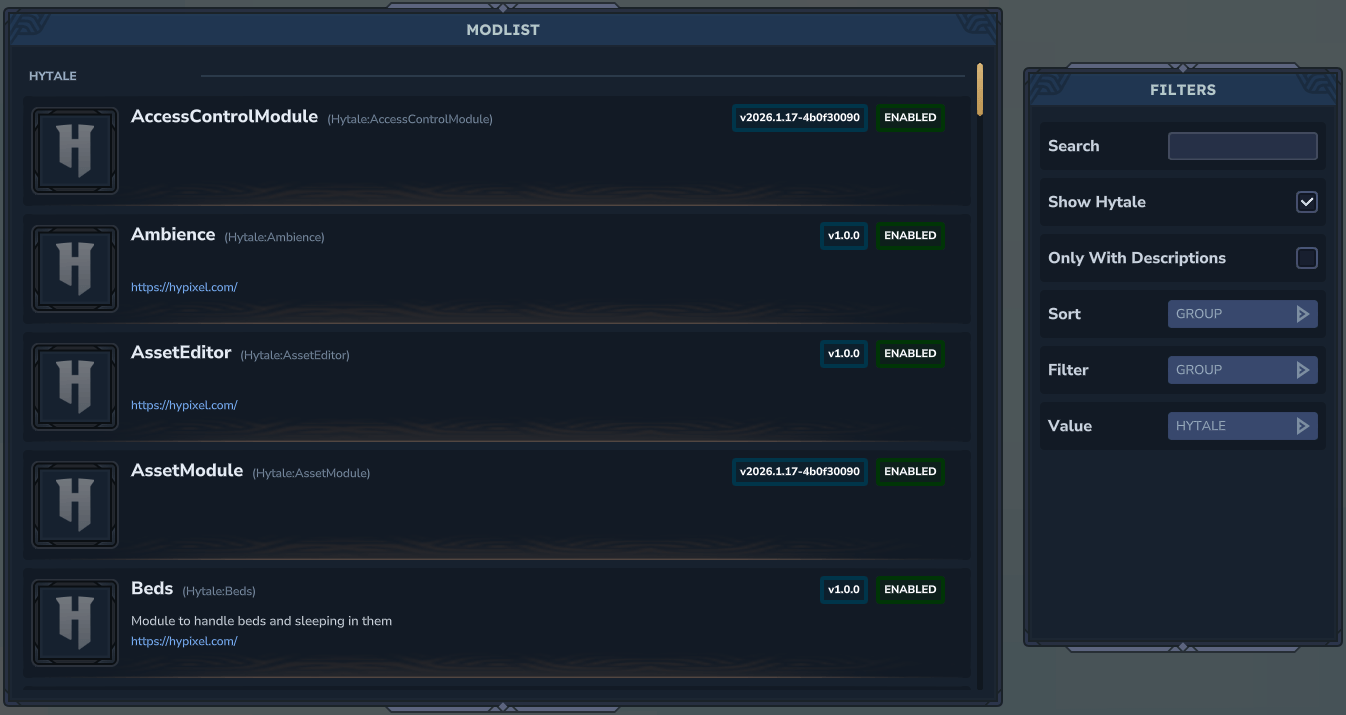
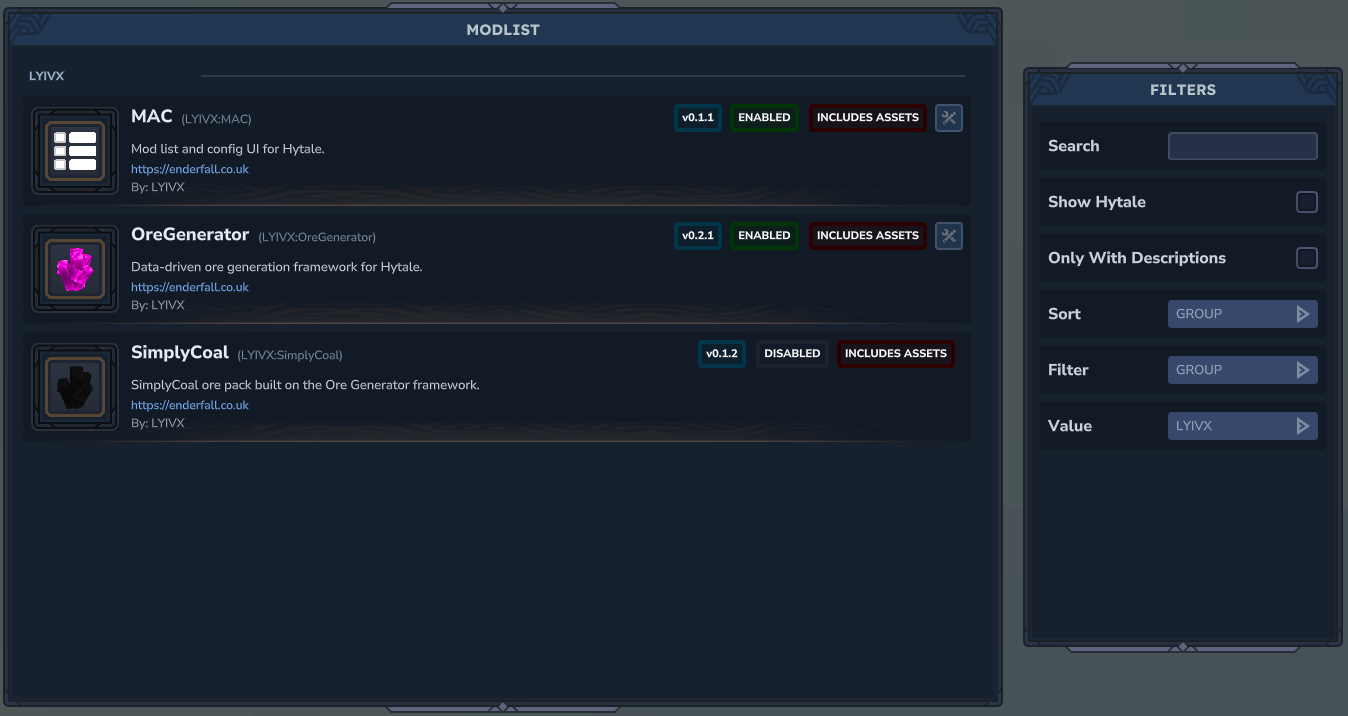
MAC adds an in-game mod list with rich metadata and a config editor that other plugins can hook into with a small registration call. It discovers mods, shows status/icons, and exposes your plugin settings as editable fields.
Features
Mod list with name, version, authors, description, website, enabled/disabled, asset pack badge
Grouped list sorting + filters + search
Config editor with live reloads (boolean, number, slider, enum, color, file, string, array, object)
Can see un registered configs (for editing)
Config section dividers (titles/subtitles)
Inline tooltip bubbles for config fields
Admin page for access control, view-only mode, and mod allowlist
Per-mod icons and fallback icons for Hytale/Hypixel and missing assets
Permission nodes: lyivx.mac
lyivx.mac.config
lyivx.mac.admin
How to use
Open the MAC UI: /mac
Open a mod config directly: /mac config LYIVX:MAC
/mac config LYIVX_OreGenerator
Open the admin UI: /mac admin
Aliases for /mac: /modlist, /mods
Installation
Drop the MAC mod into your mods folder. It includes an asset pack and will load automatically.
For developers: adding configs to your plugin
MAC reads a config schema registered in code and generates the on-disk config file automatically. Defaults come from the builder chain (no resource config files).
1) Register a config schema
Use PluginConfig.register(...) in your plugin setup:
PluginConfig<MySettings> config = PluginConfig.register( this.getLogger(), new PluginIdentifier(this.getManifest()), MySettings.class, MySettings::new, builder -> builder .add.booleanField("Enable Feature").defaultsTo(true) .add.slider("Max Count", 1, 100, 1).defaultsTo(50) .add.enumField("Mode", "safe", "fast", "wild").defaultsTo("safe") .add.color("Accent Color").defaultsTo("#1aa3a3") .add.file("Icon File", "Common/UI/Custom", "png").defaultsTo("") .add.stringField("Footer Note").defaultsTo("") ); The config file is written to: config/<GROUP>/<NAME>_Config.json
The schema order is preserved in the UI.
Config section dividers
You can add titled sections to group fields:
builder .add.section("Gameplay") .add.booleanField("Enable Feature").defaultsTo(true) .add.section("Display") .add.color("Accent Color").defaultsTo("#1aa3a3"); Config tooltips
Attach a tooltip to the last-added field:
builder .add.booleanField("Enable Feature") .tooltip("Turns the feature on/off.") .defaultsTo(true); Object and array fields
You can nest fields as objects and add arrays with add/remove controls:
import net.lyivx.mac.config.ConfigField;
builder .add.objectField("Mob Settings", mob -> mob .add.booleanField("Enabled").defaultsTo(true) .add.numberField("Spawn Rate").defaultsTo(1.5) ) .add.arrayField("Whitelist", ConfigField.stringField("Name")) .add.arrayField("Levels", ConfigField.numberField("Level")); Arrays are rendered as sub-entries with + to add and - to remove items. Objects render their fields as nested sub-entries under a header.
Settings defaults
Your settings class can be plain fields with no initializers. Defaults are defined with .defaultsTo(...) in the schema builder.
Icons
MAC looks for a per-mod icon at: UI/Custom/<GROUP>_<NAME>.png This matches Better Modlist icon paths for compatibility: https://www.curseforge.com/hytale/mods/better-modlist so devs only need one icon location.
Fallbacks:
Hytale/Hypixel group -> Icons/ItemCategories/Hypixel.png
Missing icon -> Icons/ItemCategories/Natural.png
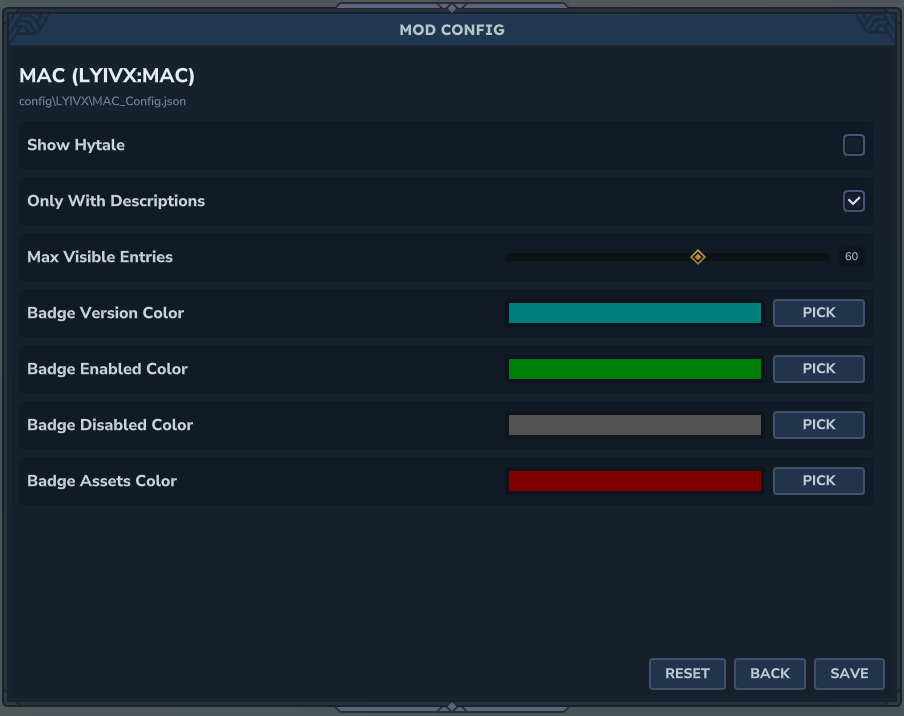
Modlist settings (MAC's own config)
The MAC config controls:
Show Hytale
Only With Descriptions
Only Show Configs
Max Visible Entries
Badge colors (version/enabled/disabled/assets)
This file is: config/LYIVX/MAC_Config.json
Admin settings (MAC admin config)
The admin config controls:
Enable whitelist mode (restrict /mac usage)
View-only access for non-whitelisted users
Mod allowlist for view-only users
This file is: config/LYIVX/MAC_Admin.json
Permissions
MAC command permission nodes:
lyivx.mac.command.mac
lyivx.mac.command.mac.config
lyivx.mac.command.mac.admin
Notes
The config UI only edits keys present in the registered schema.
Unknown keys are preserved in memory but removed from the on-disk file when detected.
Important
If you use MAC's config system, your mod depends on MAC being installed. That means other modlist/config browsers won't work for your mod unless MAC is present. Future updates aim to support configs that work without requiring MAC as a hard dependency. Full example
import com.hypixel.hytale.common.plugin.PluginIdentifier; import com.hypixel.hytale.logger.HytaleLogger; import net.lyivx.mac.config.ConfigBuilder; import net.lyivx.mac.config.ConfigField; import net.lyivx.mac.config.PluginConfig;
public final class ExampleConfig { public static class Settings { public String title; public boolean enableFeature; public int maxCount; public String mode; public String accentColor; public String iconFile; public String footerNote; public Nested settings; public java.util.List<String> items; public java.util.List<Item> objectArray; }
public static class Nested { public boolean flag; public int level; }
public static class Item { public String name; public int count; }
public static PluginConfig<Settings> register(HytaleLogger logger, PluginIdentifier identifier) { return PluginConfig.register( logger, identifier, Settings.class, Settings::new, builder -> builder .add.section("Basics") .add.stringField("Title") .tooltip("Example tooltip on a string.") .defaultsTo("Example") .add.booleanField("Enable Feature").defaultsTo(true) .add.numberField("Amount").defaultsTo(1.5) .add.section("Display") .add.slider("Max Count", 1, 100, 1).defaultsTo(50) .add.enumField("Mode", "safe", "fast", "wild").defaultsTo("safe") .add.section("Style") .add.color("Accent Color").defaultsTo("#1aa3a3") .add.file("Icon File", "Common/UI/Custom", "png").defaultsTo("") .add.stringField("Footer Note").defaultsTo("") .add.section("Nested") .add.objectField("Settings", nested -> nested .add.booleanField("Flag").defaultsTo(true) .add.numberField("Level").defaultsTo(3) ) .add.arrayField("Items", ConfigField.stringField("Item")) .add.section("Arrays") .add.arrayField("Object Array",ConfigField.objectField("Item", new ConfigBuilder() .add.stringField("Name").defaultsTo("Item") .add.numberField("Count").defaultsTo(1) .build() ) ) ); } }
Categories
Screenshots
Need a Server?
Run MAC (ModList And Config) on a dedicated Hytale server with easy mod management.
Get Hytale HostingFrequently Asked Questions
What is MAC (ModList And Config)?
Mod list and config UI for Hytale.
How do I download MAC (ModList And Config)?
You can download MAC (ModList And Config) for free from CurseForge. Click the "Download on CurseForge" button on this page to go directly to the download page.
Who created MAC (ModList And Config)?
MAC (ModList And Config) was created by LYIVX. The mod has been downloaded 4.9K times.
Is MAC (ModList And Config) compatible with Hytale servers?
MAC (ModList And Config) is designed for Hytale and can be used on both single-player and multiplayer servers. Check the mod page on CurseForge for specific compatibility information.
How do I install MAC (ModList And Config)?
To install MAC (ModList And Config): 1) Download the mod from CurseForge, 2) Place the file in your Hytale mods folder, 3) Restart the game. The mod should load automatically.
Related Qol Mods
View all mods
EyeSpy
DarkhaxDev
Adds a HUD that displays information about what you're looking at!

Advanced Item Info
Buuz135
Adds a searchable GUI that displays all the items and the game and displays extra properties they have

Overstacked
DarkhaxDev
Increases the maximum stack size of items.

Violet's Wardrobe
VioletsWorkshop
Adds more customisation options in the form of craftable cosmetics

Item Magnet
Jaredlll08
Adds a magnet that attracts items towards the player.

Endgame & QoL - Boss & Elite Update (3.0.0 in a week)
Lewaii
Endgame & QoL v2.2: Face the Alpha T-Rex & Void Spectres! Unlock Backpack IV & Void Gliders. Restore unused content and challenge stronger, rebalanced bosses!