The Ultimate Welcome Plugin
Custom Welcome Messages
About The Ultimate Welcome Plugin
Community Plugin
The ultimate community management plugin for your Hytale server!
Build your community with automated broadcasts, welcome messages, and clickable links - all fully customizable through a simple config file.
Join Hytaleus Server! https://hytaleus.com/
Features
Automated Broadcasts
Keep your players informed with rotating broadcast messages that appear at configurable intervals. Perfect for promoting your Discord, website, or vote links.
Welcome Messages
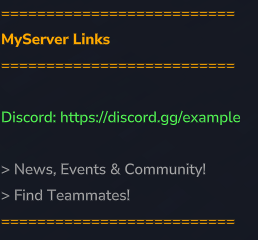
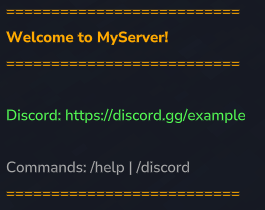
Greet new players with a customizable welcome message when they join your server. Make a great first impression!
Clickable Links
All links (Discord, Website, Vote) are clickable in chat - players can join your community with a single click.
Full Customization
Every single message, color, and formatting option can be configured through the config.json file. No coding required!
Smart Link Detection
Lines containing %WEBSITE% are automatically hidden if no website is configured
Lines containing %VOTE% are automatically hidden if no vote link is configured
Broadcasts can require specific links to be configured before showing
Live Reload
Reload your config without restarting the server! All settings are applied immediately, including broadcast intervals.
Commands
Command Permission Description
/discord Everyone Shows all server links (Discord, Website, Vote)
/vote Everyone Shows the vote link (only available if configured)
/community OP only Reloads the config without server restart
Permissions
The plugin uses the server's permissions.json file. Only players in a group with * (all permissions) can use /community.
Example permissions.json:
{ "users": { "your-uuid-here": { "groups": ["OP"] } }, "groups": { "Default": [], "OP": ["*"] } }
Installation
Download the community-plugin.jar
Place it in your server's mods/ folder
Start the server
The plugin will create mods/community-plugin/config.json
Edit the config to your liking
Restart the server
Configuration
The config file is located at mods/community-plugin/config.json
Basic Settings
{ "serverName": "MyServer", "discordLink": "https://discord.gg/example", "websiteLink": "https://myserver.com", "voteLink": "https://vote-site.com/myserver", "broadcastIntervalMinutes": 30, "enableWelcomeMessage": true, "enableBroadcasts": true }
Setting Description
serverName Your server name (used in messages via %SERVER%)
discordLink Your Discord invite link
websiteLink Your website URL (leave empty "" to disable)
voteLink Your vote page URL (leave empty "" to disable)
broadcastIntervalMinutes Time between broadcasts in minutes
enableWelcomeMessage Enable/disable welcome messages
enableBroadcasts Enable/disable automated broadcasts
Message Configuration
Each message line is an object with these properties:
{ "text": "Your message here", "color": "#FFAA00", "bold": true, "isLink": false }
Property Description
text The message text (supports placeholders)
color Hex color code (e.g. #FF0000 for red)
bold Make text bold (true/false)
isLink Make text clickable (true/false)
Placeholders
Use these placeholders in your messages:
Placeholder Replaced with
%SERVER% Your server name
%DISCORD% Your Discord link
%WEBSITE% Your website link
%VOTE% Your vote link
Broadcast Configuration
Broadcasts rotate through the configured messages. You can require specific links:
{ "lines": [ { "text": "Visit our website!", "color": "#FFAA00", "bold": true, "isLink": false }, { "text": "%WEBSITE%", "color": "#55FFFF", "bold": false, "isLink": true } ], "requiresWebsite": true, "requiresVote": false }
requiresWebsite: Only show this broadcast if a website is configured
requiresVote: Only show this broadcast if a vote link is configured
Example Config
{ "serverName": "MyAwesomeServer", "discordLink": "https://discord.gg/example", "websiteLink": "https://myserver.com", "voteLink": "", "broadcastIntervalMinutes": 15, "enableWelcomeMessage": true, "enableBroadcasts": true,
"welcomeMessages": [ { "text": "==========================", "color": "#FFAA00", "bold": false, "isLink": false }, { "text": "Welcome to %SERVER%!", "color": "#FFAA00", "bold": true, "isLink": false }, { "text": "==========================", "color": "#FFAA00", "bold": false, "isLink": false }, { "text": "", "color": "#FFFFFF", "bold": false, "isLink": false }, { "text": "Discord: %DISCORD%", "color": "#55FF55", "bold": false, "isLink": true }, { "text": "", "color": "#FFFFFF", "bold": false, "isLink": false }, { "text": "Have fun!", "color": "#AAAAAA", "bold": false, "isLink": false }, { "text": "==========================", "color": "#FFAA00", "bold": false, "isLink": false } ] }
Color Reference
Some common hex colors:
Color Hex Code
Gold #FFAA00
Green #55FF55
Cyan #55FFFF
Red #FF5555
Blue #5555FF
Purple #AA55FF
White #FFFFFF
Gray #AAAAAA
Support
Need help? Have suggestions?
Join our Discord for support
Report issues on our GitHub
Enjoy building your community!
Categories
Screenshots
Need a Server?
Run The Ultimate Welcome Plugin on a dedicated Hytale server with easy mod management.
Get Hytale HostingFrequently Asked Questions
What is The Ultimate Welcome Plugin?
Custom Welcome Messages
How do I download The Ultimate Welcome Plugin?
You can download The Ultimate Welcome Plugin for free from CurseForge. Click the "Download on CurseForge" button on this page to go directly to the download page.
Who created The Ultimate Welcome Plugin?
The Ultimate Welcome Plugin was created by gogodev. The mod has been downloaded 251 times.
Is The Ultimate Welcome Plugin compatible with Hytale servers?
The Ultimate Welcome Plugin is designed for Hytale and can be used on both single-player and multiplayer servers. Check the mod page on CurseForge for specific compatibility information.
How do I install The Ultimate Welcome Plugin?
To install The Ultimate Welcome Plugin: 1) Download the mod from CurseForge, 2) Place the file in your Hytale mods folder, 3) Restart the game. The mod should load automatically.
Related Qol Mods
View all mods
EyeSpy
DarkhaxDev
Adds a HUD that displays information about what you're looking at!

Advanced Item Info
Buuz135
Adds a searchable GUI that displays all the items and the game and displays extra properties they have

Overstacked
DarkhaxDev
Increases the maximum stack size of items.

Violet's Wardrobe
VioletsWorkshop
Adds more customisation options in the form of craftable cosmetics

Item Magnet
Jaredlll08
Adds a magnet that attracts items towards the player.

Endgame & QoL - Boss & Elite Update (3.0.0 in a week)
Lewaii
Endgame & QoL v2.2: Face the Alpha T-Rex & Void Spectres! Unlock Backpack IV & Void Gliders. Restore unused content and challenge stronger, rebalanced bosses!