MiningAlerts
Announces when players find ores in your server!
About MiningAlerts
Mining Alerts
MiningWatchdog watches players while they mine and announces it when someone finds a big amount of ores.
It doesn’t spam chat for every block. It waits until the player finishes mining, then checks if they found enough ore to be worth announcing.
How It Works
A player starts mining ore
As long as they keep mining, MiningWatchdog keeps counting
When the player stops mining for a couple of seconds, the plugin checks:
How much ore they mined
What type of ore it was
If they mined a lot, the server announces it
If they didn’t mine enough, nothing happens
That’s it. No spam, no commands, no setup required.
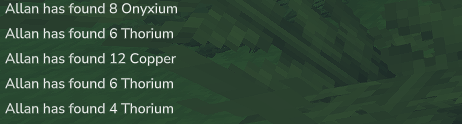
Example Message
Allan has found 9 Copper
You can fully change this message in the config.
Why Use MiningWatchdog?
Keeps chat clean
Highlights big ore finds
Helps staff notice suspicious mining
Works automatically in the background
Very lightweight
Great for survival, SMP, and semi-vanilla servers.
Configuration
The plugin creates a config file on first start:
plugins/MiningWatchdog/config.properties
This file controls what ores are tracked, how many blocks are required, and what message is shown.
Message Settings
msg.alert={player} has found {count} {ore}
This is the message players see.
You can use:
{player} → player name
{count} → how many blocks they mined
{ore} → ore name
You can rewrite this however you want or translate it.
Ore Settings (The Important Part)
Each ore has three lines:
How the plugin recognizes the ore
What name is shown in chat
How many blocks are required before announcing
Example:
ore.Copper.prefix=Ore_Copper_ ore.Copper.name=Copper ore.Copper.threshold=8
What this means:
Any block that starts with Ore_Copper_ counts (like Ore_Copper_Basalt, Ore_Copper_Stone)
The message will say Copper
The plugin will only announce if 8 or more copper blocks were mined
If someone mines 7 copper? Nothing is announced.
Full Default Ore List
ore.Adamantite.prefix=Ore_Adamantite_ ore.Adamantite.name=Adamantite ore.Adamantite.threshold=5
ore.Cobalt.prefix=Ore_Cobalt_ ore.Cobalt.name=Cobalt ore.Cobalt.threshold=6
ore.Copper.prefix=Ore_Copper_ ore.Copper.name=Copper ore.Copper.threshold=8
ore.Gold.prefix=Ore_Gold_ ore.Gold.name=Gold ore.Gold.threshold=6
ore.Iron.prefix=Ore_Iron_ ore.Iron.name=Iron ore.Iron.threshold=8
ore.Mithril.prefix=Ore_Mithril_ ore.Mithril.name=Mithril ore.Mithril.threshold=5
ore.Onyxium.prefix=Ore_Onyxium_ ore.Onyxium.name=Onyxium ore.Onyxium.threshold=4
ore.Silver.prefix=Ore_Silver_ ore.Silver.name=Silver ore.Silver.threshold=6
ore.Thorium.prefix=Ore_Thorium_ ore.Thorium.name=Thorium ore.Thorium.threshold=4
You can:
Raise or lower thresholds
Add new ores
Remove ores you don’t care about
Rename ores in chat
Restart the server after changing the file.
Good to Know
Messages only appear after the player finishes mining
No chat spam
No commands
No permissions needed
Works with all ore variants
Categories
Screenshots
Need a Server?
Run MiningAlerts on a dedicated Hytale server with easy mod management.
Get Hytale HostingFrequently Asked Questions
What is MiningAlerts?
Announces when players find ores in your server!
How do I download MiningAlerts?
You can download MiningAlerts for free from CurseForge. Click the "Download on CurseForge" button on this page to go directly to the download page.
Who created MiningAlerts?
MiningAlerts was created by AllanStrat. The mod has been downloaded 378 times.
Is MiningAlerts compatible with Hytale servers?
MiningAlerts is designed for Hytale and can be used on both single-player and multiplayer servers. Check the mod page on CurseForge for specific compatibility information.
How do I install MiningAlerts?
To install MiningAlerts: 1) Download the mod from CurseForge, 2) Place the file in your Hytale mods folder, 3) Restart the game. The mod should load automatically.
Related Misc Mods
View all mods
Ymmersive Melodies
Conczin
Upload and play MIDI files in-game on various instruments to annoy your friends with custom melodies!

MultipleHUD
Buuz135
A simple mod that allows you to have multiple HUDs present at once.

Spanish Translation
Plexu5
A Spanish language translation for Hytale. Includes UI, items, and menus.

YUNG's HyDungeons
YUNGNICKYOUNG
Adds new procedurally generated dungeon instances!

Just Enough Tales (JEI mod)
uwudwagon
A JEI mod for Hytale.
![[NoCube's] Simple Bags](https://media.forgecdn.net/avatars/thumbnails/1601/201/256/256/639034453685921721.png)
[NoCube's] Simple Bags
NoCube
Adds bags that you can put anything in!