OreGenLib
This Plugin allows you to inject your ore packs into the natural world Generation using an XML sheet inside your pack and making this plugin a dependency of your mod on Curseforge . It also comes with tools to test if your injection was successful.
About OreGenLib
If you are just looking for the testing tools check out my other plugin --EZDEV (coming soon) which has the teleporter tools and much more in it like a Ui based whom to whom tp menu, ore tp, biome tp, and more coming!
Original Idea for the mod came from Coal! by Meowerz (MIT)
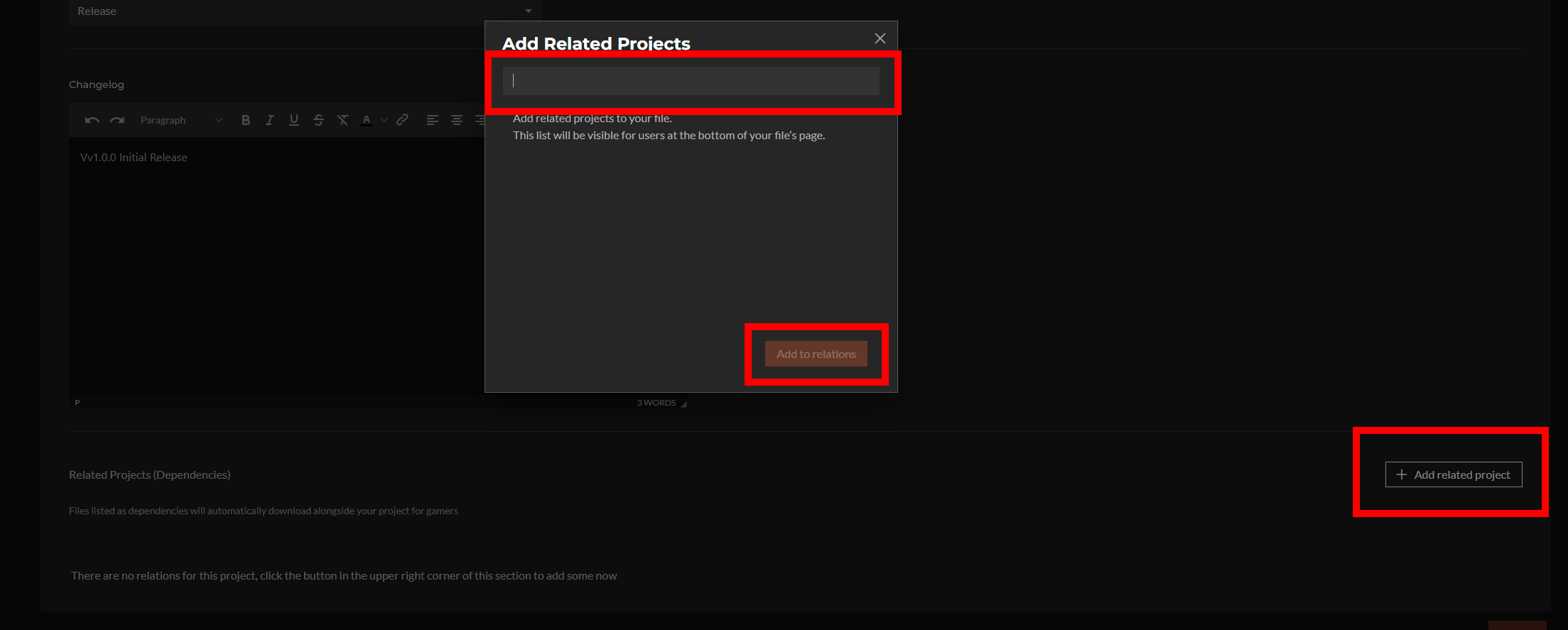
Important Reminder: make this plugin a dependency of your mod on Curseforge if you are using it to inject ore for your asset packs. to do this when you upload your mod for the first time to curseforge at the bottom of the page where its asking for your "change log" you will see "add related project" click that and type out "OreGenLib" without the quotes this should allow you to select this plugin and add it as a dependency! (You may want to put it in the description of your mod that it installs this mod as a required mod for if someone sees this mod and uninstalls it because they dont know what it is it will not inject the ores anymore either and the base game will not send a warning about dependency missing for normal asset zipped mods only Jar "Plugins" as of update 2. --I will update this paragraph if they add dependency driven errors for zipped asset mods and explain then how to add as a dependency in manifest file.
OreGenLibrary (MIT) — XML-Driven Ore Worldgen + Ore/Biome/Zone Admin UI & Teleport Tools
OreGenLibrary is a configurable ore-generation library that lets modpack authors add or tweak ore generation using a simple XML file — no code required. It also includes in-game UI pages (assets) for browsing ores/biomes and exporting documentation.
What this mod does
1) Loads ore generation rules from XML
OreGenLibrary automatically scans installed mods folder for asset packs containing this file:
✅ Ore_Gen/CustomOreTypes.xml
It merges all found configs and uses them to drive worldgen.
Where your XML goes inside your pack/mod:
YourPackOrMod/ manifest.json Ore_Gen/ CustomOreTypes.xml
You can have multiple asset packs containing Ore_Gen/CustomOreTypes.xml — OreGenLibrary merges them all.
2) Injects ores into world generation (how injection works)
OreGenLibrary hooks into the server’s chunk generation pipeline and applies your ore rules only when a chunk is newly generated.
Important vanilla-style rule: existing chunks don’t change automatically — to see new ore rules, explore new chunks (or use the retrogen tools below).
3) Supports two placement styles (your choice)
OreGenLibrary supports both approaches — choose what fits your pack:
A) Spawn / Replace-Host placement
A classic ore generator that places veins based on:
chancePerChunk
veinsMin / veinsMax
veinSizeMin / veinSizeMax
yMin / yMax
plus per-variant host replacement rules
This is “manual control” and is great when you want exact tuning.
B) Template / Near-Vein injection
Anchors your custom ore placement near existing base-game ore families (Iron/Copper/etc) rather than purely random placement.
This is useful when you want your modded ore distribution to “follow” where a base ore family exists.
Neither mode is “recommended” — they are different tools for different balancing goals.
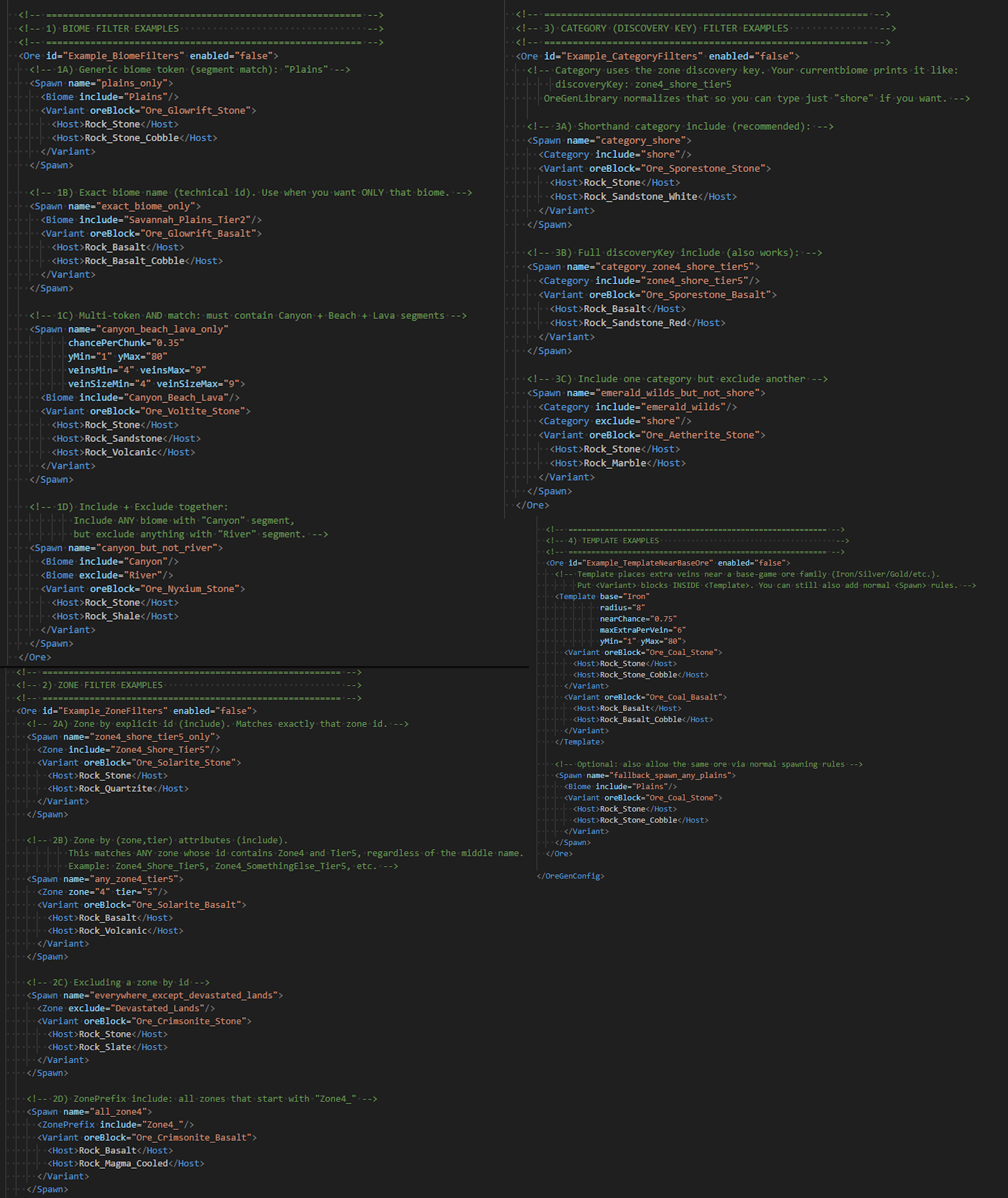
4) Powerful filters (biomes, zones, categories)
Every ore rule can be restricted using filters such as:
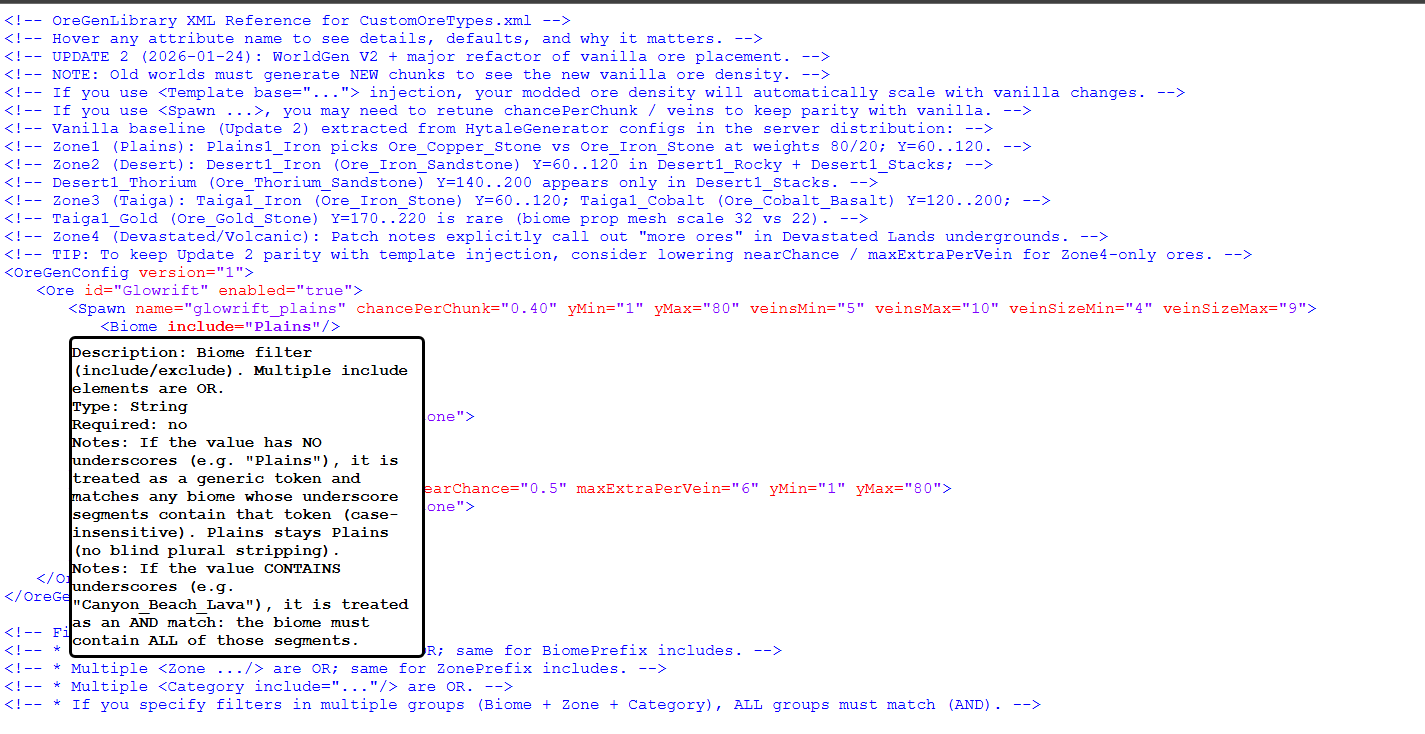
Biome includes/excludes (token matching)
Zone and Tier matching (ex: Zone 4 tier 5 only)
Category / discovery keys (shore/underground/etc)
Prefix matching for biome/zone families
This lets you do things like:
“Spawn only in Zone 4 underground”
“Spawn only in Desert stacks biomes”
“Spawn only in shore categories”
“Separate variants per host (Stone/Basalt/Sandstone/etc)”
5) Admin UI pages (browse + teleport tools)
OreGenLibrary includes custom UI pages that provide:
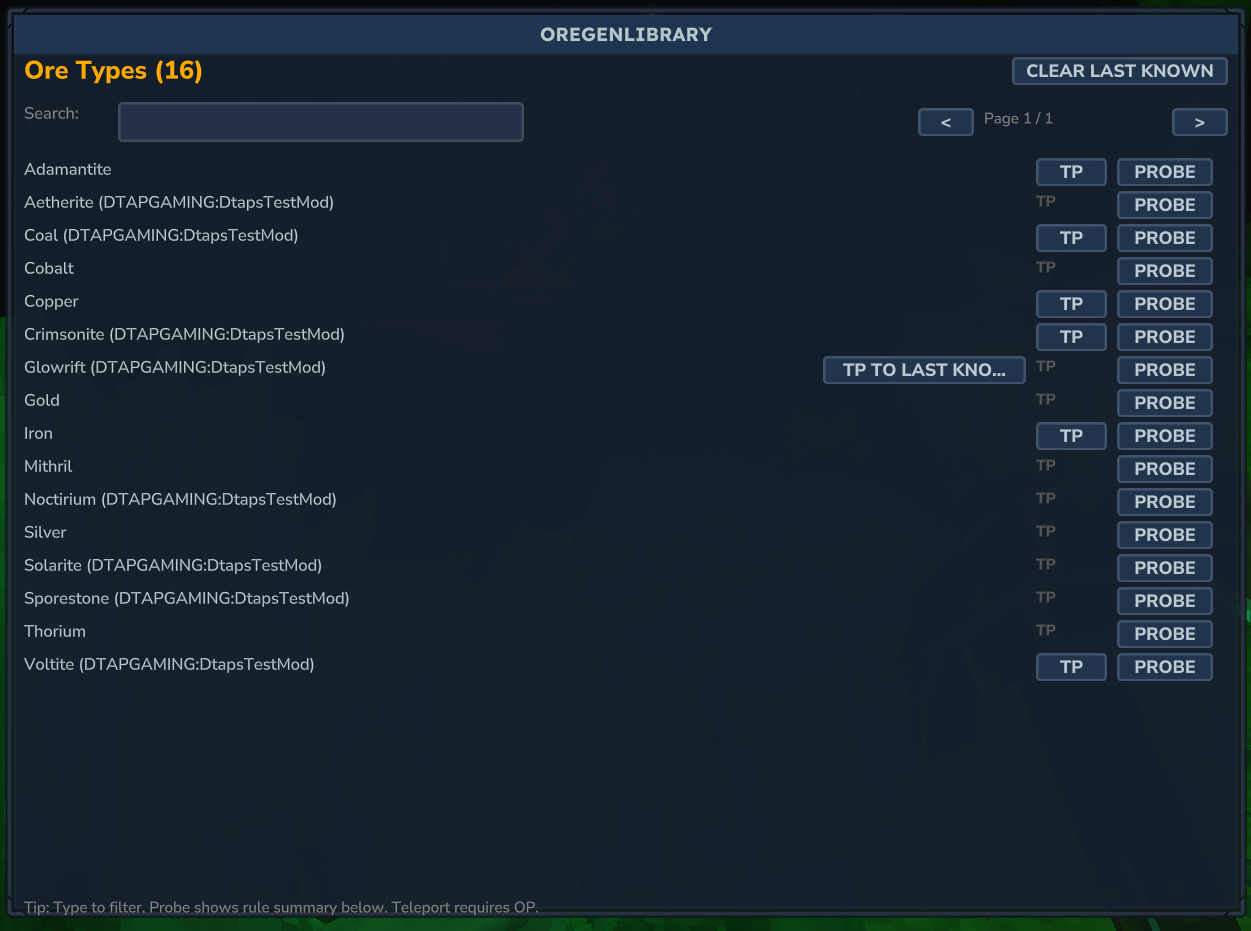
Ore list UI: searchable list of loaded ore IDs and actions
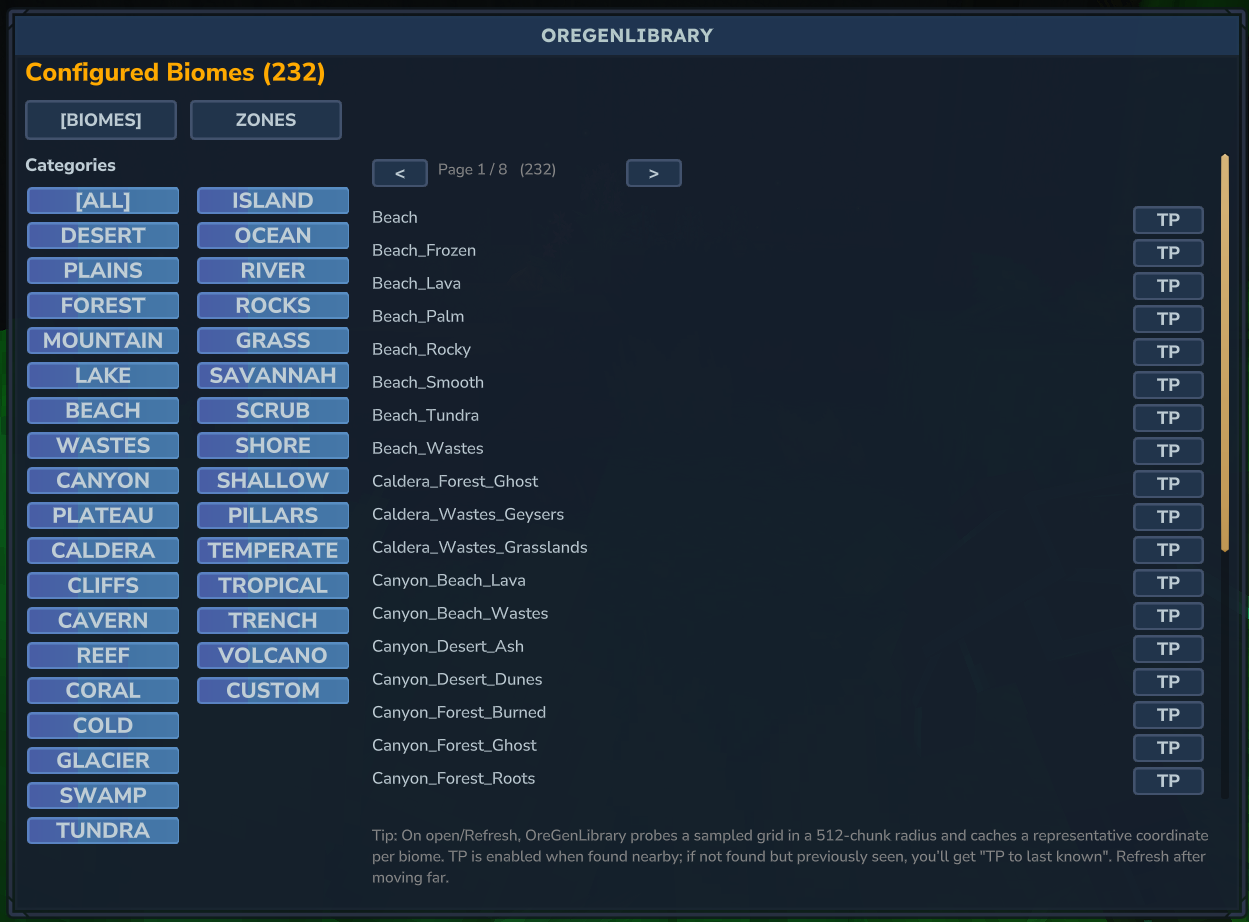
Biome list UI: browse all biomes from the current generator
Known-biomes UI: probe biome map around you and list nearby biomes
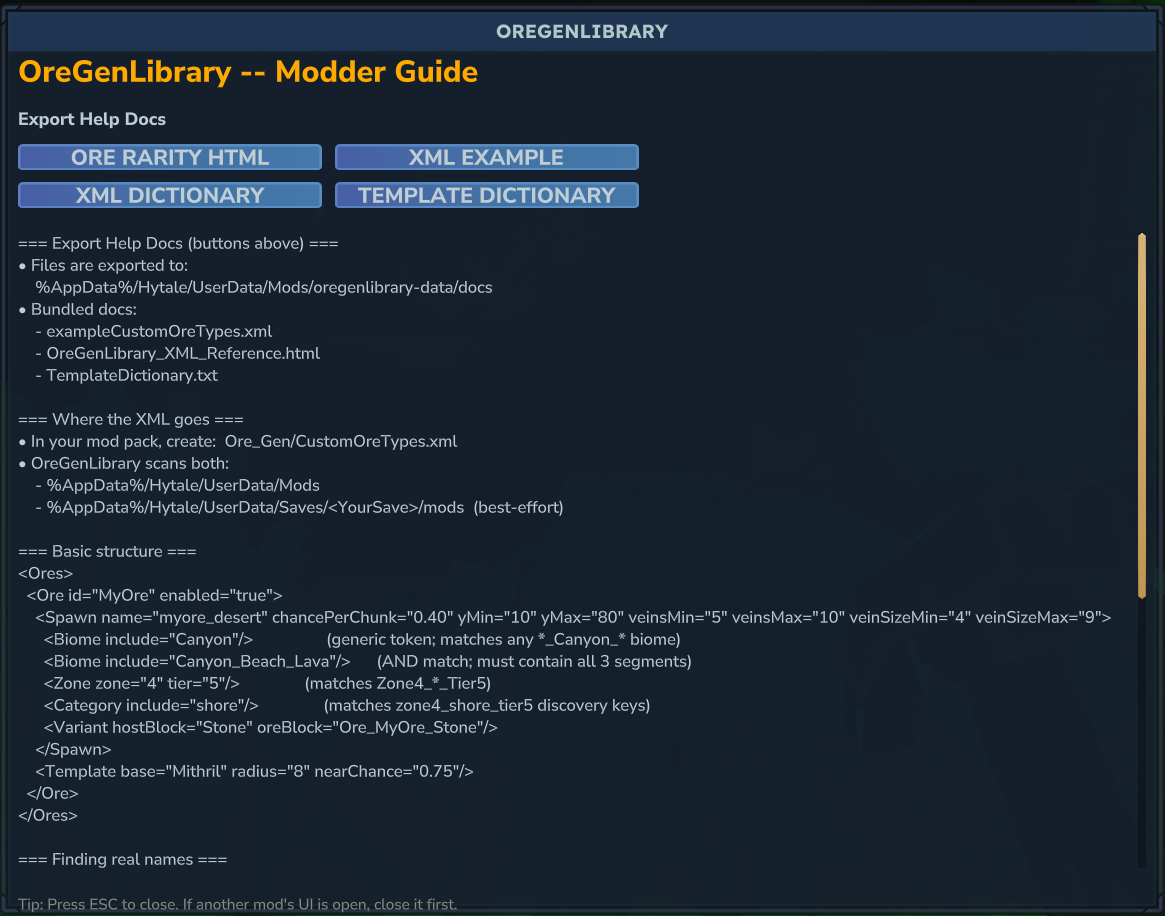
Guide UI: in-game documentation + export tools
6) Safe teleporting + “Last Known” ore locations
Teleport tools include:
Safe teleport logic (tries to avoid spawning you inside blocks by finding a valid nearby space)
Probe without teleport (store a representative coordinate)
Last Known stored locations (persistent between restarts)
Commands (Creative/admin group)
Root command:
/customoregen Aliases:
/cog
/COG
/cog reload
Reloads all CustomOreTypes.xml configs (rescans).
Optional: --clear re-applies rules to currently loaded chunks around you (does not delete chunks; can affect underground builds)
Optional: --radius=<chunks> (used with --clear)
/cog retrogen
Budgeted re-application over nearby chunks (safety tools included):
--radius=<chunks> (default 2)
--maxY=<y> (default 45)
--budget=<chunks> (default 120)
--dry (simulate / preview)
--confirm (required to actually run)
/cog guide
Opens the in-game Modder Guide page.
/cog listore
Opens a searchable UI list of ore IDs loaded from XML.
/cog listbiomes
Lists all biomes configured by the current generator (includes mod-added biomes).
/cog listknownbiomes [--radius=<chunks>]
Probes the biome map around you and lists the set of biomes seen (does not require chunks to already exist).
/cog currentbiome
Prints a one-line output showing your current Biome + Zone.
/cog tp
Teleport helper (ore or biome). Arguments supported include:
ore (custom ore id OR base ore family name)
biome (biome token or full biome name)
radius
maxY
next (skip first N matches)
fallback (ore fallback chunk load radius)
last=1 (teleport to stored last-known for ore)
probe=1 (store a result without teleporting)
x / z (manual coordinate overrides)
label (optional logging label)
For the exact argument format your server build expects, open /cog guide in-game — it shows examples.
Where to find the docs + exports (HTML / examples / spreadsheet)
In-game Guide
Use:
/cog guide
The guide page includes Export Help Docs buttons that write files to a stable folder on disk.
Export output folder (default)
Exports are written to:
%AppData%\Hytale\UserData\Mods\oregenlibrary-data\docs
(You can override the Mods directory with the env var OREGENLIB_MODS_DIR.)
What the guide currently exports via buttons
exampleCustomOreTypes.xml
OreGenLibrary_XML_Reference.html
TemplateDictionary.html
Where the spreadsheet is
The rarity spreadsheet is bundled inside the mod JAR at:
docs/OreRarity_UserGuide.xlsx
If your version doesn’t have a button exporting it yet, you can:
open the mod JAR with 7-Zip/WinRAR
extract docs/OreRarity_UserGuide.xlsx
(optionally) place it alongside the exported docs in oregenlibrary-data/docs
Notes on world updates / vanilla changes
Vanilla worldgen updates often require new chunks to reflect new ore distribution. OreGenLibrary behaves the same way for injection: newly generated chunks receive the rules automatically; existing chunks need retrogen tools if you want changes applied retroactively.
License
OreGenLibrary is released under the MIT License (keep attribution + license if redistributing).
Categories
Screenshots
Need a Server?
Run OreGenLib on a dedicated Hytale server with easy mod management.
Get Hytale HostingFrequently Asked Questions
What is OreGenLib?
This Plugin allows you to inject your ore packs into the natural world Generation using an XML sheet inside your pack and making this plugin a dependency of your mod on Curseforge . It also comes with tools to test if your injection was successful.
How do I download OreGenLib?
You can download OreGenLib for free from CurseForge. Click the "Download on CurseForge" button on this page to go directly to the download page.
Who created OreGenLib?
OreGenLib was created by Dtap_Gaming. The mod has been downloaded 2.2K times.
Is OreGenLib compatible with Hytale servers?
OreGenLib is designed for Hytale and can be used on both single-player and multiplayer servers. Check the mod page on CurseForge for specific compatibility information.
How do I install OreGenLib?
To install OreGenLib: 1) Download the mod from CurseForge, 2) Place the file in your Hytale mods folder, 3) Restart the game. The mod should load automatically.
Related Misc Mods
View all mods
Ymmersive Melodies
Conczin
Upload and play MIDI files in-game on various instruments to annoy your friends with custom melodies!

MultipleHUD
Buuz135
A simple mod that allows you to have multiple HUDs present at once.

Spanish Translation
Plexu5
A Spanish language translation for Hytale. Includes UI, items, and menus.

YUNG's HyDungeons
YUNGNICKYOUNG
Adds new procedurally generated dungeon instances!

Just Enough Tales (JEI mod)
uwudwagon
A JEI mod for Hytale.
![[NoCube's] Simple Bags](https://media.forgecdn.net/avatars/thumbnails/1601/201/256/256/639034453685921721.png)
[NoCube's] Simple Bags
NoCube
Adds bags that you can put anything in!