
Player Kits
A powerful, feature-rich kit management plugin for Hytale servers that allows administrators to create, manage, and distribute predefined item sets to players with extensive customization options.
About Player Kits
PlayerKitsPlugin for Hytale
A powerful, feature-rich kit management plugin for Hytale servers that allows administrators to create, manage, and distribute predefined item sets to players with extensive customization options.
Features
Core Functionality
Create Kits: Save player inventories as reusable kits with a single command
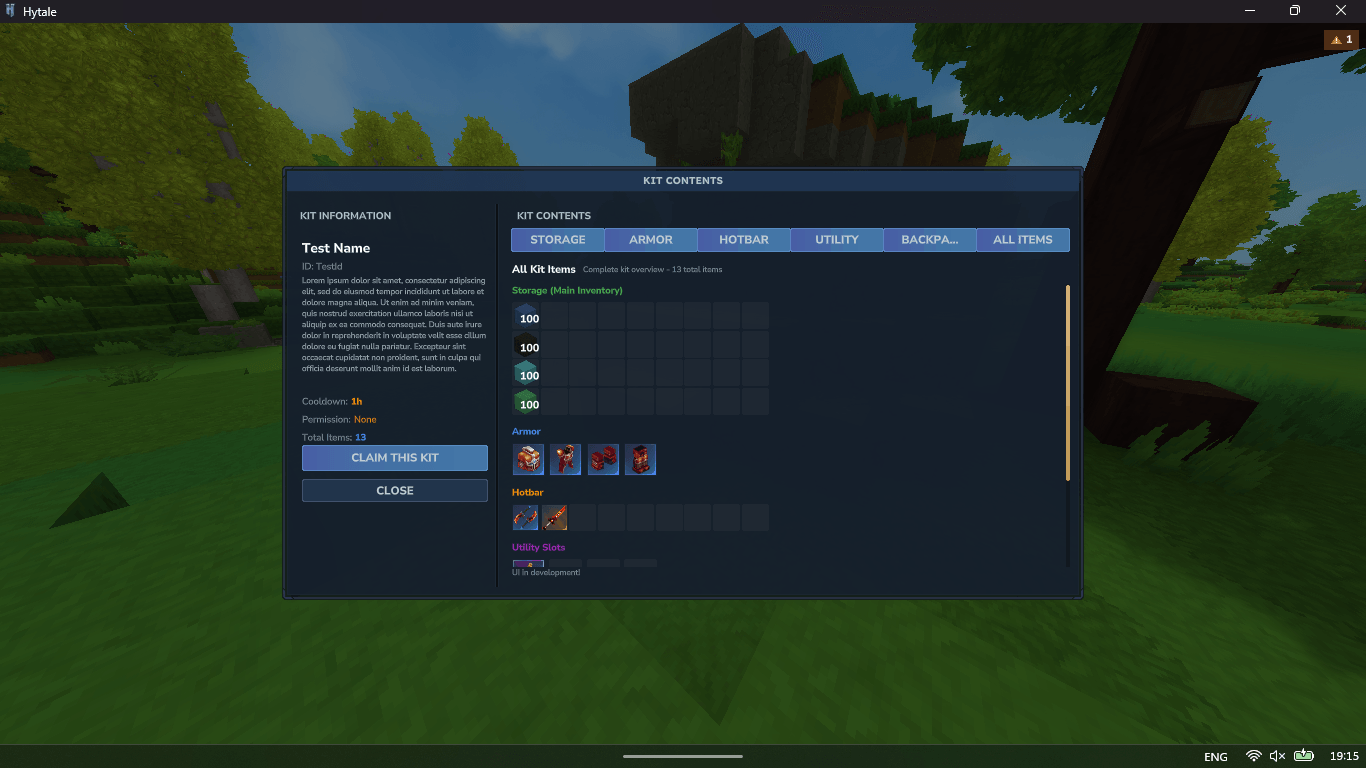
Multi-Inventory Support: Kits include storage, armor, hotbar, utility slots, and backpack items
Permission-Based Access: Assign specific permissions to each kit
Cooldown System: Configure custom cooldowns per kit (from seconds to hours)
Easy Distribution: Give kits to yourself or other players with intuitive commands
Administrative Tools
Batch Operations: Save, reload, or delete multiple kits at once
Cooldown Management: View and reset player cooldowns through commands
Kit Information: Detailed view of kit contents and metadata
File-Based Storage: Each kit saved as individual JSON file for easy backup
Player Experience
Kit Browser: List all available kits with pagination support
Cooldown Display: Real-time cooldown tracking with formatted time remaining
Permission Feedback: Clear messages when players lack required permissions
Inventory Safety: Non-destructive kit application that respects existing items
Commands
Player Commands
Command Permission Description
/kit list <page> razorplay.playerkitsplugin.command.kit.list List all available kits with pagination
/kit get <kitId> razorplay.playerkitsplugin.command.kit.get Claim a kit you have permission for
Admin Commands
Command Permission Description
/kit create <kitId> <displayName> [description] razorplay.playerkitsplugin.command.kit.create Create a kit from your current inventory
/kit delete <kitId> --confirm razorplay.playerkitsplugin.command.kit.delete Permanently delete a kit
/kit give <player> <kitId> razorplay.playerkitsplugin.command.kit.give Give a kit to another player
/kit reload razorplay.playerkitsplugin.command.kit.reload Reload all kits from disk
Cooldown Management
Command Permission Description
/kit cooldown clear razorplay.playerkitsplugin.command.kit.cooldown.clear Clear all cooldowns for all players
/kit cooldown check <player> <kitId> razorplay.playerkitsplugin.command.kit.cooldown.check Check a player's cooldown for a kit
/kit cooldown reset <player> razorplay.playerkitsplugin.command.kit.cooldown.reset Reset all cooldowns for a specific player
🔧 Configuration
File Structure
mods/RazorPlay_PlayerKitsPlugin/ ├── kits/ # Individual kit JSON files │ ├── starter.json │ ├── warrior.json │ └── ... ├── cooldowns.json # Player cooldown data Kit Properties
Each kit can be configured with:
ID: Unique identifier (no spaces/slashes)
Name: Display name shown to players
Description: Optional description
Permission: Required permission node (leave empty for public)
Cooldown: Time between uses in seconds (0 for no cooldown)
Items: Full inventory including armor and backpack
Permission Nodes
razorplay.playerkitsplugin.command.kit.* # All kit commands razorplay.playerkitsplugin.command.kit.create # Create kits razorplay.playerkitsplugin.command.kit.delete # Delete kits razorplay.playerkitsplugin.command.kit.give # Give kits to others razorplay.playerkitsplugin.command.kit.reload # Reload kits razorplay.playerkitsplugin.command.kit.cooldown.* # All cooldown commands Custom Kit Permissions
Create custom permissions for specific kits: kit.mykit.use # Example: Custom permission for "mykit"
🔌 API Integration
PlayerKitsPlugin provides a comprehensive API for developers
Get the KitAPI instance KitAPI kitAPI = PlayerKitsPlugin.getKitAPI();
Create kits programmatically Kit kit = kitAPI.createKit("id", "name", player, "description");
Give kits to players boolean success = kitAPI.giveKit(player, playerRef, "kitId");
Event system for custom behavior kitAPI.registerListener(new KitEventListener() { @Override public void onKitClaimed(KitClaimEvent event) { // Custom logic when kit is claimed } });
Async permission checking CompletableFuture<List<Kit>> availableKits = kitAPI.getAvailableKitsAsync( playerId, (uuid, permission) -> checkPermissionAsync(uuid, permission) ); 🎮 Usage Examples
1. Creating a Starter Kit
/kit create starter Starter "Basic tools and armor for new players"
2. Setting Up a Daily Reward
Create the kit with 24-hour cooldown: /kit create daily Daily
Edit the JSON file to set "Cooldown": 86400 (24 hours in seconds)
Set permission: "Permission": "kit.daily.use"
3. Importing Community Kits
/kit import /path/to/community_kit.json
📋 Installation
Download the latest PlayerKitsPlugin.jar
Place it in your Hytale server's mods/ directory
Start or reload your server
The plugin will create necessary directories and files automatically
🔍 Technical Details
Storage System
Kits: Individual JSON files in mods/PlayerKitsPlugin/kits/
Cooldowns: Centralized JSON file with player-based tracking
Serialization: Uses Hytale's Codec system for reliable item serialization
Performance Features
Caching: Player-specific kit availability caching (30-second TTL)
Async Operations: Non-blocking file I/O and permission checking
Efficient Loading: Lazy loading of kit files on demand
Safety Features
Input Validation: Sanitized kit IDs to prevent file system issues
Error Handling: Comprehensive exception handling with detailed logging
Data Integrity: Automatic backup through individual kit files
🐛 Troubleshooting
Common Issues
"Kit not found": Ensure kit ID is correct and case-sensitive
Permission denied: Check permission nodes and LuckPerms/group setup
Inventory not saving: Verify player has items in inventory when creating kit
File errors: Check file permissions in mods/RazorPlay_PlayerKitsPlugin/ directory
Logs
Check server logs for detailed error information:
[PlayerKitsPlugin] prefixed messages show plugin activity
Warnings indicate non-critical issues
Errors require immediate attention
🤝 Contributing
Found a bug or have a feature request? Please open an issue on our GitHub repository!
📄 License
This plugin is provided under the MIT License. See LICENSE file for details.
🙏 Credits
Developer: Razorplay Testing: Your contributions welcome!
Categories
Screenshots
Need a Server?
Run Player Kits on a dedicated Hytale server with easy mod management.
Get Hytale HostingFrequently Asked Questions
What is Player Kits?
A powerful, feature-rich kit management plugin for Hytale servers that allows administrators to create, manage, and distribute predefined item sets to players with extensive customization options.
How do I download Player Kits?
You can download Player Kits for free from CurseForge. Click the "Download on CurseForge" button on this page to go directly to the download page.
Who created Player Kits?
Player Kits was created by RazorPlay01. The mod has been downloaded 30 times.
Is Player Kits compatible with Hytale servers?
Player Kits is designed for Hytale and can be used on both single-player and multiplayer servers. Check the mod page on CurseForge for specific compatibility information.
How do I install Player Kits?
To install Player Kits: 1) Download the mod from CurseForge, 2) Place the file in your Hytale mods folder, 3) Restart the game. The mod should load automatically.
Related Misc Mods
View all mods
Ymmersive Melodies
Conczin
Upload and play MIDI files in-game on various instruments to annoy your friends with custom melodies!

MultipleHUD
Buuz135
A simple mod that allows you to have multiple HUDs present at once.

Spanish Translation
Plexu5
A Spanish language translation for Hytale. Includes UI, items, and menus.

YUNG's HyDungeons
YUNGNICKYOUNG
Adds new procedurally generated dungeon instances!

Just Enough Tales (JEI mod)
uwudwagon
A JEI mod for Hytale.
![[NoCube's] Simple Bags](https://media.forgecdn.net/avatars/thumbnails/1601/201/256/256/639034453685921721.png)
[NoCube's] Simple Bags
NoCube
Adds bags that you can put anything in!