Saros Money
A simple but powerful economy system for Hytale servers.
About Saros Money
Saros Money Mod - Hytale Edition
A simple but powerful economy system for Hytale servers. Based on the popular Minecraft mod "Saros Money Mod", this plugin brings essential economy features to your Hytale server.
Features
Player Balances - Every player has their own bank account
Money Transfer - Send ingame money to other players with /pay
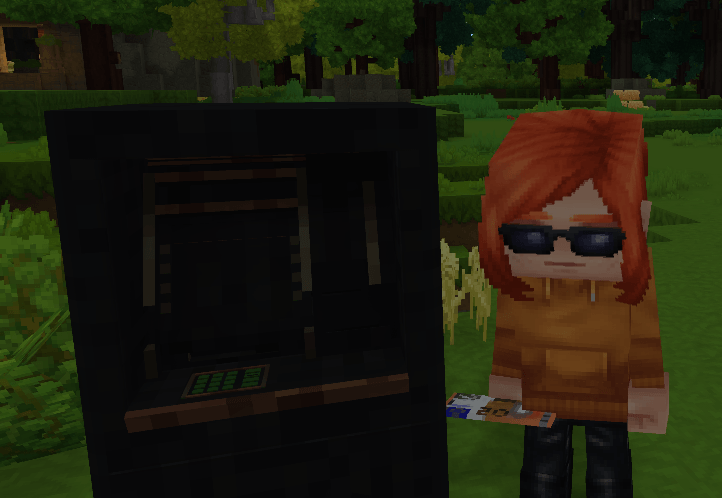
ATM Block - Physical ATM blocks in the world for banking
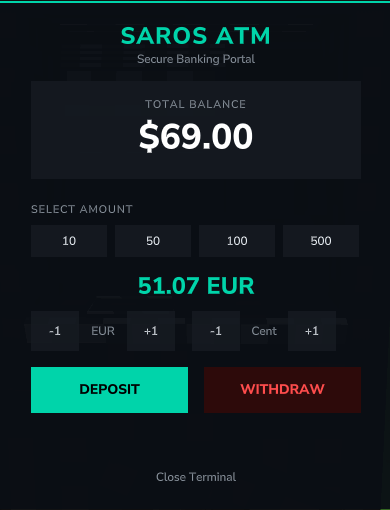
Modern ATM Interface - Clean, modern UI with intuitive controls
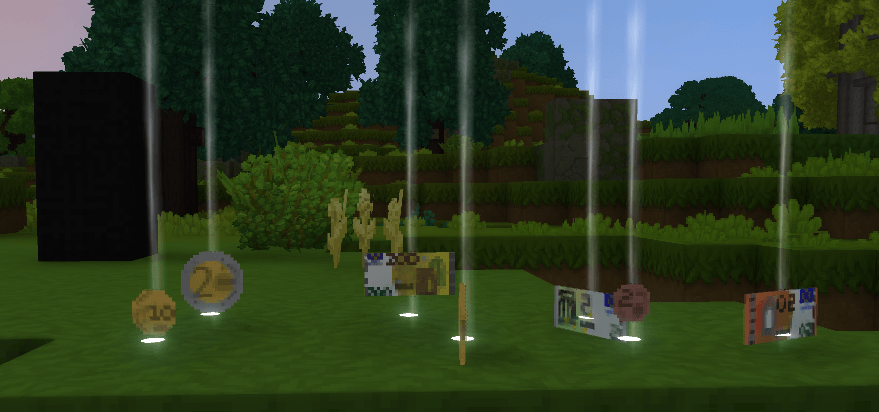
Euro Currency Items - Real Euro banknotes (1-500 EUR)
Real Inventory Integration - Deposit actually removes Euro items from your inventory
Smart Change System - Withdraw any amount and receive optimal denominations
Admin Commands - Full control over the economy with /eco
Persistent Storage - Balances are automatically saved
Self-Pay Protection - Players cannot send ingame money to themselves
Commands
Command Description
/money Shows your current balance
/pay <player> <amount> Transfer ingame money to another player
/deposit <amount> Deposit ingame money into your balance
/withdraw <amount> Withdraw ingame money from your balance
/eco help Show all economy admin commands
/eco get <player/UUID> View a player's balance (Admin)
/eco add <player/UUID> <amount> Add ingame money to a player (Admin)
/eco set <player/UUID> <amount> Set a player's balance (Admin)
/eco take <player/UUID> <amount> Remove ingame money from a player (Admin)
ATM Block
The ATM block allows players to interact with the economy system directly in the world.
How to use:
Hit the ATM block (without a tool in hand) to open the ATM interface
Hit the ATM block with a tool (pickaxe, axe, hammer, shovel) to break it
ATM Features:
Modern, clean user interface
Quick Select Buttons - Instantly select 10, 50, 100, or 500 EUR
Plus/Minus Buttons - Fine-tune your amount by 1 EUR increments
Deposit All - Set amount to 0 to deposit all Euro items in your inventory
Balance display with real-time updates
Available Euro Denominations:
1, 2, 5, 10, 20, 50, 100, 200, 500 EUR
How Deposit Works
Open the ATM by hitting the ATM block (without a tool)
Select an amount using Quick Select buttons or Plus/Minus buttons
Click DEPOSIT to deposit that amount
The corresponding Euro items are automatically removed from your inventory
Your balance is updated
Tip: Set the amount to 0 to deposit ALL Euro items in your inventory at once!
How Withdraw Works
Open the ATM by hitting the ATM block (without a tool)
Select an amount using Quick Select buttons or Plus/Minus buttons
Click WITHDRAW to withdraw that amount
You receive Euro banknote items in optimal denominations
Your balance is reduced accordingly
Configuration
Balance data is automatically saved to:
plugins/sarosmoneymod_data/balances.json
Author
Sarocesch
If you enjoy this plugin, consider leaving a review or donation!
Categories
Screenshots
Need a Server?
Run Saros Money on a dedicated Hytale server with easy mod management.
Get Hytale HostingFrequently Asked Questions
What is Saros Money?
A simple but powerful economy system for Hytale servers.
How do I download Saros Money?
You can download Saros Money for free from CurseForge. Click the "Download on CurseForge" button on this page to go directly to the download page.
Who created Saros Money?
Saros Money was created by Sarocesch. The mod has been downloaded 32 times.
Is Saros Money compatible with Hytale servers?
Saros Money is designed for Hytale and can be used on both single-player and multiplayer servers. Check the mod page on CurseForge for specific compatibility information.
How do I install Saros Money?
To install Saros Money: 1) Download the mod from CurseForge, 2) Place the file in your Hytale mods folder, 3) Restart the game. The mod should load automatically.
Related Misc Mods
View all mods
Ymmersive Melodies
Conczin
Upload and play MIDI files in-game on various instruments to annoy your friends with custom melodies!

MultipleHUD
Buuz135
A simple mod that allows you to have multiple HUDs present at once.

Spanish Translation
Plexu5
A Spanish language translation for Hytale. Includes UI, items, and menus.

YUNG's HyDungeons
YUNGNICKYOUNG
Adds new procedurally generated dungeon instances!

Just Enough Tales (JEI mod)
uwudwagon
A JEI mod for Hytale.
![[NoCube's] Simple Bags](https://media.forgecdn.net/avatars/thumbnails/1601/201/256/256/639034453685921721.png)
[NoCube's] Simple Bags
NoCube
Adds bags that you can put anything in!