Shops
A comprehensive Hytale mod that allows players to set up personalized shops, enabling a player-driven economy using a virtual currency system.
About Shops
Hytale Shops Mod
IMPORTANT: This mod requires an Economy Provider like Coins or VaultUnlocked to be installed. Coins Mod is recommended, as it will have better mod compatibility within the ecosystem of my mods.
A comprehensive Hytale mod that allows players to set up personalized shops, enabling a player-driven economy using a virtual currency system.
🌟 Features
Personalized Player Shops: Place a Player_Shop block to start your business.
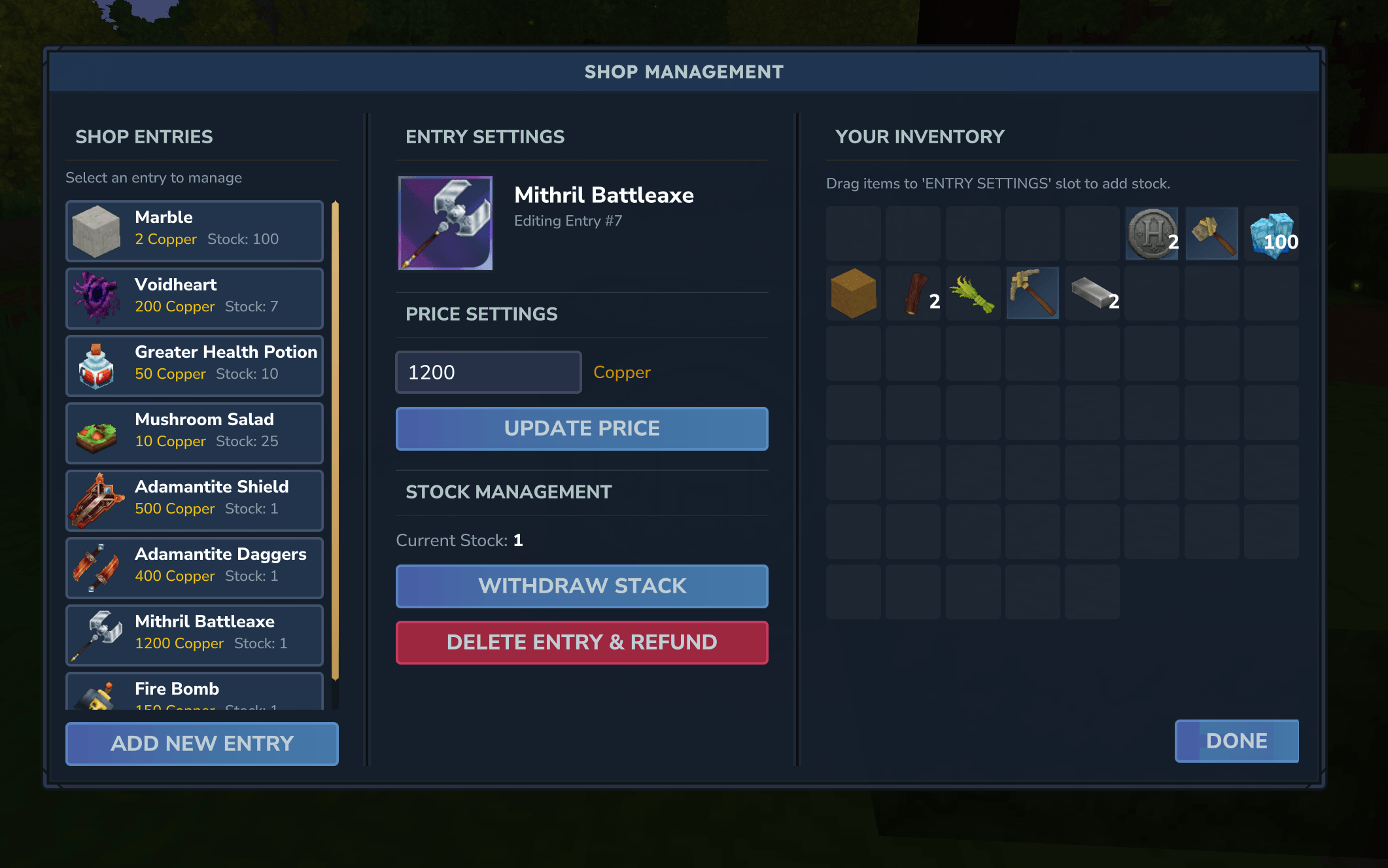
Advanced Owner Interface: Inventory Management: Drag and drop items from your inventory into the shop.
Price Control: Set custom prices for each item in your shop (in Copper coins).
Stock Tracking: Keep track of available quantities and restock easily.
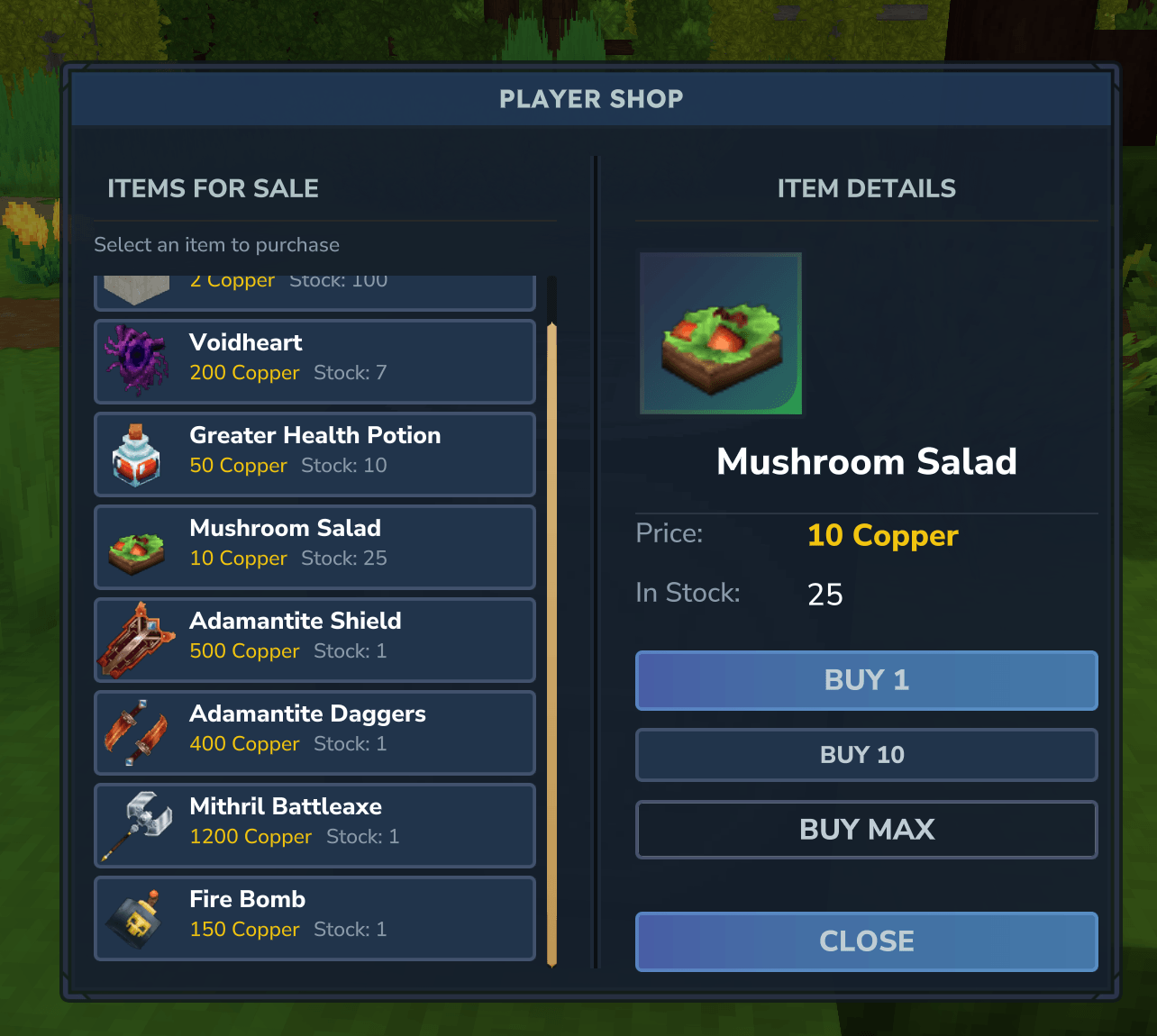
User-Friendly Buyer Interface: Browsing: View available items and their prices in a clean, intuitive UI.
Balance Display: View your current Copper coin balance directly in the shop interface.
Secure Transactions: Instant purchases with automatic balance checks.
Server Owned Shops: Unlimited Stock: Shops can be configured to have infinite inventory.
Admin/Server Use: Perfect for server-wide shops where players can always buy essential items.
Creative Mode Toggle: Players in creative mode can easily toggle any shop between a regular player shop and a server shop.
Economy Integration: Fully integrated with economy providers like VaultUnlocked and Coins Mod for all financial transactions. The mod uses an abstraction layer for its economy, allowing for seamless switching between currency systems.
Inventory Safety: When breaking a shop block, all remaining stock is automatically returned to your inventory. If your inventory is full, items are safely dropped on the ground.
Permission Control: Only shop owners (or players in creative mode) can manage or break their shops, ensuring security for your goods.
🛠 Getting Started
Requirements
Java 25: The mod is built and optimized for Java 25.
Hytale Server: A running Hytale server environment.
Economy Provider: At least one of the following must be installed: VaultUnlocked: Preferred provider if available.
Coins Mod: Alternative provider. If neither is found, the mod will fail to initialize. If both are installed, VaultUnlocked will be used (for now).
Installation for Server Owners
Ensure an Economy Provider (VaultUnlocked or Coins Mod) is installed on your server.
Place the JAR file into your server's mods/ directory.
Restart the server to load the mod.
🎮 How to Use
Creating Your Shop
Craft a Player Shop Block: You can craft a Player_Shop block at a Workbench using the following materials: 20x Wood Trunk
20x Rock
6x Iron Bar
Note: For Server Owners, just go into creative mode, search for Player Shop, and get it from there. Make sure to set it as a server shop in the Owner UI.
Place it anywhere in the world. You are now officially the owner of this shop!
Managing Your Shop (Owners)
Open Management UI: Right-click your shop block.
Adding Items: Drag items from your inventory into the shop slots in the UI.
Setting Prices: Enter the desired price in Copper coins for each item slot.
Removing Items: Click or drag items out of the shop slots back to your inventory.
Toggle Server Shop: If you are in Creative Mode, you will see a button to toggle between a "Player Shop" and a "Server Shop". Server shops have unlimited stock and do not transfer coins to the owner.
Buying Items (Players)
Browse Shop: Right-click another player's shop block to open the Buyer UI.
Check Balance: Your current Copper coin balance is displayed in the top right corner of the details panel.
Purchase: Select the item you want and confirm the purchase. The cost will be deducted from your Coins balance, and the item will be added to your inventory.
Bulk Buy: Use the "Buy 10", "Buy 100", or "Buy Max" buttons for faster transactions.
Closing a Shop
To close your shop and retrieve all remaining stock, simply break the Player_Shop block.
Note: You can only break shops that you own. Players in Creative Mode can break any shop.
📜 License
Copyright (c) 2026 Pandaismyname1. All Rights Reserved.
Permission is granted for modpack usage through CurseForge. Redistributing the JAR file directly is prohibited.
Categories
Screenshots
Frequently Asked Questions
What is Shops?
A comprehensive Hytale mod that allows players to set up personalized shops, enabling a player-driven economy using a virtual currency system.
How do I download Shops?
You can download Shops for free from CurseForge. Click the "Download on CurseForge" button on this page to go directly to the download page.
Who created Shops?
Shops was created by pandaismyname1. The mod has been downloaded 674 times.
Is Shops compatible with Hytale servers?
Shops is designed for Hytale and can be used on both single-player and multiplayer servers. Check the mod page on CurseForge for specific compatibility information.
How do I install Shops?
To install Shops: 1) Download the mod from CurseForge, 2) Place the file in your Hytale mods folder, 3) Restart the game. The mod should load automatically.
Related Qol Mods
View all mods
EyeSpy
DarkhaxDev
Adds a HUD that displays information about what you're looking at!

Advanced Item Info
Buuz135
Adds a searchable GUI that displays all the items and the game and displays extra properties they have

Overstacked
DarkhaxDev
Increases the maximum stack size of items.

Violet's Wardrobe
VioletsWorkshop
Adds more customisation options in the form of craftable cosmetics

Item Magnet
Jaredlll08
Adds a magnet that attracts items towards the player.

Endgame & QoL - Boss & Elite Update (3.0.0 in a week)
Lewaii
Endgame & QoL v2.2: Face the Alpha T-Rex & Void Spectres! Unlock Backpack IV & Void Gliders. Restore unused content and challenge stronger, rebalanced bosses!