Smart benches
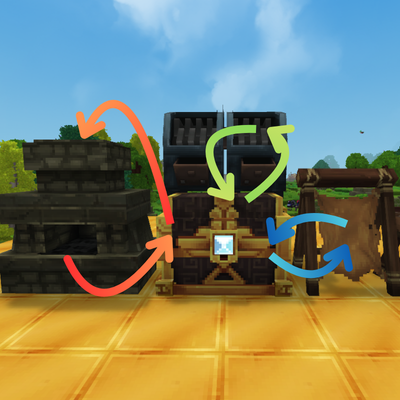
You want benches output to go straight into a chest? There we go!
About Smart benches
🔧 Smart Benches
**Want bench output to go straight into a chest? Here i am**
✨ Features
Automatic Output Transfer: Finished products are instantly moved to nearby chests.
Zero Configuration: Just place a chest next to your processing bench and it works!
Works with All Processing Benches: Furnaces, forges, kilns, smelters, and any station with an output slot.
⚠️ Important: How It Works
This mod works with Processing Benches — stations that have a dedicated output container where finished items appear (furnaces, forges, kilns, etc.).
Bench Type Has Output? Works?
🔥 Furnace / Forge / Kiln ✅ Yes ✅ Auto-transfers to chest
⚒️ Crafting Table ❌ No (goes to player) ❌ Not applicable
🧪 Processing stations ✅ Yes ✅ Auto-transfers to chest
🚀 Update v1.2: Smart Automation & Control!
🔄 Two-Way Automation: Now supports Input & Fuel automation!
Items in the chest can automatically feed the furnace's Input and Fuel slots.
(Enabled by default, toggleable via command).
🧠 Smart Logic: If a chest is full, it automatically searches for other nearby chests.
⚙️ Configurable: Customize search radius (default: 2 blocks) and update speed via config.
🎮 In-Game Commands:
/smartbenches input <on|off> - Toggle auto-feeding from chests.
/smartbenches <on|off> - Toggle auto-output to chests.
🎮 How to Use
Place any processing bench (furnace, forge, kiln, etc.).
Place a chest directly adjacent (above, below, or on any side).
Add fuel and materials to the bench.
Watch as finished products automatically transfer to the chest!
[Chest] ↑ [Furnace] → Processed items flow to chest! ⚙️ Technical Details
Scans all 6 adjacent positions (up, down, north, south, east, west).
Only the first chest found receives items per tick cycle.
Uses reflection to access only the outputContainer, leaving fuel and input untouched.
Built on Hytale's ECS system for efficient processing.
📥 Installation
Download the Linceros.SmartBenches-1.0.0.jar.
Place the .jar file into your Hytale server's mods folder.
Enjoy!
🔮 Future Ideas
Grab items and process them.
Priority system for multiple adjacent chests.
Filter which items go to which chest.
Visual indicator when auto-transfer is active.
👨‍💻 Author
Created by Linceros.
Part of the Linceros Mod Collection for Hytale.
Categories
Need a Server?
Run Smart benches on a dedicated Hytale server with easy mod management.
Get Hytale HostingFrequently Asked Questions
What is Smart benches?
You want benches output to go straight into a chest? There we go!
How do I download Smart benches?
You can download Smart benches for free from CurseForge. Click the "Download on CurseForge" button on this page to go directly to the download page.
Who created Smart benches?
Smart benches was created by Linceros. The mod has been downloaded 10.9K times.
Is Smart benches compatible with Hytale servers?
Smart benches is designed for Hytale and can be used on both single-player and multiplayer servers. Check the mod page on CurseForge for specific compatibility information.
How do I install Smart benches?
To install Smart benches: 1) Download the mod from CurseForge, 2) Place the file in your Hytale mods folder, 3) Restart the game. The mod should load automatically.
Related Qol Mods
View all mods
EyeSpy
DarkhaxDev
Adds a HUD that displays information about what you're looking at!

Advanced Item Info
Buuz135
Adds a searchable GUI that displays all the items and the game and displays extra properties they have

Overstacked
DarkhaxDev
Increases the maximum stack size of items.

Violet's Wardrobe
VioletsWorkshop
Adds more customisation options in the form of craftable cosmetics

Item Magnet
Jaredlll08
Adds a magnet that attracts items towards the player.

Endgame & QoL - Boss & Elite Update (3.0.0 in a week)
Lewaii
Endgame & QoL v2.2: Face the Alpha T-Rex & Void Spectres! Unlock Backpack IV & Void Gliders. Restore unused content and challenge stronger, rebalanced bosses!