Werchat
A fully featured chat plugin including a chat channel system for Hytale servers. Organize player communication with customizable channels, private messaging, and moderation tools.
About Werchat
Werchat - Channel Chat System for Hytale
A fully-featured chat channel system for Hytale servers. Organize player communication with customizable channels, private messaging, moderation tools, and more.
Join our new discord for fast support outside of curseforge: https://discord.gg/vN6Zh3DmZf
Features
Multiple Chat Channels - Create and manage unlimited chat channels
Channel Customization - Set colors, nicknames, and passwords for each channel
Private Messaging - Send private messages with /msg and quick replies with /r
Channel Moderation - Ban, mute, and manage channel moderators
Auto-Join Channels - Configure channels players automatically join on connect
Local/Global Chat - Distance-based local channels or server-wide global channels
Persistent Storage - All channel settings saved to disk
Player Nickname/Color Support - With /ch playernick anyone can choose their nickname and color!
New in v1.1.0
Word Filter - Block or censor profanity (admins bypass)
@Mentions - Tag players with @username, highlighted in yellow
Ignore List - /ignore and /ignorelist to block annoying players
Chat Cooldown - Anti-spam delay (admins bypass)
Admin Bypass - Ops with * or werchat.* permission bypass filter & cooldown
Installation
Download Werchat-1.1.0.jar
Place in your Hytale server's Mods folder
Restart the server
(Optional) Edit config.json to enable word filter, cooldown, or announcements
(Optional) Grant werchat.create permission to staff who should create channels
Commands
General Commands (All Players)
| | /ch <name> |Switch to a channel (supports partial matching) | | /ch list |List all available channels | | /ch join <channel> [password] |Join a channel | | /ch leave <channel> |Leave a channel | | /ch who <channel> |See online members in a channel | | /ch info <channel> |View channel details (owner, mods, range) | | /ch help |Show help menu | | /msg <player> <message> |Send a private message | | /r <message> |Reply to last private message | | /ignore <player> |Toggle ignoring a player | | /ignorelist |Show your ignored players |
Channel Management (Moderators/Permission Holders)
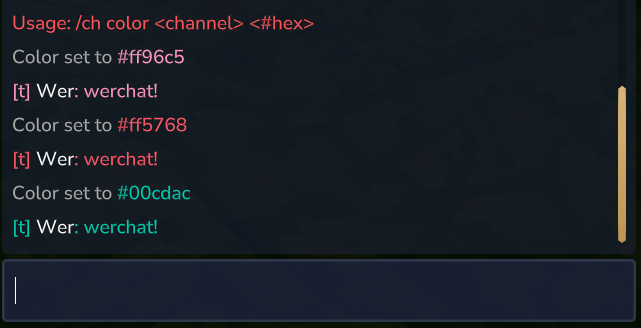
| | /ch create <name> |werchat.create |Create a new channel | | /ch remove <channel> |werchat.remove |Delete a channel | | /ch color <channel> <#hex> |werchat.color |Set channel color (e.g., #FF5555) | | /ch nick <channel> <nick> |werchat.nick |Set channel shortcut/nickname | | /ch password <channel> [pw] |werchat.password |Set or clear channel password | | /ch rename <channel> <newname> |werchat.rename |Rename a channel | | /ch mod <channel> <player> |werchat.mod |Add a channel moderator | | /ch unmod <channel> <player> |werchat.mod |Remove a channel moderator | | /ch distance <channel> <blocks> |werchat.distance |Set chat range (0 = global) | | /ch ban <channel> <player> |werchat.ban |Ban player from channel | | /ch unban <channel> <player> |werchat.ban |Unban player from channel | | /ch mute <channel> <player> |werchat.mute |Mute player in channel | | /ch unmute <channel> <player> |werchat.mute |Unmute player in channel |
Permissions
All commands are available to players in Adventure mode by default. The following permission nodes provide fine-grained control:
| | * |Grants all permissions (includes all werchat permissions) | | werchat.* |Grants all Werchat permissions | | werchat.create |Create new channels | | werchat.remove |Delete any channel | | werchat.color |Change any channel's color | | werchat.nick |Change any channel's nickname | | werchat.password |Set/clear any channel's password | | werchat.rename |Rename any channel | | werchat.mod |Add/remove moderators on any channel | | werchat.distance |Set chat range on any channel | | werchat.ban |Ban/unban players from any channel | | werchat.mute |Mute/unmute players in any channel |
Note: Management commands can also be used by channel moderators without needing explicit permissions. The creator of a channel automatically becomes its owner and moderator.
Configuration (config.json)
Werchat creates a config.json file in the plugin data directory with these options:
{ "wordFilter": { "enabled": false, "mode": "censor", "replacement": "***", "notifyPlayer": true, "warningMessage": "Your message contained inappropriate language.", "words": ["badword1", "badword2"] }, "cooldown": { "enabled": false, "seconds": 3, "message": "Please wait {seconds}s before sending another message." }, "mentions": { "enabled": true, "color": "#FFFF55" } } Word Filter Modes
censor: Replaces bad words with *** but sends the message
block: Blocks the entire message from being sent
Note: Admins (players with * or werchat.* permission) bypass the word filter. A default list of common profanity is included - customize via config.json.
@Mentions
Type @username to mention someone. The mentioned player sees the message highlighted in yellow.
Example: Hey @Wer check this out!
Ignore System
/ignore <player> - Toggle ignoring a player (you won't see their messages)
/ignorelist - See all players you're ignoring
Use /ignore <player> again to unignore
Channel Ownership & Moderation
Owner: The player who created the channel. Shown in /ch info.
Moderators: Players who can manage channel settings. The owner is automatically a moderator.
Adding Moderators: Use /ch mod <channel> <player> to add a moderator.
Removing Moderators: Use /ch unmod <channel> <player> to remove a moderator.
Banning & Muting
Ban: Removes player from channel and prevents rejoining. Use /ch ban <channel> <player>.
Mute: Player can read messages but cannot send. Use /ch mute <channel> <player>.
Unban/Unmute: Use /ch unban or /ch unmute to reverse.
Players are notified when banned or muted with a configurable message.
Local vs Global Channels
Channels can be global (server-wide) or local (distance-based):
Global: Range set to 0. All members see messages regardless of location.
Local: Range set to a number of blocks. Only members within range see messages.
Use /ch distance <channel> <blocks> to configure. Example: /ch distance local 50 limits chat to 50 blocks.
Default Channels
Werchat creates these channels on first run:
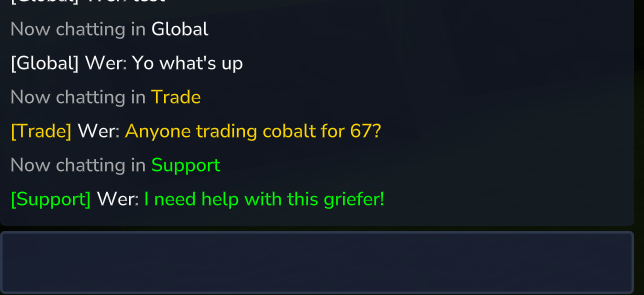
| | Global |[Global] |White |Server-wide chat (default) | | Local |[Local] |Gray |Distance-based local chat (100 blocks) | | Trade |[Trade] |Gold |Trading channel | | Support |[Support] |Green |Support/help channel |
Plugin Integrations
Newly compatible with LuckPerms
Fully tested and compatible with Hyperperms by ZenithDevHQ
All current party plugins on Curseforge tested and confirmed compatible
Support
For issues or feature requests, leave a comment on CurseForge.
Categories
Screenshots
Frequently Asked Questions
What is Werchat?
A fully featured chat plugin including a chat channel system for Hytale servers. Organize player communication with customizable channels, private messaging, and moderation tools.
How do I download Werchat?
You can download Werchat for free from CurseForge. Click the "Download on CurseForge" button on this page to go directly to the download page.
Who created Werchat?
Werchat was created by Werw. The mod has been downloaded 613 times.
Is Werchat compatible with Hytale servers?
Werchat is designed for Hytale and can be used on both single-player and multiplayer servers. Check the mod page on CurseForge for specific compatibility information.
How do I install Werchat?
To install Werchat: 1) Download the mod from CurseForge, 2) Place the file in your Hytale mods folder, 3) Restart the game. The mod should load automatically.
Related Misc Mods
View all mods
Ymmersive Melodies
Conczin
Upload and play MIDI files in-game on various instruments to annoy your friends with custom melodies!

MultipleHUD
Buuz135
A simple mod that allows you to have multiple HUDs present at once.

Spanish Translation
Plexu5
A Spanish language translation for Hytale. Includes UI, items, and menus.

YUNG's HyDungeons
YUNGNICKYOUNG
Adds new procedurally generated dungeon instances!

Just Enough Tales (JEI mod)
uwudwagon
A JEI mod for Hytale.
![[NoCube's] Simple Bags](https://media.forgecdn.net/avatars/thumbnails/1601/201/256/256/639034453685921721.png)
[NoCube's] Simple Bags
NoCube
Adds bags that you can put anything in!