
WorldProtect
Region protection & land-claim system: protect builds, manage PvP zones, members/owners, and optional world map markers.
About WorldProtect
WorldProtect
WorldProtect is a flexible region protection plugin inspired by WorldGuard, designed with modern usability, visual map integration, and a clean flag-based system.
It allows server owners to protect regions, control player interactions, manage building permissions, and visually display regions on the world map — all with fine-grained permissions and customizable messages.
Built for the Hytale survival server at play.HolyTale.net
Quick Start
Install: Download the latest release and drop the JAR into your server's mods/ folder
Restart your server
Select area: Select two corners of the area you want to protect /pos1 and /pos2
Claim land: Then create the region with /rg claim <name>
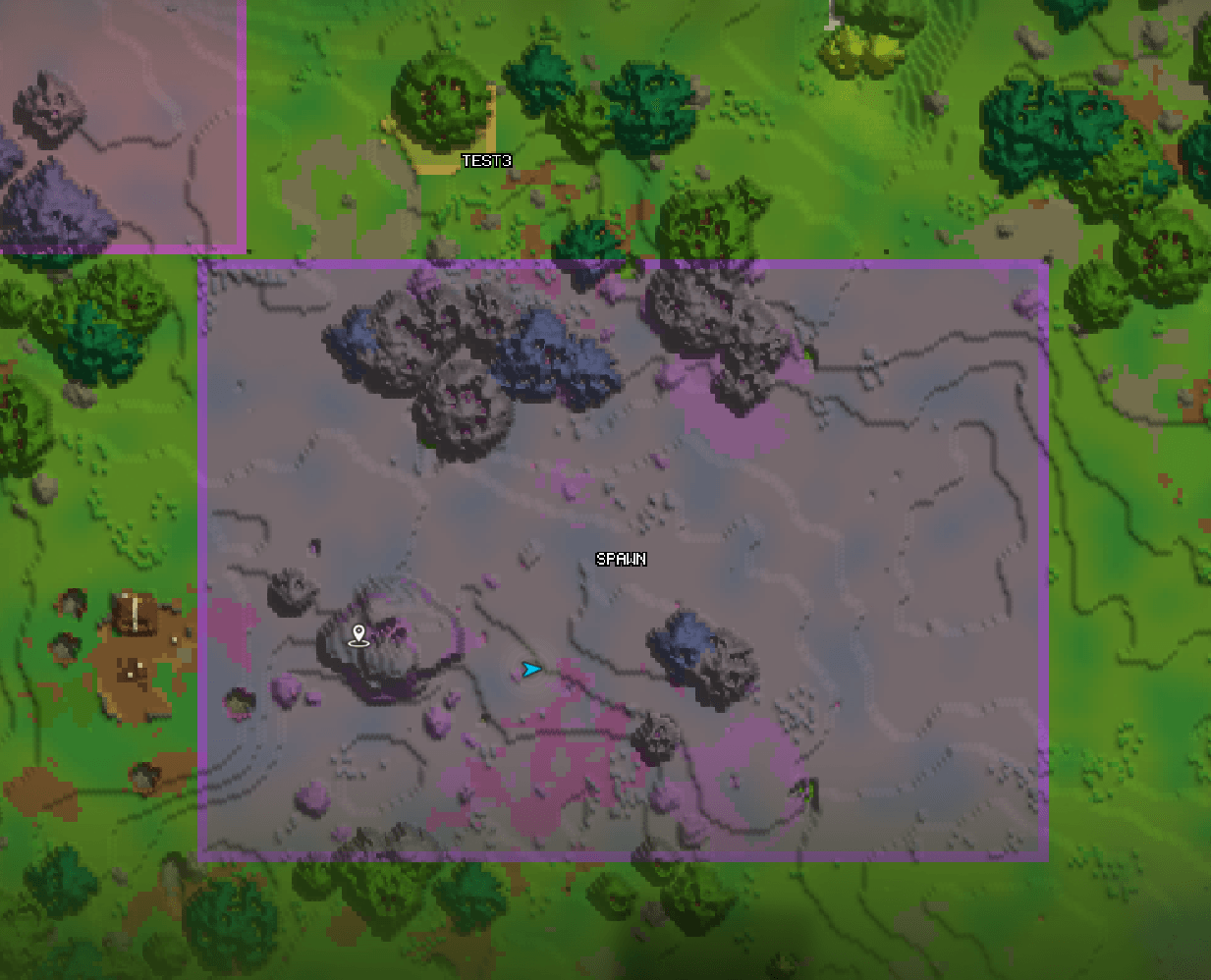
See your claims: Open your map (M) - claimed regions show in color!
Features
Region Map Overlay - Claimed regions appear colored on the world map
Interaction Control - Full control over how players interact inside regions
Region Flags System - Each region supports multiple independent flags
Custom Messages & Localization - Language file support/Colored chat messages
Performance & Stability - Optimized cancel handling/Reduced client/server desync warnings
Commands
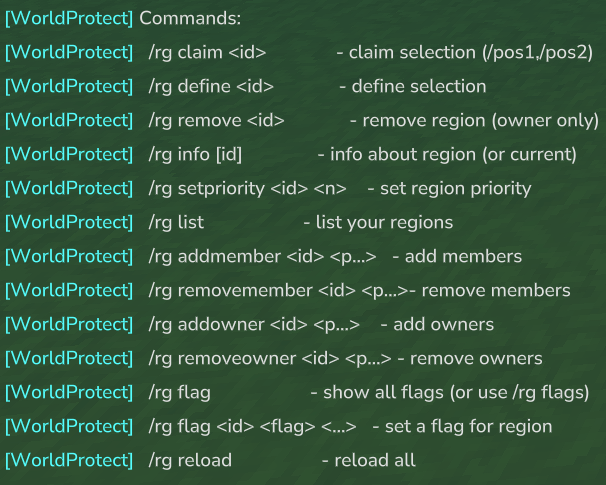
Base command /rg command set:
/rg claim <region> — create a protected claim from your current selection
/rg define <region> — create an admin region from selection
/rg remove <region> — delete a region (owner/admin)
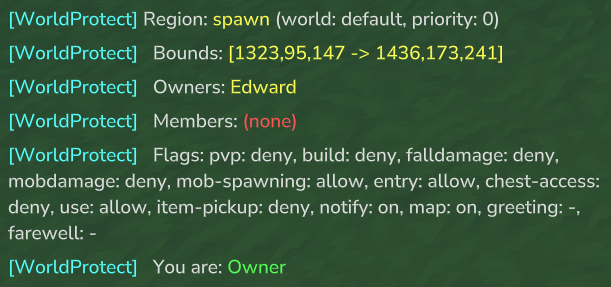
/rg info — info about region (or current)
/rg preority <region> <priority> — set region priority (higher priority wins when regions overlap)
/rg list — list your regions
/rg addmember <region> <player> — add member
/rg removemember <region> <player> — remove member
/rg addowner <region> <player> — add owner
/rg removeowner <region> <player> — remove owner
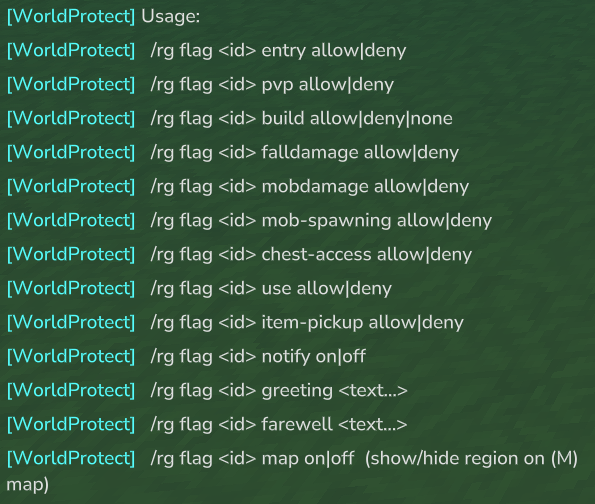
/rg flag <region> <flag> allow|deny|none — set region flags
/rg reload — reload configs, messages and regions
Permissions
dev.worldprotect.worldprotect.command.rg — allows using /rg (base command access)
worldprotect.bypass — bypasses all region restrictions and permission checks (admin override)
worldprotect.reload — allows using /rg reload (reloads config, messages, and regions)
worldprotect.flag.pvp — allows changing the PvP flag (/rg flag <id> pvp allow|deny)
worldprotect.flag.build — allows changing the build flag (/rg flag <id> build allow|deny|none)
worldprotect.flag.falldamage — allows changing the fall damage flag (/rg flag <id> falldamage allow|deny)
worldprotect.flag.mobdamage — allows changing the mob damage flag (/rg flag <id> mobdamage allow|deny)
worldprotect.flag.chestaccess — allows changing the chest-access flag (/rg flag <id> chest-access allow|deny)
worldprotect.flag.use — allows changing the use/interact flag (/rg flag <id> use allow|deny)
worldprotect.flag.notify — allows changing notifications (/rg flag <id> notify on|off)
worldprotect.flag.greeting — allows changing greeting text (/rg flag <id> greeting <text...>)
worldprotect.flag.farewell — allows changing farewell text (/rg flag <id> farewell <text...>)
worldprotect.flag.map — allows toggling region visibility on the (M) map overlay (/rg flag <id> map on|off)
worldprotect.flag.mobspawning — allows changing the mob spawning flag (/rg flag <id> mob-spawning allow|deny)
worldprotect.flag.itempickup — allows changing the item pickup flag (/rg flag <id> item-pickup allow|deny)
worldprotect.flag.entry — allows changing the entry flag (/rg flag <id> entry allow|deny)
hytale.editor.selection.use — allows using region selection tools (set pos1 and pos2 with the selection)
Why download WorldProtect?
If you host a multiplayer server, WorldProtect adds clarity, safety, and control:
Protect builds and bases so players can invest time without fear of griefing or theft
Easy land claiming with a clean /rg workflow, plus member/owner management for teams and factions
Create protected areas instantly (spawn, market, towns, event zones) with admin regions and priorities
Control gameplay per region using flags: safe zones, PvP arenas, build-permitted areas, restricted entry zones, and more
Map visibility helps players understand borders at a glance (claimed regions appear colored on the world map)
Optimized and stable: refactored internals to reduce overhead, bugs, and client/server desync warnings
Configuration
WorldProtect includes a configuration system that lets you fine-tune server rules, including:
Block/build protection (prevent breaking/placing where not allowed)
PvP protection rules (safe zones, arenas, wilderness logic)
Overlap handling & priority rules (which region wins when they intersect)
Region limits (claims per player, maximum region size, admin region behavior)
Map overlay/marker integration (show/hide regions and adjust display behavior)
Categories
Screenshots
Need a Server?
Run WorldProtect on a dedicated Hytale server with easy mod management.
Get Hytale HostingFrequently Asked Questions
What is WorldProtect?
Region protection & land-claim system: protect builds, manage PvP zones, members/owners, and optional world map markers.
How do I download WorldProtect?
You can download WorldProtect for free from CurseForge. Click the "Download on CurseForge" button on this page to go directly to the download page.
Who created WorldProtect?
WorldProtect was created by Elych. The mod has been downloaded 558 times.
Is WorldProtect compatible with Hytale servers?
WorldProtect is designed for Hytale and can be used on both single-player and multiplayer servers. Check the mod page on CurseForge for specific compatibility information.
How do I install WorldProtect?
To install WorldProtect: 1) Download the mod from CurseForge, 2) Place the file in your Hytale mods folder, 3) Restart the game. The mod should load automatically.
Related Misc Mods
View all mods
Ymmersive Melodies
Conczin
Upload and play MIDI files in-game on various instruments to annoy your friends with custom melodies!

MultipleHUD
Buuz135
A simple mod that allows you to have multiple HUDs present at once.

Spanish Translation
Plexu5
A Spanish language translation for Hytale. Includes UI, items, and menus.

YUNG's HyDungeons
YUNGNICKYOUNG
Adds new procedurally generated dungeon instances!

Just Enough Tales (JEI mod)
uwudwagon
A JEI mod for Hytale.
![[NoCube's] Simple Bags](https://media.forgecdn.net/avatars/thumbnails/1601/201/256/256/639034453685921721.png)
[NoCube's] Simple Bags
NoCube
Adds bags that you can put anything in!