Advanced Playtime & Rewards
Allows server owners to track player activity with precision, store data locally or via MySQL, and display live, auto-updating leaderboards.
About Advanced Playtime & Rewards
⏳ Overview
Advanced Playtime & Rewards is the ultimate engagement plugin for Hytale servers. It tracks player activity with millisecond precision, displays live auto-updating leaderboards, and automatically rewards players for their dedication.
Unlike basic trackers, this plugin combines real-time session data with historical database stats to ensure leaderboards and rewards are always instant and accurate.
New in v1.3.0: A fully automated Timed Reward System! Set up daily, weekly, or all-time milestones directly in-game and let the plugin handle the rest.
✨ Key Features
🎁 Timed Rewards: Automatically execute console commands (items, ranks, currency) when players reach specific playtime goals.
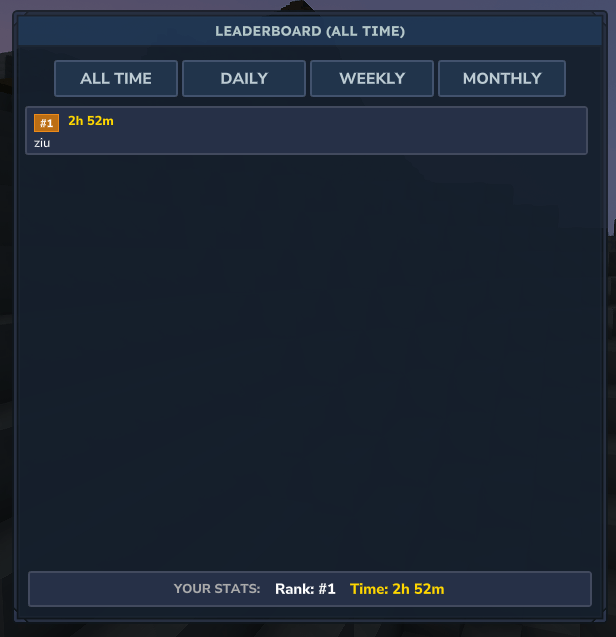
🖥️ Interactive GUI: Browse leaderboards in a modern, dark-themed menu with tabs for Daily, Weekly, Monthly, and All-time stats.
🛡️ Secure & Manageable: Full permission support (playtime.check, playtime.admin, etc.) gives server owners total control.
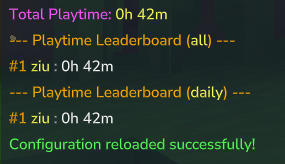
🚀 Live Tracking: Top 10 lists and personal stats update instantly—even while you are playing.
🎨 Hex Color Support: Use modern RGB colors (e.g., &#FF0000) in all your broadcast messages and configs.
💾 Dual Database Support: SQLite: Zero-setup local database (default).
MySQL: High-performance support for large networks.
🎁 How to Add Timed Rewards
You can configure rewards directly in-game without touching config files!
1. Create a Reward: Use the admin command to add a new reward. /playtime admin addReward <id> <period> <time> "<command>"
id: A unique name (e.g., daily_bonus).
period: Choose daily, weekly, monthly, or all (all-time).
time: The required time (e.g., 30m, 1h, 1d).
command: The console command to run. Use %player% for the username.
Example: Give 10 gold after 1 hour of playtime today: /playtime admin addReward daily_gold daily 1h "economy give %player% 10"
2. Manage Rewards:
List all rewards: /playtime admin listRewards
Delete a reward: /playtime admin removeReward <id>
Player view: Players can type /playtime rewards to see what they have claimed or what is coming up next!
📜 Commands & Permissions
Command Permission Description
/playtime playtime.check View your own total playtime.
/playtime rewards playtime.check View your reward status (Claimed/Locked).
/playtime menu playtime.gui Open the interactive Leaderboard GUI.
/playtime top playtime.top View the Leaderboard.
/playtime admin playtime.admin View the in-game tutorial for rewards.
/playtime admin addReward playtime.admin Add a new timed reward.
/playtime reload playtime.reload Reload the config.json without restarting.
Note: You can change /playtime to /pt, /stat, or any custom alias in the config!
⚙️ Configuration
The plugin generates a config.json in your mods/Playtime folder. You can edit:
Rewards: You can also edit rewards manually in the JSON list if you prefer files over commands.
Database: Switch between SQLite and MySQL.
Aliases: Change the main command name and aliases.
GUI Settings: Customize the window title, button names, and footer text.
Messages: Full control over prefixes, hex colors, and text output.
🗺️ Roadmap & To-Do
We are actively developing Advanced Playtime! Here is what's coming next:
AFK Detection: Stop counting playtime if a player hasn't moved for X minutes.
Milestone Broadcasts: Announce to the server when a player hits a major goal (e.g., "Player has reached 100 hours!").
Web Interface: (Planned) View leaderboards on a website using the MySQL database.
🔧 Installation
Download the .jar file.
Drop it into your Hytale Server's mods folder.
Start the server!
Found a bug or have a suggestion? Open an issue on our [GitHub Repository]!
Categories
Screenshots
Need a Server?
Run Advanced Playtime & Rewards on a dedicated Hytale server with easy mod management.
Get Hytale HostingFrequently Asked Questions
What is Advanced Playtime & Rewards?
Allows server owners to track player activity with precision, store data locally or via MySQL, and display live, auto-updating leaderboards.
How do I download Advanced Playtime & Rewards?
You can download Advanced Playtime & Rewards for free from CurseForge. Click the "Download on CurseForge" button on this page to go directly to the download page.
Who created Advanced Playtime & Rewards?
Advanced Playtime & Rewards was created by ItsZib. The mod has been downloaded 1.3K times.
Is Advanced Playtime & Rewards compatible with Hytale servers?
Advanced Playtime & Rewards is designed for Hytale and can be used on both single-player and multiplayer servers. Check the mod page on CurseForge for specific compatibility information.
How do I install Advanced Playtime & Rewards?
To install Advanced Playtime & Rewards: 1) Download the mod from CurseForge, 2) Place the file in your Hytale mods folder, 3) Restart the game. The mod should load automatically.
Related Utility Mods
View all mods
BetterMap
Paralaxe
Enhance Hytale World Map

Hybrid
Serilum
🏛️ A Hytale mod library that contains common code for all of Serilum's mods.

VeinMining
EineNT
Instantly mine connected ores and blocks by holding the Walk key (LEFT ALT) while breaking a single block.

Wayback Charm
DarkhaxDev
A charm to help you find your way back home.

Better Modlist
Buuz135
Adds a better modlist to the game, with improved features like searching and logos.

Simple Claims
Buuz135
Adds a chunk claim and protection system.