Advanced Scoreboard
Clean, config-first Minecraft-style scoreboard for Hytale servers.
About Advanced Scoreboard
Advanced Scoreboard for Hytale
Transform your Hytale server with a fully customizable, Minecraft-style scoreboard that displays real-time player and server information.
Designed to be clean, predictable, and config-first — not command-heavy or visually cluttered. This is the better scoreboard!
✨ Features
Custom Logo & Colors
Add your own logo and use full color support, including hex codes, to brand your scoreboard.
Dynamic Placeholders
Uses PlaceholderLib to display live player and server information.
Real-Time Updates
Scoreboard content refreshes automatically as values change.
Player Toggle Command
Players can use /sboard to toggle the scoreboard on or off.
Admin Reload Command
Admins can use /sbrl to reload the configuration without restarting the server.
Fully Configurable
Customize the title, lines, colors, and layout entirely via Scoreboard.yml.
Custom Animations
Create animated text with frame-by-frame control using Animations.yml.
✅ Requirements
MultipleHUD: Required to manage multiple HUD elements.
PlaceholderLib: Required for dynamic placeholders.
🚀 Quick Start
Install
Place AdvancedScoreboard.jar and the required mods into your server’s mods folder.
Start
Run your server to generate the default configuration.
Customize
Edit mods/AdvancedScoreboard/Scoreboard.yml to your liking.
Reload
Use /sbrl in-game to apply changes instantly.
🎮 Commands
/sboard
Toggles the scoreboard on or off for the player.
/sbrl
Reloads the scoreboard configuration file.
(Requires admin / configured permissions)
⚙️ Configuration
Customize your scoreboard by editing mods/AdvancedScoreboard/Scoreboard.yml.
Note: The scoreboard currently supports a maximum of 12 lines.
Example Scoreboard.yml:
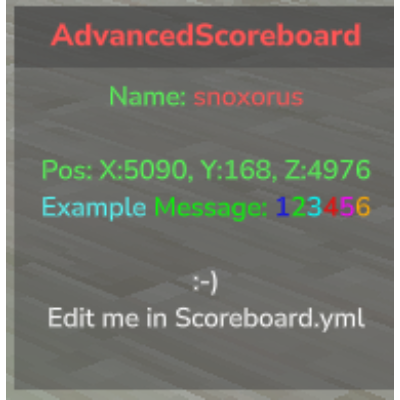
title: "&cAdvanced &dScoreboard" showLogo: true lines: - "{animation:welcome}" - "&aName: &c%player_name%" - "&aRank: %luckperms_prefix% %luckperms_group% %luckperms_suffix%" - "" - "&aPos: X:%player_x%, Y:%player_y%, Z:%player_z%" - "&aOnline: _online/%server_max_players%" - "&bExample &2Message: &11&22&33&44&55&66" - "" 🎨 Colors & Formatting
Color Codes: Use & followed by a number/letter (e.g., &c for red).
Hex Colors: Use &# followed by a 6-digit hex code (e.g., &#FF5733).
Formatting:(WIP fix.) Use codes like &l (Bold), &o (Italic), &n (Underline).
🎬 Animations
Create animated text effects using Animations.yml:
change-interval: 400 frames: - "&eH_" - "&eHe_" - "&eHel_" - "&eHell_" - "&eHello_" Using Animations: Add animations to your scoreboard using {animation:name} format:
lines: - "{animation:hello}" - "&aPlayer: &c%player_name%"
📍 Placeholders
AdvancedScoreboard gets its power from PlaceholderLib.
Any placeholder available on your server will work automatically.
LuckPerms
(Required for these placeholders)
%luckperms_prefix%
%luckperms_suffix%
%luckperms_group%
Player
%player_name%
%player_uuid%
%player_x% %player_y% %player_z%
%player_language%
Server
%server_name%
%server_max_players%
%server_default_world%
%server_gamemode%
Legacy Placeholders (Deprecated):
_player _online _pos_x _pos_y _pos_z _lp_prefix _lp_suffix _lp_group
It is strongly recommended to use PlaceholderLib equivalents.
🛠️ Troubleshooting
Scoreboard Not Showing? Ensure MultipleHUD and PlaceholderLib are installed and running correctly.
Check for errors in the server console when you start the server.
Config Changes Not Applying? Use the /sbrl command.
Verify your Scoreboard.yml has valid YAML syntax.
Logo Not Changing? Due to how Hytale currently handles mod resources, the logo (logo.png) must be manually replaced inside the .jar file. You can find it at \Common\UI\Custom\Textures\logo.png within the jar.
Animations Not Working? Ensure your animation names in {animation:name} match exactly with those defined in Animations.yml.
Check that your Animations.yml file is in the correct location (mods/AdvancedScoreboard/Animations.yml).
Use /sbrl to reload both scoreboard and animation configurations.
📚 Need Help?
Join our Discord Server for support, to suggest features, or to check out our other mods!
Categories
Need a Server?
Run Advanced Scoreboard on a dedicated Hytale server with easy mod management.
Get Hytale HostingFrequently Asked Questions
What is Advanced Scoreboard?
Clean, config-first Minecraft-style scoreboard for Hytale servers.
How do I download Advanced Scoreboard?
You can download Advanced Scoreboard for free from CurseForge. Click the "Download on CurseForge" button on this page to go directly to the download page.
Who created Advanced Scoreboard?
Advanced Scoreboard was created by Snoxorus. The mod has been downloaded 502 times.
Is Advanced Scoreboard compatible with Hytale servers?
Advanced Scoreboard is designed for Hytale and can be used on both single-player and multiplayer servers. Check the mod page on CurseForge for specific compatibility information.
How do I install Advanced Scoreboard?
To install Advanced Scoreboard: 1) Download the mod from CurseForge, 2) Place the file in your Hytale mods folder, 3) Restart the game. The mod should load automatically.
Related Utility Mods
View all mods
BetterMap
Paralaxe
Enhance Hytale World Map

Hybrid
Serilum
🏛️ A Hytale mod library that contains common code for all of Serilum's mods.

VeinMining
EineNT
Instantly mine connected ores and blocks by holding the Walk key (LEFT ALT) while breaking a single block.

Wayback Charm
DarkhaxDev
A charm to help you find your way back home.

Better Modlist
Buuz135
Adds a better modlist to the game, with improved features like searching and logos.

Simple Claims
Buuz135
Adds a chunk claim and protection system.