
BroadcastSystem
A lightweight Hytale plugin that sends configurable automatic and manual chat and title announcements, plus join messages, with legacy & color codes and placeholders.
About BroadcastSystem
The 1.1 will be a final version for now. I prefer to have a reliable plugin without errors than a plugin with multiple methods and errors or lags.
Looking for an easy way to display server tips, rules, Discord links, or announcements? BroadcastSystem provides two independent auto-broadcast systems (Chat + Title), plus join messages, manual commands, & colors, placeholders, and a clean JSON configuration.
Features:
✅ Chat broadcasts (multi-line supported)
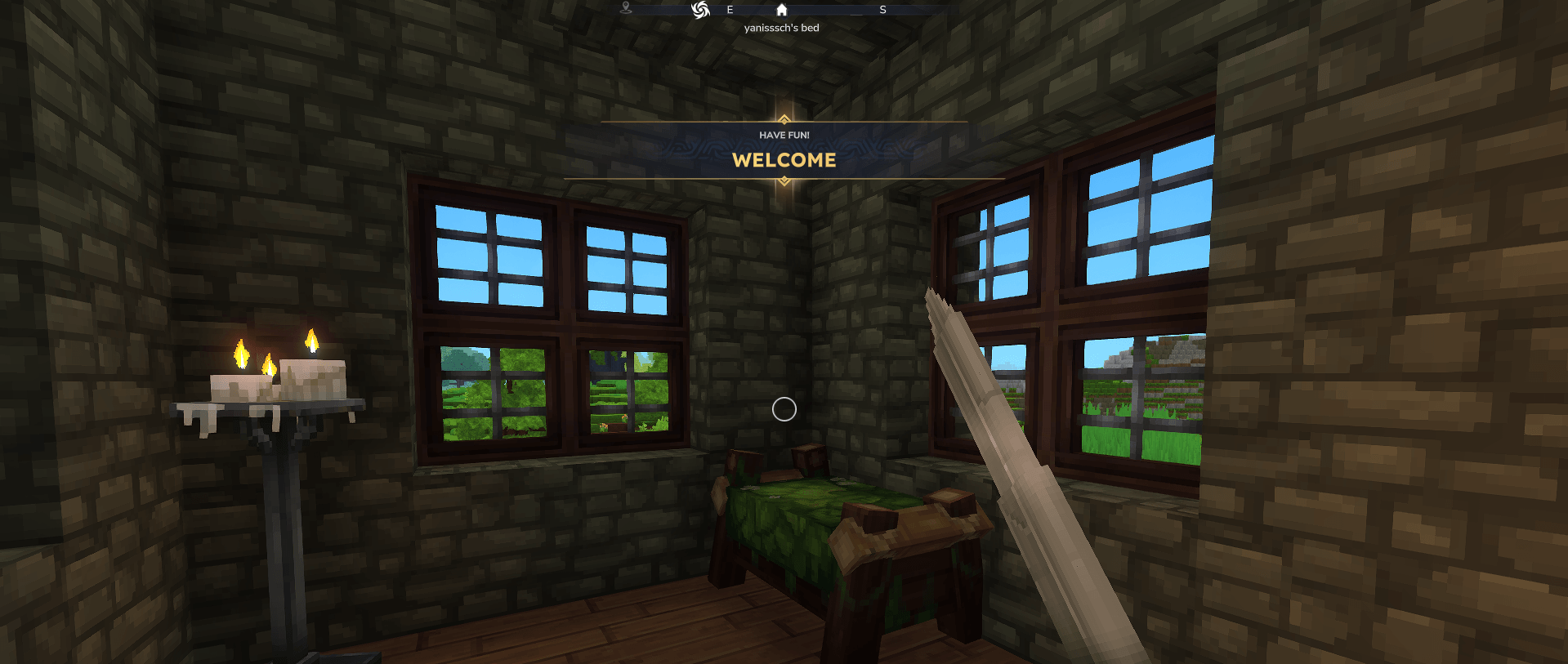
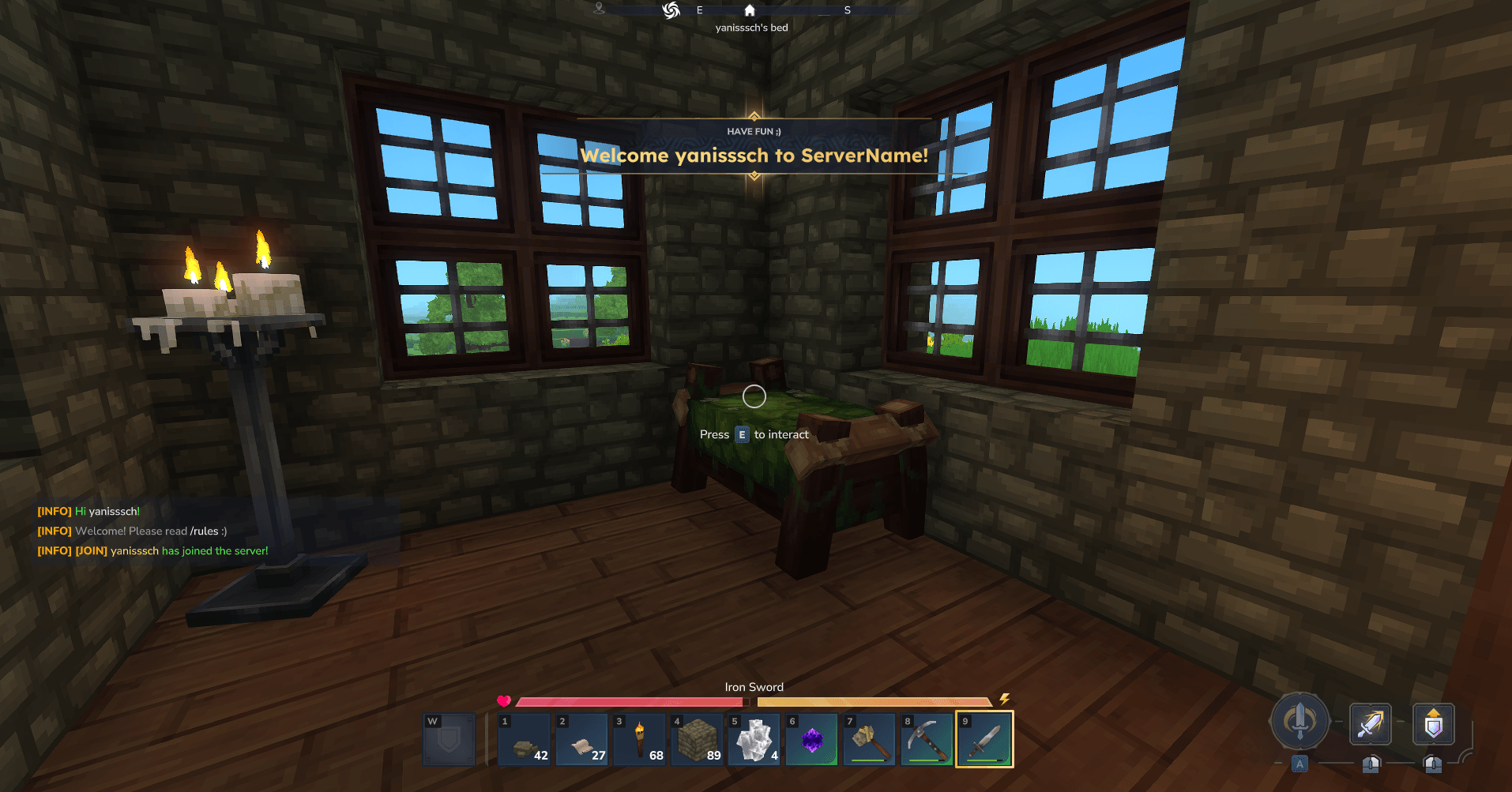
✅ Title broadcasts (Event Title / “big title” in the middle of the screen)
It also includes:
✅ Manual broadcast commands
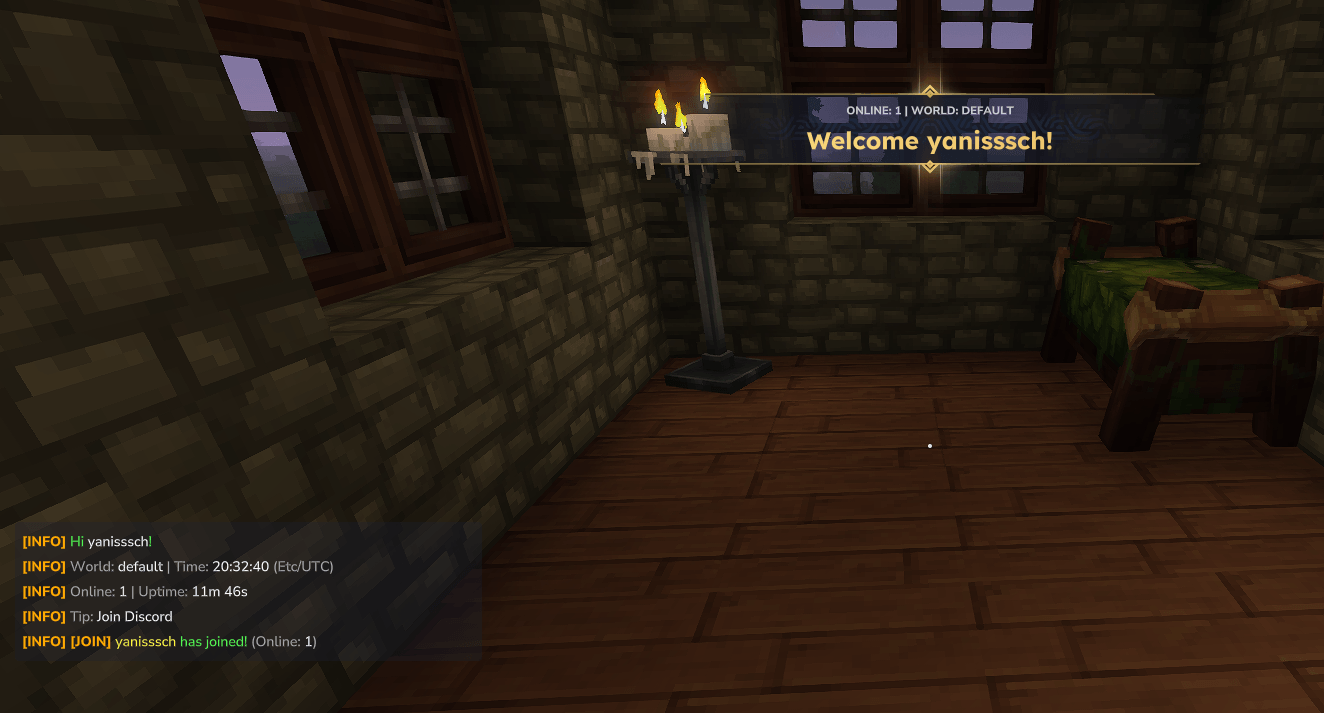
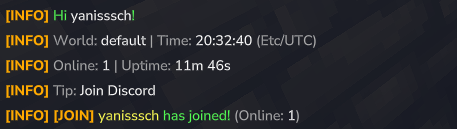
✅ Join messages (private message to joiner + public message to everyone)
✅ Minecraft-style & color codes
✅ Placeholders like %player% and %joiner%
✅ Simple JSON configuration (config.json)
Features
1) Two independent broadcast systems
Each system has its own settings:
enabled/disabled
interval in seconds
shuffle mode (random) or round-robin order
So you can run:
Chat every 120s
Title every 300s
Or disable one entirely.
2) Shared announcement pool with per-entry targets
You define announcements once in "announcements" and choose where they go using:
"targets": ["CHAT"]
"targets": ["TITLE"]
Each announcement can contain:
"chat" content (multi-line block)
"title" content
"subtitle" content (optional)
3) Join messages (optional)
Two dedicated join message sections:
joinSelf: only sent to the joining player
joinServer: broadcast to all online players
Both support:
chat and/or title targets
multi-line blocks
placeholders
optional disabling of vanilla join message
4) Text formatting
Legacy color codes
Supports Minecraft-like codes:
Colors: &0 to &9, &a to &f
Formatting: &l (bold), &o (italic), &r (reset)
Works with both & and §
Multi-line blocks
For chat messages (and join chat), you can use:
"chat": "----\nLine 1\nLine 2\n----"
Or simply use \n newlines.
5) Placeholders
%player% Replaced with the recipient player name (the player who receives the message).
%joiner% Replaced with the joining player name (only meaningful for join messages).
%world% Replaced with the recipient player’s current world (best-effort: name/id/uuid depending on API availability).
%players_online% Replaced with the number of players currently online.
%online% (alias of %players_online%) Same as above, shorter name.
%server_uptime% Replaced with the server/plugin uptime (time since plugin boot), formatted like: 12m 05s, 3h 12m 09s, 2d 04h 01m 33s
%time% Current server local time: HH:mm:ss Example: 21:43:10
%date% Current server local date: yyyy-MM-dd Example: 2026-01-15
%datetime% Current server local date + time: yyyy-MM-dd HH:mm:ss Example: 2026-01-15 21:43:10
%day% Current day of week (uppercase): MONDAY, TUESDAY, etc.
%timezone% Current server system timezone id (example: Europe/Paris)
Random integer
%random_int:min:max% Generates a random integer between min and max (inclusive). Examples:
%random_int:1:100% → 42
%random_int:-5:5% → -1
%random_int:10:10% → 10
Random choice
%random_choice:a|b|c% Randomly picks ONE option from a | separated list. Examples:
%random_choice:Read /rules|Join Discord|Use /help%
%random_choice:Hello|Hi|Hey%
✅ Supports placeholders inside options, for example:
%random_choice:Online: %online%|World: %world%|Time: %time%%
Commands
Main command: /hb
/bs reload
Reloads config.json and restarts the broadcast schedulers.
/bs status
Shows current status:
whether chat/title systems are enabled
intervals
pool sizes
config file path
/bs now [chat|title|both]
Instantly sends a broadcast from the configured pool.
Examples:
/bs now
/bs now chat
/bs now title
/bs start [chat|title|both]
Starts broadcasting.
Examples:
/bs start
/bs start chat
/bs stop [chat|title|both]
Stops broadcasting.
Examples:
/bs stop
/bs stop title
/bs send chat <message...>
Sends a manual chat announcement to all players.
Example:
/bs send chat &aHello world!
/bs send title <message...>
Sends a manual title announcement to all players. Supports \n to force multi-line title.
Example:
/bs send title &eServer Restart\n&7In 5 minutes
Permissions
Admin permission (full control)
- broadcast_system.admin Allows:
reload
status
start/stop
now
Send permission (manual broadcasts only)
- broadcast_system.send Allows:
/hb send chat ...
/hb send title ...
Operator fallback
If your server uses role permissions, the plugin also allows:
role.operator
Configuration
The plugin creates:
mods/Yanisssch_BroadcastSystem/config.json
Key sections:
chat
title
joinSelf
joinServer
announcements
Important notes
If "showSubtitle": false, subtitles will be hidden even if provided.
If subtitle is empty, title.defaultSubtitle is used (when enabled).
If disableDefaultJoinMessage is true for join configs, vanilla join broadcast is disabled.
Do not use colors for Title, this not work….
Do not use BOTH target for announcement (currently fixing an issue with this target)
Be careful when making the config, keep backup in case your making errors, the "," and "{}" are very important and do not use " in the chat or title it can break the config itself ;)
Take time to test the plugin and read all the config file
And, this plugin is the first i made for Hytale, i'm still learning the api so if you see some bugs do not hesitate to tell me on discord "Yanisssch_Sori"
Example Config
{ "_comment": "BroadcastSystem config.json - examples. Colors(only for the chat - not the titles!): &a, &6, &l, &r… Placeholders: %player% = recipient, %joiner% = joining player. '\n' blocks allow multi-line text only for chat, not titles!", "_help_targets": "targets for JoinSelf and JoinServer can be: [\"CHAT\"], [\"TITLE\"], and for announcement can be [\"BOTH\"] (or [\"CHAT\",\"TITLE\"]).",
"chat": { "_comment": "Automatic announcements in chat.", "enabled": true, "intervalSeconds": 120, "shuffle": false, "prefix": "&6&l[INFO]&r " },
"title": { "_comment": "Automatic announcements as center title (EventTitle).", "enabled": true, "intervalSeconds": 300, "shuffle": false, "showSubtitle": true, "defaultSubtitle": "&eAnnouncement", "animate": true },
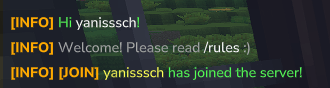
"joinSelf": { "_comment": "Message sent ONLY to the joining player (private).", "enabled": true, "disableDefaultJoinMessage": true, "targets": ["BOTH"], "chat": "----\n&aHi &f%player%&a!\n&7Welcome! Please read &f/rules&7 :)\n----", "title": "Welcome %player% to ServerName!", "subtitle": "Have fun ;)",
"_example_title": { "_comment": "ALTERNATIVE EXAMPLE: show a Title instead of chat", "enabled": false, "disableDefaultJoinMessage": true, "targets": ["TITLE"], "title": "WELCOME", "subtitle": "&7Rules: &f/rules" },
"_example_chat": { "_comment": "ALTERNATIVE EXAMPLE: show a Chat instead of title", "enabled": false, "disableDefaultJoinMessage": true, "targets": ["CHAT"], "chat": "----\n&aHi &f%player%&a!\n&7Welcome! Please read &f/rules&7 :)\n----" } },
"joinServer": { "_comment": "Message sent to EVERYONE when someone joins.", "enabled": true, "disableDefaultJoinMessage": true, "targets": ["CHAT"], "chat": "----\n&6&l[JOIN]&r &e%joiner% &ahas joined the server!\n----",
"_example_both": { "_comment": "ALTERNATIVE EXAMPLE: send both CHAT + TITLE at the same time.", "enabled": false, "disableDefaultJoinMessage": true, "targets": ["BOTH"], "chat": "----\n&6&l[JOIN]&r &e%joiner% &ahas joined the server!\n----", "title": "&aNew player!", "subtitle": "&e%joiner%" } },
"_comment": "For the announcement, no BOTH for the target (Currently fixing an issue with this part)", "announcements": [ { "_comment": "EXAMPLE 1: CHAT multi-line announcement (with ----\n block).", "targets": ["CHAT"], "chat": "----\n&bWelcome &f%player%&b!\n&7Make sure to read &f/rules&7 :)\n----" },
{ "_comment": "EXAMPLE 2: TITLE announcement.", "targets": ["TITLE"], "title": "WELCOME", "subtitle": "Have fun!" },
{ "_comment": "EXAMPLE 3: TITLE without subtitle).", "targets": ["TITLE"], "title": "Need help?", "subtitle": "" },
{ "_comment": "EXAMPLE 4: CHAT Discord announcement.", "targets": ["CHAT"], "chat": "----\n&bDiscord: &ddiscord.gg/....\n&7Come say hi!\n----" }
] }
Use cases
Server tips / rules reminders
Discord link rotations
Event announcements
Welcome messages
Installation
Download the .jar
Put it in the mods folder in your server files
Restart the server
Check the config file at /mods/Yanisssch_BroadcastSystem
Restart the server or do /hbs reload
And check the result
And voila ;)
SUPPORT
You can contact me on discord only: Yanisssch_Sori (i can take 6 to 12hours to respond)
Categories
Screenshots

Need a Server?
Run BroadcastSystem on a dedicated Hytale server with easy mod management.
Get Hytale HostingFrequently Asked Questions
What is BroadcastSystem?
A lightweight Hytale plugin that sends configurable automatic and manual chat and title announcements, plus join messages, with legacy & color codes and placeholders.
How do I download BroadcastSystem?
You can download BroadcastSystem for free from CurseForge. Click the "Download on CurseForge" button on this page to go directly to the download page.
Who created BroadcastSystem?
BroadcastSystem was created by yanisssch. The mod has been downloaded 188 times.
Is BroadcastSystem compatible with Hytale servers?
BroadcastSystem is designed for Hytale and can be used on both single-player and multiplayer servers. Check the mod page on CurseForge for specific compatibility information.
How do I install BroadcastSystem?
To install BroadcastSystem: 1) Download the mod from CurseForge, 2) Place the file in your Hytale mods folder, 3) Restart the game. The mod should load automatically.
Related Utility Mods
View all mods
BetterMap
Paralaxe
Enhance Hytale World Map

Hybrid
Serilum
🏛️ A Hytale mod library that contains common code for all of Serilum's mods.

VeinMining
EineNT
Instantly mine connected ores and blocks by holding the Walk key (LEFT ALT) while breaking a single block.

Wayback Charm
DarkhaxDev
A charm to help you find your way back home.

Better Modlist
Buuz135
Adds a better modlist to the game, with improved features like searching and logos.

Simple Claims
Buuz135
Adds a chunk claim and protection system.