ChatFilter / Reportsystem
A simple Hytale mod providing a chat filter and an easy-to-use in-game report system.
About ChatFilter / Reportsystem
The ChatFilter mod started as simple Chat/Profanity-Filter, during the development, I knew i can't cover every possible bypass. So I added a simple Report-System.
Key-Features:
Light-Weight Chatfilter Config
Permissions for pretty every command
In-game commands to change filtering
Notification to any admins if a player is getting reported
Own UI for admins to process the reports
Kick, Tempban or Permaban reported players
Known Issues:
Kick Screen Sync: Sometimes, even after a player is successfully kicked from the server, the Hytale client may still appear connected and fail to show the kick screen. This seems to be a issus with hytale it self. I added a (temporary) message that is sent to the player, which has the same content as the screen message and a request that the player must disconnect manually
Scuntthorpe Problem: Simply explained, it can lead to false positives in the word detection, especially with very short words. I'll add a whitelist in the future to counter this Problem at least a bit. -> I added a whitelist in 1.0.1 now
Commands:
/chatfilter
/chatfilter add <Word>
/chatfilter remove <Word>
/chatfilter list
/chatfilter mode <censor/block>
/chatfilter sync
/chatfilter test <Word>
/chatfilter whitelist
/chatfilter whitelist add <Word>
/chatfilter whitelist remove <Word>
/chatfilter whitelist list
/report <Player> <Reason>
/reports
You can see what each command can do (if not self-explanatory) below in the "Permissions" Part
Showcase:
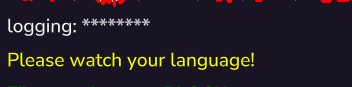
A filtered message with "censor" mode:
A filtered message with "block" mode:
Report-UI:
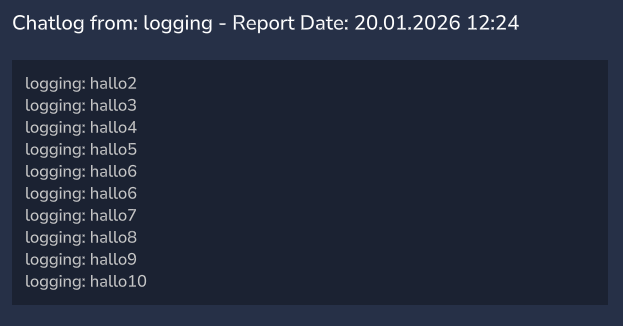
Chatlog (last 10 messages from the reported player)
Permissions:
Chatfilter-permissions
chatfilter.command.chatfilter | Allows you /chatfilter (which is pretty useless and only shows the subcommands you are allowed to use)
chatfilter.command.chatfilter.add | Allows you to add a word to the filter
chatfilter.command.chatfilter.remove | Allows you to remove a word to the filter
chatfilter.command.chatfilter.list | Allows you to list all filtered words
chatfilter.command.chatfilter.mode | Allows you to change the Filter-Mode (censor just replace every bad char; block the message completely)
chatfilter.command.chatfilter.sync | Allows you to sync/reload the config if you edited the config-file on the server while it stays online
chatfilter.command.chatfilter.test | Allows you to test if a message would be filtered
chatfilter.command.chatfilter.whitelist | Allows you /chatfilter whitelist (which is pretty useless and only shows the subcommands you are allowed to use)
chatfilter.command.chatfilter.whitelist.add | Allows you to add a word to the whitelist
chatfilter.command.chatfilter.whitelist.remove | Allows you to remove a word to the whitelist
chatfilter.command.chatfilter.whitelist.list | Allows you to list all whitelisted words
Report-permissions
Everyone can report everyone (except yourself)
chatfilter.command.reports | Anyone with this permission will be notified when a player is reported. NOTE: ANYONE WITH THIS PERMISSION CAN KICK & BAN WITH THE UI, PLEASE GRANT THIS PERMISSION CAREFULLY
Categories
Screenshots



Need a Server?
Run ChatFilter / Reportsystem on a dedicated Hytale server with easy mod management.
Get Hytale HostingFrequently Asked Questions
What is ChatFilter / Reportsystem?
A simple Hytale mod providing a chat filter and an easy-to-use in-game report system.
How do I download ChatFilter / Reportsystem?
You can download ChatFilter / Reportsystem for free from CurseForge. Click the "Download on CurseForge" button on this page to go directly to the download page.
Who created ChatFilter / Reportsystem?
ChatFilter / Reportsystem was created by fabi361. The mod has been downloaded 60 times.
Is ChatFilter / Reportsystem compatible with Hytale servers?
ChatFilter / Reportsystem is designed for Hytale and can be used on both single-player and multiplayer servers. Check the mod page on CurseForge for specific compatibility information.
How do I install ChatFilter / Reportsystem?
To install ChatFilter / Reportsystem: 1) Download the mod from CurseForge, 2) Place the file in your Hytale mods folder, 3) Restart the game. The mod should load automatically.
Related Utility Mods
View all mods
BetterMap
Paralaxe
Enhance Hytale World Map

Hybrid
Serilum
🏛️ A Hytale mod library that contains common code for all of Serilum's mods.

VeinMining
EineNT
Instantly mine connected ores and blocks by holding the Walk key (LEFT ALT) while breaking a single block.

Wayback Charm
DarkhaxDev
A charm to help you find your way back home.

Better Modlist
Buuz135
Adds a better modlist to the game, with improved features like searching and logos.

Simple Claims
Buuz135
Adds a chunk claim and protection system.