DiscordRelay
A simple chat bridge between your Hytale server and Discord.
About DiscordRelay
Discord Relay
Bridges your Hytale server with Discord. Chat syncs both ways, player events get posted to your channel, and you can even run console commands from Discord.
Features
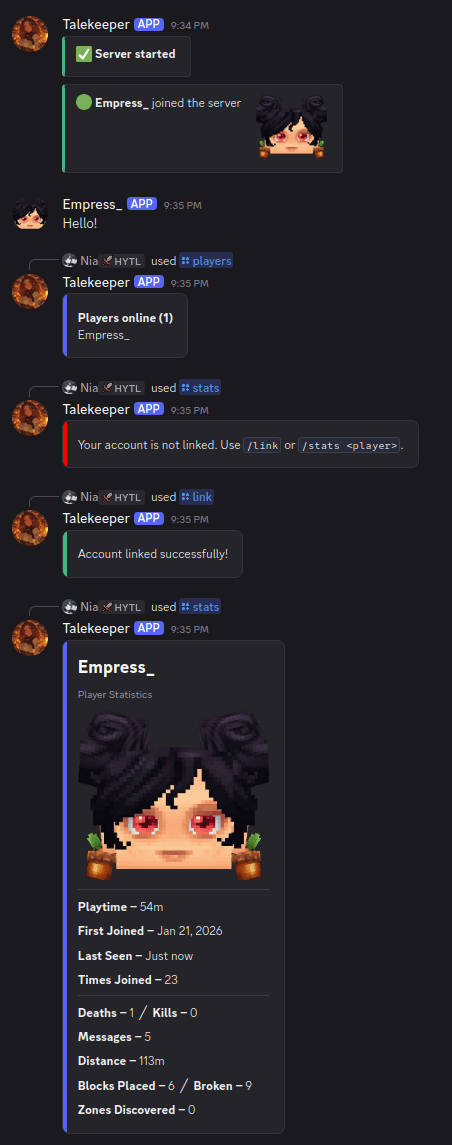
Chat relay - messages sync between Discord and in-game
Join/leave notifications - with player avatar thumbnails
Death messages - announces player deaths
Server start/stop announcements
Console channel - run server commands from Discord
Account linking - link Discord to in-game accounts with /link
Player stats - track playtime, blocks placed/broken, chat messages, deaths
Role sync - auto-assign Discord roles when linked (bot needs Manage Roles)
Nickname sync - set Discord nickname to in-game name (bot needs Manage Nicknames)
Bot status - shows player count as Discord bot status
Chat filter - censor or block words (configurable word list)
Embed messages - Discord embeds for join/leave/death/status (bot needs Embed Links)
AFK detection - marks players as AFK after configurable timeout
Commands
Supports both slash commands and prefix commands.
Discord:
/players or !players - list online players
/link <code> or !link <code> - link your account
/unlink or !unlink - unlink your account
/stats [player] or !stats [player] - view player statistics
In-game:
/players - list online players
/link - get a link code
/unlink - unlink your account
Config
Toggle any feature on/off
Custom message formats with %player% and %message% placeholders
Console command blacklist (blocks dangerous commands by default)
Named colors supported (red, dodgerblue, etc.) or hex codes
Chat filter with censor or block mode
Optional embed messages (can be disabled for plain text)
Separate channels for chat, console, and join/leave messages
Webhook mode - create a webhook in Discord and set the URL in config to show player avatars and usernames in chat messages
Setup
Create a bot at discord.com/developers, enable Message Content intent
Drop the JAR in your mods folder
Start server once, then edit mods/DiscordRelay/config.yml
Add your bot token and channel ID
Restart
Privacy Notice
Since Hytale doesn't provide an official avatar API yet, I built a custom renderer to make player avatars work. When the avatar feature is enabled, player skin data (cosmetic choices) and UUID are sent to our avatar rendering server (api.blocktale.gg) to generate player head images for Discord embeds. This data is used solely for avatar generation and is not shared with third parties. You can disable this feature in the config by setting avatar.enabled to false.
Note: The avatar feature is currently in beta and may occasionally fail or be slow. If avatars aren't loading, the plugin will fall back to showing messages without avatars.
Support
For issues, suggestions, or questions, join our Discord: https://discord.gg/knXSzeute3
Categories
Screenshots
Need a Server?
Run DiscordRelay on a dedicated Hytale server with easy mod management.
Get Hytale HostingFrequently Asked Questions
What is DiscordRelay?
A simple chat bridge between your Hytale server and Discord.
How do I download DiscordRelay?
You can download DiscordRelay for free from CurseForge. Click the "Download on CurseForge" button on this page to go directly to the download page.
Who created DiscordRelay?
DiscordRelay was created by darkcupid412. The mod has been downloaded 673 times.
Is DiscordRelay compatible with Hytale servers?
DiscordRelay is designed for Hytale and can be used on both single-player and multiplayer servers. Check the mod page on CurseForge for specific compatibility information.
How do I install DiscordRelay?
To install DiscordRelay: 1) Download the mod from CurseForge, 2) Place the file in your Hytale mods folder, 3) Restart the game. The mod should load automatically.
Related Utility Mods
View all mods
BetterMap
Paralaxe
Enhance Hytale World Map

Hybrid
Serilum
🏛️ A Hytale mod library that contains common code for all of Serilum's mods.

VeinMining
EineNT
Instantly mine connected ores and blocks by holding the Walk key (LEFT ALT) while breaking a single block.

Wayback Charm
DarkhaxDev
A charm to help you find your way back home.

Better Modlist
Buuz135
Adds a better modlist to the game, with improved features like searching and logos.

Simple Claims
Buuz135
Adds a chunk claim and protection system.