HWaila
HWaila is a utility mod for Hytale servers that displays a tooltip at the top of the screen with information about the block the player is currently looking at.
About HWaila
Waila is a utility mod for Hytale servers that displays a tooltip at the top of the screen with information about the block the player is currently looking at. It is a server-side implementation of the classic "What Am I Looking At" mod, utilizing Hytale's Custom UI system.
Support MultipleHUD
🌍 Localization / Языковая поддержка
This mod fully supports multi-language servers.
🇺🇸 English (en-US) — Default
🇷🇺 Russian (ru-RU) — Fully translated
✨ Features
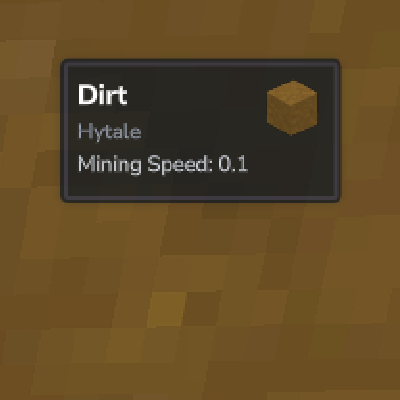
When a player looks at a block, a HUD appears displaying the following information (customizable):
Block Name: The localized name of the block.
Block Icon: Renders the actual item model of the block.
Mod Source: Displays which namespace/mod the block belongs to (e.g., Hytale, Minecraft, etc.).
Internal ID: Shows the registry key (e.g., stone).
Mining Speed: Shows how efficient the currently held tool is against the target block.
Farming Status: Shows current growth percentage and level.
📸 Screenshots
In-Game HUD
See exactly what you are looking at with real-time updates.
Configuration Menu
Fully interactive in-game GUI to toggle specific information and adjust HUD position.
⚙️ Configuration & Commands
You don't need to edit files manually! The mod comes with a built-in UI for configuration.
Command
/waila — Opens the configuration menu.
Permissions
waila.command.waila — Allows access to the /waila command.
Configurable Options
Inside the menu, every player can customize their own experience:
Content Settings
Show Waila: Master toggle to enable/disable the HUD.
Show Block Name: Toggle the display of the block's display name.
Show Mod Name: Toggle the namespace identifier.
Show Block ID: Toggle the raw technical ID.
Show Mining Speed: Toggle the tool efficiency calculator.
Show Farming Info: Toggle crop growth stage and harvestability status.
Show Item Icon: Toggle the visual icon of the block.
Visual & Layout Settings
Mirror Orientation: Flips the HUD layout (Useful for different screen setups).
HUD Scale: Adjust the size of the Waila tooltip.
Offset X / Y: Finely tune the position of the HUD on your screen.
Categories
Frequently Asked Questions
What is HWaila?
HWaila is a utility mod for Hytale servers that displays a tooltip at the top of the screen with information about the block the player is currently looking at.
How do I download HWaila?
You can download HWaila for free from CurseForge. Click the "Download on CurseForge" button on this page to go directly to the download page.
Who created HWaila?
HWaila was created by BbIJABNPOBATEJb. The mod has been downloaded 2.6K times.
Is HWaila compatible with Hytale servers?
HWaila is designed for Hytale and can be used on both single-player and multiplayer servers. Check the mod page on CurseForge for specific compatibility information.
How do I install HWaila?
To install HWaila: 1) Download the mod from CurseForge, 2) Place the file in your Hytale mods folder, 3) Restart the game. The mod should load automatically.
Related Utility Mods
View all mods
BetterMap
Paralaxe
Enhance Hytale World Map

Hybrid
Serilum
🏛️ A Hytale mod library that contains common code for all of Serilum's mods.

VeinMining
EineNT
Instantly mine connected ores and blocks by holding the Walk key (LEFT ALT) while breaking a single block.

Wayback Charm
DarkhaxDev
A charm to help you find your way back home.

Better Modlist
Buuz135
Adds a better modlist to the game, with improved features like searching and logos.

Simple Claims
Buuz135
Adds a chunk claim and protection system.