HyBackup
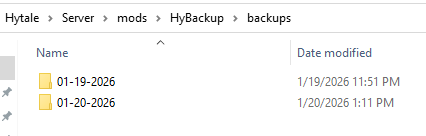
HyBackup automatically backup your Hytale server. Schedule daily or interval backups. archives are saved as .zip in mods/HyBackup/backups/ (one folder per day).
About HyBackup
HyBackup
Save your world/server from corruption or grief!
What it does
Runs automatic backups (daily at a time, or every N minutes).
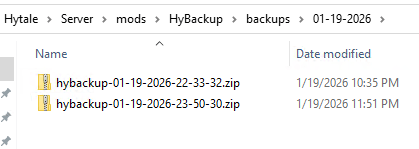
Stores backups in mods/HyBackup/backups/ with one subfolder per day (MM-dd-yyyy).
Skips locked files so backups complete reliably.
Always excludes mods/HyBackup/backups from backups.
Install
Drop HyBackup-<version>.jar into mods/ folder
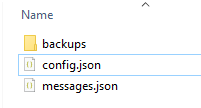
Start the server once → creates mods/HyBackup/config.json and mods/HyBackup/messages.json
Edit config.json if needed, then /hybackup-configreload or restart your world/server
Permissions
Commands are OP‑only.
Commands
/forcebackup — run a backup immediately
/hybackup-configreload — reload config and messages at runtime
Default config (defaults)
The file is generated with inline comments for quick guidance.
{ "_comments": [ "schedule: 'daily' runs once per day at 'time'; 'interval' runs every 'everyMinutes' minutes.", "time: 12-hour format (e.g., '3:00 AM'). Used only when schedule='daily'.", "everyMinutes: minutes between backups. Used only when schedule='interval'.", "target: 'world' = only 'universe'; 'entire' = whole server (excludes mods/HyBackup/backups; ZIP root is 'Server'); 'specific' = only 'include'.", "include: list of directories to include when target='specific'.", "replaceSameDay: (ZIP) true = overwrite daily ZIP; false = multiple ZIPs per day (adds HH-mm-ss)." ], "schedule": "daily", "time": "12:00 AM", "everyMinutes": 60, "replaceSameDay": true, "target": "world", "include": [ "universe" ] }
Options (quick reference)
schedule: How often backups run
"daily": one backup per day at time
"interval": a backup every everyMinutes minutes
Uses the server's local time and clock
time (when schedule = "daily")
12‑hour time, e.g. "3:00 AM"
Ignored if schedule = "interval"
everyMinutes (when schedule = "interval")
Minutes between backups, e.g. 30
Minimum 1 minute
target: What to backup
"world": only the world folder (universe)
"entire": the whole server directory, automatically excluding mods/HyBackup/backups
Inside the archive, the top‑level folder is named Server
HyBackup's config.json and messages.json are included
"specific": only the folders listed in include
include (used with target = "specific")
List of folder paths relative to the server root, e.g. ["universe", "configs"]
Each entry must exist; non‑existing paths are skipped with a warning
Use simple, top‑level folder names (no wildcards)
replaceSameDay:
true: one archive per day (overwrites hybackup-MM-dd-yyyy.zip)
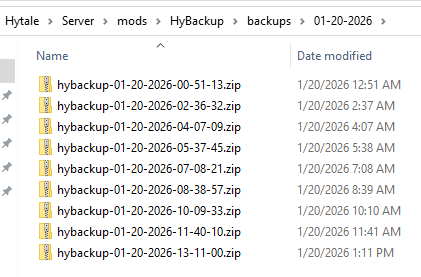
false: multiple archives per day (hybackup-MM-dd-yyyy-HH-mm-ss.zip, ...-1.zip, etc.)
Output layout
All ZIP archives are written under the day’s folder, for example:
mods/HyBackup/backups/MM-dd-yyyy/hybackup-MM-dd-yyyy.zip (replaceSameDay = true)
mods/HyBackup/backups/MM-dd-yyyy/hybackup-MM-dd-yyyy-HH-mm-ss.zip (replaceSameDay = false)
Examples
Daily at 3:00 AM, world only, one file per day:
{ "schedule": "daily", "time": "3:00 AM", "replaceSameDay": true, "target": "world", "include": ["universe"] }
Every 30 minutes, specific folders, multiple files per day:
{ "schedule": "interval", "everyMinutes": 30, "replaceSameDay": false, "target": "specific", "include": ["universe", "configs"] }
Entire server, daily at midnight, multiple files per day:
{ "schedule": "daily", "time": "12:00 AM", "replaceSameDay": false, "target": "entire", "include": ["universe"] }
Notes
When target = "entire", the root folder inside the ZIP archive is Server.
Locked files are skipped with a warning and the backup continues.
Use /hybackup-configreload after editing config.json or messages.json.
Credits
Created by burlone413, this is my first mod for Hytale, I hope you like it! For any bugs, contact me on Discord (Name = burlone413)
Categories
Screenshots


Frequently Asked Questions
What is HyBackup?
HyBackup automatically backup your Hytale server. Schedule daily or interval backups. archives are saved as .zip in mods/HyBackup/backups/ (one folder per day).
How do I download HyBackup?
You can download HyBackup for free from CurseForge. Click the "Download on CurseForge" button on this page to go directly to the download page.
Who created HyBackup?
HyBackup was created by Burlone. The mod has been downloaded 174 times.
Is HyBackup compatible with Hytale servers?
HyBackup is designed for Hytale and can be used on both single-player and multiplayer servers. Check the mod page on CurseForge for specific compatibility information.
How do I install HyBackup?
To install HyBackup: 1) Download the mod from CurseForge, 2) Place the file in your Hytale mods folder, 3) Restart the game. The mod should load automatically.
Related Utility Mods
View all mods
BetterMap
Paralaxe
Enhance Hytale World Map

Hybrid
Serilum
🏛️ A Hytale mod library that contains common code for all of Serilum's mods.

VeinMining
EineNT
Instantly mine connected ores and blocks by holding the Walk key (LEFT ALT) while breaking a single block.

Wayback Charm
DarkhaxDev
A charm to help you find your way back home.

Better Modlist
Buuz135
Adds a better modlist to the game, with improved features like searching and logos.

Simple Claims
Buuz135
Adds a chunk claim and protection system.