HyTickets
HyTickets is a Hytale server plugin that lets players open, view, and close support tickets, while staff can manage all tickets, reply, assign, and teleport to reported locations. Includes optional Discord integration.
About HyTickets
HyTickets
HyTickets is a complete in-game support ticket system for Hytale servers, designed around a clean UI-first workflow (with commands as a full fallback).
Players can create tickets, browse their own history, reply to staff, and close issues when resolved. Staff can review all tickets, assign ownership, reply in-game, take tickets with a single click, and teleport directly to the reported location.
Each ticket logs the player's world + coordinates at creation time, making issues faster to reproduce and resolve.
Storage is flexible: run on a simple JSON flatfile or use MySQL for larger servers. If you switch from flatfile to MySQL, HyTickets can automatically migrate existing ticket data.
Key highlights
UI-first experience: the primary interface for both players and staff
Full in-game workflow: create, reply, review, assign, close
Teleport to issue location: jump to saved world/coordinates
Flexible storage: JSON flatfile or MySQL
Automatic migration: flatfile -> MySQL when switching storage type
Optional Discord integration: thread-per-ticket, buttons, slash commands, and account linking
Features
Player workflow
Create tickets with a message
View open/closed tickets (and drill into details)
Reply to staff on your own tickets
Close your own tickets when done
Staff workflow
List all tickets (with optional status filtering)
Assign a ticket to yourself (or Take Ticket in the UI)
Reply to players from within the server
Teleport to the ticket's saved world/coordinates
Filter views: Open / All / Assigned to me / Closed / Unassigned
Notifications (online-only)
Staff are notified when a new ticket is created
Ticket owners are notified when staff reply
Assignees are notified when a player replies to an assigned ticket
Ticket owners are notified when a ticket is closed
Storage
FLATFILE_JSON (simple, zero-setup)
MYSQL (recommended for scale)
Automatic flatfile -> MySQL migration when changing storage type
UI (optional, but recommended)
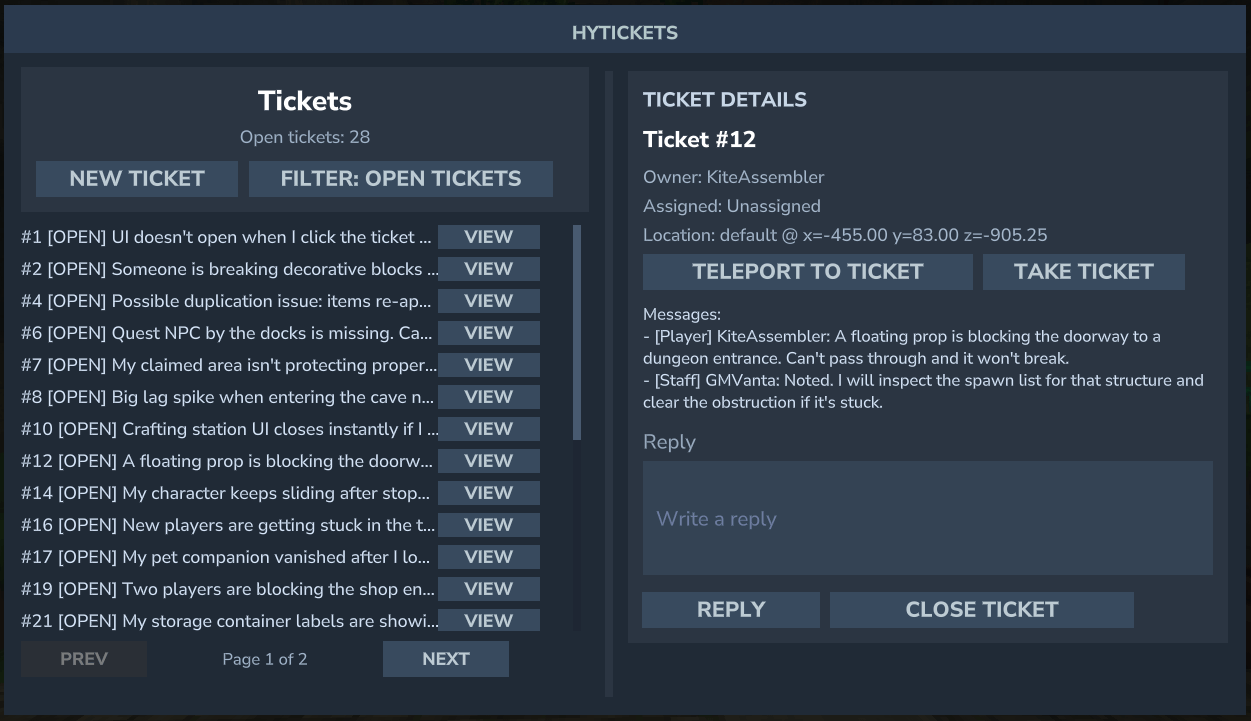
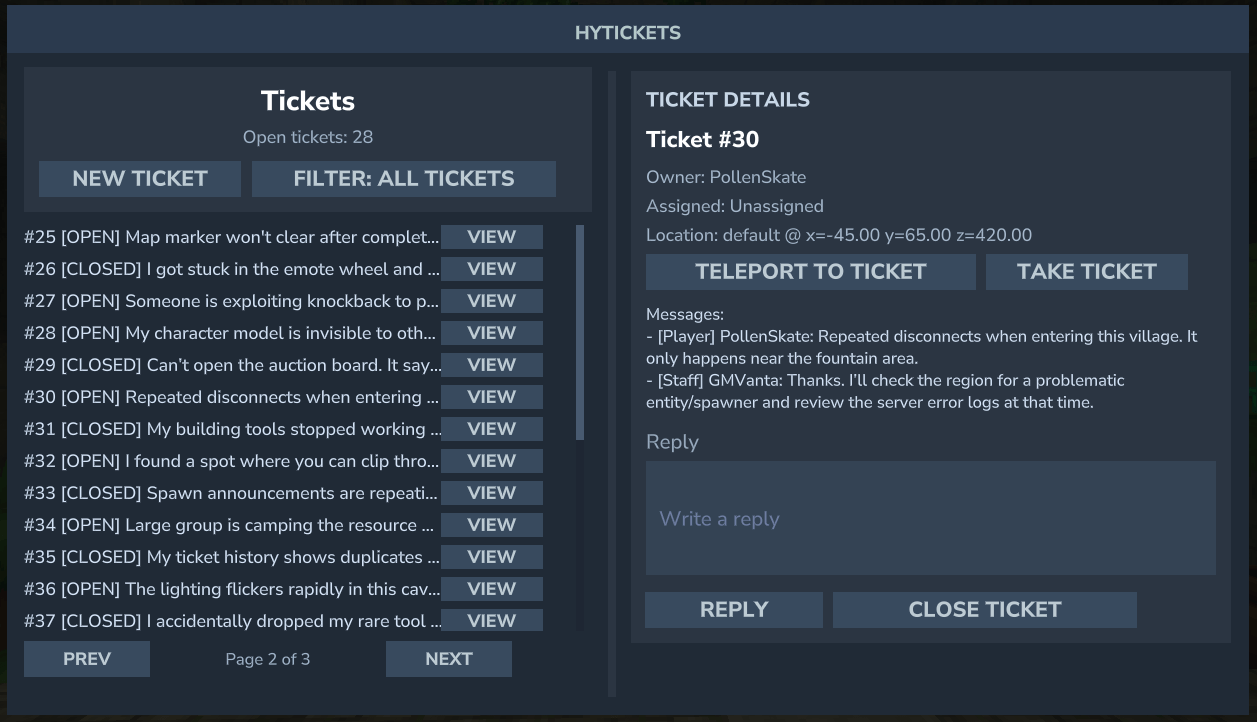
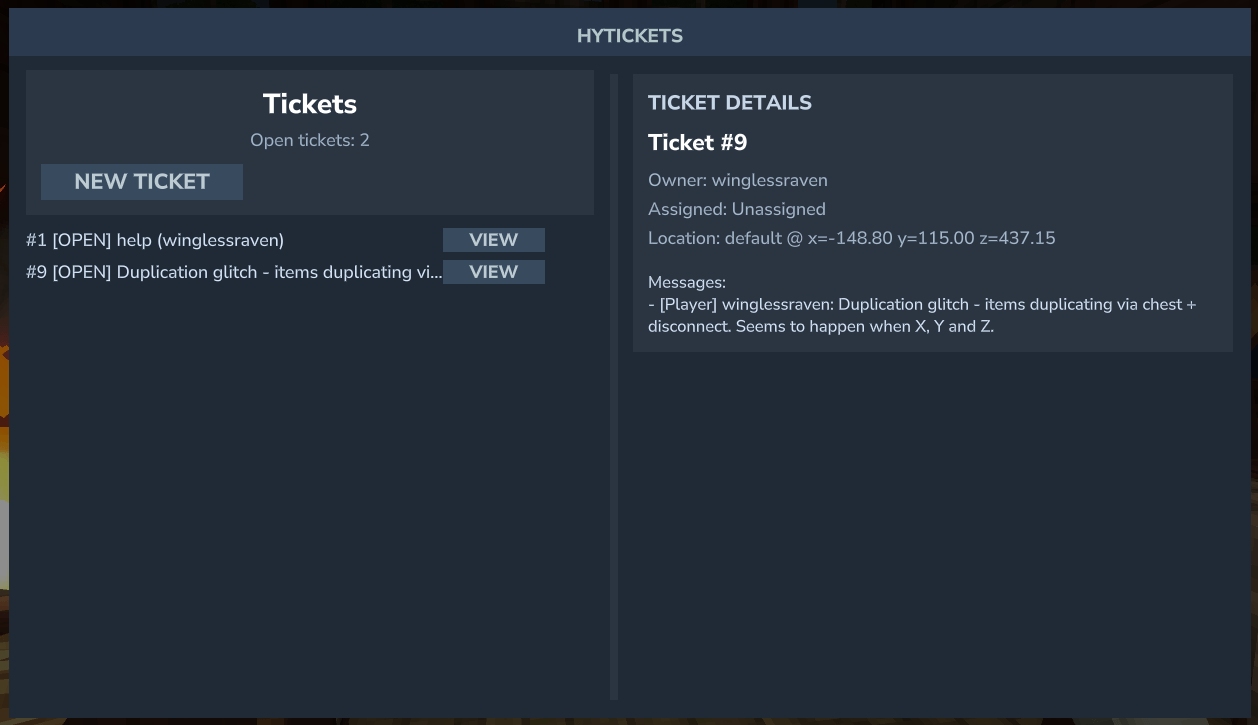
Clean in-game ticket browser
Ticket list with a preview of the first message
Ticket detail view with full conversation and metadata
Staff-only actions: Teleport, Take Ticket, Reply, Close
Staff-only filter button that cycles through views
Discord integration (optional)
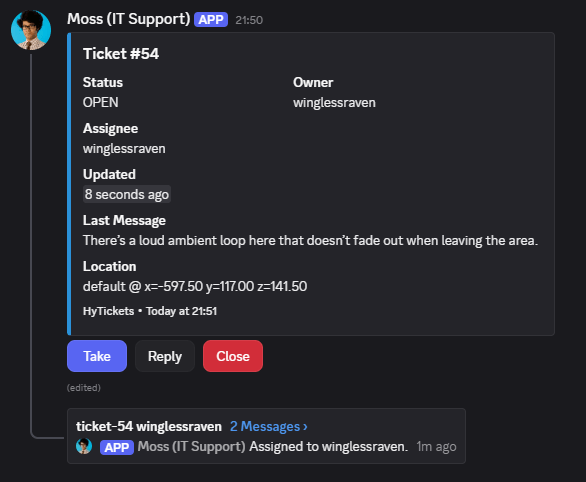
Thread-per-ticket: one embed + one thread per ticket in a configured channel
Buttons on the embed: Take / Reply / Close
Slash commands: /ticket view <id> and /ticket list [status] [assigned]
Account linking: /hytickets link in-game + /link <code> in Discord
Role-gated: only allowed role IDs can use buttons/commands
Auto-updating embeds and thread event lines for ticket changes
Automatic flatfile -> MySQL migration for Discord mappings when switching storage type
Configuration (config.json)
Core
StorageType: FLATFILE_JSON or MYSQL
FlatfilePath: file path for JSON storage
UiEnabled: true / false
MySQL
MySql.Host
MySql.Port
MySql.Database
MySql.Username
MySql.Password
MySql.UseSsl
MySql.TablePrefix
Discord (optional)
Discord.Enabled: enable the Discord module
Discord.BotToken: bot token
Discord.GuildId: guild where slash commands are registered
Discord.TicketChannelId: channel for ticket embeds/threads
Discord.AllowedRoleIds: comma/space-separated role IDs allowed to use buttons/commands
Discord.StorageType: FLATFILE_JSON or MYSQL
Discord.FlatfilePath: JSON file for Discord mappings
Discord.MySql.*: MySQL settings for Discord storage
Discord.LinkCodeExpiryMinutes: link code expiry
Discord.EmbedColor: hex color (e.g., 2B90D9)
Discord.EmbedFooter: footer text
Discord.EmbedIncludeLocation: include world/coords in embed
Example config (full)
{ "StorageType": "FLATFILE_JSON", "FlatfilePath": "tickets.json", "MySql": { "Host": "127.0.0.1", "Port": 3306, "Database": "hytickets", "Username": "root", "Password": "password", "UseSsl": false, "TablePrefix": "hyt_" }, "UiEnabled": true, "Discord": { "Enabled": false, "BotToken": "", "GuildId": "", "TicketChannelId": "", "AllowedRoleIds": "", "StorageType": "FLATFILE_JSON", "FlatfilePath": "discord.json", "MySql": { "Host": "127.0.0.1", "Port": 3306, "Database": "hytickets", "Username": "root", "Password": "password", "UseSsl": false, "TablePrefix": "hyt_" }, "LinkCodeExpiryMinutes": 10, "EmbedColor": "2B90D9", "EmbedFooter": "HyTickets", "EmbedIncludeLocation": true } }
Commands
Player Commands
Permission: hytickets.command.basic
Command Description
/hytickets Open the in-game ticket UI (recommended).
/hytickets create <message...> Create a new ticket with a full description.
/hytickets view [id] View your tickets, or a specific ticket by ID.
/hytickets reply <id> <message...> Reply to your own ticket.
/hytickets close <id> Close one of your tickets.
/hytickets link Generate a Discord link code for your account.
Staff Commands
Permission: hytickets.command.staff
Command Description
/hytickets list [status] List all tickets (optionally filter by status).
/hytickets assign <id> Assign a ticket to yourself.
/hytickets reply <id> <message...> Reply to any ticket.
/hytickets tp <id> Teleport to the ticket's saved location.
Discord Commands (optional)
Requires allowed role + linked account
Command Description
/link <code> Link your Discord account to Hytale.
/ticket view <id> View ticket details and thread link.
/ticket list [status=open/closed] [assigned=me/any] List tickets with filters.
Discord Setup Notes
The bot needs permission to View Channel, Send Messages, Create Public Threads, and Send Messages in Threads in the ticket channel.
All Discord button/command actions require a linked account. Use /hytickets link in-game, then /link <code> in Discord.
Categories
Screenshots
Need a Server?
Run HyTickets on a dedicated Hytale server with easy mod management.
Get Hytale HostingFrequently Asked Questions
What is HyTickets?
HyTickets is a Hytale server plugin that lets players open, view, and close support tickets, while staff can manage all tickets, reply, assign, and teleport to reported locations. Includes optional Discord integration.
How do I download HyTickets?
You can download HyTickets for free from CurseForge. Click the "Download on CurseForge" button on this page to go directly to the download page.
Who created HyTickets?
HyTickets was created by winglessraven. The mod has been downloaded 76 times.
Is HyTickets compatible with Hytale servers?
HyTickets is designed for Hytale and can be used on both single-player and multiplayer servers. Check the mod page on CurseForge for specific compatibility information.
How do I install HyTickets?
To install HyTickets: 1) Download the mod from CurseForge, 2) Place the file in your Hytale mods folder, 3) Restart the game. The mod should load automatically.
Related Utility Mods
View all mods
BetterMap
Paralaxe
Enhance Hytale World Map

Hybrid
Serilum
🏛️ A Hytale mod library that contains common code for all of Serilum's mods.

VeinMining
EineNT
Instantly mine connected ores and blocks by holding the Walk key (LEFT ALT) while breaking a single block.

Wayback Charm
DarkhaxDev
A charm to help you find your way back home.

Better Modlist
Buuz135
Adds a better modlist to the game, with improved features like searching and logos.

Simple Claims
Buuz135
Adds a chunk claim and protection system.