
Metrics
A powerful Hytale server utility for real-time performance monitoring, resource tracking, and secure HTTP API integration.
About Metrics
Metrics Mod for Hytale
The Metrics Mod is a powerful, lightweight utility designed for Hytale server administrators who want deep insights into their server's performance and status. Whether you're running a small community server or a large network, this mod provides the tools you need to monitor health in real-time.
🎮 Commands & Permissions
The mod provides several commands for in-game monitoring. Each command requires a specific permission node:
Command Description Permission
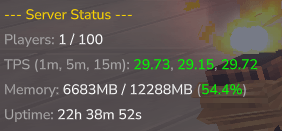
/tps View live performance stats, memory usage, and world summaries. metrics.command.tps
/status Quick summary of server health and player counts. metrics.command.status
/uptime Track exactly how long your server has been running. metrics.command.uptime
/list Detailed player list with names. metrics.command.list
/metricsdebug Diagnostics to verify API health and troubleshoot errors. metrics.command.debug
🚀 Key Features
Rolling Averages: Automatically tracks performance over time, providing rolling averages for the last 1, 5, 10, and 15 minutes.
Deep Performance Insights: High-precision TPS calculation using a delta-based approach, ensuring accuracy similar to internal tools.
Memory & Resource Tracking: Real-time monitoring of JVM memory usage (Used, Total, Max) and world metrics (entities and loaded chunks).
Network & Lag Monitoring: Track average tick times, "long ticks" (lag spikes), network connection counts, and traffic errors.
Built-in Secure HTTP API: Live Status: Access a clean JSON endpoint (/api/status) to integrate your server status with websites, Discord bots, or monitoring dashboards.
Enterprise-Grade Security: Includes configurable Rate Limiting, IP Blacklisting/Whitelisting, and Packet Size Validation to protect your API from abuse.
Configurable Visibility: Choose exactly what info is exposed (Performance, Players, Worlds, Uptime, or Server Info) via simple config toggles.
Seamless Integration: Automatically syncs with Hytale’s core configuration to report your MOTD, Server Name, Gamemode, and Whitelist status.
Update Checker: Integrated CurseForge update checking so you always have the latest improvements.
🛠️ Configuration
The mod is fully customizable via mods/MetricsMod/config.json. You can easily toggle the API, change ports, set security thresholds, and manage data visibility.
{ "apiPort": 8080, "apiEnabled": true, "rateLimitEnabled": true, "maxRequestsPerSecond": 50, "whitelistEnabled": false, "whitelistedIps": [], "showPerformance": true, "showPlayers": true, "showWorlds": true, "showUptime": true, "showNetwork": true, "updateCheckerEnabled": true }
📦 Quick Start
Drop MetricsMod.jar into your server's mods directory.
Start the server to generate the default configuration.
(Optional) Edit mods/MetricsMod/config.json to customize your API settings or security rules.
Enjoy real-time insights into your Hytale universe!
📡 API Example
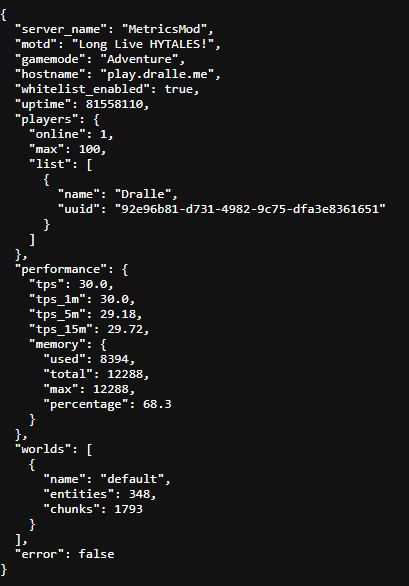
A GET request to /api/status provides a comprehensive overview:
{ "server_name": "My Hytale Server", "motd": "Adventure Awaits!", "gamemode": "ADVENTURE", "hytale_port": 30000, "whitelist_enabled": true, "players": { "online": 5, "max": 100, "list": [{"name": "Dralle", "uuid": "..."}] }, "performance": { "tps": 30.0, "tps_1m": 29.95, "tps_5m": 29.98, "memory": { "used": 450, "total": 1024, "max": 4096, "percentage": 11.0 }, }, "worlds": [ { "name": "game_world", "entities": 150, "chunks": 400 } ], "uptime": 3600000 }
Categories
Screenshots



Frequently Asked Questions
What is Metrics?
A powerful Hytale server utility for real-time performance monitoring, resource tracking, and secure HTTP API integration.
How do I download Metrics?
You can download Metrics for free from CurseForge. Click the "Download on CurseForge" button on this page to go directly to the download page.
Who created Metrics?
Metrics was created by Dralle. The mod has been downloaded 292 times.
Is Metrics compatible with Hytale servers?
Metrics is designed for Hytale and can be used on both single-player and multiplayer servers. Check the mod page on CurseForge for specific compatibility information.
How do I install Metrics?
To install Metrics: 1) Download the mod from CurseForge, 2) Place the file in your Hytale mods folder, 3) Restart the game. The mod should load automatically.
Related Utility Mods
View all mods
BetterMap
Paralaxe
Enhance Hytale World Map

Hybrid
Serilum
🏛️ A Hytale mod library that contains common code for all of Serilum's mods.

VeinMining
EineNT
Instantly mine connected ores and blocks by holding the Walk key (LEFT ALT) while breaking a single block.

Wayback Charm
DarkhaxDev
A charm to help you find your way back home.

Better Modlist
Buuz135
Adds a better modlist to the game, with improved features like searching and logos.

Simple Claims
Buuz135
Adds a chunk claim and protection system.