
OrbisMines | Mine Reset
A Hytale server plugin for creating and managing auto-resetting mines with customizable block compositions, timer-based or percentage-based resets, and full GUI editing support.
About OrbisMines | Mine Reset
OrbisMines
Auto-resetting mines for Hytale. Create mines that reset on a timer or when depleted.
Think MineResetLite but for Hytale.
Requirements
OrbisGuard is required. Mines are linked to OrbisGuard regions for boundaries and protection.
Hytale/ └── mods/ ├── OrbisGuard-x.x.x.jar <- Required dependency └── OrbisMines-1.0.0.jar <- This plugin
Features
Timer Resets - Automatically reset mines every X minutes
Percentage Resets - Reset when X% of blocks are mined
Block Composition - Define what blocks spawn and their percentages
Surface Layer - Optional different block for the top layer
Fill Mode - Only replace air/mined blocks (preserve structures)
Teleport Safety - Move players out before resetting
Reset Warnings - Configurable minute and second warnings
Local Broadcast - Only notify players inside the mine
GUI Editor - Visual editor for mine composition and settings
Async Resets - Non-blocking block placement
Quick Start
1. Create an OrbisGuard region first: /rg wand (select two corners) /rg define mymine
2. Create a mine from the region: /mine create mymine - Uses region with same name /mine create mymine otherregion - Uses a different region
3. Add blocks to the composition: /mine set mymine Stone 50 /mine set mymine Coal_Ore 30 /mine set mymine Iron_Ore 20
4. Set a reset timer (minutes): /mine flag mymine delay 15
5. Reset the mine: /mine reset mymine
GUI Editor
Use /mine edit to open a visual editor with:
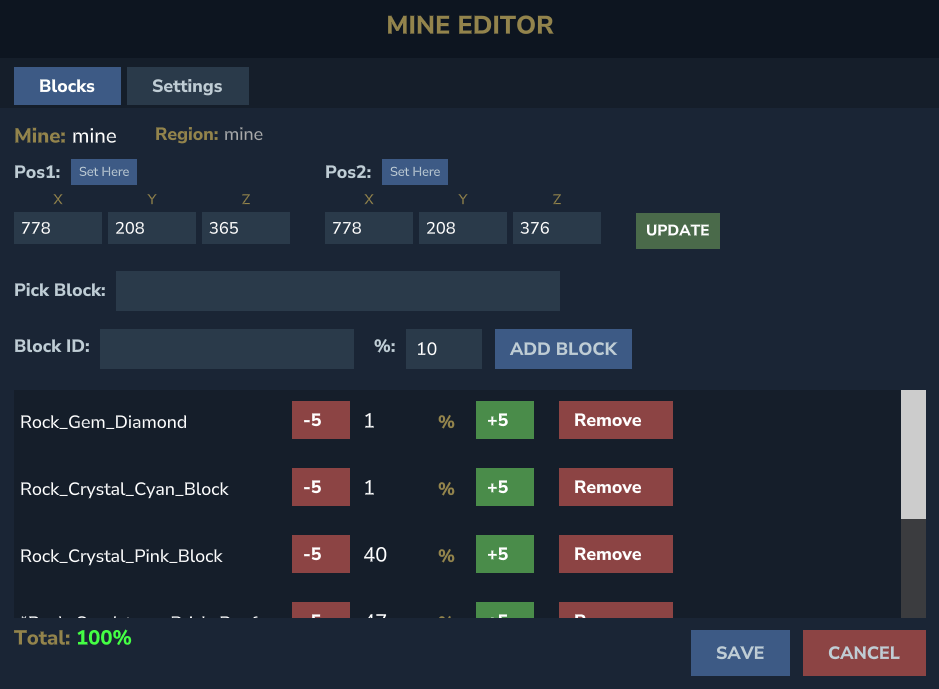
Blocks Tab - Add/remove blocks, adjust percentages with +/- buttons
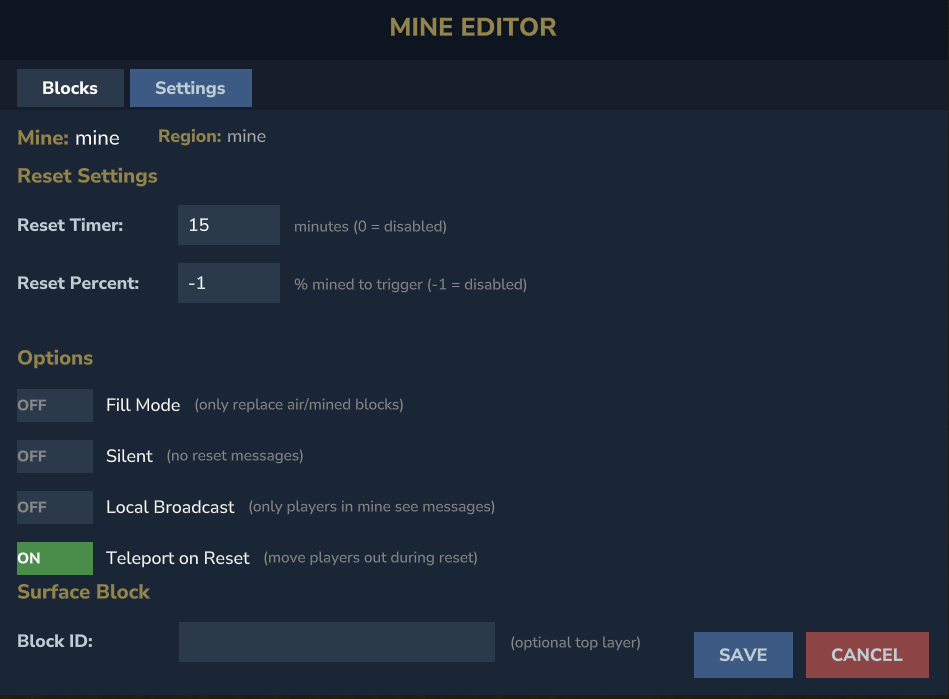
Settings Tab - Configure reset timer, percentage trigger, and options
Region Editing - Adjust mine coordinates with "Set Here" buttons
Block Picker - Searchable dropdown of all block types
All Commands
Command Description
/mine create <name> [region] Create mine (region defaults to name if not specified)
/mine delete <name> Delete a mine
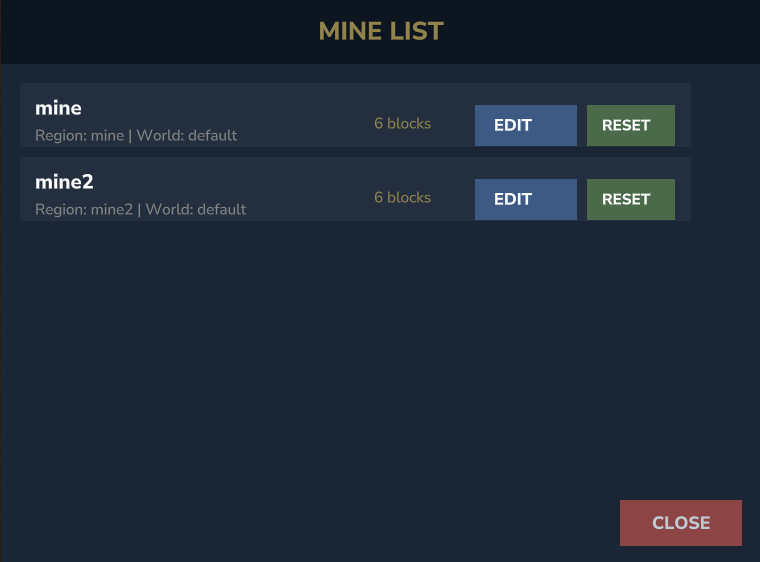
/mine list List all mines
/mine info <name> Show mine details
/mine reset <name> Manually reset a mine
/mine set <name> <block> <percent> Add/update block in composition
/mine unset <name> <block> Remove block from composition
/mine flag <name> <flag> <value> Set mine flag
/mine tp <name> Teleport to mine
/mine settp <name> Set mine teleport point
/mine edit [name] Open GUI editor (or mine list)
Aliases: /mines, /om
Flags
Flag Default Description
delay 0 Reset timer in minutes (0 = disabled)
percent -1 Reset when X% mined (-1 = disabled)
fillmode false Only replace air/mined blocks
silent false Disable all reset messages
localbroadcast false Only message players in the mine
teleport true Move players out during reset
surface none Block type for top layer (e.g., Grass)
Configuration
Edit mods/OrbisMines/config.json to customize:
Reset broadcast messages
Warning messages (minutes and seconds)
Default values for new mines
Blocks per tick (performance tuning)
Example Setup
Prison-style mine with mixed ores:
/rg define mine_a /mine create mine_a /mine set mine_a Stone 60 /mine set mine_a Coal_Ore 20 /mine set mine_a Iron_Ore 15 /mine set mine_a Gold_Ore 5 /mine flag mine_a delay 10 /mine flag mine_a teleport true /mine settp mine_a Quick-reset PvP mine:
/mine create pvpmine /mine set pvpmine Rock_Crystal_Cyan_Block 100 /mine flag pvpmine percent 80 /mine flag pvpmine silent true
Permissions
Permission Description
orbismines.admin Access to all mine commands
Support
Questions or issues? Join the Discord server or contact w1fl0w.
Categories
Screenshots
Need a Server?
Run OrbisMines | Mine Reset on a dedicated Hytale server with easy mod management.
Get Hytale HostingFrequently Asked Questions
What is OrbisMines | Mine Reset?
A Hytale server plugin for creating and managing auto-resetting mines with customizable block compositions, timer-based or percentage-based resets, and full GUI editing support.
How do I download OrbisMines | Mine Reset?
You can download OrbisMines | Mine Reset for free from CurseForge. Click the "Download on CurseForge" button on this page to go directly to the download page.
Who created OrbisMines | Mine Reset?
OrbisMines | Mine Reset was created by wiflow. The mod has been downloaded 203 times.
Is OrbisMines | Mine Reset compatible with Hytale servers?
OrbisMines | Mine Reset is designed for Hytale and can be used on both single-player and multiplayer servers. Check the mod page on CurseForge for specific compatibility information.
How do I install OrbisMines | Mine Reset?
To install OrbisMines | Mine Reset: 1) Download the mod from CurseForge, 2) Place the file in your Hytale mods folder, 3) Restart the game. The mod should load automatically.
Related Utility Mods
View all mods
BetterMap
Paralaxe
Enhance Hytale World Map

Hybrid
Serilum
🏛️ A Hytale mod library that contains common code for all of Serilum's mods.

VeinMining
EineNT
Instantly mine connected ores and blocks by holding the Walk key (LEFT ALT) while breaking a single block.

Wayback Charm
DarkhaxDev
A charm to help you find your way back home.

Better Modlist
Buuz135
Adds a better modlist to the game, with improved features like searching and logos.

Simple Claims
Buuz135
Adds a chunk claim and protection system.