Play Time Tracker
Keep track of how long you've been playing with customizable time limits and visual feedback
About Play Time Tracker
A Play Time Tracker mod displays your online playtime and lets you set a time limit with a dynamic color-changing progress bar.
Features
Real-time playtime display - Shows how long you've been online in HH:MM:SS format
Customizable time limits - Set a maximum playtime for yourself or other players
Visual progress bar - Color-coded bar that changes based on remaining time: 🟢 Green (>50% remaining)
🟡 Yellow (25-50% remaining)
🔴 Red (<25% remaining)
Auto-disconnect - Automatically disconnects players when their time limit is reached
Admin controls - Operators can set time limits for other players
Installation
Download the latest PlaytimeTracker-1.0.0.jar from releases
Place the JAR file in your server's mods/ folder
Restart the server
Commands
/limitTime <minutes> (self)
/limitTime <minutes> [player] (op only)
Set a time limit for yourself or another player.
Parameter Type Required Description
minutes Integer ✅ Yes Time limit in minutes. Use 0 to remove the limit
player Player ❌ No Target player (operators only)
Examples
/limitTime 60 # Set your own limit to 60 minutes /limitTime 0 # Remove your time limit /limitTime 30 Steve # Set Steve's limit to 30 minutes (admin only) /limitTime 0 Steve # Remove Steve's limit (admin only) Permissions
Action Permission Required
Set your own limit None (everyone)
Set other player's limit Operator (*)
HUD Display
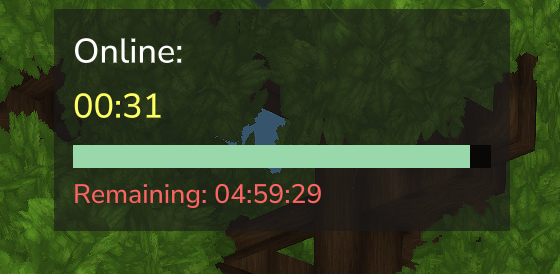
The HUD appears in the top-left corner of the screen and shows:
┌─────────────────────┐ │ Time Online: │ │ 01:23:45 │ │ ████████░░░░ (bar) │ │ Remaining: 00:36:15 │ └─────────────────────┘
Time Online - Your current session duration
Progress Bar - Visual indicator (only visible when limit is set)
Remaining - Time left before disconnect (only visible when limit is set)
Configuration
Currently, PlaytimeTracker does not require any configuration files. All settings are managed through in-game commands.
Technical Details
Per-session tracking - Playtime resets when you disconnect
Changelog
v1.0.0
Initial release
Playtime HUD display
Time limit command with progress bar
Color-coded visual feedback
Admin controls for setting other players' limits
Categories
Screenshots
Need a Server?
Run Play Time Tracker on a dedicated Hytale server with easy mod management.
Get Hytale HostingFrequently Asked Questions
What is Play Time Tracker?
Keep track of how long you've been playing with customizable time limits and visual feedback
How do I download Play Time Tracker?
You can download Play Time Tracker for free from CurseForge. Click the "Download on CurseForge" button on this page to go directly to the download page.
Who created Play Time Tracker?
Play Time Tracker was created by Xilerth. The mod has been downloaded 47 times.
Is Play Time Tracker compatible with Hytale servers?
Play Time Tracker is designed for Hytale and can be used on both single-player and multiplayer servers. Check the mod page on CurseForge for specific compatibility information.
How do I install Play Time Tracker?
To install Play Time Tracker: 1) Download the mod from CurseForge, 2) Place the file in your Hytale mods folder, 3) Restart the game. The mod should load automatically.
Related Utility Mods
View all mods
BetterMap
Paralaxe
Enhance Hytale World Map

Hybrid
Serilum
🏛️ A Hytale mod library that contains common code for all of Serilum's mods.

VeinMining
EineNT
Instantly mine connected ores and blocks by holding the Walk key (LEFT ALT) while breaking a single block.

Wayback Charm
DarkhaxDev
A charm to help you find your way back home.

Better Modlist
Buuz135
Adds a better modlist to the game, with improved features like searching and logos.

Simple Claims
Buuz135
Adds a chunk claim and protection system.