
Server Optimizer
Optimizer is a lightweight, fully automated performance plugin that keeps your server responsive under load while preserving player experience.
About Server Optimizer
Hytaled Optimizer
A lightweight, fully automated performance plugin that keeps servers smooth under load while preserving player experience. It adapts view distance, per‑player simulation ranges, NPC AI tick rates, and idle player behavior in real time using TPS, memory, and player activity signals. The system reacts quickly to spikes and recovers quality only when conditions are stable.
Key Features
Smart Global View Distance Control
Dynamically lowers global view distance on low TPS or high heap usage, then restores only after strict recovery conditions (time delay + player drop + stable TPS/heap). Prevents oscillation and lag spikes.
Per‑Player Simulation (HOT) Radius
Automatically reduces per‑player simulation range during TPS drops to cut entity processing cost in heavy hotspots.
AI LOD for NPCs
Adjusts NPC tick rates by distance and visibility with a safety clamp to avoid over‑ticking. Built for large servers with many entities. Heuristic detection (asset source) for custom entities to prevent freezing / resetting of custom spawned entities.
Idle Player Optimization
Lowers view/hot/min‑loaded radii for inactive players, reducing RAM and CPU usage while keeping active players unaffected.
Profiler & Diagnostics
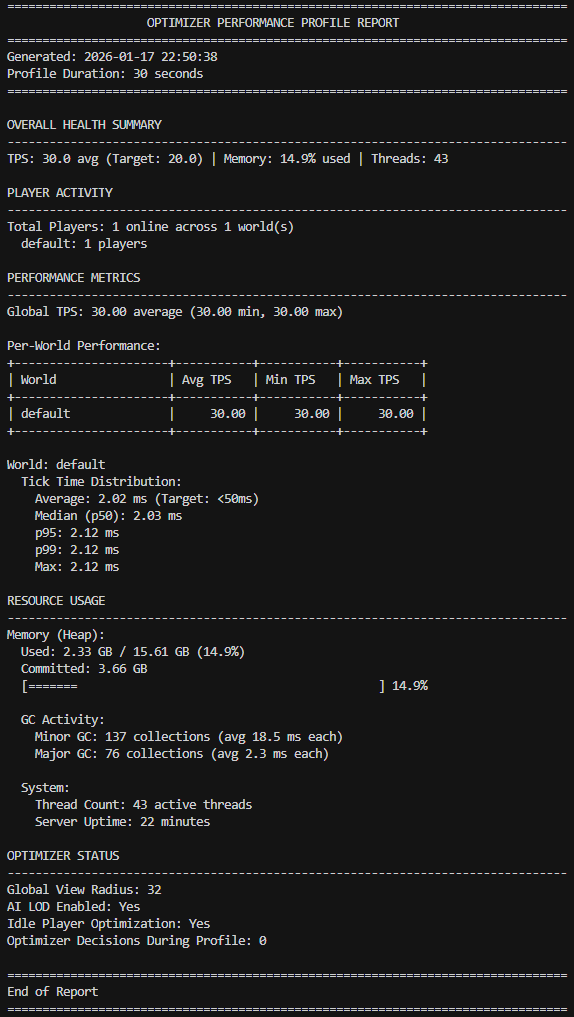
Built‑in profiling command with JSON/text export for analysis. Optional event logging with cooldowns to prevent spam.
Auto‑generated & Auto‑repaired Config
Missing keys are added, invalid configs are reset safely, and defaults are enforced without server restarts.
Auto heap-based garbage collection
Automatically triggerign garbage collection under stress with a safe min. delay.
Commands
- /optimizer status
Shows current effective settings and all active optimization ranges.
- /optimizer reload
Reloads config and applies changes immediately (no restart required).
- /optimizer gc
Forces a garbage collection cycle (OP only)
- /optimizer tps
Shows a color-coded TPS report for the current world and all other worlds.
- /optimizer profile [duration]
Starts a profiling window (20–60s). Saves a detailed report to `/mods/Hytaled_Optimizer/profiles/`.
Console has full access. Player permissions are handled through standard server permission nodes.
Installation
1) Drop `Optimizer.jar` into `/mods`
2) Start the server
3) Config is generated at `/mods/Hytaled_Optimizer/config.json`
4) Edit config and run `/optimizer reload` (or restart)
Configuration Guide (Defaults)
LoopIntervalSeconds
- How often optimizer evaluates TPS/heap and makes decisions
- Default: 3 (recommended 1–3)
ViewRadius
- Enabled: true
- BroadcastChanges: true
- Min/Max: 5 / 14
- DecreaseFactor: 0.75
- AdjustmentCooldownSeconds: 5
- RecoveryDelaySeconds: 900 (15 minutes)
- RecoveryPlayerDropPercent: 0.20 (20%)
- TpsLow: 15.0
- TpsHigh: 25.0
- HeapPressureHigh: 0.90
- HeapPressureLow: 0.80
Simulation (Per‑player HOT radius)
- Enabled: true
- Min/Max: 5 / 11
- DecreaseStep: 2
- RecoveryStep: 1
- TpsLow: 15.0
- TpsHigh: 20.0
PerPlayerDistance (Hotspot control)
- Enabled: true
- Min/Max: 5 / 11
- MinLoadedOffset: 1
- HotspotTpsLow: 15.0
- HotspotReduceBy: 2
- CooldownSeconds: 5
AiLod
- Enabled: true
- ApplyToCustomNPCs: false
- UpdateIntervalMs: 150
- UseVisibility: true
- NearDistance: 40.0
- MidDistance: 80.0
- FarDistance: 120.0
- MidTickSeconds: 0.2
- FarTickSeconds: 0.5
- VeryFarTickSeconds: 1.0
- MinTickSeconds: 0.05
Logging
- EnableEventLogging: true
- EventLogCooldownSeconds: 30
IdlePlayer
- Enabled: true
- IdleTimeoutSeconds: 90
- CheckIntervalSeconds: 10
- ReduceViewRadius: true (IdleViewRadius: 4)
- ReduceHotRadius: true (IdleHotRadius: 3)
- ReduceMinLoadedRadius: true (IdleMinLoadedRadius: 2)
- ClearWorldMapCache: true
Profiler
- Enabled: true
- AutoWindowDurationSeconds: 60
- ProfileDurationSeconds: 30
- ExportJson: true
DespawnAccelerator
- Enabled: false
- RunIntervalSeconds: 10
- InactiveSeconds: 30
- NoPlayerRadiusBlocks: 64.0
- ReduceRemainingFactor: 0.5
- MinSecondsRemaining: 10
- ApplyToProjectiles: true
- ApplyToItems: true
- ApplyToBlockEntities: true
AutoGC
- Enabled: true
- HeapUsageTrigger: 0.90
- ConsecutiveChecks: 3
- MinIntervalSeconds: 900
Notes
- Recovery is intentionally strict to prevent oscillation and lag spikes.
- All thresholds and timings are configurable.
- Defaults are tuned for high‑population servers & maximizing server usages and only optimizing when really required.
Categories
Screenshots
Need a Server?
Run Server Optimizer on a dedicated Hytale server with easy mod management.
Get Hytale HostingFrequently Asked Questions
What is Server Optimizer?
Optimizer is a lightweight, fully automated performance plugin that keeps your server responsive under load while preserving player experience.
How do I download Server Optimizer?
You can download Server Optimizer for free from CurseForge. Click the "Download on CurseForge" button on this page to go directly to the download page.
Who created Server Optimizer?
Server Optimizer was created by 0x90sh. The mod has been downloaded 22.2K times.
Is Server Optimizer compatible with Hytale servers?
Server Optimizer is designed for Hytale and can be used on both single-player and multiplayer servers. Check the mod page on CurseForge for specific compatibility information.
How do I install Server Optimizer?
To install Server Optimizer: 1) Download the mod from CurseForge, 2) Place the file in your Hytale mods folder, 3) Restart the game. The mod should load automatically.
Related Utility Mods
View all mods
BetterMap
Paralaxe
Enhance Hytale World Map

Hybrid
Serilum
🏛️ A Hytale mod library that contains common code for all of Serilum's mods.

VeinMining
EineNT
Instantly mine connected ores and blocks by holding the Walk key (LEFT ALT) while breaking a single block.

Wayback Charm
DarkhaxDev
A charm to help you find your way back home.

Better Modlist
Buuz135
Adds a better modlist to the game, with improved features like searching and logos.

Simple Claims
Buuz135
Adds a chunk claim and protection system.