
ServerPortals
A cross-server portal mod. Place a portal block, set the destination in a GUI, and let players walk through to transfer between servers.
About ServerPortals
ServerPortals
A cross-server portal mod. Place a portal block, set the destination, and let players walk through to transfer between servers. Perfect for server networks and hub servers.
No configuration files needed. Each portal stores its destination address in block metadata. Just place the latest ServerPortals-x.x.x.jar in your server's mods/ directory.
Usage
Creating a Portal
1. Get the Create Server Portal item:
Using the /giveportal command or
from the creative inventory (Blocks > Portals, search for "Create Server Portal")
2. Place a portal in the world
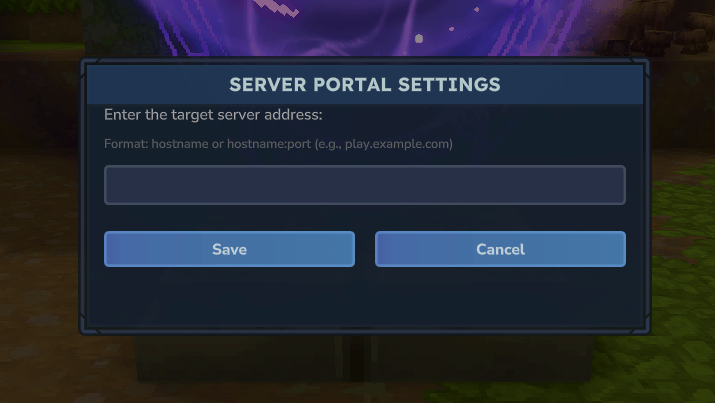
3. Interact with the portal (F key) to open the configuration GUI
4. Enter the target server address (e.g., play.example.com)
5. Click Save
Using a Portal
Walk into a configured portal to be transferred to the target server.
Portals without a configured address do nothing when entered.
Commands
/giveportal: Gives you the Create Server Portal item
Permissions
serverportals.portal.create: Allows creating server portals and using /giveportal
Players without this permission cannot open the portal settings GUI or use the /giveportal command. They can still use existing portals to transfer to other servers.
🐳 Tired of managing mods by hand?
Our Hytale Server Docker image installs and updates CurseForge mods automatically.
Get started with our guide.
Categories
Screenshots
Need a Server?
Run ServerPortals on a dedicated Hytale server with easy mod management.
Get Hytale HostingFrequently Asked Questions
What is ServerPortals?
A cross-server portal mod. Place a portal block, set the destination in a GUI, and let players walk through to transfer between servers.
How do I download ServerPortals?
You can download ServerPortals for free from CurseForge. Click the "Download on CurseForge" button on this page to go directly to the download page.
Who created ServerPortals?
ServerPortals was created by Hybrowse. The mod has been downloaded 395 times.
Is ServerPortals compatible with Hytale servers?
ServerPortals is designed for Hytale and can be used on both single-player and multiplayer servers. Check the mod page on CurseForge for specific compatibility information.
How do I install ServerPortals?
To install ServerPortals: 1) Download the mod from CurseForge, 2) Place the file in your Hytale mods folder, 3) Restart the game. The mod should load automatically.
Related Utility Mods
View all mods
BetterMap
Paralaxe
Enhance Hytale World Map

Hybrid
Serilum
🏛️ A Hytale mod library that contains common code for all of Serilum's mods.

VeinMining
EineNT
Instantly mine connected ores and blocks by holding the Walk key (LEFT ALT) while breaking a single block.

Wayback Charm
DarkhaxDev
A charm to help you find your way back home.

Better Modlist
Buuz135
Adds a better modlist to the game, with improved features like searching and logos.

Simple Claims
Buuz135
Adds a chunk claim and protection system.