Shubshub Server Jump
A Mod that lets you jump to another Server, And your Inventory comes with you
About Shubshub Server Jump
I heard you all ask for it on all the other Server Hopping mods, So I thought I would take things into my own hands and craft this lovely mod
Adds a Portal to the game with the item id "Shubshub_Server_Portal"
To use
Install the Mod
Start the Server
A ShubshubSerJumpConfig.json file will be created on your Server, At this point stop the server
Configure the Config file On the Main Server have something in the file like this {"MainServer": true, "KickBackToAuthServer": false, "MainServerHost": "Your Server IP Here", "MainServerPort": Your Server Port Here, "SharedSecretKey": "AES Key Here (32 Bytes)", "TrustedHosts": "TrustedSource:TrustedPort,TrustedSource2:TrustedPort2", "ThisServerHost": "Your Server IP Here", "ThisServerGamePort":Your Server Port Here}
If you are a Sub Server {"MainServer": false, "KickBackToAuthServer": false, "MainServerHost": "Main Server IP Here", "MainServerPort": Main Server Port here, "SharedSecretKey": "AES Key Here (32 Bytes)", "TrustedHosts": "TrustedSource:TrustedPort,TrustedSource2:TrustedPort2", "ThisServerHost": "Your Server IP Here", "ThisServerGamePort": Your Server Port Here}
Start the Server
Give yourself the "Shubshub_Server_Portal"
Make sure you have the permission for "ssj.portal.configure"
Hit F on the placed down Portal
Configure the portal for a Target Server IP and Target Port, As well as a Portal ID and a Destination Portal ID for the otherside
On the Sub Server do the same with the portal but point it at the main server, Make sure to use the Destination Portal ID you set on the Main Server as the Portal ID here, Make sure to set the Destination on this side to the Portal ID on the Main Server
Put some items in your inventory
Walk through the Portal, Voila
Congratulations you just brought your inventory to another server
A few additional things
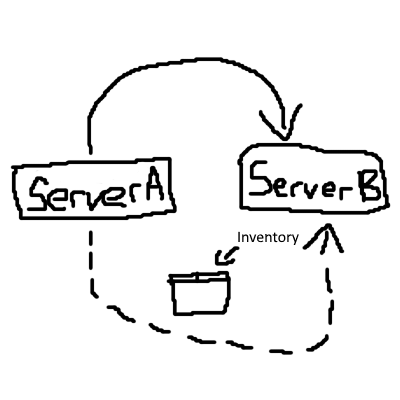
Your server of authority will follow you, So if you join Server B, Server B is now your Server of Authority, If you rejoin Server A directly then it will pull your Inventory from Server A, And then Server A will become your Server of Authority
Should a Sub Server crash through a Java Exception, Or otherwise be shut down gracefully, The Server will attempt to hand all authority back to the Main Server, Which means your Inventory will be sent back to the Main Server
This Mod has only been tested so far again 2 Servers on my Home Network, But I see no reason why it wont work with 3 or more servers in the mix provided they're all set up correctly, If it doesnt, Please let me know
Best way to contact me right now is in the official Hytale Discord (shubshub) or on twitter (@shubshub11)
Categories
Need a Server?
Run Shubshub Server Jump on a dedicated Hytale server with easy mod management.
Get Hytale HostingFrequently Asked Questions
What is Shubshub Server Jump?
A Mod that lets you jump to another Server, And your Inventory comes with you
How do I download Shubshub Server Jump?
You can download Shubshub Server Jump for free from CurseForge. Click the "Download on CurseForge" button on this page to go directly to the download page.
Who created Shubshub Server Jump?
Shubshub Server Jump was created by shubshub. The mod has been downloaded 8 times.
Is Shubshub Server Jump compatible with Hytale servers?
Shubshub Server Jump is designed for Hytale and can be used on both single-player and multiplayer servers. Check the mod page on CurseForge for specific compatibility information.
How do I install Shubshub Server Jump?
To install Shubshub Server Jump: 1) Download the mod from CurseForge, 2) Place the file in your Hytale mods folder, 3) Restart the game. The mod should load automatically.
Related Utility Mods
View all mods
BetterMap
Paralaxe
Enhance Hytale World Map

Hybrid
Serilum
🏛️ A Hytale mod library that contains common code for all of Serilum's mods.

VeinMining
EineNT
Instantly mine connected ores and blocks by holding the Walk key (LEFT ALT) while breaking a single block.

Wayback Charm
DarkhaxDev
A charm to help you find your way back home.

Better Modlist
Buuz135
Adds a better modlist to the game, with improved features like searching and logos.

Simple Claims
Buuz135
Adds a chunk claim and protection system.