
WelcomeTale
A Hytale server plugin that disables the default join/leave message broadcast and displays custom welcome messages when players join/leave your server.
About WelcomeTale
WelcomeTale
A Hytale server plugin that disables the default join/leave message broadcast and displays custom welcome messages when players join/leave your server.
Description
WelcomeTale is a plugin for Hytale that enhances the player experience with a comprehensive message system:
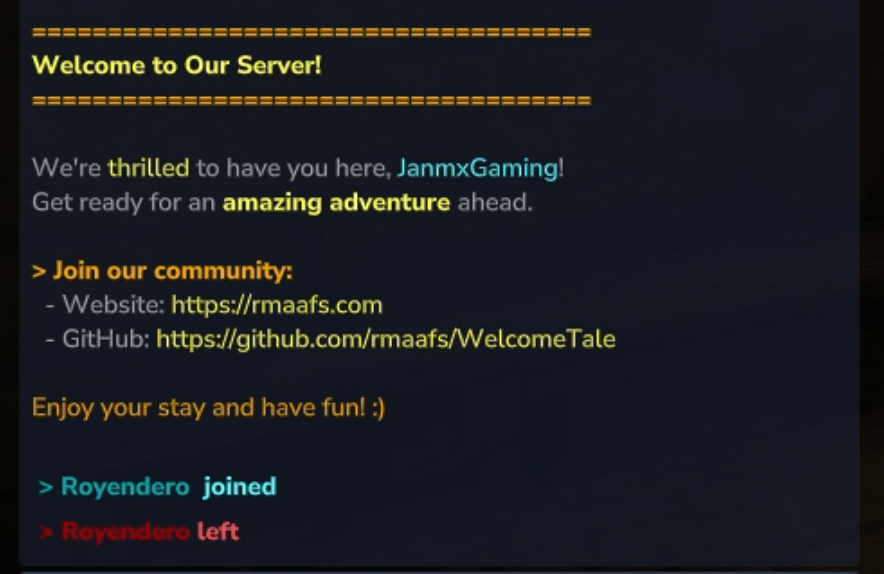
Server-wide join announcements when someone joins (customizable join message broadcasted to all players)
Private welcome messages sent directly to the joining player
Server-wide leave announcements when someone leaves (customizable leave message broadcasted to all players)
You can personalize all message formats with colors, multiple lines, and control whether default join messages are displayed.
GitHub Repository
Where to Download
You can download WelcomeTale from multiple platforms:
GitHub Releases - Official releases
CurseForge - Hytale mod repository
ModTale - Community mod platform
Unified Hytale - Hytale mod repository
📢 Want us to publish on another platform? Let us know which one you'd like to see!
Features
💬 Triple message system - Complete control over player connection messages: Join broadcast (JoinMessage) - Announce to all players when someone joins
Private welcome (WelcomePlayerMessage) - Personal welcome message sent only to the joining player
Leave broadcast (LeaveMessage) - Announce to all players when someone leaves
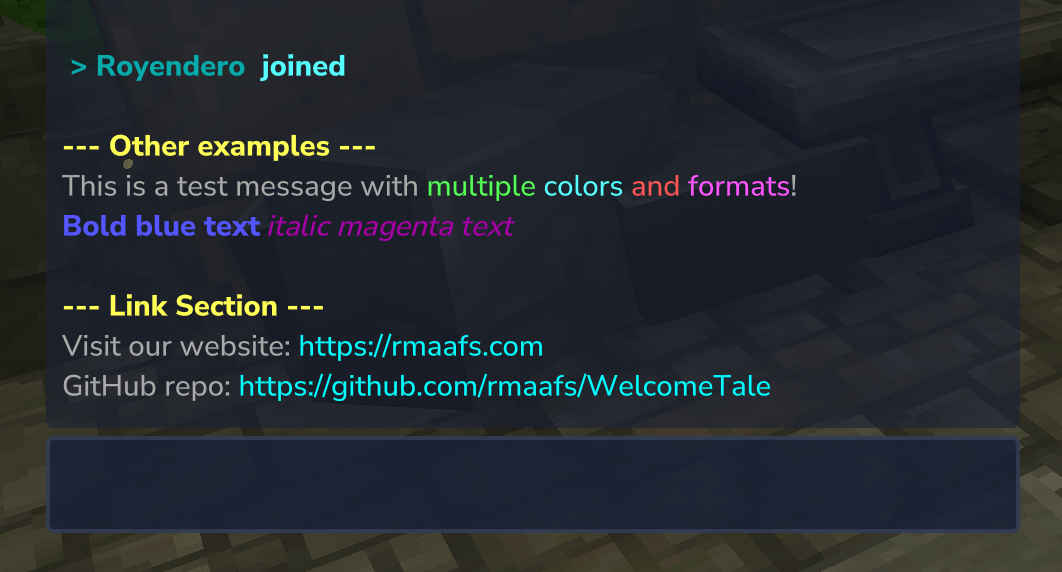
🎨 Color & formatting support - Use Minecraft color codes (&) for colorful, styled messages 16 color options (black, blue, green, aqua, red, purple, gold, gray, etc.)
Text formatting: bold (&l), italic (&o), reset (&r)
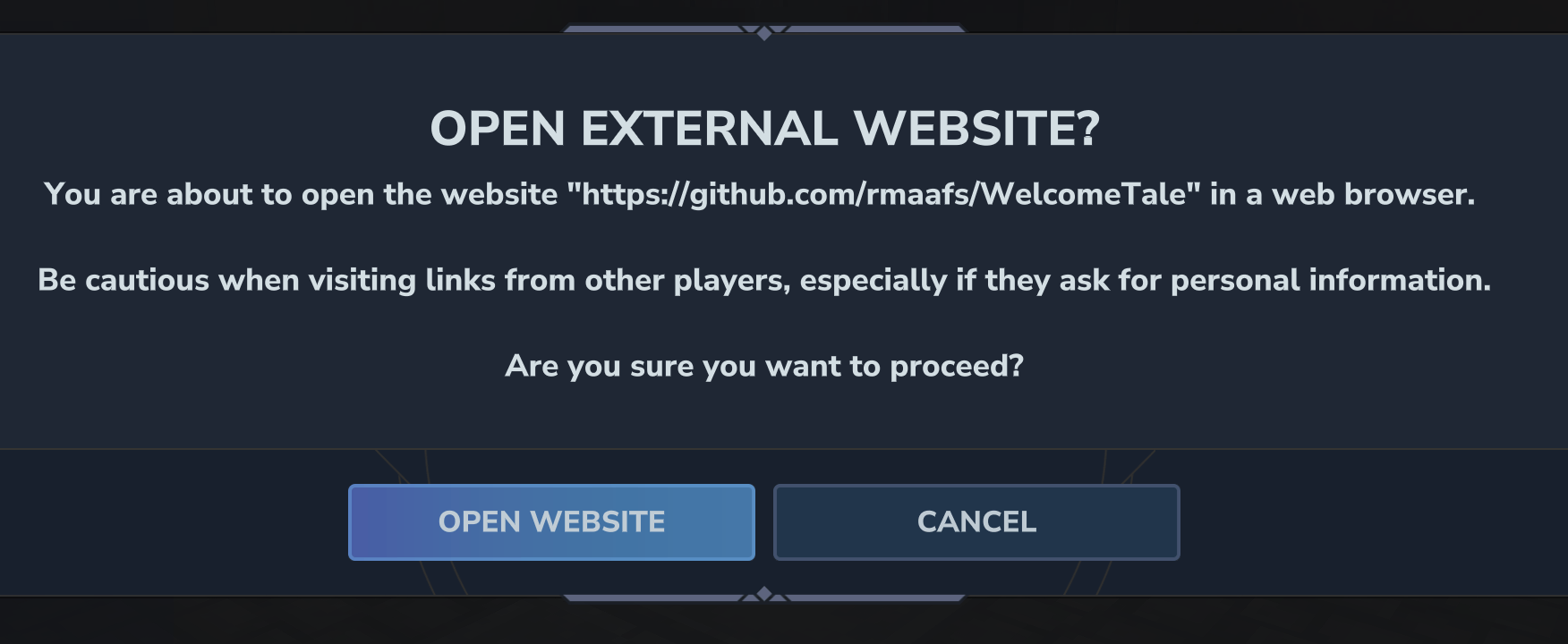
🔗 Clickable links - Automatically detects and converts HTTP/HTTPS URLs into clickable links Links are displayed in cyan color and open in browser when clicked
Supports complex URLs with paths, queries, and parameters
📝 Multi-line message support - Create beautiful message banners with multiple lines
👤 Player name placeholder - Use {player} to dynamically insert the joining player's name
🔕 Optional join message control - Disable Hytale's default join messages for full control
🚪 Optional leave message patch - Disable Hytale's default "player left world" messages using an early plugin transformer
🔄 Hot-reload configuration - Update settings without restarting the server using /welcometale
⚙️ Easy JSON configuration - Simple, human-readable configuration file
🛡️ Permission system - Control who can reload the configuration
⚠️ Note about default leave messages: Unlike join messages, Hytale does not provide a native way to disable default "player left world" messages through the plugin API. To disable them, you can use the /welcometalepatch command to install the early plugin patch automatically, or read leaveWorldMessagePatch.md for detailed instructions, manual installation, and safety information.
For Server Administrators
Installation
Download the latest release from the Releases page
Place the WelcomeTale-x.x.x.jar file in your Hytale server's mods folder
Start your server
The plugin will automatically create a folder at mods/com.rmaafs_WelcomeTale
Configuration
First Time Setup
When you first run the plugin, it will generate a config.example.json file in the mods/com.rmaafs_WelcomeTale directory.
Important: You must rename config.example.json to config.json to use your own configuration.
⚠️ Upgrading from an older version? Check the config.example.json file inside your server's mods/com.rmaafs_WelcomeTale folder to use the new configuration format.
Configuration Options
The config.json file contains the following options:
{ "DisableDefaultJoinMessage": true, "JoinMessage": ["", "&3&l > &3{player} &b joined", ""], "LeaveMessage": ["", "&4&l > &4{player} &cleft", ""], "WelcomePlayerMessage": [ "", "&6&l=====================================", "&e&lWelcome to Our Server!", "&6&l=====================================", "", "&7We're ðrilled &7to have you here, &b{player}&7!", "&7Get ready for an &e&lamazing adventure &r&7ahead.", "", "&6&l> &6Join our community:", "&7 - Website: &ehttps://rmaafs.com", "&7 - GitHub: &ehttps://github.com/rmaafs/WelcomeTale", "", "&6Enjoy your stay and have fun! :)", "" ], "MessageReloaded": "&aConfiguration reloaded successfully!", "NoPermission": "&cYou don't have permission to use this command!", "CheckForUpdates": true } Configuration Fields:
JoinMessage: Server-wide broadcast message sent to all players when someone joins
Use {player} as a placeholder for the joining player's name
Supports color codes with & (see Color Codes section below)
Set to empty array [] to disable server broadcasts
Example: ["&3&l > &3{player} &b joined"]
LeaveMessage: Server-wide broadcast message sent to all players when someone leaves
Use {player} as a placeholder for the leaving player's name
Supports color codes with & (see Color Codes section below)
Set to empty array [] to disable leave broadcasts
Example: ["&3&l < &3{player} &c left"]
WelcomePlayerMessage: Private welcome message sent only to the joining player
Use {player} as a placeholder for the joining player's name
Perfect for server rules, links, or personalized greetings
Set to empty array [] to disable private welcome messages
Example: ["&7Welcome &a{player} &7to the server!"]
DisableDefaultJoinMessage: Set to true to disable the default Hytale join message. This gives you full control over join notifications
MessageReloaded: Message displayed when configuration is successfully reloaded
NoPermission: Message displayed when a player lacks permission to execute the command
CheckForUpdates: Set to true to enable automatic update checking. When enabled:
The plugin checks for new versions on GitHub when the server starts
Users with the welcometale.reload permission receive an in-game notification when joining if a new version is available
Set to false to disable all update checks and notifications
Default: true
Color Codes
You can customize your messages with colors using the & symbol followed by a color code:
Color Codes:
&0 - Black
&1 - Dark Blue
&2 - Dark Green
&3 - Dark Aqua
&4 - Dark Red
&5 - Dark Purple
&6 - Gold
&7 - Gray
&8 - Dark Gray
&9 - Blue
&a - Green
&b - Aqua
&c - Red
&d - Light Purple
&e - Yellow
&f - White
Formatting Codes:
&l - Bold
&o - Italic
&r - Reset (removes all formatting)
Example:
"WelcomePlayerMessage": ["&7Welcome &a&l{player}&r &7to our &b&oawesome&r &7server!"] This will display: "Welcome {player} to our awesome server!" with appropriate colors.
Multi-Line Messages
You can create multi-line messages by using an array format for both JoinMessage and WelcomePlayerMessage:
"WelcomePlayerMessage": [ "&7============================", "&a&lWelcome {player}!", "&7Thank you for joining", "&eHave fun playing!", "&7============================" ] Each line will be displayed separately, creating a beautiful message banner.
Message Behavior
When a player joins the server:
JoinMessage is broadcasted to all players on the server (if not empty)
WelcomePlayerMessage is sent privately to the joining player (if not empty)
When a player leaves the server:
LeaveMessage is broadcasted to all players on the server (if not empty)
If any message field is an empty array [] or contains only whitespace, that message will not be sent
Reloading Configuration
After modifying the config.json file, you can reload the configuration without restarting the server:
In-game: Run the command /welcometale
Console: Execute welcometale
This will reload all configuration changes immediately.
Commands
Command Description Permission
/welcometale Reloads the plugin configuration welcometale.reload
/welcometalepatch Installs the early plugin patch for leave messages welcometale.admin
⚠️ Important: To disable the default "player left world" message from Hytale, run /welcometalepatch to install the early plugin that disables this message. A server restart will be required after installation.
Note: Only users with the welcometale.reload permission can execute this command. By default, server operators have this permission.
Update Notifications: Users with the welcometale.reload permission will receive an in-game notification when they join the server if a new version of the plugin is available. To disable these notifications, set CheckForUpdates to false in the config.json file.
🌟 Show Your Support
If you find this plugin useful, please consider:
⭐ Star this repository to show your support and help others discover it!
👀 Follow @rmaafs on GitHub to stay updated on future Hytale plugins and projects
☕ Buy me a coffee on PayPal to support continued development
🎨 Need a Custom Plugin?
I'm available for custom plugin development! If you need a specific plugin tailored to your server's needs or want a private, custom solution, feel free to reach out. Let's bring your ideas to life!
License
This project is provided as-is for use with Hytale servers.
Categories
Screenshots
Need a Server?
Run WelcomeTale on a dedicated Hytale server with easy mod management.
Get Hytale HostingFrequently Asked Questions
What is WelcomeTale?
A Hytale server plugin that disables the default join/leave message broadcast and displays custom welcome messages when players join/leave your server.
How do I download WelcomeTale?
You can download WelcomeTale for free from CurseForge. Click the "Download on CurseForge" button on this page to go directly to the download page.
Who created WelcomeTale?
WelcomeTale was created by rmaafs. The mod has been downloaded 945 times.
Is WelcomeTale compatible with Hytale servers?
WelcomeTale is designed for Hytale and can be used on both single-player and multiplayer servers. Check the mod page on CurseForge for specific compatibility information.
How do I install WelcomeTale?
To install WelcomeTale: 1) Download the mod from CurseForge, 2) Place the file in your Hytale mods folder, 3) Restart the game. The mod should load automatically.
Related Utility Mods
View all mods
BetterMap
Paralaxe
Enhance Hytale World Map

Hybrid
Serilum
🏛️ A Hytale mod library that contains common code for all of Serilum's mods.

VeinMining
EineNT
Instantly mine connected ores and blocks by holding the Walk key (LEFT ALT) while breaking a single block.

Wayback Charm
DarkhaxDev
A charm to help you find your way back home.

Better Modlist
Buuz135
Adds a better modlist to the game, with improved features like searching and logos.

Simple Claims
Buuz135
Adds a chunk claim and protection system.