Wellcome Gui
A Hytale server plugin that automatically displays a customizable welcome GUI featuring server rules, commands, and a Discord link upon player connection.
About Wellcome Gui
Hytale Welcome GUI (English Version)
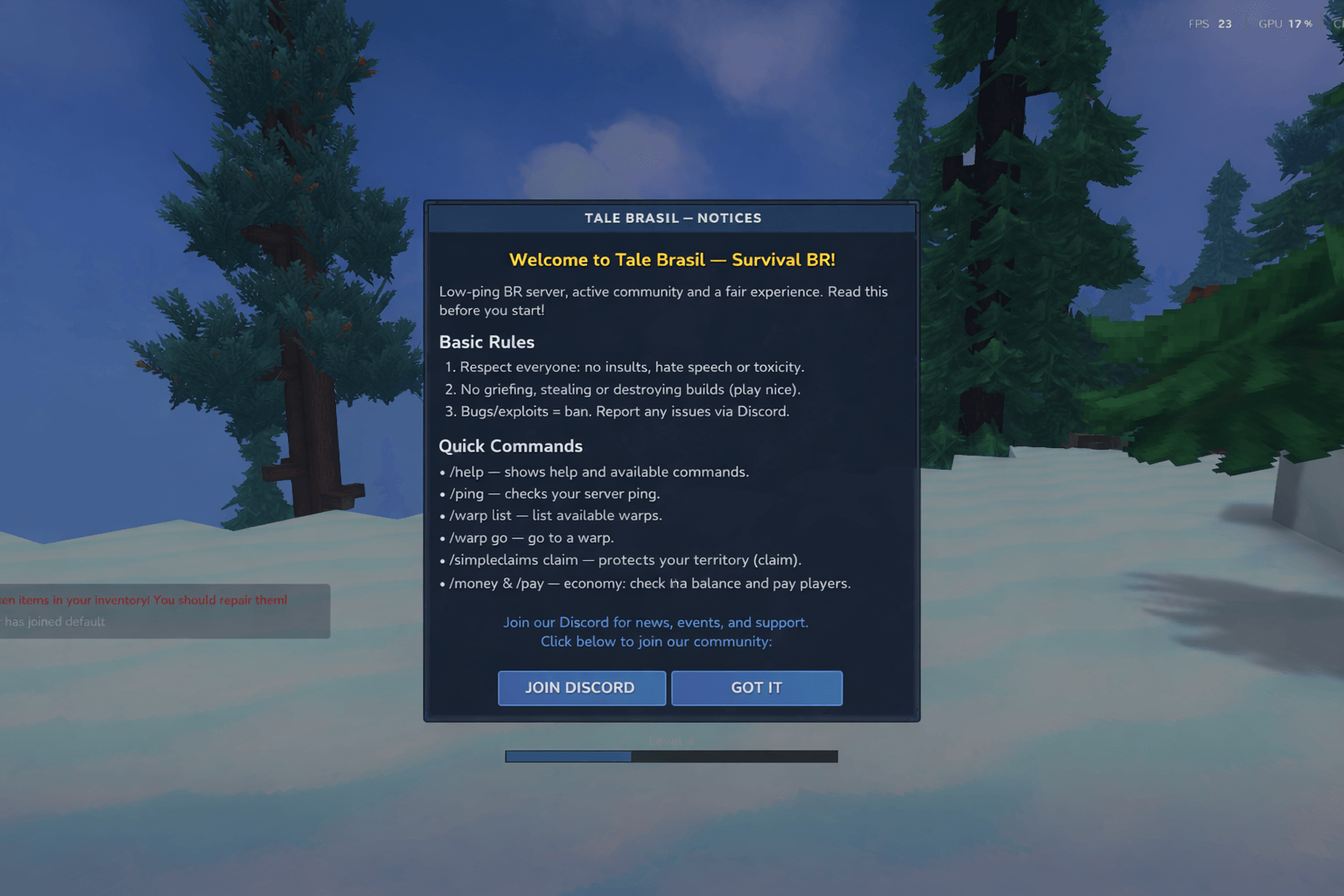
This project is a Hytale server plugin that automatically displays a Custom Welcome GUI when a player joins the server.
Currently configured for the Tale Brasil server, it displays rules, useful commands, and interactive buttons.
📋 Features
Auto-Open: The GUI opens automatically 2 seconds after the player joins the world.
Visual Info: Displays welcome text, a list of rules, and basic commands (e.g., /help, /ping).
Interactivity:
DISCORD Button: Sends a clickable message in the chat with the Discord invite link.
ENTENDI (Understood) Button: Closes the window.
Command: Manual access to the screen via command (default: /modlist).
🛠 How to Modify the Welcome Screen
Customization is divided into two parts: Visuals (Text/Layout) and Logic (Buttons/Links).
1. Changing Texts and Layout (Visuals)
To change the displayed text (Rules, Title, Commands), you must edit the .ui interface file.
File: src/main/resources/Common/UI/Custom/Pages/WelcomeGUI.ui
In this file, modify the Text fields inside the Label components. Example:
Label #WelcomeText { Style: (FontSize: 20, TextColor: #ffcc00, RenderBold: true); Text: "Your New Title Here!"; // <--- Change this }
2. Changing Links and Button Behavior (Logic)
To change the Discord link or button actions, you must edit the Java class.
File: src/main/java/com/talebrasil/hy/wellcomegui/gui/WelcomePage.java
Look for the handleDataEvent method. There you will find the logic for #DiscordButton. Example:
// Discord button logic if (data.discordClicked != null) { FormattedMessage msg = new FormattedMessage(); // Change the message and link below msg.rawText = "[Discord] Click here: [https://discord.gg/YOUR_NEW_LINK](https://discord.gg/YOUR_NEW_LINK)"; msg.link = "[https://discord.gg/YOUR_NEW_LINK](https://discord.gg/YOUR_NEW_LINK)"; player.sendMessage(new Message(msg)); }
3. Changing the Command
By default, the command registered in WellcomeCommand.java is /modlist. To change it to /rules or /welcome:
File: src/main/java/com/talebrasil/hy/wellcomegui/command/WellcomeCommand.java
Edit: super("modlist", "Shows the wellcome screen"); to your desired command name.
🚀 How to Build
Ensure you have the JDK configured (the project is set to Java 25 in gradle.properties, adjust according to your environment).
# Windows gradlew.bat build
# Linux/Mac ./gradlew build
The output .jar file will be located in the build/libs folder.
Hytale Welcome GUI (Tale Brasil)
Este projeto é um plugin para servidores Hytale (baseado na engine Hytale) que exibe automaticamente uma Interface Gráfica (GUI) de Boas-vindas quando um jogador entra no servidor.
Atualmente configurado para o servidor Tale Brasil, ele exibe regras, comandos úteis e botões interativos.
📋 Funcionalidades
Abertura Automática: A janela abre 2 segundos após o jogador conectar ao mundo.
Informações Visuais: Exibe texto de boas-vindas, lista de regras e comandos básicos (/help, /ping, etc).
Interatividade:
Botão DISCORD: Envia uma mensagem clicável no chat com o link do Discord.
Botão ENTENDI: Fecha a janela.
Comando: Acesso manual à tela através do comando configurado (padrão: /modlist).
🛠 Como Modificar a Tela de Boas-Vindas
A customização é dividida em duas partes: Visual (Texto/Layout) e Lógica (Botões/Links).
1. Alterar Textos e Layout (Visual)
Para mudar o que está escrito na tela (Regras, Título, Comandos), você deve editar o arquivo de interface .ui.
Arquivo: src/main/resources/Common/UI/Custom/Pages/WelcomeGUI.ui
Neste arquivo, você pode alterar os campos Text dentro dos componentes Label. Exemplo:
Label #WelcomeText { Style: (FontSize: 20, TextColor: #ffcc00, RenderBold: true); Text: "Seu Novo Título Aqui!"; // <--- Altere aqui }
2. Alterar Links e Comportamento dos Botões (Lógica)
Para alterar o link do Discord ou o que acontece ao clicar nos botões, você deve editar a classe Java.
Arquivo: src/main/java/com/talebrasil/hy/wellcomegui/gui/WelcomePage.java
Procure pelo método handleDataEvent. Lá você encontrará a lógica do botão #DiscordButton. Exemplo:
// Lógica do botão Discord if (data.discordClicked != null) { FormattedMessage msg = new FormattedMessage(); // Altere a mensagem e o link abaixo msg.rawText = "[Discord] Clique aqui: [https://discord.gg/SEU_NOVO_LINK](https://discord.gg/SEU_NOVO_LINK)"; msg.link = "[https://discord.gg/SEU_NOVO_LINK](https://discord.gg/SEU_NOVO_LINK)"; player.sendMessage(new Message(msg)); }
3. Alterar o Comando
Por padrão, o comando registrado no arquivo WellcomeCommand.java é /modlist. Para alterar para /regras ou /welcome:
Arquivo: src/main/java/com/talebrasil/hy/wellcomegui/command/WellcomeCommand.java
Edite: super("modlist", "Shows the wellcome screen"); para o nome desejado.
🚀 Como Compilar
Certifique-se de ter o JDK configurado (o projeto está definido para Java 25 no gradle.properties, ajuste conforme seu ambiente).
# Windows gradlew.bat build
# Linux/Mac ./gradlew build
O arquivo .jar gerado estará na pasta build/libs.
Categories
Screenshots
Need a Server?
Run Wellcome Gui on a dedicated Hytale server with easy mod management.
Get Hytale HostingFrequently Asked Questions
What is Wellcome Gui?
A Hytale server plugin that automatically displays a customizable welcome GUI featuring server rules, commands, and a Discord link upon player connection.
How do I download Wellcome Gui?
You can download Wellcome Gui for free from CurseForge. Click the "Download on CurseForge" button on this page to go directly to the download page.
Who created Wellcome Gui?
Wellcome Gui was created by mrboreal. The mod has been downloaded 186 times.
Is Wellcome Gui compatible with Hytale servers?
Wellcome Gui is designed for Hytale and can be used on both single-player and multiplayer servers. Check the mod page on CurseForge for specific compatibility information.
How do I install Wellcome Gui?
To install Wellcome Gui: 1) Download the mod from CurseForge, 2) Place the file in your Hytale mods folder, 3) Restart the game. The mod should load automatically.
Related Utility Mods
View all mods
BetterMap
Paralaxe
Enhance Hytale World Map

Hybrid
Serilum
🏛️ A Hytale mod library that contains common code for all of Serilum's mods.

VeinMining
EineNT
Instantly mine connected ores and blocks by holding the Walk key (LEFT ALT) while breaking a single block.

Wayback Charm
DarkhaxDev
A charm to help you find your way back home.

Better Modlist
Buuz135
Adds a better modlist to the game, with improved features like searching and logos.

Simple Claims
Buuz135
Adds a chunk claim and protection system.