EasyAnnounce
Automated server announcements for Hytale. Welcome messages, scheduled broadcasts, vote reminders, and Discord links. Fully customizable with hex colors, per-message intervals, and hot reload.
About EasyAnnounce
EasyAnnounce
Built for the European Hytale survival server at play.hyfyve.net
Automated announcements for your Hytale server! Welcome messages, vote reminders, Discord links - all fully customizable.
Quick Start
Download the latest EasyAnnounce.jar from Releases
Put it in your server's mods folder
Restart your server
Edit mods/cryptobench_EasyAnnounce/config.json to customize
Use /announce reload to apply changes
Features
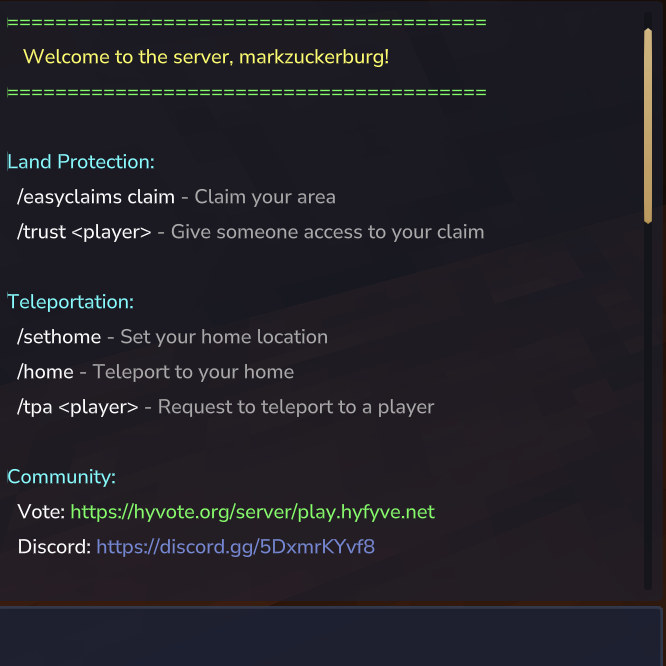
Welcome Messages - Greet players when they join
Scheduled Announcements - Vote reminders, tips, Discord links
Hex Colors - Full RGB color support with {#RRGGBB}
Per-Announcement Intervals - Each message on its own timer
Permission Filtering - Show announcements to specific groups
Hot Reload - Change config without restarting
Commands
Command What it does
/announce reload Reload config without restart
/announce status See what's running
/announce list List all announcements
/announce toggle <id> Enable/disable an announcement
Configuration
Config file: mods/cryptobench_EasyAnnounce/config.json
The config has two main sections: joinMessages and scheduledAnnouncements.
Join Messages
Messages sent to players when they connect to the server.
"joinMessages": { "enabled": true, "prefix": "{#55FF55}[Welcome] ", "messages": [ "Line 1", "Line 2" ] }
Field Type Description
enabled boolean true to send messages, false to disable
prefix string Text added before each message (can be empty "")
messages array List of messages - each string is a new line
Notes:
Use {player} to insert the player's name
Use empty strings "" for blank lines
All messages are sent in order when a player joins
Scheduled Announcements
Repeating messages broadcast to all online players. Each announcement is independent with its own timer.
"scheduledAnnouncements": [ { "id": "vote", "enabled": true, "intervalSeconds": 300, "prefix": "{#FFAA00}[Vote] ", "message": "{#FFFFFF}Vote for us!", "permission": "" } ]
Field Type Description
id string Unique name for this announcement (used in commands)
enabled boolean true to run, false to disable
intervalSeconds number How often to broadcast (in seconds)
prefix string Text added before the message
message string The announcement text
permission string Only players with this permission see it (empty = everyone)
Common intervals: | Seconds | Time | |---------|------| | 60 | 1 minute | | 300 | 5 minutes | | 600 | 10 minutes | | 1800 | 30 minutes | | 3600 | 1 hour |
Full Example Config
{ "joinMessages": { "enabled": true, "prefix": "", "messages": [ "{#55FF55}========================================", "{#FFFF55} Welcome to the server, {player}!", "{#55FF55}========================================", "", "{#55FFFF}Commands:", "{#FFFFFF} /home {#AAAAAA}- Teleport home", "{#FFFFFF} /tpa <player> {#AAAAAA}- Request teleport", "", "{#AAAAAA}Have fun!" ] }, "scheduledAnnouncements": [ { "id": "vote", "enabled": true, "intervalSeconds": 300, "prefix": "{#FFAA00}[Vote] ", "message": "{#FFFFFF}Vote for us at {#55FF55}" rel="noopener nofollow" target="_blank">https://example.com/vote", "permission": "" }, { "id": "discord", "enabled": true, "intervalSeconds": 600, "prefix": "{#7289DA}[Discord] ", "message": "{#FFFFFF}Join our Discord! {#7289DA}" rel="noopener nofollow" target="_blank">https://discord.gg/example", "permission": "" }, { "id": "staff-reminder", "enabled": true, "intervalSeconds": 900, "prefix": "{#FF5555}[Staff] ", "message": "{#FFFFFF}Remember to check reports!", "permission": "announce.staff" } ] }
Colors
Use {#RRGGBB} hex codes anywhere in your messages:
Color Code Example
Green {#55FF55} Success messages
Red {#FF5555} Warnings
Yellow {#FFFF55} Highlights
Gold {#FFAA00} Prefixes
Aqua {#55FFFF} Info
Gray {#AAAAAA} Descriptions
White {#FFFFFF} Normal text
Discord Blue {#7289DA} Discord links
Example:
"{#FF5555}Warning: {#FFFFFF}PvP is enabled!"
Placeholders
Placeholder Replaced with
{player} Player's username (join messages only)
Permissions
Permission What it does
announce.admin Access to /announce commands
Custom per-announcement:
Set "permission": "announce.vip" on any announcement to only show it to players with that permission.
FAQ
Q: How do I change how often an announcement shows?
Change intervalSeconds in the config. Examples:
60 = every 1 minute
300 = every 5 minutes
3600 = every 1 hour
Q: How do I add more announcements?
Add another object to the scheduledAnnouncements array:
{ "id": "tip1", "enabled": true, "intervalSeconds": 120, "prefix": "{#55FF55}[Tip] ", "message": "{#FFFFFF}Your tip here!", "permission": "" }
Q: Can I disable an announcement without deleting it?
Set "enabled": false or use /announce toggle <id>
Q: How do I reload after editing config?
Use /announce reload - no restart needed!
Q: Can I show announcements only to staff?
Set "permission": "announce.staff" and give that permission to your staff group.
License
MIT - Do whatever you want with it!
Categories
Need a Server?
Run EasyAnnounce on a dedicated Hytale server with easy mod management.
Get Hytale HostingFrequently Asked Questions
What is EasyAnnounce?
Automated server announcements for Hytale. Welcome messages, scheduled broadcasts, vote reminders, and Discord links. Fully customizable with hex colors, per-message intervals, and hot reload.
How do I download EasyAnnounce?
You can download EasyAnnounce for free from CurseForge. Click the "Download on CurseForge" button on this page to go directly to the download page.
Who created EasyAnnounce?
EasyAnnounce was created by PhillipJ. The mod has been downloaded 138 times.
Is EasyAnnounce compatible with Hytale servers?
EasyAnnounce is designed for Hytale and can be used on both single-player and multiplayer servers. Check the mod page on CurseForge for specific compatibility information.
How do I install EasyAnnounce?
To install EasyAnnounce: 1) Download the mod from CurseForge, 2) Place the file in your Hytale mods folder, 3) Restart the game. The mod should load automatically.
Related Gameplay Mods
View all mods
Wan's Wonder Weapons
WanMine
A collection of unique weapons for Hytale, new "relics" blending elemental power, dark magic, and a touch of absurdity!

Perfect Parries
narwhals
Adds a souls-like/RPG combat mechanic where if you block at the instant where you are supposed to take damage, you don't lose stamina, deflect some damage, and stun the attacker. This mod includes a stamina system similar to that of souls/RPG games.

Spellbook
DarkhaxDev
Powering your favorite mods with clean, reusable helpers and utilities.

RPG Leveling And Stats/Skills
Zuxaw_dev
An RPG leveling plugin for Hytale that adds experience points, leveling, stat allocation, and character progression with a GUI, HUD, competitive leaderboard system, and full multi-language translation support.

Lucky Mining
Buuz135
Get more ores from mining, the more you mine in a row, the more ores you get.

MMO Skill Tree
ziggfreed
(Multiple Languages) MMO Skill Tree adds an RPG-style progression system where every action you take helps you grow stronger.