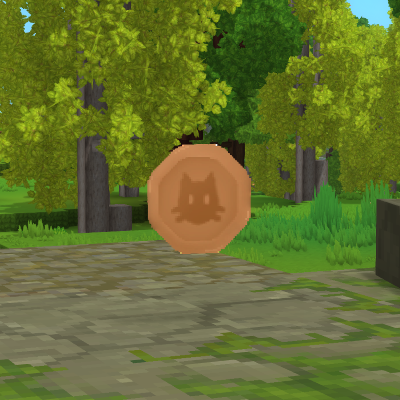
EcotaleCoins - Physical Currency
Physical coin items and banking system for the Ecotale economy. Players collect coins in the world and store them in the bank.
About EcotaleCoins - Physical Currency
EcotaleCoins - Physical Currency for Hytale
Physical coin items and banking system for the Ecotale economy. Players collect coins in the world and store them in the bank.
Screenshots
Bank GUI
Physical Coins
Features
Physical Currency
6 coin denominations - COPPER, IRON, COBALT, GOLD, MITHRIL, ADAMANTITE
World drops - Coins drop from mobs when EcotaleJobs is installed
Optimal breakdown - Large values auto-convert to highest denominations
Pickup system - Walk over coins to collect them
Bank System
Secure storage - Bank balance separate from inventory coins
Deposit/Withdraw - Convert between bank and physical coins
Exchange - Convert between coin denominations
Consolidate - Combine small coins into larger ones
API
Full provider API for other plugins
Drop coins at entity positions
Secure transaction handling
Installation
Install Ecotale first
Download EcotaleCoins-1.0.0.jar
Place in your Hytale mods/ folder
Start the server
First Startup Behavior
On first installation, the plugin extracts coin assets to mods/Ecotale_EcotaleCoins/. This creates an asset pack that Hytale must load.
The server will automatically restart once after extracting assets. This is expected behavior - Hytale requires a restart to register new asset packs.
[EcotaleCoins] First-time setup detected. Restarting server to load assets... After the restart, coins will work normally. This only happens once.
Commands
Command Description Permission
/bank Open bank GUI All players (Adventure mode)
/bank deposit <amount|all> Deposit coins to bank All players (Adventure mode)
/bank withdraw <amount|all> Withdraw coins from bank All players (Adventure mode)
Permissions
Permission Description Default
ecotale.ecotalecoins.command.bank Access to /bank commands All players (Adventure mode)
Important: LuckPerms Override Behavior
If you install LuckPerms, commands will be blocked for all players until you grant permissions:
# Grant bank access to all players /lp group default permission set ecotale.ecotalecoins.command.bank true
# Verify permission /lp user <username> permission check ecotale.ecotalecoins.command.bank
Customization
All coin assets are extracted to mods/Ecotale_EcotaleCoins/ and can be modified.
Texture Customization
Located in Common/Items/Currency/Coins/:
File Description
Coin_Copper.png Copper coin texture (64x64)
Coin_Iron.png Iron coin texture
Coin_Cobalt.png Cobalt coin texture
Coin_Gold.png Gold coin texture
Coin_Mithril.png Mithril coin texture
Coin_Adamantite.png Adamantite coin texture
To customize: Replace any PNG with your own 64x64 texture and restart the server.
Model Customization
File Description
Coin.blockymodel Dropped coin 3D model
Coin_Held.blockymodel Held/inventory coin model
Icon Customization
Located in Common/Icons/Items/Coins/ - these appear in the inventory UI.
Coin Values
Coin Base Value Relative Value
COPPER 1 1 coin
IRON 10 10 copper
COBALT 100 10 iron
GOLD 1,000 10 cobalt
MITHRIL 10,000 10 gold
ADAMANTITE 100,000 10 mithril
Configuration
Note: EcotaleCoins does not have a config file. Coin values are defined in CoinType.java enum and cannot be changed without recompiling.
If you need configurable coin values, submit a feature request or modify CoinType.java:
public enum CoinType { COPPER("Coin_Copper", 1, "Copper"), IRON("Coin_Iron", 10, "Iron"), COBALT("Coin_Cobalt", 100, "Cobalt"), GOLD("Coin_Gold", 1_000, "Gold"), MITHRIL("Coin_Mithril", 10_000, "Mithril"), ADAMANTITE("Coin_Adamantite", 100_000, "Adamantite"); // ... } API Usage
import com.ecotale.api.EcotaleAPI; import com.ecotale.api.PhysicalCoinsProvider;
// Check if coins addon is available if (EcotaleAPI.isPhysicalCoinsAvailable()) { PhysicalCoinsProvider coins = EcotaleAPI.getPhysicalCoins();
// Drop coins at entity position coins.dropCoinsAtEntity(entityRef, store, commandBuffer, 500L); } Building from Source
Requirements: Place JARs in libs/ folder:
hytale-server.jar (Hytale dedicated server)
Ecotale-1.0.0.jar (from Ecotale project)
./gradlew jar Output: build/libs/EcotaleCoins-1.0.0.jar
License
MIT License - 2026 Tera-bytez
Categories
Need a Server?
Run EcotaleCoins - Physical Currency on a dedicated Hytale server with easy mod management.
Get Hytale HostingFrequently Asked Questions
What is EcotaleCoins - Physical Currency?
Physical coin items and banking system for the Ecotale economy. Players collect coins in the world and store them in the bank.
How do I download EcotaleCoins - Physical Currency?
You can download EcotaleCoins - Physical Currency for free from CurseForge. Click the "Download on CurseForge" button on this page to go directly to the download page.
Who created EcotaleCoins - Physical Currency?
EcotaleCoins - Physical Currency was created by MichiWeon. The mod has been downloaded 341 times.
Is EcotaleCoins - Physical Currency compatible with Hytale servers?
EcotaleCoins - Physical Currency is designed for Hytale and can be used on both single-player and multiplayer servers. Check the mod page on CurseForge for specific compatibility information.
How do I install EcotaleCoins - Physical Currency?
To install EcotaleCoins - Physical Currency: 1) Download the mod from CurseForge, 2) Place the file in your Hytale mods folder, 3) Restart the game. The mod should load automatically.
Related Gameplay Mods
View all mods
Wan's Wonder Weapons
WanMine
A collection of unique weapons for Hytale, new "relics" blending elemental power, dark magic, and a touch of absurdity!

Perfect Parries
narwhals
Adds a souls-like/RPG combat mechanic where if you block at the instant where you are supposed to take damage, you don't lose stamina, deflect some damage, and stun the attacker. This mod includes a stamina system similar to that of souls/RPG games.

Spellbook
DarkhaxDev
Powering your favorite mods with clean, reusable helpers and utilities.

RPG Leveling And Stats/Skills
Zuxaw_dev
An RPG leveling plugin for Hytale that adds experience points, leveling, stat allocation, and character progression with a GUI, HUD, competitive leaderboard system, and full multi-language translation support.

Lucky Mining
Buuz135
Get more ores from mining, the more you mine in a row, the more ores you get.

MMO Skill Tree
ziggfreed
(Multiple Languages) MMO Skill Tree adds an RPG-style progression system where every action you take helps you grow stronger.