
Equipment HUD
Custom HUD showing equipped armor, durability, and armor statistics in real-time.
About Equipment HUD
🛡️ Equipment HUD
See your equipped armor directly on your HUD — including durability, stats, and resistances. Clean, readable, real-time.
✅ Works as a Hytale server plugin (CustomUIHud). No client-side installation required.
✨ Features
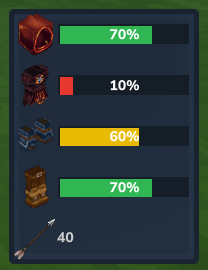
🧩 Armor slots on HUD (Head / Chest / Legs / Hands) with icons + durability display
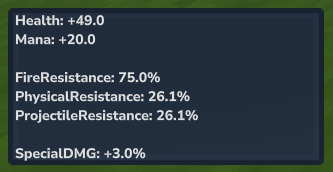
📊 Combined stats overview: bonuses, resistances & damage modifiers from all equipped pieces
🏹 Arrow count: shows total arrows (hotbar + storage) below the armor slots
📉 Durability display modes: classic text or optional durability bar with centered % (color-coded red/yellow/green)
🖼️ Optional HUD background/frame for readability
📍 Flexible positioning: choose from 4 corners (top/bottom, left/right)
🎯 Fine-tuning: pixel-precise offsets via a simple in-game UI
👤 Per-player settings + saved and restored automatically
🌍 Translations (i18n): choose your language in the config UI
⚙️ In-game configuration (no config file editing)
👁️ Session toggles: quick HUD on/off and optional bold text for better readability (session-only)
💾 Use Save Favorite to store your current layout (positions, offsets, scale).
💾 Use Load Favorite to instantly restore it later.
🧭 Usage
To open the settings UI, run one of these commands:
/seh
/showequipmenthud
No OP needed. Normal players can open the config without extra permission setup.
⚠️ Compatibility (quick & important)
Hytale currently allows only one custom HUD per player. If you want to run multiple HUD mods at the same time, install MultipleHUD (by Buuz135). EquipmentHUD detects it automatically and integrates with it.
💬 Feedback
Have ideas to improve Equipment HUD? Feel free to leave feature requests, suggestions, or bug reports in the comments — I read everything and will prioritize the most helpful ideas.
Author: Valcoms
Categories
Screenshots




Need a Server?
Run Equipment HUD on a dedicated Hytale server with easy mod management.
Get Hytale HostingFrequently Asked Questions
What is Equipment HUD?
Custom HUD showing equipped armor, durability, and armor statistics in real-time.
How do I download Equipment HUD?
You can download Equipment HUD for free from CurseForge. Click the "Download on CurseForge" button on this page to go directly to the download page.
Who created Equipment HUD?
Equipment HUD was created by Valcoms. The mod has been downloaded 1.2K times.
Is Equipment HUD compatible with Hytale servers?
Equipment HUD is designed for Hytale and can be used on both single-player and multiplayer servers. Check the mod page on CurseForge for specific compatibility information.
How do I install Equipment HUD?
To install Equipment HUD: 1) Download the mod from CurseForge, 2) Place the file in your Hytale mods folder, 3) Restart the game. The mod should load automatically.
Related Gameplay Mods
View all mods
Wan's Wonder Weapons
WanMine
A collection of unique weapons for Hytale, new "relics" blending elemental power, dark magic, and a touch of absurdity!

Perfect Parries
narwhals
Adds a souls-like/RPG combat mechanic where if you block at the instant where you are supposed to take damage, you don't lose stamina, deflect some damage, and stun the attacker. This mod includes a stamina system similar to that of souls/RPG games.

Spellbook
DarkhaxDev
Powering your favorite mods with clean, reusable helpers and utilities.

RPG Leveling And Stats/Skills
Zuxaw_dev
An RPG leveling plugin for Hytale that adds experience points, leveling, stat allocation, and character progression with a GUI, HUD, competitive leaderboard system, and full multi-language translation support.

Lucky Mining
Buuz135
Get more ores from mining, the more you mine in a row, the more ores you get.

MMO Skill Tree
ziggfreed
(Multiple Languages) MMO Skill Tree adds an RPG-style progression system where every action you take helps you grow stronger.