
HDiscord Chat Bridge
A powerful plugin that connects your Hytale server to Discord
About HDiscord Chat Bridge
# Hytale-Discord Chat Bridge
**Synchronize your Hytale server with Discord in real-time!**
## 🌟 Description
Hytale-Discord Chat Bridge is a powerful plugin that connects your Hytale server to Discord, enabling instant bidirectional communication between players and Discord members. Keep your community connected even when they're on different platforms!
## 🔧 Main Features
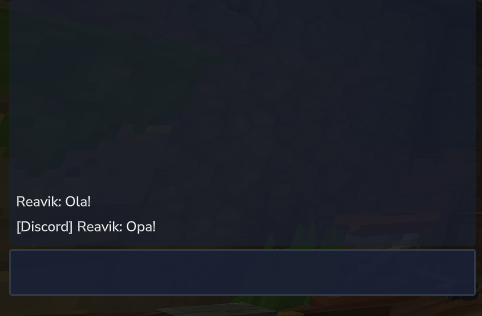
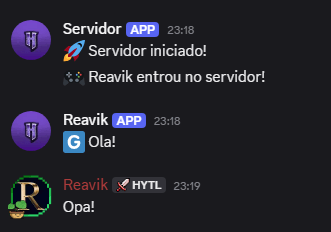
### 💬 Bidirectional Chat Sync - Game messages automatically appear on Discord - Discord messages appear in-game chat - Customizable prefix system to identify message origins
### 🎮 Automatic Notifications - Real-time alerts when players join/leave the server - Configurable messages for server events - Optional suppression of default server messages
### 🖼️ Full Customization - Custom avatar for server webhook - Fully configurable messages
### 🔧 Technical Features - Automatic reconnection on failures - Detailed logging system for diagnostics - Simple configuration via JSON file
## ⚙️ Configuration
### 1. Installation 1. Place the `.jar` file in your server's `mods` folder 2. Restart the server 3. Configure the generated `config.json` file
### 2. Arquivo de Configuração ```json { "botToken": "TOKEN_DO_SEU_BOT", "channelId": "ID_DO_CANAL_DISCORD", "serverAvatarUrl": "URL_DA_IMAGEM_DO_SERVIDOR", "enableHytaleToDiscord": true, "enableDiscordToHytale": true, "discordMessagePrefix": "[Discord] ", "hytaleMessagePrefix": "[Hytale] ", "hytaleMessageFormat": "[Discord] %s: %s", "playerJoinMessage": "🎮 %s entrou no servidor!", "playerLeaveMessage": "👋 %s saiu do servidor!", "serverStartMessage": "🚀 Servidor iniciado!", "serverStopMessage": "🛑 Servidor desligando... Voltamos já!", "showJoinLeaveMessages": true, "suppressDefaultJoinMessages": true, "reconnectAttempts": 3, "reconnectDelayMs": 5000 } ```
### 3. Getting Credentials - **Bot Token**: Create a bot on [Discord Developer Portal](https://discord.com/developers/applications) - **Channel ID**: Enable developer mode on Discord and copy the channel ID - **Avatar**: Use any public image URL (PNG, JPG, GIF)
## 🎯 Benefits
### For Administrators - Monitor server activity in real-time - Easily communicate with your community - Keep everyone informed about important events
### For Players - Interact with Discord friends while playing - See who is online on the server - Participate in discussions even outside the game
### For the Community - Strengthens sense of community - Facilitates event organization - Keeps everyone connected and engaged
## 🛠️ Requirements - Discord bot with appropriate permissions - Text channel on Discord for synchronization
## 🔒 Required Permissions
Your Discord bot needs the following permissions: - `VIEW_CHANNEL` - View channels - `SEND_MESSAGES` - Send messages - `MANAGE_WEBHOOKS` - Manage webhooks - `READ_MESSAGE_HISTORY` - Read message history
## 📊 Usage Example
With the plugin installed and configured: 1. A player types in chat: "Hello everyone!" 2. The message instantly appears on Discord as: `[Hytale] PlayerName: Hello everyone!` 3. A Discord member responds: "Welcome!" 4. The response appears in-game as: `[Discord] UserName: Welcome!`
## 🆘 Support and Issues
If you encounter problems: 1. Check server logs for error messages 2. Confirm all credentials are correct 3. Test with known avatar URLs 4. Verify bot permissions on Discord
---
*Keep your Hytale community connected with the Discord world!* 🚀
Categories
Screenshots
Need a Server?
Run HDiscord Chat Bridge on a dedicated Hytale server with easy mod management.
Get Hytale HostingFrequently Asked Questions
What is HDiscord Chat Bridge?
A powerful plugin that connects your Hytale server to Discord
How do I download HDiscord Chat Bridge?
You can download HDiscord Chat Bridge for free from CurseForge. Click the "Download on CurseForge" button on this page to go directly to the download page.
Who created HDiscord Chat Bridge?
HDiscord Chat Bridge was created by Reavik. The mod has been downloaded 95 times.
Is HDiscord Chat Bridge compatible with Hytale servers?
HDiscord Chat Bridge is designed for Hytale and can be used on both single-player and multiplayer servers. Check the mod page on CurseForge for specific compatibility information.
How do I install HDiscord Chat Bridge?
To install HDiscord Chat Bridge: 1) Download the mod from CurseForge, 2) Place the file in your Hytale mods folder, 3) Restart the game. The mod should load automatically.
Related Gameplay Mods
View all mods
Wan's Wonder Weapons
WanMine
A collection of unique weapons for Hytale, new "relics" blending elemental power, dark magic, and a touch of absurdity!

Perfect Parries
narwhals
Adds a souls-like/RPG combat mechanic where if you block at the instant where you are supposed to take damage, you don't lose stamina, deflect some damage, and stun the attacker. This mod includes a stamina system similar to that of souls/RPG games.

Spellbook
DarkhaxDev
Powering your favorite mods with clean, reusable helpers and utilities.

RPG Leveling And Stats/Skills
Zuxaw_dev
An RPG leveling plugin for Hytale that adds experience points, leveling, stat allocation, and character progression with a GUI, HUD, competitive leaderboard system, and full multi-language translation support.

Lucky Mining
Buuz135
Get more ores from mining, the more you mine in a row, the more ores you get.

MMO Skill Tree
ziggfreed
(Multiple Languages) MMO Skill Tree adds an RPG-style progression system where every action you take helps you grow stronger.