Hide Armor Command
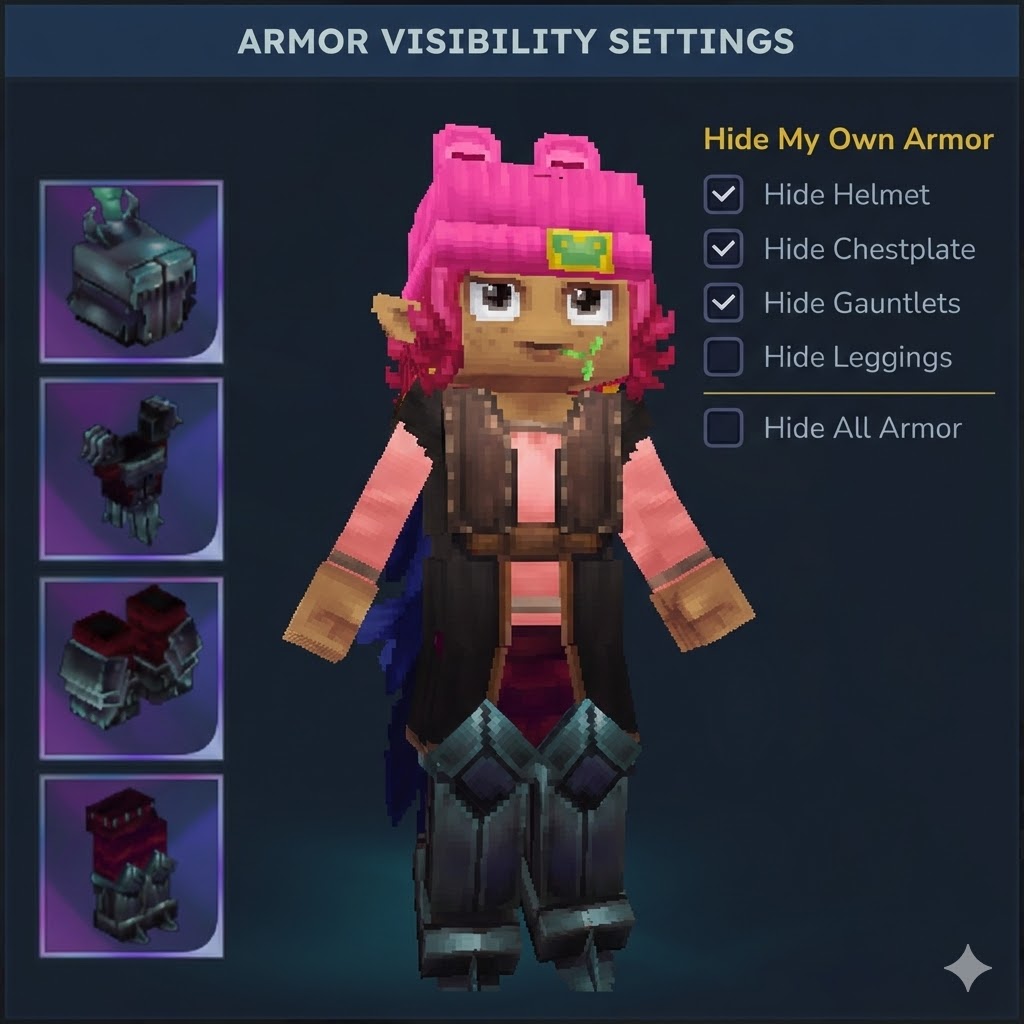
A Hytale plugin that allows players to toggle the visibility of their armor pieces while maintaining full protection benefits.
About Hide Armor Command
HideArmor - Advanced Armor Visibility Control
A Hytale plugin that allows players to toggle the visibility of their armor pieces while maintaining full protection benefits. Now featuring a privacy-focused mutual opt-in system for multiplayer interactions, LuckPerms integration, and comprehensive admin controls.
Check some of my other mods as well:
Equipment Plus Hud - Check on HUD for your current item durability, and ammunition count
⚠️ Important: Permission System Changes in 0.7.2
Commands now require proper permissions! By default, permission nodes may be ALLOWED unless explicitly denied. For security, we recommend using LuckPerms and explicitly denying admin commands for default players. See Permission Setup below.
Changelog
v0.8.0-alpha - Internationalization & UI Improvements
Added multi-language support (EN, ES, PT, FR, DE, RU)
New three-column layout for both user and admin UIs
Language selector in both /hidearmor and /hidearmoradmin GUIs
Server-wide default language setting with persistence
0.7.2-alpha - LuckPerms Integration & Permission Enforcement
LuckPerms auto-detection - permissions managed via /lp when installed
Proper permission enforcement for ALL commands
Better Modlist logo support
Updated documentation
0.7.1-alpha - Stability Fixes
Fixed Ancient Gateways world transition lag spike
Fixed permission button ID mismatch
0.7.0-alpha - Admin Features
Admin configuration menu (/hidearmoradmin)
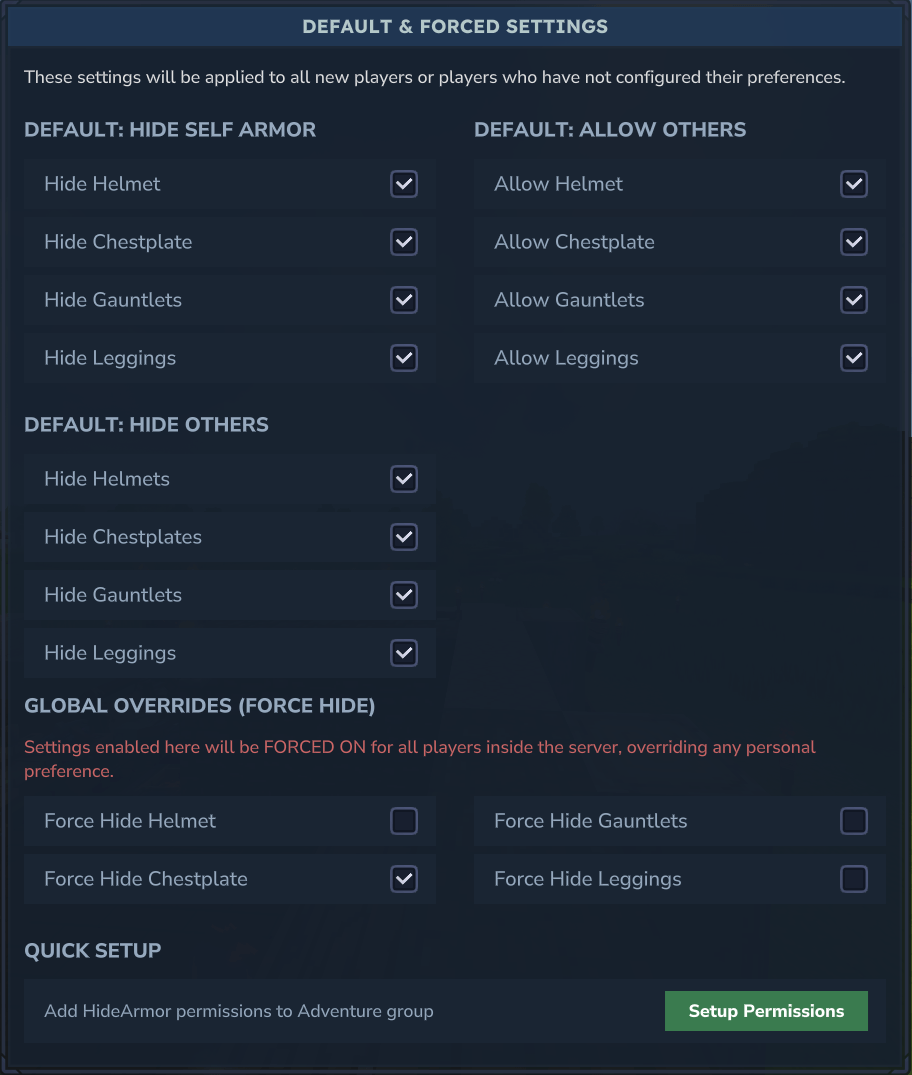
Default & force override settings
Features
Hide Individual Armor Pieces - Toggle visibility for helmet, chestplate, gauntlets, and leggings independently
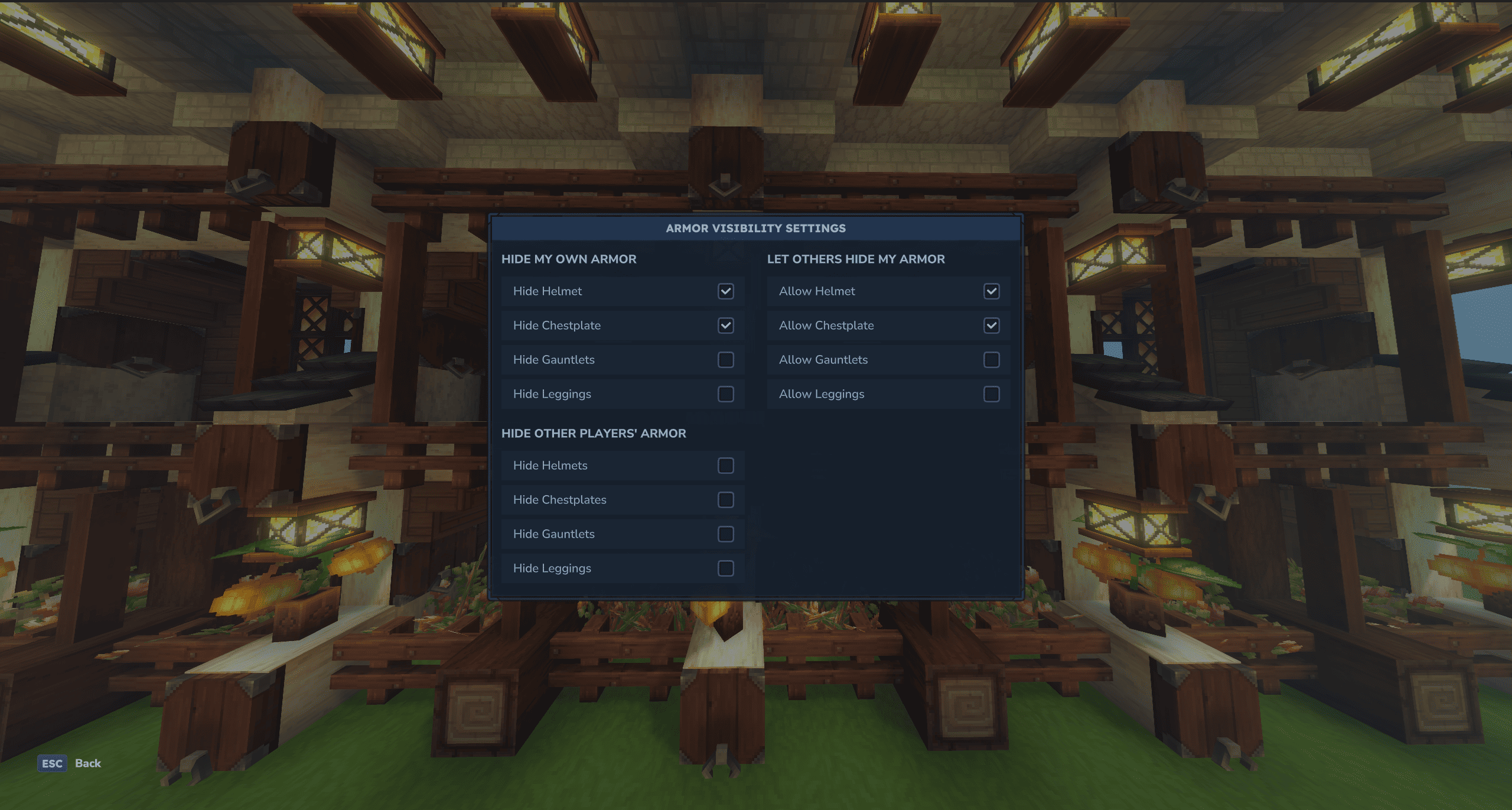
Multiplayer Support - Hide other players' armor with a Mutual Opt-In system (requires permission from both parties)
Privacy Control - Granular "Allow Others" permissions ensure you maintain control over your appearance
Persistent State - All preferences are automatically saved and restored
Native GUI - Modern, interactive Hytale UI with three distinct configuration sections
LuckPerms Integration - Seamless permission management when LuckPerms is installed
Better Modlist Support - Shows mod logo when Better Modlist is installed
Multi-Language Support
Built-in translations for English, Spanish, Portuguese, French, German, and Russian. Change language directly from the UI or via /hidearmor language <code>.
⚡ Known Behavior: Armor Flickering
When armor visibility updates during inventory changes (equipping/unequipping), a brief flicker may occur. This is due to Hytale's packet system processing the original item before our filter applies.
Mitigation Options:
Adjust refreshDelayMs in players.json (default: 50ms, range: 10-1000ms)
Higher values reduce flicker frequency but add slight delay
This is a visual-only effect and doesn't impact gameplay
Commands
Player Commands
Command Permission Description
/hidearmor dev.nxtime.hidearmor.command.hidearmor Open armor visibility menu
/hidearmor {piece} dev.nxtime.hidearmor.command.hidearmor Toggle specific armor piece
/hidehelmet dev.nxtime.hidearmor.command.hidehelmet Quick helmet toggle
Admin Commands
Command Permission Description
/hidearmoradmin dev.nxtime.hidearmor.command.hidearmoradmin Admin configuration menu
/hidearmoradmin reload dev.nxtime.hidearmor.command.hidearmoradmin Reload config from disk
Permission Setup
⚠️ SECURITY WARNING
By default, Hytale may ALLOW commands if permissions are not explicitly set. This includes admin commands! Always configure permissions properly.
Option 1: LuckPerms (Recommended) ✅
Install LuckPerms for advanced permission management. HideArmor automatically detects LuckPerms and uses it for all permission checks.
Deny admin access by default:
/lp group default permission set dev.nxtime.hidearmor.command.hidearmoradmin false Grant player commands to a group:
/lp group member permission set dev.nxtime.hidearmor.command.hidearmor true /lp group member permission set dev.nxtime.hidearmor.command.hidehelmet true Grant admin commands to admins only:
/lp group admin permission set dev.nxtime.hidearmor.command.hidearmoradmin true
Option 2: Native Permissions (permissions.json)
Quick Setup
Use the "Setup Permissions" button in /hidearmoradmin to automatically configure player permissions!
Manual Setup
Modify your permissions.json:
{ "users": { ... }, "groups": { "Default": [], "OP": ["*"], "Adventure": [ "dev.nxtime.hidearmor.command.hidearmor", "dev.nxtime.hidearmor.command.hidehelmet" ] } }
Note: Do NOT add dev.nxtime.hidearmor.command.hidearmoradmin to player groups - this should be admin-only!
Configuration
Settings are stored in plugins/HideArmor/players.json:
Setting Default Description
defaultMask 0 Default visibility for new players
forcedMask 0 Force hide (overrides player preferences)
refreshDelayMs 50 Delay before armor refresh (10-1000ms)
Compatibility
Hytale Version: Early Access SDK
LuckPerms: Auto-detected, optional but recommended
Better Modlist: Logo support included
Categories
Screenshots
Need a Server?
Run Hide Armor Command on a dedicated Hytale server with easy mod management.
Get Hytale HostingFrequently Asked Questions
What is Hide Armor Command?
A Hytale plugin that allows players to toggle the visibility of their armor pieces while maintaining full protection benefits.
How do I download Hide Armor Command?
You can download Hide Armor Command for free from CurseForge. Click the "Download on CurseForge" button on this page to go directly to the download page.
Who created Hide Armor Command?
Hide Armor Command was created by nxtime. The mod has been downloaded 20.6K times.
Is Hide Armor Command compatible with Hytale servers?
Hide Armor Command is designed for Hytale and can be used on both single-player and multiplayer servers. Check the mod page on CurseForge for specific compatibility information.
How do I install Hide Armor Command?
To install Hide Armor Command: 1) Download the mod from CurseForge, 2) Place the file in your Hytale mods folder, 3) Restart the game. The mod should load automatically.
Related Gameplay Mods
View all mods
Wan's Wonder Weapons
WanMine
A collection of unique weapons for Hytale, new "relics" blending elemental power, dark magic, and a touch of absurdity!

Perfect Parries
narwhals
Adds a souls-like/RPG combat mechanic where if you block at the instant where you are supposed to take damage, you don't lose stamina, deflect some damage, and stun the attacker. This mod includes a stamina system similar to that of souls/RPG games.

Spellbook
DarkhaxDev
Powering your favorite mods with clean, reusable helpers and utilities.

RPG Leveling And Stats/Skills
Zuxaw_dev
An RPG leveling plugin for Hytale that adds experience points, leveling, stat allocation, and character progression with a GUI, HUD, competitive leaderboard system, and full multi-language translation support.

Lucky Mining
Buuz135
Get more ores from mining, the more you mine in a row, the more ores you get.

MMO Skill Tree
ziggfreed
(Multiple Languages) MMO Skill Tree adds an RPG-style progression system where every action you take helps you grow stronger.