HyOptimizer
The Ultimate Utility for Console Organization & Memory Efficiency
About HyOptimizer
HyOptimizer 🚀
The Essential Suite for Console Clarity, RAM Management & Entity Cleanup
Version: 3.0.0 (Latest Release - Jan 2026)
📖 Overview
HyOptimizer is a high-performance utility designed to solve the three biggest headaches for Hytale server administrators: Console Spam, Memory Leaks, and Entity Lag.
By combining surgical log filtering, aggressive memory recovery, and a thread-safe cleanup engine, HyOptimizer keeps your server running lean and your logs readable. Version 3.0.0 introduces a massive overhaul in stability, aesthetics, and engine compatibility.
✨ Key Features
1. 🧹 Advanced Anti-Spam & Log Filtering
Reclaim your console from the endless flood of engine warnings. HyOptimizer intercepts the server's output to hide unnecessary "noise."
Engine Silence: Automatically suppresses frequent Hytale warnings like InteractionChain, Missing interaction, and Chunk pre-load/post-load timing errors.
Readable Output: Fixed the common bug where logs displayed unreadable Java hashes. Now, all messages appear in crystal-clear text.
Regex Customization: Use the config.json to create your own patterns and block any specific lines you don't want to see.
2. 🧠 Aggressive Memory Recovery (Legacy Mode)
Prevent "Out of Memory" crashes by proactively clearing the server's garbage data.
Legacy Mode (Default): Runs the Garbage Collector on a strict timer (e.g., every 30 seconds). This ensures constant RAM availability without waiting for a crisis.
Smart Mode: Optional setting that only triggers optimization when RAM usage hits a specific target (like 90%).
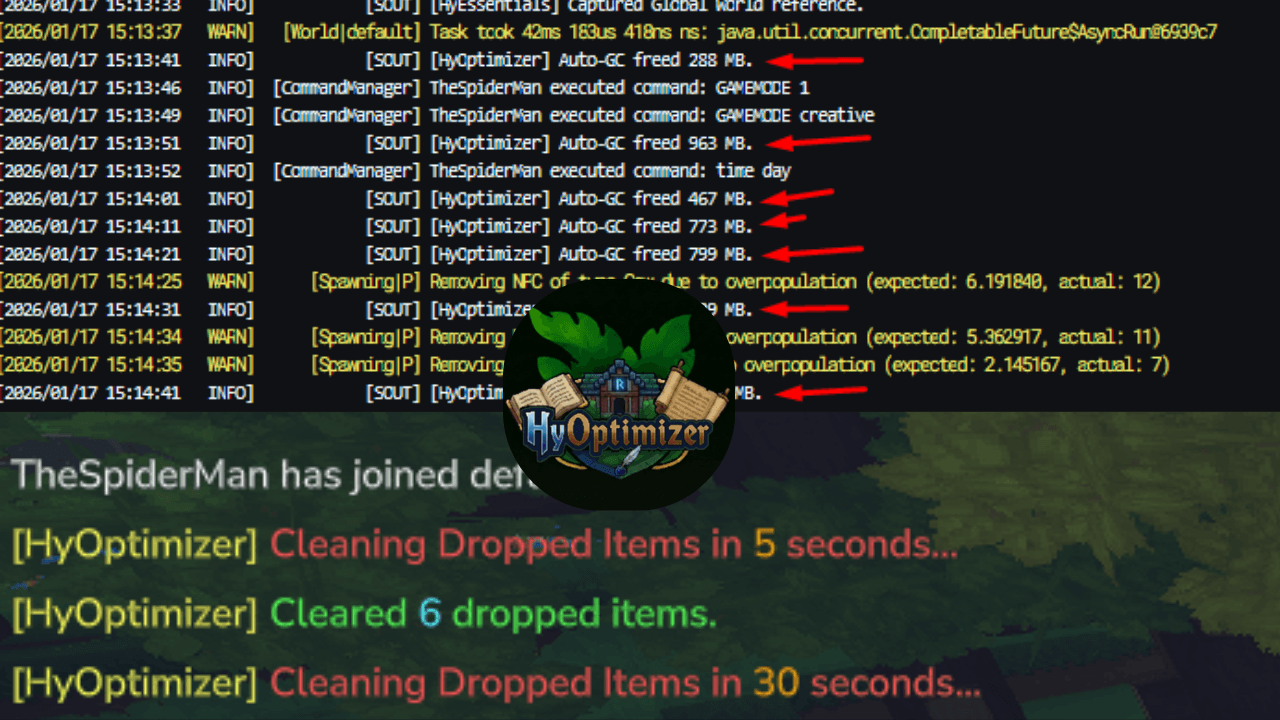
Live Stats: Get instant confirmation of every cycle, showing exactly how many MB were recovered.
3. 🎨 Visual Upgrades: Chat Colors
Version 3.0.0 brings a professional look to your server notifications.
Full Color Support: All plugin broadcasts now support standard & color codes.
Dynamic Formatting: Messages are color-coded for clarity—Green/Gold for successful cleanups and Red/Yellow for urgent warnings.
4. ♻️ Crash-Proof Item Cleaner
Maintain high TPS by clearing dropped items without the risk of a crash.
Thread Safety: Uses the official world.execute() API to ensure all entity removals happen safely on the World thread.
Fail-Safe Logic: Intelligently skips cleanup cycles if the world thread is overloaded or unloading to prevent instability.
Whitelist Protection: Keep important loot safe by adding specific item IDs to the protection list.
🎮 Command Center
Access all features via /optimize or the /ho shortcut.
Command Action Permission
/ho gc Forces a RAM cleanup cycle. hyoptimizer.gc
/ho clean Manually wipes dropped items (except whitelisted). hyoptimizer.clean
/ho reload Refreshes the configuration instantly. hyoptimizer.reload
<button class="mdc-button mat-mdc-button-base export-sheets-button-container mat-mdc-button mat-unthemed ng-star-inserted">Export to Sheets</button><button class="mdc-icon-button mat-mdc-icon-button mat-mdc-button-base mat-mdc-tooltip-trigger copy-button mat-unthemed ng-star-inserted" aria-label="Copy table" data-test-id="copy-table-button"></button>
⚙️ Configuration (mods/HyOptimizer/config.json)
Pro-Tip: v3.0.0 features Auto-Reset. If the plugin detects an outdated config, it will backup your old file and generate a fresh one with these optimized defaults automatically!
JSON <button class="mdc-icon-button mat-mdc-icon-button mat-mdc-button-base mat-mdc-tooltip-trigger copy-button ng-tns-c4168566432-73 mat-unthemed ng-star-inserted" aria-label="Copy code"></button>
{ "configVersion": 3, "enableAutoGc": true, "autoGcIntervalSeconds": 30, "useCriticalGcStrategy": false, "memoryThreshold": 0.0, "enableItemCleaner": true, "itemCleanerIntervalSeconds": 60, "warningIntervals": [60, 30, 5], "protectedItems": [ "hytale:diamond", "hytale:emerald" ], "blockedPatterns": [ "missing or invalid manifest.json", "Duplicate export name", "Took too long to .* process chunk", "Took too long to run pre-load process", "InteractionChain", "Missing interaction", "Client/Server desync", "Removing NPC .* due to overpopulation", "Reallocate:" ] }
💡 Optimization Settings Explained
Legacy Mode (Recommended): Set memoryThreshold: 0.0. This ignores RAM percentages and cleans every interval, mimicking classic high-performance server tools.
Smart Mode: Set memoryThreshold: 0.9 (90%). This pauses optimization until your RAM is almost full—best for top-tier dedicated hardware.
📥 Installation
Shut down your Hytale Server.
Clean Up: Remove the old HyOptimizer.jar and the mods/HyOptimizer folder to ensure a perfect v3.0.0 setup.
Deploy: Place HyOptimizer-3.0.0.jar into your mods folder.
Launch: Restart your server.
The plugin will instantly generate your new config and begin its work. Use /ho reload to apply any tweaks on the fly.
❓ Why HyOptimizer?
Hytale's early access environment is naturally "loud" and memory-intensive. These distractions make it difficult to find actual coding errors and maintain high uptime. HyOptimizer handles the engine's mess for you, giving you a clean console and a fast server so you can focus on building your world.
Developed by the HytaleLibrary Team
Categories
Screenshots
Need a Server?
Run HyOptimizer on a dedicated Hytale server with easy mod management.
Get Hytale HostingFrequently Asked Questions
What is HyOptimizer?
The Ultimate Utility for Console Organization & Memory Efficiency
How do I download HyOptimizer?
You can download HyOptimizer for free from CurseForge. Click the "Download on CurseForge" button on this page to go directly to the download page.
Who created HyOptimizer?
HyOptimizer was created by HytaleLibrary. The mod has been downloaded 3.9K times.
Is HyOptimizer compatible with Hytale servers?
HyOptimizer is designed for Hytale and can be used on both single-player and multiplayer servers. Check the mod page on CurseForge for specific compatibility information.
How do I install HyOptimizer?
To install HyOptimizer: 1) Download the mod from CurseForge, 2) Place the file in your Hytale mods folder, 3) Restart the game. The mod should load automatically.
Related Gameplay Mods
View all mods
Wan's Wonder Weapons
WanMine
A collection of unique weapons for Hytale, new "relics" blending elemental power, dark magic, and a touch of absurdity!

Perfect Parries
narwhals
Adds a souls-like/RPG combat mechanic where if you block at the instant where you are supposed to take damage, you don't lose stamina, deflect some damage, and stun the attacker. This mod includes a stamina system similar to that of souls/RPG games.

Spellbook
DarkhaxDev
Powering your favorite mods with clean, reusable helpers and utilities.

RPG Leveling And Stats/Skills
Zuxaw_dev
An RPG leveling plugin for Hytale that adds experience points, leveling, stat allocation, and character progression with a GUI, HUD, competitive leaderboard system, and full multi-language translation support.

Lucky Mining
Buuz135
Get more ores from mining, the more you mine in a row, the more ores you get.

MMO Skill Tree
ziggfreed
(Multiple Languages) MMO Skill Tree adds an RPG-style progression system where every action you take helps you grow stronger.