
Killstreaks PVP - by Mytale.gg
Tracks PvP killstreaks for Hytale. Tiered rewards at kill milestones using effects, items, or stat commands. Supports timed, repeating, and until-death buffs, persists through logout, resets on death, in-game config, announcements, and leaderboards.
About Killstreaks PVP - by Mytale.gg
Killstreaks Plugin for Hytale
A powerful killstreak reward system for Hytale servers. Players earn awesome rewards as they get consecutive kills without dying!
What Does This Plugin Do?
When players kill other players, they build up a "killstreak". As they reach certain kill counts, they unlock rewards like:
Weapons and armor
Speed boosts
Health regeneration
Stamina restoration
And more!
When a player dies, their streak resets to zero and they lose their active buffs.
Features
Tiered Rewards - Create as many tiers as you want with custom kill requirements
Multiple Reward Types - Give items, speed boosts, healing, stamina regen, and more
Repeating Buffs - Set up rewards that tick every few seconds (like health regen every 3 seconds)
Until Death Rewards - Some rewards can last until the player dies (even if they log out and back in!)
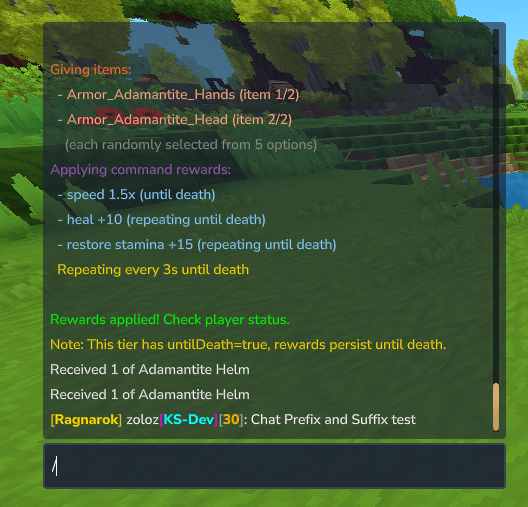
Chat Prefixes - Show the player's current tier in chat: [Berserkr] PlayerName: hello
Chat Suffixes - Show the player's all-time best killstreak: PlayerName[30]: hello
Custom Icons - Each tier can have its own icon in the rewards menu
Leaderboards - See who has the best killstreaks with /ks top
Easy Configuration - Change everything in a simple text file
Quick Start
Put Killstreaks-1.1.0.jar in your server's mods/ folder
Start the server - it creates a default config automatically
Play! Get 3 kills to unlock your first tier
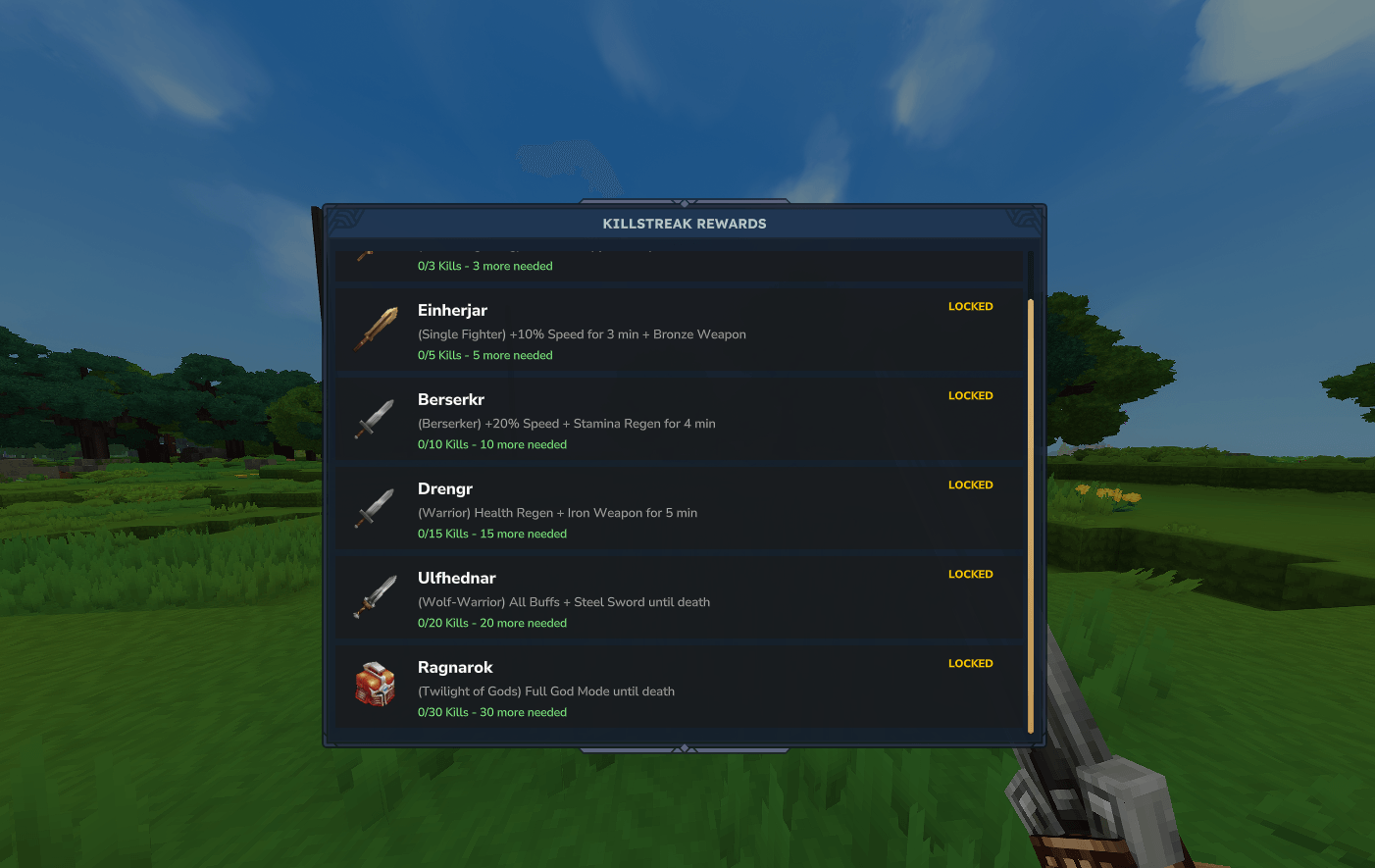
Type /ks rewards to see all available tiers
Commands
CommandWhat It Does
/ksShows your current killstreak /ks helpShows all commands /ks statsShows your killstreak statistics /ks stats <player>Shows another player's stats /ks topShows the all-time best killstreaks /ks rewardsOpens a menu showing all reward tiers /ks reloadReloads the config file (admin only) /ks reset <player>Resets a player's streak (admin only) /ks addkill <player>Adds a kill to a player (admin only) /ks testreward <tier> <player>Tests a reward on a player (admin only)
Files and Folders
Everything is stored in plugins/killstreaks/:
plugins/killstreaks/ ├── config.properties <- All your settings go here! ├── data.properties <- Stores all-time best killstreaks └── active_rewards.properties <- Tracks active "until death" rewards
config.properties
This is where you set up everything - tiers, rewards, colors, and more.
data.properties
This file automatically saves each player's best killstreak ever. You don't need to edit this.
active_rewards.properties
This tracks rewards that last "until death" so they survive even if the player logs out.
Configuration Guide
Open plugins/killstreaks/config.properties in any text editor.
General Settings
These control the whole plugin:
SettingWhat It DoesOptions
enabledTurn the plugin on or offtrue or false broadcast.chatAnnounce killstreaks in chattrue or false broadcast.titleShow big title when reaching a tiertrue or false theme.nameName of your theme (just for display)Any text debug.loggingShow debug messages in consoletrue or false
Example:
enabled=true broadcast.chat=true broadcast.title=true theme.name=Nordic debug.logging=false
Tip: Set debug.logging=false on live servers to reduce console spam!
Chat Prefix Settings
The prefix shows the player's CURRENT tier name in chat. It disappears when they die.
SettingWhat It DoesDefault
prefix.chat.enabledShow tier name before player nametrue prefix.bracket.colorColor of the [ ] brackets#FFD700 (gold) prefix.name.boldMake the tier name boldtrue
What it looks like: [Berserkr] PlayerName: hello everyone
Chat Suffix Settings
The suffix shows the player's ALL-TIME BEST killstreak. It NEVER resets!
SettingWhat It DoesDefault
suffix.chat.enabledShow best killstreak after player nametrue suffix.bracket.colorColor of the [ ] brackets#AAAAAA (gray) suffix.number.colorColor of the number#FFAA00 (orange) suffix.number.boldMake the number boldtrue
What it looks like: PlayerName[30]: hello everyone
Both together: [Berserkr] PlayerName[30]: hello everyone
Creating Tiers
Each tier uses the format tier.X.property where X is the tier number (1, 2, 3, etc).
Basic Tier Settings
Every tier needs these:
SettingWhat It DoesExample
tier.X.killsKills needed to reach this tier3 tier.X.nameName of the tierBerserkr tier.X.meaningDescription/subtitleBerserker tier.X.colorColor (hex code with #)#FF6B35 tier.X.descriptionWhat the reward does+20% Speed
Example - A basic tier:
tier.1.kills=3 tier.1.name=Kringla tier.1.meaning=Circle/Beginning tier.1.color=#C0C0C0 tier.1.description=Random Copper Weapon
Giving Items
Give players weapons, armor, or other items!
SettingWhat It Does
tier.X.itemsList of items (comma-separated) - picks one randomly tier.X.itemQuantityHow many items to give
Example - Give a random copper weapon:
tier.1.items=Weapon_Sword_Copper,Weapon_Axe_Copper,Weapon_Mace_Copper tier.1.itemQuantity=1
Example - Give 2 pieces of adamantite armor:
tier.6.items=Armor_Adamantite_Chest,Armor_Adamantite_Head,Armor_Adamantite_Legs tier.6.itemQuantity=2
Giving Buffs (Commands)
Buff players with speed, healing, or stat restoration!
SettingWhat It Does
tier.X.commandsCommands to run (use ; to separate multiple) tier.X.commandIntervalMilliseconds between repeats (0 = run once) tier.X.commandDurationTotal duration in SECONDS tier.X.untilDeathIf true, lasts until the player dies
Available commands:
speed {player} 1.2 - Make player 20% faster (1.0 = normal)
heal {player} 5 - Heal 5 health
restore {player} <stat> <amount> - Restore a specific stat
Available stats for restore command:
StatAliasesExample
Healthhealth, hprestore {player} health 10 Staminastamina, stamrestore {player} stamina 15 Manamana, mprestore {player} mana 20 Oxygenoxygen, air, breathrestore {player} oxygen 50 Signature Energysignatureenergy, energy, sigrestore {player} energy 25 Ammoammorestore {player} ammo 10
The {player} part gets replaced with the player's name automatically!
Example: One-Time Speed Boost
Speed boost that lasts 3 minutes:
tier.2.commands=speed {player} 1.1 tier.2.commandInterval=0 tier.2.commandDuration=180
commandInterval=0 means "run once" (not repeating)
commandDuration=180 means it lasts 180 seconds (3 minutes)
Example: Repeating Health Regen
Heal 3 HP every 5 seconds for 5 minutes:
tier.4.commands=heal {player} 3 tier.4.commandInterval=5000 tier.4.commandDuration=300
commandInterval=5000 means "every 5000 milliseconds" (5 seconds)
commandDuration=300 means "for 300 seconds total" (5 minutes)
Example: Until Death Buffs
Speed, healing, AND stamina that lasts until the player dies:
tier.5.commands=speed {player} 1.3;heal {player} 5;restore {player} stamina 10 tier.5.commandInterval=5000 tier.5.commandDuration=0 tier.5.untilDeath=true
Multiple commands are separated by ;
untilDeath=true means it lasts until they die (even if they log out!)
commandDuration=0 when using untilDeath (duration doesn't matter)
Custom Icons
Set a custom icon for each tier in the /ks rewards menu:
SettingWhat It Does
tier.X.iconItemIdItem to use as the icon
Example:
tier.6.iconItemId=Armor_Adamantite_Head
Tip: If you don't set an icon, the first item from tier.X.items is used automatically!
Complete Tier Example
Here's a fully configured tier with everything:
# Tier 6: Ragnarok - The ultimate tier! tier.6.kills=30 tier.6.name=Ragnarok tier.6.meaning=Twilight of Gods tier.6.color=#FFD700 tier.6.description=Full God Mode until death
# Give 2 pieces of Adamantite gear tier.6.items=Armor_Adamantite_Chest,Armor_Adamantite_Head,Armor_Adamantite_Legs,Armor_Adamantite_Hands tier.6.itemQuantity=2
# Buffs that repeat every 3 seconds until death tier.6.commands=speed {player} 1.5;heal {player} 10;restore {player} stamina 15 tier.6.commandInterval=3000 tier.6.commandDuration=0 tier.6.untilDeath=true
# Custom icon in the menu tier.6.iconItemId=Armor_Adamantite_Head
Color Codes
Use hex color codes for all colors. Here are some popular ones:
ColorCode
Gold#FFD700 Silver#C0C0C0 Bronze#B8860B Red#FF0000 Dark Red#8B0000 Orange#FF6B35 Blue#4A90D9 Green#00FF00 White#FFFFFF Gray#AAAAAA
Important: Always put # before the color code in the config file!
Default Tiers (Nordic Theme)
The plugin comes with these tiers pre-configured:
TierKillsNameMeaningReward
13KringlaCircle/BeginningRandom Copper Weapon 25EinherjarSingle Fighter+10% Speed + Bronze Weapon 310BerserkrBerserker+20% Speed + Stamina Regen 415DrengrWarriorHealth Regen + Iron Weapon 520UlfhednarWolf-WarriorAll Buffs + Steel Sword (until death) 630RagnarokTwilight of GodsFull God Mode (until death)
Feel free to change these or add your own!
Tips and Tricks
Test Before Going Live - Use /ks testreward <tier> <playername> to test rewards
Turn Off Debug Logs - Set debug.logging=false on production servers
Balance Your Tiers - Start with small rewards, make high tiers really powerful
Use Until Death Sparingly - Save it for high kill counts (15+) to keep it special
Reload Without Restart - Use /ks reload after editing the config
Troubleshooting
Chat prefix not showing?
You need at least 3 kills to reach the first tier
Rewards not working?
Check that enabled=true in the config
Use /ks testreward to test manually
Set debug.logging=true and check console for errors
Wrong icon showing?
Make sure iconItemId uses the exact item ID from the game
The property name is lowercase: iconItemId (not IconItemId)
Config not loading?
Check for typos in property names
Make sure every line has an = sign
Use /ks reload after making changes
Need Help?
Type /ks help in-game for command help
Check the console for error messages (set debug.logging=true)
Make sure your config file has no typos
Version: 1.1.0
Requires: Hytale Server
Categories
Screenshots
Need a Server?
Run Killstreaks PVP - by Mytale.gg on a dedicated Hytale server with easy mod management.
Get Hytale HostingFrequently Asked Questions
What is Killstreaks PVP - by Mytale.gg?
Tracks PvP killstreaks for Hytale. Tiered rewards at kill milestones using effects, items, or stat commands. Supports timed, repeating, and until-death buffs, persists through logout, resets on death, in-game config, announcements, and leaderboards.
How do I download Killstreaks PVP - by Mytale.gg?
You can download Killstreaks PVP - by Mytale.gg for free from CurseForge. Click the "Download on CurseForge" button on this page to go directly to the download page.
Who created Killstreaks PVP - by Mytale.gg?
Killstreaks PVP - by Mytale.gg was created by zoloyolo. The mod has been downloaded 81 times.
Is Killstreaks PVP - by Mytale.gg compatible with Hytale servers?
Killstreaks PVP - by Mytale.gg is designed for Hytale and can be used on both single-player and multiplayer servers. Check the mod page on CurseForge for specific compatibility information.
How do I install Killstreaks PVP - by Mytale.gg?
To install Killstreaks PVP - by Mytale.gg: 1) Download the mod from CurseForge, 2) Place the file in your Hytale mods folder, 3) Restart the game. The mod should load automatically.
Related Gameplay Mods
View all mods
Wan's Wonder Weapons
WanMine
A collection of unique weapons for Hytale, new "relics" blending elemental power, dark magic, and a touch of absurdity!

Perfect Parries
narwhals
Adds a souls-like/RPG combat mechanic where if you block at the instant where you are supposed to take damage, you don't lose stamina, deflect some damage, and stun the attacker. This mod includes a stamina system similar to that of souls/RPG games.

Spellbook
DarkhaxDev
Powering your favorite mods with clean, reusable helpers and utilities.

RPG Leveling And Stats/Skills
Zuxaw_dev
An RPG leveling plugin for Hytale that adds experience points, leveling, stat allocation, and character progression with a GUI, HUD, competitive leaderboard system, and full multi-language translation support.

Lucky Mining
Buuz135
Get more ores from mining, the more you mine in a row, the more ores you get.

MMO Skill Tree
ziggfreed
(Multiple Languages) MMO Skill Tree adds an RPG-style progression system where every action you take helps you grow stronger.