NPC Dialog
Create interactive NPC conversations in your Hytale world. Press F to open custom multi-page dialogs with navigation, persistent storage, command execution, custom button text, forced story progression, and entity state controls.
About NPC Dialog
NPC Dialog
Support Server - https://discord.gg/DRxwt8Qg2W
A powerful and intuitive NPC dialog system for Hytale servers that allows you to create interactive conversations with any entity in your world.
Version [1.2.0] - 2026-01-17 Now live!
Description
NPC Dialog is a comprehensive plugin that enables server administrators to create rich, multi-page dialog systems for any entity in their Hytale world. Players can interact with NPCs by pressing F, opening a beautiful custom UI that displays conversations with navigation between multiple pages.
Perfect for quest systems, story-driven servers, interactive tutorials, or any scenario where you want entities to have meaningful conversations with players.
Additional Use Cases
NPC Dialog isn't limited to story or quest NPCs — it can also be used as a general-purpose information system for your server:
- Help & Tutorial NPCs – Display /help-style information in an interactive, readable UI - Server Rules NPCs – Let players read server rules page-by-page instead of spamming chat - Guides & Tips – Explain server mechanics, ranks, or custom features - New Player Onboarding – Create step-by-step introductions for new players - Information Hubs – Central NPCs for FAQs, commands, or announcements
Features
Core Functionality
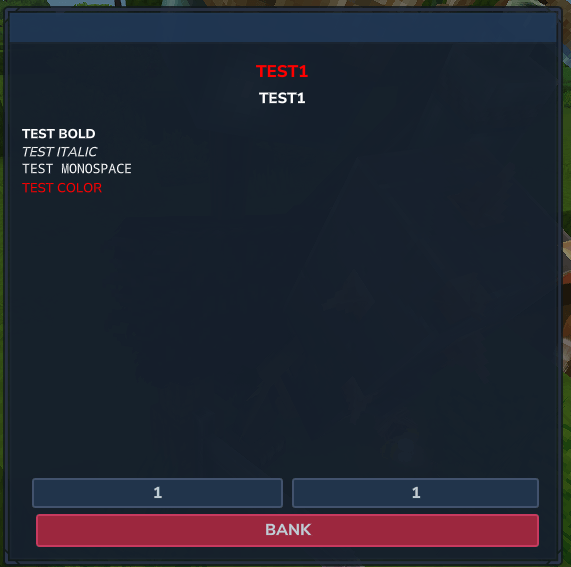
- Interactive NPC System - Link dialog conversations to any entity in your world - Frozen state (entities cannot move) - Non-hostile state (entities cannot attack) - Invulnerable state (entities cannot take damage) - Idle animation selection with scrollable animation list displaying all available animations for each entity model - Custom interaction hint text (e.g., "Press F to open Large Tavern Chest") - Multi-Page Dialogs - Create branching conversations with multiple pages - Custom Buttons - Two fully customizable buttons (Custom Button 1 and Custom Button 2) in player dialog UI, positioned above navigation buttons - Text Formatting in Dialogs Markup for bold, italic, color, and monospace in NPC name, dialog title, and dialog content: `{b}`, `{i}`, `{m}`, `{#RRGGBB}` or `{#RGB}`, and `{/}` to end. Example: `Hello {b}bold{/} and {#ff0000}red{/} text.` - Player Interaction - Players press F to interact with linked entities - Persistent Storage - All NPC data is saved in JSON format and persists across server restarts - Automatic Restoration - Interactions are automatically restored when the server restarts or when entities load - Permission Support - Requires npcdialog.admin permission to use admin commands (compatible with LuckPerms) - Data Migration - Plugin data folder changed from _NPC Dialog to Hyronix_NPC Dialog with automatic migration on first startup
User Interface
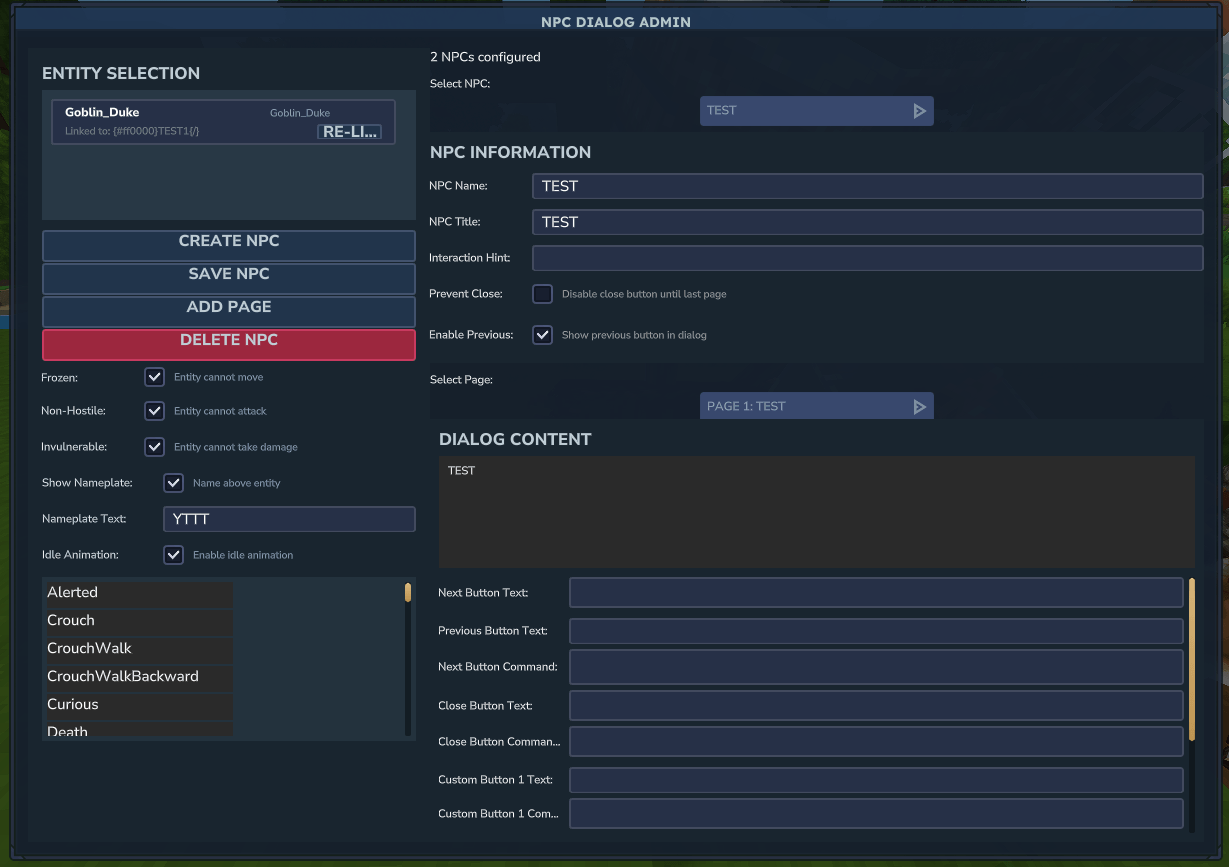
Admin Panel - Beautiful, intuitive GUI for creating and managing NPCs and dialog pages - Create new NPCs with custom names and titles - Edit existing NPCs and their properties - Add multiple dialog pages per NPC - Link NPCs to entities by selecting them in-world - Delete NPCs and automatically remove their interactions - Page selection dropdown for easy editing - Customize Next button text for each page - Customize Previous button text for each page - Customize Close button text for each page - Set command executions for Next and Close buttons - Toggle "Prevent Close Until Last Page" option - Enable/disable Previous button visibility per page - Enable/disable Custom Button 1 and Custom Button 2 per page - Configure Custom Button 1 and Custom Button 2 text and commands - Toggle entity states directly from admin UI (Frozen, Non-hostile, Invulnerable, Idle Animation) - Idle Animation Selection - Scrollable animation list showing all available animations for the selected entity's model, with selection highlighting - Set custom interaction hint text for each NPC - Improved layout and scrolling behavior for better usability
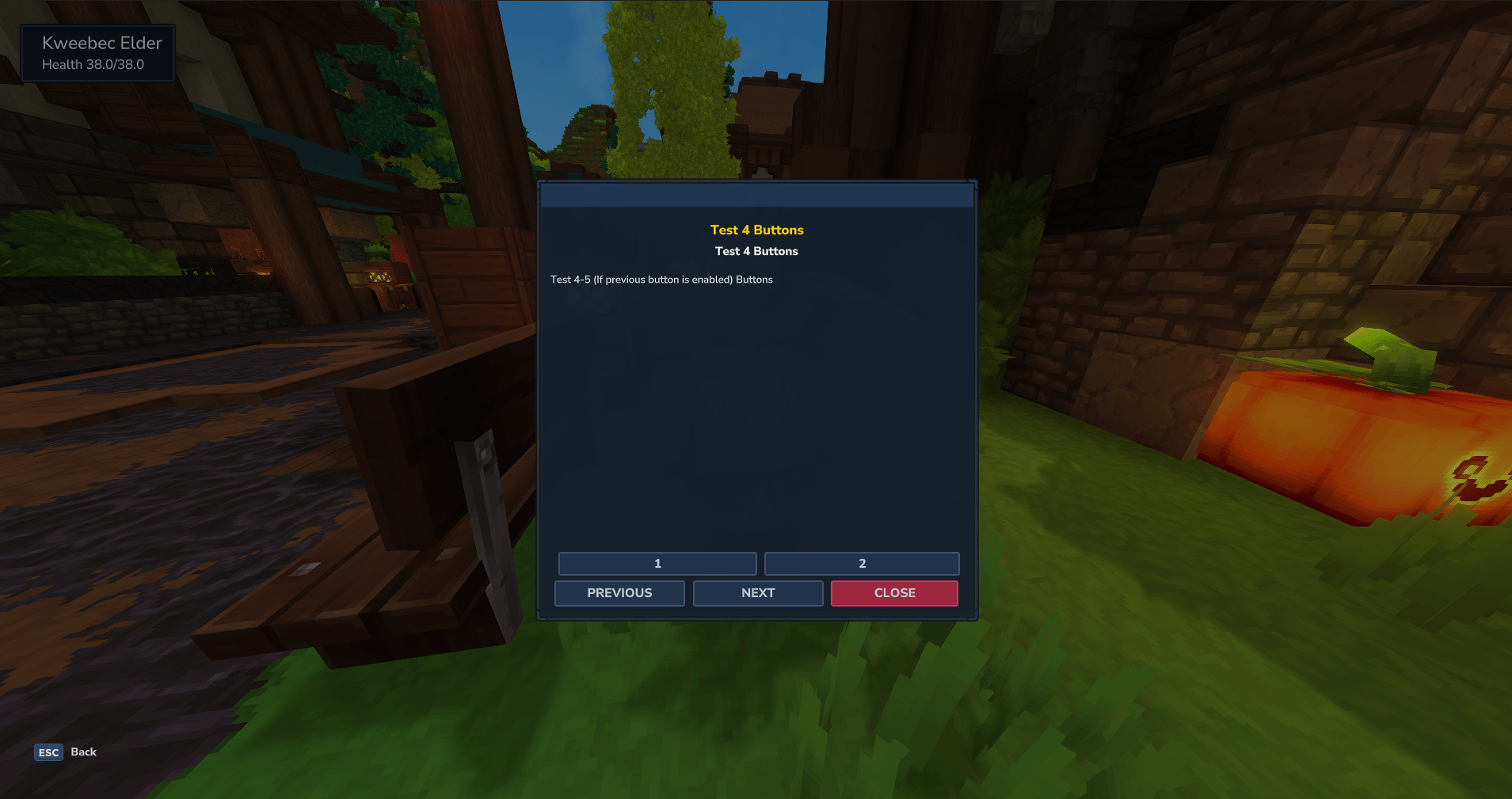
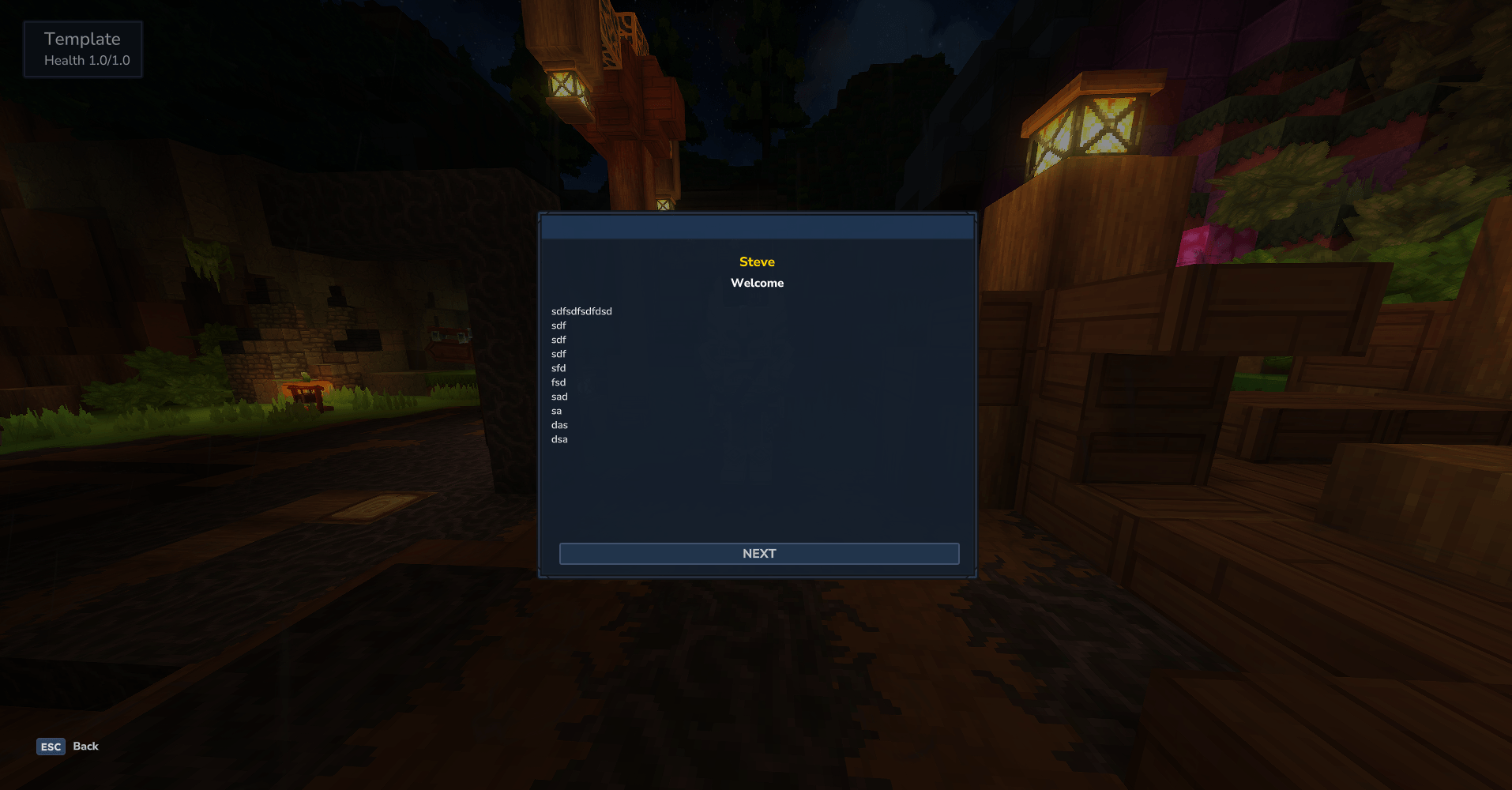
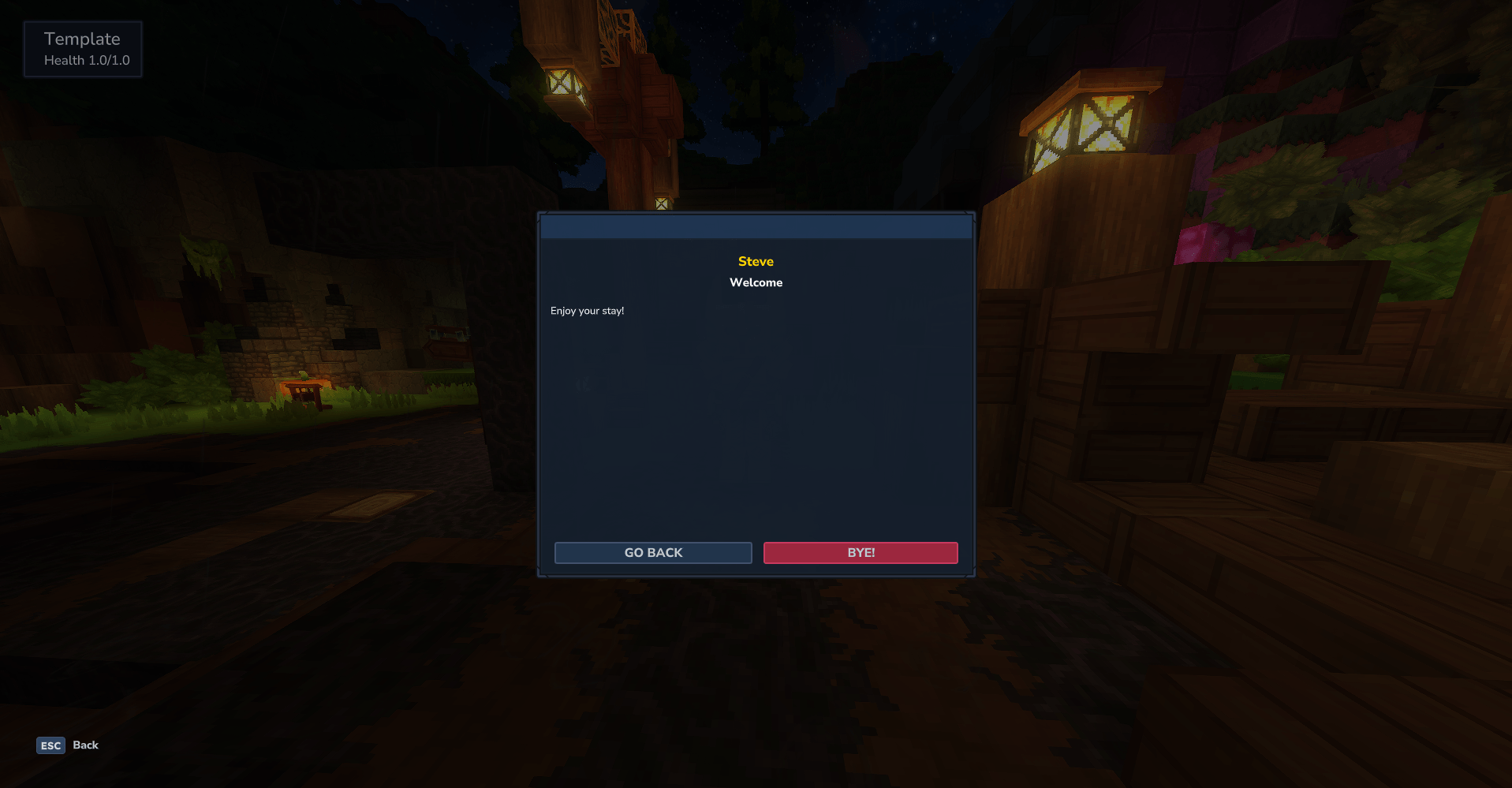
Player Dialog UI - Clean, readable interface for players - Centered NPC name and title - Scrollable multi-line dialog content - Two customizable buttons (Custom Button 1 and Custom Button 2) positioned above navigation buttons - Navigation buttons (Previous/Next) for multi-page conversations - Customizable button text (Previous, Next, Close, Custom Button 1, Custom Button 2) - Close button (can be hidden until last page)
Advanced Features
- Command Execution System - Execute server commands when players interact with dialog buttons - Next Button Command: Run commands when players click the "Next" button (e.g., /help) - Close Button Command: Run commands when players close the dialog (e.g., /spawn, /warp spawn) - Custom Button 1 Command: Execute commands when players click Custom Button 1 - Custom Button 2 Command: Execute commands when players click Custom Button 2 - Command Selectors: Support for @p and @s selectors in commands - @p = nearest player (closest player to the command execution point) - automatically replaced with the player who clicked the button - @s = self (the entity executing the command) - automatically replaced with the player who clicked the button - Both selectors are replaced with the player's name, so they work identically in this context - Example: "give @p Plant_Fruit_Apple --quantity=1" will give the item to the player who clicked the button - Admin Commands: Commands like /give, /tp, /effect, /summon, etc. automatically execute as console for proper permissions - Player Commands: Regular commands execute as the player who clicked the button - Configuration Files: - playerPermissionCommands.json - Maps player-executed commands to permission nodes. Commands listed here will have permissions temporarily granted via LuckPerms when executed, allowing players to use restricted commands through NPC interactions - consoleCommands.json - Defines commands that should execute as console (bypassing player permissions). Commands in this list will run with full console permissions when triggered through NPC buttons, useful for admin commands like `/give`, `/tp`, etc. - Custom Button Text - Change the "Previous", "Next", "Close", "Custom Button 1", and "Custom Button 2" button text to anything you want (e.g., "Continue", "Accept Quest", "Go Forward") - Custom Interaction Hints - Set custom interaction hint text that appears when players look at linked entities (e.g., "Press F to open Large Tavern Chest") - Prevent Close Until Last Page - Force players to read through all dialog pages before they can close the dialog (perfect for story-driven servers and tutorials) - Enable/Disable Previous Button - Control whether the Previous button appears on each page (useful for linear story progression where you don't want players going back) - Enable/Disable Custom Buttons - Toggle Custom Button 1 and Custom Button 2 visibility per page - Entity State Management - Toggle entity states (Frozen, Non-hostile, Invulnerable, Idle Animation) directly from the admin UI - Idle Animation Selection - Select specific idle animations from a scrollable list showing all available animations for each entity model - Multi-Line Content - Support for long dialog text with automatic scrolling - Entity Linking - Link dialogs to any existing entity using in-game selection - Cross-World Support - Works across all worlds on your server - Smart Interaction Management - Automatically adds/removes interaction components - Safe Deletion - Properly cleans up interactions when NPCs are deleted - Error Prevention - Prevents crashes when interacting with deleted NPCs
Commands
| /npcdialog | Opens the admin GUI for managing NPCs and dialogs | Requires npcdialog.admin permission |
Usage Guide
Creating an NPC Dialog
1. Open Admin Panel: Run /npcdialog in-game (requires npcdialog.admin permission) 2. Create NPC: - Enter the NPC name in the "NPC Name" field - Enter a title (optional) in the "NPC Title" field - Set custom interaction hint text (optional, e.g., "Press F to open Large Tavern Chest") - Click "Create NPC" 3. Add Dialog Content: - Enter dialog text in the "Dialog Content" field (supports multiple lines) - Optionally customize the "Next Button Text" (defaults to "Next") - Optionally customize the "Previous Button Text" (defaults to "Previous") - Optionally customize the "Close Button Text" (defaults to "Close") - Optionally add a "Next Button Command" to execute when players click Next - You can use @p or @s selectors in commands (e.g., "give @p Plant_Fruit_Apple --quantity=1") - @p and @s are automatically replaced with the player's name who clicked the button - Optionally add a "Close Button Command" to execute when players close the dialog - You can use @p or @s selectors in commands (e.g., "tp @p 100 64 200") - Admin commands (give, tp, effect, etc.) automatically execute as console for proper permissions - Enable/disable Custom Button 1 and Custom Button 2 - Configure Custom Button 1 and Custom Button 2 text and commands - Toggle "Prevent Close Until Last Page" if you want to force players to read all pages - Toggle "Show Previous Button in Dialog" to enable/disable the Previous button - Click "Save NPC" to save the first page 4. Configure Entity States (Optional): - Toggle "Frozen" to prevent the entity from moving - Toggle "Non-hostile" to prevent the entity from attacking - Toggle "Invulnerable" to prevent the entity from taking damage - Toggle "Idle Animation" to enable idle animation - Select a specific idle animation from the scrollable animation list (shows all available animations for the selected entity model) 5. Link to Entity: - Select the entity you want to link in the entity list (left panel) - The entity will automatically be linked to your selected NPC 6. Add More Pages (Optional): - Select the page you want to edit from the "Select Page" dropdown - Add new pages using the "Add Page" button - Use Previous/Next buttons in the player UI to navigate between pages
Player Interaction
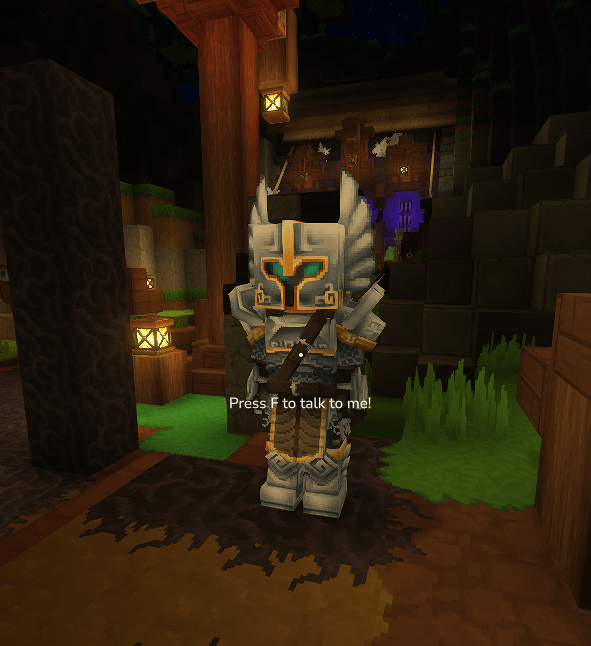
- Players simply look at a linked entity and press F to interact - The custom interaction hint text (if set) will appear when looking at the entity - The dialog UI opens showing the NPC's name, title, and conversation - Players can use Custom Button 1 and Custom Button 2 (if enabled) positioned above the navigation buttons - Players can navigate between pages using Previous/Next buttons (with custom text if configured) - If "Prevent Close Until Last Page" is enabled, players must reach the last page before they can close the dialog - Commands configured for Next/Close/Custom buttons will execute automatically when clicked
Example Use Cases
Quest Giver NPC - Create a multi-page quest introduction - Use "Prevent Close Until Last Page" to ensure players read the full quest - Set Next Button Command to "quest accept" on the last page (Dont use the "/") - Or use "give @p Quest_Item_1 --quantity=1" to give quest items when accepting - Customize Next button text to "Accept Quest" - Use Custom Button 1 for "View Rewards" with a command to show reward information - Set custom interaction hint: "Press F to accept quest"
Tutorial NPC - Create step-by-step tutorial pages - Disable Previous button to force linear progression - Use command execution to teleport players or give items at specific steps - Example: "tp @p 100 64 200" to teleport the player who clicked the button - Example: "give @p Tutorial_Book --quantity=1" to give items to the player - Use Custom Button 1 for "Skip Tutorial" option - Prevent closing until tutorial is complete - Enable Frozen state to keep the tutorial NPC in place - Select a specific idle animation from the animation list
Information NPC - Create FAQ or server rules pages - Allow players to navigate freely with Previous/Next buttons - Use Custom Button 1 for "Open Shop" or Custom Button 2 for "Teleport to Spawn" - Use Close Button Command to teleport players back to spawn when done - Example: "tp @p 0 64 0" to teleport the player who closed the dialog - Set custom interaction hint: "Press F to view server rules"
Configuration Files
The plugin creates two configuration files in the plugin data folder for advanced command management:
playerPermissionCommands.json - Maps player-executed commands to LuckPerms permission nodes. When a command is listed here, the plugin will temporarily grant the specified permission to the player via LuckPerms when executing the command. This allows players to use restricted commands through NPC interactions without having permanent permissions.
Example configuration: { "playerPermissionCommands": { "warps": "warp.list", "spawn": "spawn.use" } }
consoleCommands.json - Defines commands that should execute as console instead of as the player. Commands in this list will run with full console permissions, bypassing player permission checks. This is useful for admin commands that should work when triggered through NPC buttons.
Example configuration: { "consoleCommands": [ "give", "tp", "teleport", "kill", "gamemode" ] }
Distribution Notice: This mod may not be redistributed or bundled with third-party setups without clear and visible credit to Hyronix Studios and the mod name. Otherwise, redistribution is not permitted.
Categories
Screenshots
Need a Server?
Run NPC Dialog on a dedicated Hytale server with easy mod management.
Get Hytale HostingFrequently Asked Questions
What is NPC Dialog?
Create interactive NPC conversations in your Hytale world. Press F to open custom multi-page dialogs with navigation, persistent storage, command execution, custom button text, forced story progression, and entity state controls.
How do I download NPC Dialog?
You can download NPC Dialog for free from CurseForge. Click the "Download on CurseForge" button on this page to go directly to the download page.
Who created NPC Dialog?
NPC Dialog was created by Hyronix. The mod has been downloaded 6.5K times.
Is NPC Dialog compatible with Hytale servers?
NPC Dialog is designed for Hytale and can be used on both single-player and multiplayer servers. Check the mod page on CurseForge for specific compatibility information.
How do I install NPC Dialog?
To install NPC Dialog: 1) Download the mod from CurseForge, 2) Place the file in your Hytale mods folder, 3) Restart the game. The mod should load automatically.
Related Gameplay Mods
View all mods
Wan's Wonder Weapons
WanMine
A collection of unique weapons for Hytale, new "relics" blending elemental power, dark magic, and a touch of absurdity!

Perfect Parries
narwhals
Adds a souls-like/RPG combat mechanic where if you block at the instant where you are supposed to take damage, you don't lose stamina, deflect some damage, and stun the attacker. This mod includes a stamina system similar to that of souls/RPG games.

Spellbook
DarkhaxDev
Powering your favorite mods with clean, reusable helpers and utilities.

RPG Leveling And Stats/Skills
Zuxaw_dev
An RPG leveling plugin for Hytale that adds experience points, leveling, stat allocation, and character progression with a GUI, HUD, competitive leaderboard system, and full multi-language translation support.

Lucky Mining
Buuz135
Get more ores from mining, the more you mine in a row, the more ores you get.

MMO Skill Tree
ziggfreed
(Multiple Languages) MMO Skill Tree adds an RPG-style progression system where every action you take helps you grow stronger.