
rRPGCore
rRPGCore adds classic RPG progression to Hytale with copper/silver/gold currency and masterable professions.
About rRPGCore
rRPGCore
rRPGCore is a foundational RPG framework for Hytale, designed to bring depth, progression, and a living economy to your world.
Requires: MultipleHUD for the currency HUD display
✨ Key Features
Classic Tiered Economy Features a WoW-inspired three-tier currency system: Copper, Silver, and Gold.
Automatic Conversion: 100 Copper = 1 Silver | 100 Silver = 1 Gold.
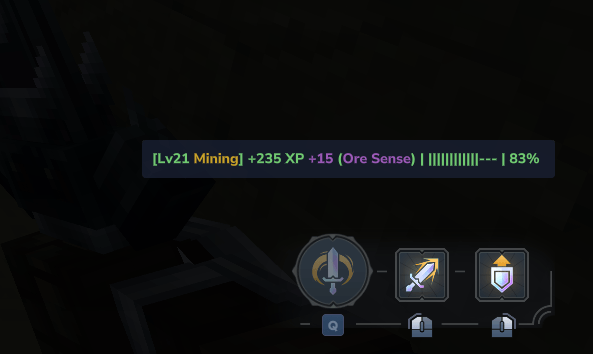
Professional Leveling System A deep progression tree for various trades and crafts.
Earn XP through gathering and crafting to unlock new tiers of mastery.
Professions: Mining, Woodcutting, Farming, Fishing
Regrowable Ore System Ores with Regrow in their block ID (e.g., Ore_Copper_Stone_Regrow) will respawn after being mined.
When mined, the ore is replaced with a depleted stone block and drops the ore item.
After a configurable delay, the ore regrows with particles and sound effects.
Perfect for creating sustainable mining nodes on servers.
Built for Compatibility As a "Core" mod, it is built to be lightweight and serve as a requirement for future RPG expansion packs.
📜 Commands
Command Usage Description
/wallet /wallet [player] View your coin balance (or another player's)
/shop /shop <name> or /shop list Open a shop or list all available shops
/sell /sell Open the sell interface to sell items from your inventory
/fix /fix Fully repair the item in your main hand
/ic /ic Clear your entire inventory
/rpgcore /rpgcore Open the main RPGCore menu UI
/rc /rc <subcommand> RPGCore command hub (see subcommands below)
/rc Subcommands:
Subcommand Usage Description
menu /rc menu Opens the main RPGCore menu
coins /rc coins <amount> [player] Set coin balance
addxp /rc addxp <profession> <amount> [player] Add XP to a profession
profreset /rc profreset <profession|all> [player] Reset profession progress
🛠️ Roadmap / Known Issues
Bugs to Fix
Regrowable ore visual glitch - ore texture briefly appears when damaging depleted stone
Client/Server desync warnings on BarterChest interactions
Deprecation warnings for getPlayerConnection() and getPlayerRef() - need to migrate to new API
Features in Progress
Farming profession XP system
Fishing profession XP system
Player-placed block tracking for anti-XP farming (implemented, needs testing)
Planned Features
Profession level requirements for gathering higher-tier resources
Profession perks/bonuses at milestone levels
Crafting profession integration
More shop customization options
Economy balancing tools for server admins
Completed
Three-tier currency system (Copper/Silver/Gold)
Mining XP system with ore tier bonuses
Woodcutting XP system
Regrowable ore system with visual effects
Shop system with buy/sell functionality
Sell interface for quick item selling
Item repair command (/fix)
Admin commands for currency and XP management
Developed with a focus on immersive progression and stable server economies.
Categories
Screenshots



Frequently Asked Questions
What is rRPGCore?
rRPGCore adds classic RPG progression to Hytale with copper/silver/gold currency and masterable professions.
How do I download rRPGCore?
You can download rRPGCore for free from CurseForge. Click the "Download on CurseForge" button on this page to go directly to the download page.
Who created rRPGCore?
rRPGCore was created by Ryzznn. The mod has been downloaded 443 times.
Is rRPGCore compatible with Hytale servers?
rRPGCore is designed for Hytale and can be used on both single-player and multiplayer servers. Check the mod page on CurseForge for specific compatibility information.
How do I install rRPGCore?
To install rRPGCore: 1) Download the mod from CurseForge, 2) Place the file in your Hytale mods folder, 3) Restart the game. The mod should load automatically.
Related Gameplay Mods
View all mods
Wan's Wonder Weapons
WanMine
A collection of unique weapons for Hytale, new "relics" blending elemental power, dark magic, and a touch of absurdity!

Perfect Parries
narwhals
Adds a souls-like/RPG combat mechanic where if you block at the instant where you are supposed to take damage, you don't lose stamina, deflect some damage, and stun the attacker. This mod includes a stamina system similar to that of souls/RPG games.

Spellbook
DarkhaxDev
Powering your favorite mods with clean, reusable helpers and utilities.

RPG Leveling And Stats/Skills
Zuxaw_dev
An RPG leveling plugin for Hytale that adds experience points, leveling, stat allocation, and character progression with a GUI, HUD, competitive leaderboard system, and full multi-language translation support.

Lucky Mining
Buuz135
Get more ores from mining, the more you mine in a row, the more ores you get.

MMO Skill Tree
ziggfreed
(Multiple Languages) MMO Skill Tree adds an RPG-style progression system where every action you take helps you grow stronger.